Rate limiting is a rule a server applies to each client: no more than a set number of requests in a set period, for example 5 per 10 seconds or 60 per hour. Requests inside the limit are served normally. Requests over it are refused, usually with the HTTP status 429 Too Many Requests and a header saying when to try again.
Sites and APIs use it to keep one client from crowding out the others. To show how it behaves we wrote two small limiters and a client on 20 November 2026 and ran them on one PC; we also read the rate limit headers of a large public API. The code and the logs are below.
Why websites and APIs limit requests
- Fair shares. A server has a finite capacity. A limit per client keeps one busy script from slowing the site for everyone else.
- Cost. Every request costs the operator compute and bandwidth, and some endpoints (search, exports, AI models) cost far more than others.
- Protection. A cap on login attempts or password resets blunts guessing attacks; a cap on everything blunts floods.
- Plans. APIs sell tiers: so many requests per minute on one plan, more on the next.
The limit is counted per "client", and the server decides what that means: an API key, a logged-in account, an IP address, or a combination. It is often enforced in a gateway or reverse proxy in front of the application.
Rate limiting algorithms
| Algorithm | How it counts | Behaviour |
|---|---|---|
| Fixed window | A counter per clock window (each minute, each 10 seconds), reset at the mark | Simplest. Allows a double burst around the mark: 10 of 10 accepted in our test |
| Sliding window | Requests in the last N seconds, measured from now | No double burst; needs a timestamp log or a weighted pair of counters |
| Token bucket | A bucket of tokens refilled at a steady rate; a request spends one | Allows a burst up to the bucket size, then the refill rate: 5 of 10 accepted in the same test |
| Leaky bucket | A queue drained at a steady rate | Smooths output to a constant pace; excess waits or is dropped |
We implemented the first and the third. Both allow 5 requests per 10 seconds per client IP:
import math, time
LIMIT, WINDOW = 5, 10            # 5 requests per 10 seconds
RATE = LIMIT / WINDOW            # token bucket refill: 0.5 tokens per second
windows, buckets = {}, {}

def fixed_window(key, now):
    start = now - now % WINDOW                      # windows start at 0, 10, 20 ... seconds
    count = windows.get((key, start), 0)
    reset = math.ceil(start + WINDOW - now)
    if count >= LIMIT:
        return False, 0, reset
    windows[(key, start)] = count + 1
    return True, LIMIT - count - 1, reset

def token_bucket(key, now):
    tokens, last = buckets.get(key, (LIMIT, now))
    tokens = min(LIMIT, tokens + (now - last) * RATE)   # refill for the time that passed
    if tokens < 1:
        buckets[key] = (tokens, now)
        return False, 0, math.ceil((1 - tokens) / RATE)
    buckets[key] = (tokens - 1, now)
    return True, int(tokens - 1), math.ceil((1 - (tokens - 1) % 1) / RATE)
Each function returns three things: allowed or not, how many requests remain, and in how many seconds the client may try again. A small Python http.server handler calls one of them per request (path /fixed or /bucket) and turns the answer into a status and headers.
What a rate limit looks like from outside
Eight requests sent with no pause, to each limiter:
/fixed   8 requests at once -> 200 200 200 200 200 429 429 429
/bucket  8 requests at once -> 200 200 200 200 200 429 429 429
Five were served and three refused, on both. This is one of the refusals in full:
curl -i http://127.0.0.1:8429/bucket
HTTP/1.0 429 Too Many Requests
Server: BaseHTTP/0.6 Python/3.12.10
Date: Fri, 20 Nov 2026 18:33:20 GMT
RateLimit-Limit: 5
RateLimit-Remaining: 0
RateLimit-Reset: 2
Retry-After: 2
Content-Length: 18

Too Many Requests
The status says what happened, and the headers say what to do. Retry-After: 2 is the instruction: wait two seconds. The three RateLimit lines give the context: the limit, what is left of it, and when it refills.
Fixed window against token bucket, at the window mark
The two limiters gave the same answer to a single burst. They differ when a burst straddles the moment the fixed window resets. We sent 5 requests just before a 10-second mark and 5 just after it:
/fixed   before the mark: 200 200 200 200 200 | after: 200 200 200 200 200 | accepted 10 of 10 in about a second
/bucket  before the mark: 200 200 200 200 200 | after: 429 429 429 429 429 | accepted 5 of 10 in about a second
The fixed window served all ten within about a second, twice the rate its owner intended, because each half fell in a different window. The token bucket served five and made the rest wait for the refill. This is why operators who care about bursts choose a token bucket or a sliding window, and it is also why the same nominal limit can feel different from one service to another.
The headers: Retry-After, RateLimit and X-RateLimit
| Header | Meaning | Seen in our tests |
|---|---|---|
Retry-After | Seconds to wait (or a date) before the next request. Standard HTTP, defined in RFC 9110 | 2 on our 429 |
RateLimit-Limit, RateLimit-Remaining, RateLimit-Reset | The quota, what is left, and seconds until it resets. From an IETF draft, in wide use | 5, 0 and 2 on our 429 |
X-RateLimit-Limit, X-RateLimit-Remaining, X-RateLimit-Reset | The older, unofficial spelling of the same three; the reset is often a Unix time | GitHub's API, below |
A real example. We made two unauthenticated requests to GitHub's public REST API from this PC and kept the rate limit headers:
curl -s -i https://api.github.com/rate_limit
HTTP/1.1 200 OK
X-RateLimit-Limit: 60
X-RateLimit-Remaining: 47
X-RateLimit-Used: 13
X-RateLimit-Resource: core
X-RateLimit-Reset: 1795202051

curl -s -i https://api.github.com/zen
HTTP/1.1 200 OK
X-RateLimit-Limit: 60
X-RateLimit-Remaining: 46
X-RateLimit-Used: 14
X-RateLimit-Resource: core
X-RateLimit-Reset: 1795202051
The limit is 60 requests per hour for a client without a token, and the count went from 47 to 46 remaining between the two calls. The reset is a Unix timestamp, the moment the hour's window ends. The headers arrive on successful answers too, so a client can see the limit coming long before it reaches it. Header names in general are covered in HTTP headers explained.
How a polite client behaves
A rate limit is the operator telling you the pace the service accepts. The correct response is to keep to it. There are two ways, and we ran both against the token bucket.
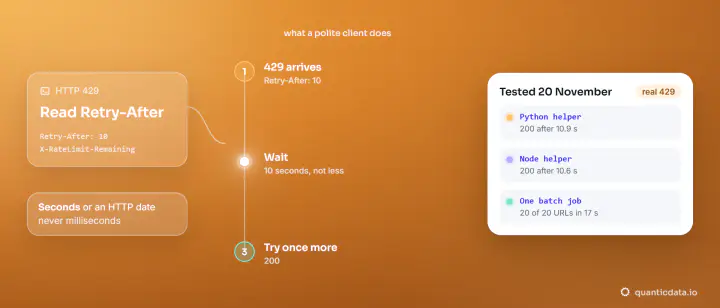
React: honour Retry-After
import random, time, requests

def polite_get(url, max_attempts=5):
    """Honour Retry-After; without it, exponential backoff with jitter; give up after max_attempts."""
    for attempt in range(max_attempts):
        r = requests.get(url, timeout=10)
        if r.status_code != 429:
            return r, attempt
        wait = r.headers.get("Retry-After")
        wait = int(wait) if wait and wait.isdigit() else min(60, 2 ** attempt + random.uniform(0, 1))
        time.sleep(wait)
    raise RuntimeError(f"still 429 after {max_attempts} attempts, stopping")
0.0s request 1: 200 remaining 4
0.0s request 2: 200 remaining 3
0.0s request 3: 200 remaining 2
0.1s request 4: 200 remaining 1
0.1s request 5: 200 remaining 0
0.1s 429, Retry-After: 2 -> sleeping 2 s
2.1s request 6: 200 remaining 0
2.1s 429, Retry-After: 2 -> sleeping 2 s
4.1s request 7: 200 remaining 0
...
14.3s request 12: 200 remaining 0
14.3s done: 12 of 12 answered 200, 7 waitsAll 12 requests were answered 200. The first five used the bucket; after that the client met a 429, slept the two seconds it was told, and got its next request through, seven times. When a server sends no Retry-After, the function falls back to exponential backoff with jitter: wait about 1, 2, 4, 8 seconds, each with a random fraction added so that many clients do not all return at the same instant. And it stops after five attempts instead of hammering.
Better: pace yourself and never see a 429
def paced(path, n=12):
    """Never hit the limit: when RateLimit-Remaining reaches 0, wait RateLimit-Reset seconds first."""
    codes = []
    for i in range(n):
        r = requests.get(BASE + path, timeout=10)
        codes.append(r.status_code)
        if r.headers["RateLimit-Remaining"] == "0":
            time.sleep(int(r.headers["RateLimit-Reset"]))
    print(f"paced: {codes.count(200)} of {n} answered 200, {codes.count(429)} answered 429")
16.1s paced: 12 of 12 answered 200, 0 answered 429Same 12 requests, no refusal at all: the client read RateLimit-Remaining on every answer and waited before the server had to say no.
| Client | Answered 200 | Answered 429 | Finished in |
|---|---|---|---|
| Burst of 8, no waiting | 5 of 8 | 3 | Under a second, with 3 requests lost |
Honours Retry-After | 12 of 12 | 7, each followed by the wait it asked for | 14.3 s |
Paces on RateLimit-Remaining | 12 of 12 | 0 | 16.1 s |
The rest of good behaviour follows from the same idea:
- Cap your concurrency. Ten workers multiply your request rate by ten; see concurrency vs parallelism.
- Cache. A page you already have costs the site nothing the second time.
- Retry only what is temporary. Timeouts and 502, 503, 504 deserve a bounded retry (retries and timeouts in Python Requests). A 429 deserves a wait. A 403 is a refusal, not a queue: stop and check the site's terms.
- Use the official route for volume. If you need more than the public limit, the operator usually offers a key, a paid tier or a bulk export.
The same list from the crawler's side is in crawling a website politely; what the status looks like in a scraper's logs is in 429 Too Many Requests when scraping.
Rate limiting and throttling
The two words are often used as one. Where they are told apart, rate limiting refuses the excess (the 429 above) and throttling slows it down: the server queues or delays requests so that they complete later instead of failing. A leaky bucket that makes requests wait is throttling; our token bucket, which refused them, is rate limiting. From the client's side the advice is the same: read the headers and slow down.
When you would rather not manage the pace yourself
Pacing, waiting and caching are work, and they are the same work for every site you read. Our Web Scraping API takes a URL and returns the page, and our collectors return structured rows for common public sources; both are called with one API key, and a client written like the two above is all the calling code they need. The status codes you can meet when a request travels through a proxy are listed in proxy error codes.