To crawl a website without getting blocked, crawl it the way its owner would accept: read robots.txt and obey Disallow and Crawl-delay, keep about one request per second per host, back off when the site answers 429 or 503, send a User-Agent that says who you are, and skip pages that have not changed. Pace and volume are the two things a crawler controls completely, so start there.
We wrote that down as a 50-line Python crawler and ran it on 20 November 2026 through two QuanticData networks, against two sites built for scraping practice. Every number on this page comes from those runs.
Why crawlers get blocked
A site rarely blocks a crawler for one request. It reacts to patterns, roughly in this order:
- Rate. Dozens of requests a second from one address, at all hours, look like a load test or an attack. The usual answers are 429 Too Many Requests and then 403 Forbidden.
- Paths no person visits. URLs that robots.txt disallows, search pages hit thousands of times, or honeypot traps: links hidden from people that only a crawler follows.
- The client itself. Headers, the TLS handshake and, in a browser, JavaScript properties tell a site what software is asking. We tested what each client gives away in how websites detect bots.
- The address. Some sites treat datacenter ranges with more suspicion than home or mobile networks.
The first two are entirely under your control, and fixing them is what "polite crawling" means.
Step 1: read robots.txt before the first page
robots.txt lists the paths a site asks crawlers to skip and, sometimes, how long to wait between requests. Python ships a parser for it. We read three live files through a residential IP:
from urllib import robotparser
rp = robotparser.RobotFileParser()
rp.set_url("https://news.ycombinator.com/robots.txt"); rp.read()
rp.crawl_delay("ExampleResearchBot/1.0")      # 30
rp.can_fetch("ExampleResearchBot/1.0", "https://news.ycombinator.com/item?id=1") # True| Site | Crawl-delay | Allowed | Disallowed |
|---|---|---|---|
| news.ycombinator.com | 30 seconds | /news, /item?id=1 | /x?fnid=... |
| en.wikipedia.org | none | /wiki/Web_crawler | edit pages (/w/index.php?...action=edit), Special:Random |
| www.python.org | none | /downloads/ | /webstats/ |
A Crawl-delay of 30 means one page every 30 seconds, about 2,880 pages a day: slow, and the rule. Wikipedia's file also names its sitemap, which is a better list of URLs than anything a crawler discovers by following links. To check a single URL against a site's file without writing code, use our robots.txt tester.
Step 2: one host, one request per second
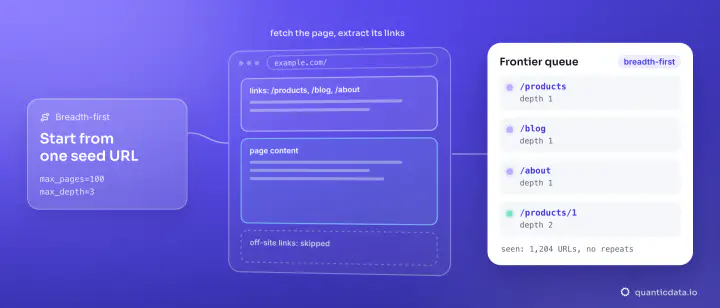
When robots.txt sets no delay, one request per second per host is a sensible default for a small site; large sites tolerate more, but start there and watch the answers. The crawler below waits between requests to the same host, reads Retry-After on a 429 or 503, and keeps one sticky session for the whole crawl, so the requests belong together instead of looking like a crowd:
import time, requests
from urllib import robotparser
from urllib.parse import urljoin, urlparse
from bs4 import BeautifulSoup

UA = "ExampleResearchBot/1.0 (+https://example.com/bot; contact@example.com)"
PROXY = "http://USER-type-residential-country-us-session-crawl01-lifetime-30:PASS@residentialboson.quanticdata.io:10000"
s = requests.Session(); s.headers["User-Agent"] = UA; s.proxies = {"http": PROXY, "https": PROXY}

def crawl(start, max_pages=30, delay=1.0):
    host = urlparse(start).netloc
    rp = robotparser.RobotFileParser(); rp.parse(s.get(f"https://{host}/robots.txt").text.splitlines())
    delay = max(delay, rp.crawl_delay(UA) or 0)
    queue, seen, last = [start], set(), 0.0
    while queue and len(seen) < max_pages:
        url = queue.pop(0)
        if url in seen or not rp.can_fetch(UA, url): continue
        seen.add(url)
        time.sleep(max(0, last + delay - time.time()))
        for attempt in range(4):
            last = time.time(); r = s.get(url, timeout=30)
            if r.status_code not in (429, 503): break
            ra = r.headers.get("Retry-After", "")
            time.sleep(int(ra) if ra.isdigit() else 2 ** (attempt + 2))
        for a in BeautifulSoup(r.text, "html.parser").select("a[href]"):
            u = urljoin(url, a["href"]).split("#")[0]
if urlparse(u).netloc == host: queue.append(u)| Run | Network | Pages | Status | Time | Data |
|---|---|---|---|---|---|
| books.toscrape.com | Residential Basic, one sticky US session | 30 | 30 x 200 | 31.8 s | 1,280,118 bytes |
| quotes.toscrape.com | Mobile, one sticky US session | 20 | 20 x 200 | 24.6 s | 119,014 bytes |
The times include fetching robots.txt. No request was refused and the crawler never had to wait for a Retry-After. Both sites returned 404 for robots.txt, which the parser reads as "everything allowed", so the one-second default applied. A sticky session matters here: the username carries a session name and a lifetime setting (30 here), so the crawl runs as one session. Rotate to a new session for a new job, not on every request to the same host.
Step 3: say who you are
The User-Agent in the code names the crawler and gives a contact URL. Search engines do the same, and it gives a site owner a way to reach you instead of a reason to block a range. Keep the other headers ordinary: Accept, Accept-Language and Accept-Encoding as a normal client sends them. A default library User-Agent such as python-requests/2.34.2 tells the site nothing about you except that it is a script.
Step 4: do not download what you already have
Most pages on a site do not change between two crawls. If the server sends an ETag or Last-Modified header, send them back and it can answer "not modified" without the page:
r1 = s.get("https://books.toscrape.com/")
r2 = s.get("https://books.toscrape.com/", headers={"If-None-Match": r1.headers["ETag"],
                                                    "If-Modified-Since": r1.headers["Last-Modified"]})
# r1: 200, 51,294 bytes    r2: 304, 0 bytes
A re-crawl that gets 304s costs the site almost nothing and costs you no proxy traffic for the body. Not every server supports it: quotes.toscrape.com sent neither header and returned the full page both times, so store a hash of the content and compare it yourself there.
Step 5: render only the pages that need it
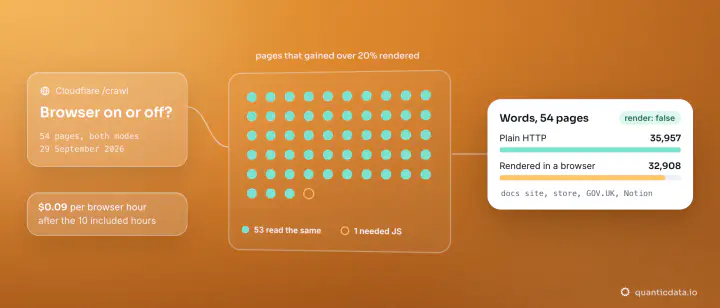
Some pages build their content with JavaScript, and a plain HTTP client sees an empty shell. quotes.toscrape.com/js/ answered our requests client with 5,808 bytes and no quotes at all; the same URL through the scrape tool of the QuanticData MCP server with rendering on came back with all 10 quotes, in 34,179 bytes. Render the pages that need it and fetch the rest as plain HTML: a browser costs more time and traffic per page, and opening hundreds of them at once is its own kind of load. For a whole site, the website crawler API lists a site's URLs and fetches them as clean Markdown, and for public pages that need a real browser, see the Web Unlocker.
Which IP to crawl from
| Network | What it is good for when crawling |
|---|---|
| Residential Basic | Long polite crawls from a home IP in the country you choose; our 30-page run used one sticky US session |
| Residential Premium | Reading robots.txt files and sitemaps from home IPs in the country you choose; the robots.txt checks above ran through it |
| Mobile | Crawls that should come from a mobile carrier IP; our 20-page run used one sticky US carrier session |
Both are on the residential proxies and mobile proxies pages. A proxy changes where the requests come from, not how many you send: a crawler that is too fast is too fast from any IP. If you do get an error, proxy error codes explains which side sent it.
What polite crawling does not cover
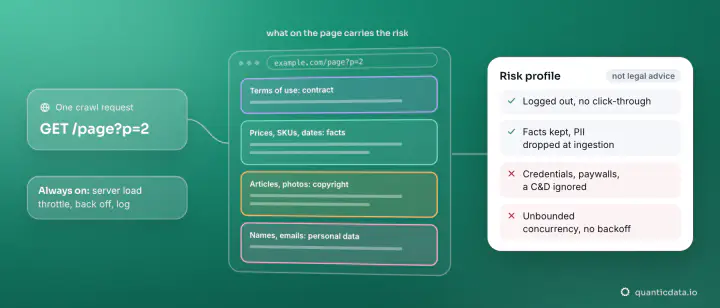
Pages behind a login, paywalled content, and anything a site's terms forbid are not made acceptable by crawling slowly, and a proxy is not a way round an account ban. Public pages, at a pace the site can carry, with the rules in robots.txt respected: that is the crawl that does not get blocked and does not need to hide. The legal side, country by country, is in is web crawling legal, and the full Python crawler, from a loop to Scrapy, is in how to web crawl with Python.