HTTP headers are the "Name: value" lines sent before the body of every request and response. Request headers tell the server who is asking and what it accepts, such as User-Agent, Accept and Cookie. Response headers describe the answer, such as Content-Type, Cache-Control and Set-Cookie. Header names are case-insensitive.
Below is what three common clients really sent to a header echo service on 20 November 2026 through QuanticData residential and mobile proxies (curl also directly), and what two large sites sent back. Exit IPs are masked.
What an HTTP header looks like
A request is a start line, then headers, then an empty line, then an optional body:
GET /headers HTTP/1.1
Host: httpbin.org
User-Agent: curl/8.21.0
Accept: */*
Host names the site, User-Agent names the client and Accept says which formats it takes. The server reads them, then answers with its own start line and headers.
The request headers three clients really send
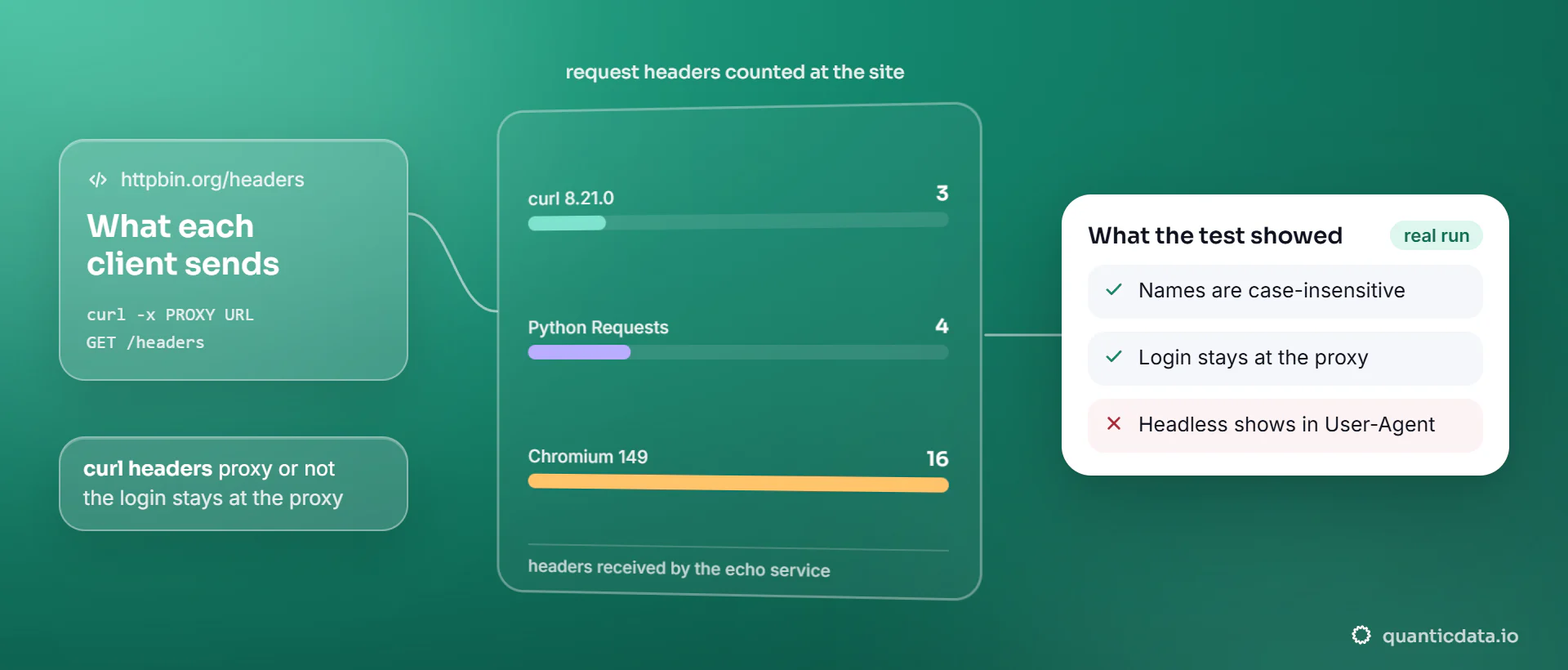
We sent the same request to httpbin.org/headers, which returns the headers it received, from curl 8.21.0, Python Requests 2.34.2 and Chromium 149 run by Playwright:
| Client | Headers received | User-Agent | Other headers |
|---|---|---|---|
| curl 8.21.0 | 3 | curl/8.21.0 | Accept: */*, Host |
| Python Requests 2.34.2 | 4 | python-requests/2.34.2 | Accept, Accept-Encoding: gzip, deflate, br, Host |
| Chromium 149, headless, through the proxy (Playwright with locale en-US) | 16 | Mozilla/5.0 (Windows NT 10.0; Win64; x64) ... HeadlessChrome/149.0.7827.55 Safari/537.36 | Accept-Language, Sec-Ch-Ua, Sec-Ch-Ua-Mobile, Sec-Ch-Ua-Platform, four Sec-Fetch-* headers, Priority, Upgrade-Insecure-Requests and more |
The three clients announce themselves plainly. The headless browser does too: its User-Agent and its Sec-Ch-Ua client hint both contain "HeadlessChrome". A site does not need the IP to tell a script from a person; the headers alone often say so. You can read the string your own browser sends with our user agent checker, and the strings AI crawlers send in our AI crawler user agent list.
Sending your own headers
Every client lets you add or replace a header. In curl it is -H, in Python Requests the headers argument:
curl -x http://USER:PASS@mobile.quanticdata.io:8080 \
  -H "x-demo-header: lower" -H "X-Other-HEADER: upper" https://httpbin.org/headers
{
  "headers": {
    "Accept": "*/*",
    "Host": "httpbin.org",
    "User-Agent": "curl/8.21.0",
    "X-Demo-Header": "lower",
    "X-Other-Header": "upper"
  }
}
import requests
proxies = {"https": "http://USER:PASS@residentialpremium.quanticdata.io:8080"}
r = requests.get("https://httpbin.org/headers", proxies=proxies,
headers={"Accept-Language": "de-DE"})For the proxy options of each client, see how to use a proxy with curl and a proxy in Python Requests.
Are HTTP headers case sensitive?
Header names are not. The HTTP standard (RFC 9110) defines field names as case-insensitive, and our test shows it in practice: we sent x-demo-header in lowercase and X-Other-HEADER in mixed case, and the server read both and printed them as X-Demo-Header and X-Other-Header. Real sites mix styles too: www.wikipedia.org answered with lowercase names (set-cookie, cache-control), www.google.com with capitalised ones (Set-Cookie, Content-Type). HTTP/2 and HTTP/3 send all names in lowercase. Header values are a different matter: whether gzip equals GZIP depends on the header, so copy values exactly.
Response headers: what a site sends back
We asked www.wikipedia.org for its home page through a Residential Basic line with curl -I, which prints only the headers:
HTTP/1.1 200 Connection Established

HTTP/1.1 200 OK
cache-control: s-maxage=86400, must-revalidate, max-age=3600
content-type: text/html
strict-transport-security: max-age=106384710; includeSubDomains; preload
set-cookie: WMF-Last-Access=20-Nov-2026;Path=/;HttpOnly;secure;...
x-client-ip: x.x.x.x
set-cookie: GeoIP=US:AL:Mobile:...; Path=/; secure; Domain=.wikipedia.org
x-cache-status: hit-front- The first line is the proxy's, not the site's: "200 Connection Established" means the proxy opened the tunnel. Everything after it comes from the site.
x-client-ipis the address the site saw: the proxy's exit, not our line. Wikipedia also stored its guess of the location, Mobile, Alabama, in theGeoIPcookie.set-cookielines create cookies; how they come back is in HTTP cookies explained.cache-controlandx-cache-statussay the page came from a cache, and for how long it may be kept.
A short list of the headers you will meet most
Every header in this table appeared in our tests of 20 November 2026, for this post and for our post on cookies:
| Header | Direction | Seen in our tests | What it does |
|---|---|---|---|
Host | Request | All three clients | The site name; one server can host many sites |
User-Agent | Request | All three clients | Names the client and its version |
Accept, Accept-Encoding, Accept-Language | Request | Chromium sent all three (locale en-US) | Formats, compression and languages the client takes |
Cookie | Request | Our cookie tests | Cookies the client sends back |
Sec-Ch-Ua, Sec-Fetch-Site | Request | Chromium | Client hints and the context of the request (typed URL, link, script) |
Content-Type | Response | Google, Wikipedia | The format of the body, such as text/html |
Cache-Control | Response | Wikipedia | How long the answer may be cached, and by whom |
Set-Cookie | Response | Google, Wikipedia, httpbin.org | Creates a cookie in the client |
Location | Response | httpbin.org (302) | Where a redirect points |
Strict-Transport-Security | Response | Wikipedia | Tells browsers to use HTTPS only for this site |
Headers and proxies
Our curl request went to httpbin.org four times: directly, through Residential Basic, through Residential Premium and through Mobile. The site received the same three headers each time. The proxy changed the IP curl's request came from and nothing in the request itself. Two proxy headers do exist, and they stay between you and the proxy:
| Header | Who reads it | What it does |
|---|---|---|
Proxy-Authorization | The proxy | Carries the proxy username and password. It did not appear in any echo: the site never saw our login. |
Proxy-Authenticate | Your client | Sent by the proxy with a 407 when the login is missing or wrong; see 407 Proxy Authentication Required. |
So with an HTTPS site behind a proxy, the headers are entirely yours to set. When a site answers 403, 403 Forbidden when scraping goes through the usual causes.
Which network to send requests from
Residential Basic and Premium send requests from home IPs in the country you choose; in our runs that meant Cox, Comcast and Deutsche Telekom lines. Mobile sends them from carrier IPs such as T-Mobile USA. The plans are on our pages for residential proxies and mobile proxies; there is also a Residential Basic free trial.