To scrape a website with Java, download the page with java.net.http.HttpClient, which ships with the JDK, and parse the HTML with jsoup and its CSS selectors. Our 86-line scraper ran on Java 25 with jsoup 1.24.1, collected 60 books from 3 pages into a CSV file, and worked the same through a proxy.
Everything below ran on 20 November 2026 (UTC) on Windows 11 against books.toscrape.com, a sandbox made for scraping practice, and against one page of our own site. The output is copied from those runs.
Which tools, and the versions we ran
| Job | Tool | Version in this run |
|---|---|---|
| JDK | Eclipse Temurin JDK | 25.0.5.1 |
| Download pages | java.net.http.HttpClient | part of the JDK since Java 11 |
| Parse HTML | jsoup | 1.24.1 |
| Build and run | Apache Maven with exec-maven-plugin | 3.9.16 and 3.7.0 |
jsoup can also download pages by itself, and a section below shows that. We keep the JDK client for the main scraper because it gives you timeouts, redirects, proxies and parallel requests with no extra dependency.
Set up the project
Create a folder with this pom.xml and put the Java files in src/main/java:
<project xmlns="http://maven.apache.org/POM/4.0.0">
  <modelVersion>4.0.0</modelVersion>
  <groupId>com.example</groupId>
  <artifactId>java-scraper</artifactId>
  <version>1.0</version>

  <properties>
    <maven.compiler.release>25</maven.compiler.release>
    <project.build.sourceEncoding>UTF-8</project.build.sourceEncoding>
  </properties>

  <dependencies>
    <dependency>
      <groupId>org.jsoup</groupId>
      <artifactId>jsoup</artifactId>
      <version>1.24.1</version>
    </dependency>
  </dependencies>

  <build>
    <plugins>
      <plugin>
        <groupId>org.codehaus.mojo</groupId>
        <artifactId>exec-maven-plugin</artifactId>
        <version>3.7.0</version>
      </plugin>
    </plugins>
  </build>
</project>
The scraper: HttpClient downloads, jsoup parses
import java.net.Authenticator;
import java.net.InetSocketAddress;
import java.net.PasswordAuthentication;
import java.net.ProxySelector;
import java.net.URI;
import java.net.http.HttpClient;
import java.net.http.HttpRequest;
import java.net.http.HttpResponse;
import java.nio.charset.StandardCharsets;
import java.nio.file.Files;
import java.nio.file.Path;
import java.time.Duration;
import java.util.ArrayList;
import java.util.List;
import org.jsoup.Jsoup;
import org.jsoup.nodes.Document;
import org.jsoup.nodes.Element;

public class Scraper {
    record Book(String title, String price, String rating, String url) {}

    static HttpClient newClient() {
        HttpClient.Builder builder = HttpClient.newBuilder()
            .connectTimeout(Duration.ofSeconds(20))
            .followRedirects(HttpClient.Redirect.NORMAL);
        String proxy = System.getenv("PROXY");   // http://USER:PASS@HOST:PORT, or unset for a direct connection
        if (proxy != null && !proxy.isBlank()) {
            URI p = URI.create(proxy);
            String[] cred = p.getUserInfo().split(":", 2);
            builder.proxy(ProxySelector.of(new InetSocketAddress(p.getHost(), p.getPort())));
            builder.authenticator(new Authenticator() {
                @Override protected PasswordAuthentication getPasswordAuthentication() {
                    if (getRequestorType() != RequestorType.PROXY) return null;
                    return new PasswordAuthentication(cred[0], cred[1].toCharArray());
                }
            });
        }
        return builder.build();
    }

    static Document get(HttpClient client, String url) throws Exception {
        HttpRequest request = HttpRequest.newBuilder(URI.create(url))
            .header("User-Agent", "my-scraper/1.0 (+https://example.com/bot)")
            .timeout(Duration.ofSeconds(30))
            .GET().build();
        HttpResponse<String> response = client.send(request, HttpResponse.BodyHandlers.ofString(StandardCharsets.UTF_8));
        if (response.statusCode() != 200) throw new IllegalStateException(response.statusCode() + " for " + url);
        return Jsoup.parse(response.body(), url);
    }

    static String csv(String s) {
        return "\"" + s.replace("\"", "\"\"") + "\"";
    }

    public static void main(String[] args) throws Exception {
        // Let the JDK answer a proxy's Basic challenge on HTTPS tunnels (off by default since Java 8u111).
        System.setProperty("jdk.http.auth.tunneling.disabledSchemes", "");
        HttpClient client = newClient();

        List<Book> books = new ArrayList<>();
        String url = "https://books.toscrape.com/catalogue/page-1.html";
        for (int page = 1; page <= 3 && url != null; page++) {
            Document doc = get(client, url);
            for (Element card : doc.select("article.product_pod")) {
                Element link = card.selectFirst("h3 a");
                books.add(new Book(
                    link.attr("title"),
                    card.selectFirst(".price_color").text().replaceAll("[^\\d.]", ""),
                    card.selectFirst("p.star-rating").className().replace("star-rating", "").trim(),
                    link.absUrl("href")));
            }
            System.out.printf("page %d: %d books so far%n", page, books.size());
            Element next = doc.selectFirst("li.next a");
            url = next == null ? null : next.absUrl("href");
            Thread.sleep(1000);   // one page a second is plenty
        }

        List<String> lines = new ArrayList<>();
        lines.add("title,price,rating,url");
        for (Book b : books) lines.add(String.join(",", csv(b.title()), b.price(), b.rating(), b.url()));
        Files.write(Path.of("books.csv"), lines, StandardCharsets.UTF_8);

        for (Book b : books.subList(0, 3)) System.out.println(b.title() + " | " + b.price() + " | " + b.rating());
        System.out.println(books.size() + " books written to books.csv");
    }
}
$ mvn -q compile exec:java -Dexec.mainClass=Scraper
page 1: 20 books so far
page 2: 40 books so far
page 3: 60 books so far
A Light in the Attic | 51.77 | Three
Tipping the Velvet | 53.74 | One
Soumission | 50.10 | One
60 books written to books.csvThe first lines of books.csv:
title,price,rating,url
"A Light in the Attic",51.77,Three,https://books.toscrape.com/catalogue/a-light-in-the-attic_1000/index.html
"Tipping the Velvet",53.74,One,https://books.toscrape.com/catalogue/tipping-the-velvet_999/index.html
"Soumission",50.10,One,https://books.toscrape.com/catalogue/soumission_998/index.html
How it works
- The User-Agent names the scraper and gives a URL where a site owner can read about it. httpbin.org, which echoes request headers, returned exactly that string.
HttpClient.sendreturns the status and the body. It does not throw on a 404 or a 500, so the code checks the status itself.Jsoup.parse(body, url)builds the document. The second argument is the base address, which is what letsabsUrl("href")turn a relative link into a full one.doc.select("article.product_pod")returns every book card. Inside a card,selectFirstfinds one element: the title is in the link'stitleattribute, where it is not shortened, and the rating is the second class name ofp.star-rating. More on choosing selectors in CSS selectors and XPath.- Pagination follows the link in
li.next auntil there is none or the page limit is reached, one page a second. Other layouts are covered in pagination patterns. - The record
Bookgives each row named, typed fields; the smallcsvmethod quotes the title so that commas inside it do not break the file.
Running it through a proxy
The JDK client takes the proxy in two parts: proxy(ProxySelector.of(...)) for the host and port, and an Authenticator for the username and password. The scraper reads one environment variable, so the same class runs both ways:
PROXY="http://USER-type-residential-country-us-session-jv01-lifetime-30:PASS@residentialboson.quanticdata.io:10000" mvn -q compile exec:java -Dexec.mainClass=Scraper
PROXY="http://USER-country-us-sid-jv02-ttl-30m:PASS@residentialpremium.quanticdata.io:8080" mvn -q compile exec:java -Dexec.mainClass=Scraper
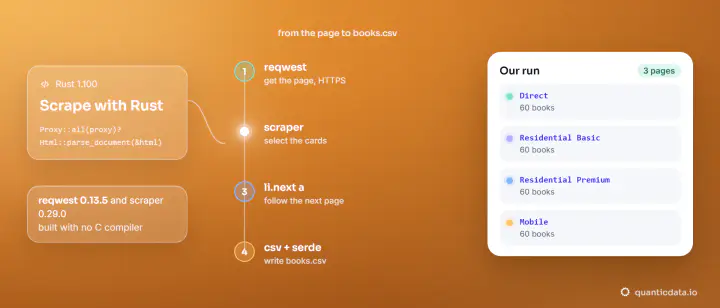
PROXY="http://USER-country-us-type-mobile-sid-jv03-ttl-30m:PASS@mobile.quanticdata.io:8080" mvn -q compile exec:java -Dexec.mainClass=Scraper| Network | Exit location (ipinfo.io) | Result |
|---|---|---|
| Residential Basic | New York City, New York, US | 60 books over 3 pages |
| Residential Premium | Bridgeport, Connecticut, US | 60 books over 3 pages |
| Mobile | Austin, Texas, US | 60 books over 3 pages |
One line in main matters whenever an HTTPS site is reached through a proxy that asks for a username and password: System.setProperty("jdk.http.auth.tunneling.disabledSchemes", ""). The JDK ships with that property set to Basic in conf/net.properties, which means it does not send a username and password when it opens an HTTPS tunnel through a proxy. With the property left alone, the same client returned status 407, the answer explained in 407 Proxy Authentication Required; with it set to an empty value at the start of main, before the client is created, every run above returned 200. You can pass it on the command line instead, as -Djdk.http.auth.tunneling.disabledSchemes=.
The session name and its length are set in the username: use one name per run. To see where the requests leave from, ask an IP service through the same client:
for (int i = 1; i <= 3; i++) {
    HttpResponse<String> r = client.send(req("https://ipinfo.io/json"), HttpResponse.BodyHandlers.ofString());
    System.out.printf("request %d: %d %s | %s, %s, %s%n", i, r.statusCode(), field(r.body(), "ip"),
        field(r.body(), "city"), field(r.body(), "region"), field(r.body(), "country"));
}
HttpResponse<String> r = client.send(req("https://httpbin.org/headers"), HttpResponse.BodyHandlers.ofString());
System.out.println("User-Agent seen by the site: " + field(r.body(), "User-Agent"));
request 1: 200 x.x.x.x | New York City, New York, US
request 2: 200 x.x.x.x | New York City, New York, US
request 3: 200 x.x.x.x | New York City, New York, US
User-Agent seen by the site: my-scraper/1.0 (+https://example.com/bot)In this run the three requests of each session reported the same exit location (addresses masked here). field is a three-line helper that reads one value out of the JSON with a regular expression, and req builds the same request as in the scraper.
jsoup on its own, with a proxy
For a quick job jsoup can fetch the page too. A session holds the proxy, the credentials and the user agent, and each newRequest reuses them:
import java.net.URI;
import org.jsoup.Connection;
import org.jsoup.Jsoup;
import org.jsoup.nodes.Document;

public class JsoupOnly {
    public static void main(String[] args) throws Exception {
        System.setProperty("jdk.http.auth.tunneling.disabledSchemes", "");
        URI p = URI.create(System.getenv("PROXY"));          // http://USER:PASS@HOST:PORT
        String[] cred = p.getUserInfo().split(":", 2);

        Connection session = Jsoup.newSession()
            .proxy(p.getHost(), p.getPort())
            .auth(auth -> auth.isProxy() ? auth.credentials(cred[0], cred[1]) : null)
            .userAgent("my-scraper/1.0 (+https://example.com/bot)")
            .timeout(30_000);

        for (String url : args) {
            Document doc = session.newRequest(url).get();
            System.out.println(url);
            System.out.println("  title: " + doc.title());
            System.out.println("  h1:    " + doc.selectFirst("h1").text());
            System.out.println("  links: " + doc.select("a[href]").size());
        }
    }
}
Run through Residential Basic against the sandbox and against our own residential proxies page:
$ mvn -q compile exec:java -Dexec.mainClass=JsoupOnly -Dexec.args="https://books.toscrape.com/ https://quanticdata.io/residential-proxies/"
https://books.toscrape.com/
  title: All products | Books to Scrape - Sandbox
  h1:    All products
  links: 94
https://quanticdata.io/residential-proxies/
  title: Residential Proxies from $0.80/GB | QuanticData
  h1:    Residential Proxies: Real Home IPs in 228 Countries
  links: 482
The same system property applies here, because jsoup sends its requests with the JDK's networking classes.
Several pages at once with sendAsync
When you already know the addresses, sendAsync starts the requests without waiting for each answer and returns a CompletableFuture per page:
long start = System.nanoTime();
List<CompletableFuture<String>> jobs = new ArrayList<>();
for (int page = 1; page <= 5; page++) {
    String url = "https://books.toscrape.com/catalogue/page-" + page + ".html";
    jobs.add(client.sendAsync(req(url), HttpResponse.BodyHandlers.ofString())
        .thenApply(r -> r.statusCode() + " " + Jsoup.parse(r.body()).select("article.product_pod").size() + " books  " + url));
}
for (CompletableFuture<String> job : jobs) System.out.println(job.get());
System.out.printf("5 pages in %.1f s%n", (System.nanoTime() - start) / 1e9);
200 20 books https://books.toscrape.com/catalogue/page-1.html
200 20 books https://books.toscrape.com/catalogue/page-2.html
200 20 books https://books.toscrape.com/catalogue/page-3.html
200 20 books https://books.toscrape.com/catalogue/page-4.html
200 20 books https://books.toscrape.com/catalogue/page-5.html
5 pages in 2.2 sThat is one run through one Residential Basic session. Keep the number of requests in flight small and fixed: five pages of a practice site is fine, hundreds at once against a real site is not. If a site answers 429 or 403, slow down or stop.
JavaScript pages
An HTTP client receives the HTML the server sends, and jsoup does not run scripts. quotes.toscrape.com has a JavaScript version of its home page; counting div.quote in each:
0 quotes in https://quotes.toscrape.com/js/
10 quotes in https://quotes.toscrape.com/
When a page shows data in the browser and jsoup finds none, the data arrives by JavaScript. Look in the browser's network tab for the JSON request the page makes and fetch that with HttpClient, or render the page with a browser tool such as Selenium or Playwright for Java and pass the resulting HTML to Jsoup.parse. The idea is the same in every language, and scraping dynamic pages walks through it.
Java next to other languages
| Language | Download | Parse | Our guide |
|---|---|---|---|
| Java | HttpClient | jsoup | this page |
| Python | requests | Beautiful Soup | web scraping with Python |
| Node.js | fetch | Cheerio | Cheerio in Node.js |
| Perl | HTTP::Tiny | HTML::TokeParser | web scraping with Perl |
| PowerShell | Invoke-WebRequest | Regular expressions | web scraping with PowerShell |
The same scraper as a compiled program with no JVM is in web scraping with Rust.
Keep to each site's terms and robots.txt, and pause between requests. Our residential proxies and mobile proxies plug into HttpClient and jsoup as shown, with a Residential Basic free trial; our web scraping API returns rendered pages from one call when a site needs a browser.