To scrape a dynamic web page in Python, first check whether the data is already in the HTML (a JSON block inside a <script>) or comes from an API call you can request directly. If not, render the page in a real browser with Playwright or Selenium, wait for the element you need, then read it.
We tested all of it on 20 November 2026 with Python 3.12.10 on quotes.toscrape.com/js/, a public practice page whose quotes are written by JavaScript, through QuanticData mobile and residential proxies.
Why requests and Beautiful Soup see nothing
import requests
from bs4 import BeautifulSoup

PROXY = "http://USER-country-us-type-mobile-sid-d01-ttl-30m:PASS@mobile.quanticdata.io:8080"
r = requests.get("https://quotes.toscrape.com/js/", proxies={"http": PROXY, "https": PROXY}, timeout=30)
soup = BeautifulSoup(r.text, "html.parser")
print(r.status_code, len(r.content), len(soup.select("div.quote")))
# 200 5808 0
Status 200, 5,808 bytes, zero quotes. Nothing is wrong with the request: the server sent the page skeleton and a script, and the quotes appear only after a browser runs that script. Beautiful Soup does not run JavaScript.
Route 1: read the JSON inside the page
Before reaching for a browser, look at what you downloaded. Search r.text for a value you can see on screen. On this page the two script tags hold the data as a JavaScript array:
import re, json
m = re.search(r"var data = (\[.*?\]);", r.text, re.S)
quotes = json.loads(m.group(1))
print(len(quotes), sorted(quotes[0]), quotes[0]["author"]["name"])
# 10 ['author', 'tags', 'text'] Albert Einstein
Ten quotes, no browser, one request. Real sites do the same at scale: frameworks put their state in tags such as __NEXT_DATA__ or application/ld+json. When the block is valid JSON, json.loads reads it; working with the result is covered in parsing JSON in Python.
Route 2: call the API the page uses
Other pages fetch their data after loading. Open the browser's developer tools, Network tab, filter Fetch/XHR, and reload or scroll: the JSON request shows up, often with a page parameter. Playwright can find it for you. On the infinite-scroll version of the same site, we waited for the request the scroll triggered:
with page.expect_response(lambda r: "/api/quotes" in r.url and r.status == 200) as info:
    page.mouse.wheel(0, 20000)
data = info.value.json()
print(info.value.url, data["page"], len(data["quotes"]))
# https://quotes.toscrape.com/api/quotes?page=1  1  10
From then on you can call /api/quotes?page=N with requests and skip the browser. This is usually the fastest and most stable route.
Route 3: render with Playwright
When the data exists only after rendering, let a browser build the page:
from playwright.sync_api import sync_playwright

with sync_playwright() as p:
    b = p.chromium.launch(proxy={"server": "http://mobile.quanticdata.io:8080",
                                 "username": "USER-country-us-type-mobile-sid-d01-ttl-30m",
                                 "password": "PASS"})
    page = b.new_page()
    page.goto("https://quotes.toscrape.com/js/", wait_until="domcontentloaded")
    page.wait_for_selector("div.quote")
    for q in page.locator("div.quote").all():
        print(q.locator("small.author").inner_text())
    html = page.content()      # hand this to Beautiful Soup if you prefer
    b.close()
Through a US mobile line (Verizon Business, Conway, Arkansas), Chromium 156 rendered the page and found all 10 quotes in 3.34 s. Two habits matter more than anything else here:
- Wait for the element, not for the page. On the delayed version of the page,
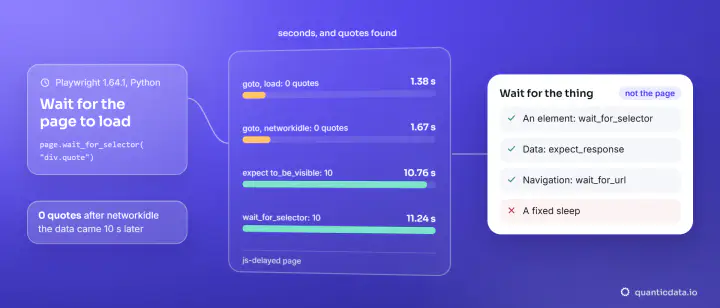
goto(..., wait_until="networkidle")returned after 1.67 s with 0 quotes;wait_for_selector("div.quote")found all 10 after 11.24 s. The full comparison of wait strategies is in waiting for a page to load in Playwright. - Proxy in launch(). Playwright takes the username and password in the proxy dictionary; more in Playwright proxy setup.
Route 3b: render with Selenium
Selenium drives the browsers installed on your machine. We ran Selenium 4.53.0 with Microsoft Edge 157 in headless mode on the delayed page:
from selenium.webdriver.support.ui import WebDriverWait
from selenium.webdriver.support import expected_conditions as EC
from selenium.webdriver.common.by import By

driver.get("https://quotes.toscrape.com/js-delayed/")
print(len(driver.find_elements(By.CLASS_NAME, "quote")))   # 0, too early
WebDriverWait(driver, 20).until(EC.presence_of_element_located((By.CLASS_NAME, "quote")))
print(len(driver.find_elements(By.CLASS_NAME, "quote")))   # 10, after 10.8 s
Edge does not take a username and password inside --proxy-server, so for Selenium we ran a small local forwarder that adds them; the method and the selectors are in Selenium find_element.
Which route to choose
| Route | Requests per page | Our result | Use when |
|---|---|---|---|
| JSON in the HTML | 1 | 10 quotes, no browser | A script tag holds the data |
| The page's API | 1 per page of data | 10 quotes per call | Data loads by XHR or on scroll |
| Playwright | The page plus its scripts and assets | 10 quotes in 3.34 s | Data exists only after rendering or clicks |
| Selenium | The same | 10 quotes on the delayed page | You already have Selenium code or need a specific installed browser |
A browser downloads everything a page needs, so it uses more time and more proxy traffic per page than one JSON request. Render only the pages that need it. Playwright in depth: Playwright for scraping.
Proxies for dynamic pages
Many dynamic sites decide what to send based on the visitor: country, device, network. Our Playwright run used a QuanticData mobile line, which presents as a phone carrier's address; residential lines present as home connections in the country you choose. Both plug into Playwright's launch() and into requests for routes 1 and 2. Plans: mobile proxies and residential proxies. If you would rather not run browsers at all, our web scraping API renders pages for you and returns the HTML or the data.