Websites detect bots by adding up signals, not by one test: the IP address and the kind of network it belongs to, the request headers, the TLS handshake, what JavaScript finds inside the browser, and how the visitor moves through the site. A high total gets a challenge, a block page or a slower answer. A proxy changes the first signal, the IP; the others come from your client.
To show that rather than assert it, we read the signals from six real clients on 20 November 2026: curl, Python Requests, Python httpx, Node's fetch, and Chromium driven by Playwright, headless and with a window. We used public test pages that echo back what they receive (tls.peet.ws for the TLS handshake, httpbin.org for headers) and a small script in the page for the JavaScript side, first directly and then, for every client except Node, through QuanticData Residential Basic, Residential Premium and Mobile.
What bot traffic is, and why sites sort it
Bot traffic is every request made by software rather than a person: search engine crawlers, uptime monitors, price trackers, AI crawlers, scrapers and, at the bad end, credential stuffing and fake sign-ups. Sites do not try to stop all of it. They try to tell the bots they want (a search engine that brings visitors) from the ones they do not (a script hammering the login page), and to decide how much of the rest their servers can carry. That sorting is what "bot detection" means in practice, and it is why a polite crawler and an abusive one get very different treatment from the same site.
Layer 1: the IP address and its network
The first thing a site knows is the address, and with it the network that owns it. A datacenter range is a strong hint that no person is behind the request; a home broadband or mobile carrier address is what real visitors use. Sites also keep a memory: an address that sent thousands of requests yesterday starts today with a worse score. Through our three networks the test pages saw home and carrier addresses in the United States (for example x.x.x.x on Residential Basic and x.x.x.x on Mobile, masked here) instead of the test PC's own connection in Europe. That is the whole of what a proxy does: it replaces this layer. How a site can still guess that an address is a proxy is covered in how to detect residential proxies.
Layer 2: the request headers
Every client introduces itself in its headers, and the defaults are honest:
| Client | User-Agent it sent | Other tells |
|---|---|---|
| curl.exe 8.22.0 | curl/8.22.0 | Accept: */*, nothing else |
| Python Requests 2.34.2 | python-requests/2.34.2 | No Accept-Language |
| Node 22 fetch | node | Accept-Language: *, Sec-Fetch-Mode: cors |
| Chromium 149, headless | ... HeadlessChrome/149.0.7827.55 ... | Sec-Ch-Ua lists "HeadlessChrome"; no Accept-Language (Playwright with no locale set) |
| Chromium 149, with a window | ... Chrome/149.0.0.0 ... | Accept-Language: en-US,en;q=0.9, full Sec-Fetch-* set |
A site does not need anything clever to sort the first four rows: the client says what it is. What the proxies did to the headers, client by client: curl sent the same headers directly and through all three networks; Chromium, headless and with a window, sent the same headers through the proxies plus Cache-Control: no-cache and Pragma: no-cache; Python Requests and Node were read directly only. Inside an HTTPS tunnel the proxy cannot read or rewrite headers; what reaches the site is what the client sends on that path.
Layer 3: the TLS handshake
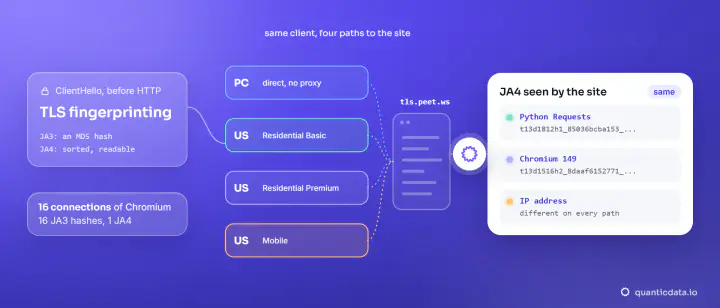
Before any header is sent, an HTTPS client says hello to the server with a list of ciphers, extensions and settings. Each TLS library says it a little differently, and a JA4 fingerprint condenses that hello into a short string. Ours:
| Client | HTTP version | JA4 (from tls.peet.ws) | Same through all three proxies? |
|---|---|---|---|
| curl.exe 8.22.0 (Schannel) | HTTP/1.1 | t13d2013h1_2b729b4bf6f3_e24568c0d440 | Yes |
| Python Requests | HTTP/1.1 | t13d1812h1_85036bcba153_b26ce05bbdd6 | Yes |
| Python httpx | HTTP/1.1 | t13d1812h1_85036bcba153_d41ae481755e | Yes |
| Chromium 149 | HTTP/2 | t13d1516h2_8daaf6152771_d8a2da3f94cd | Yes |
A site that sees a Chrome User-Agent on a handshake that only Python produces has caught a mismatch, and mismatches score worse than honest scripts. The handshake travels end to end inside the proxy tunnel, so no proxy changes it. The details, including why the older JA3 hash of Chromium changed on every connection while JA4 did not, are in TLS fingerprinting with JA3 and JA4.
Layer 4: what JavaScript finds in the browser
A page that runs a script can ask the browser about itself. We ran the same small probe in both Chromium modes:
| Property | Headless | With a window | Through the proxies |
|---|---|---|---|
navigator.webdriver | true | true | unchanged |
navigator.plugins.length | 0 | 5 | unchanged |
| WebGL renderer | SwiftShader (software) | the PC's NVIDIA graphics card | unchanged |
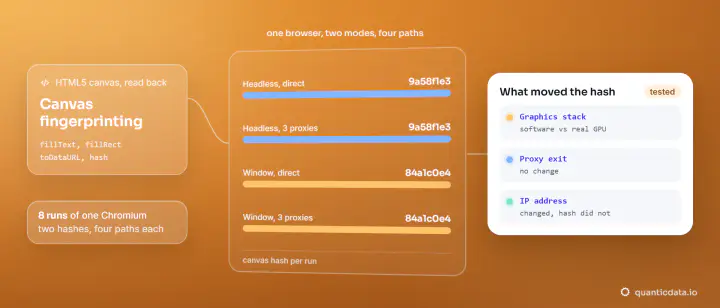
| Canvas hash | 9a58f1e3 | 84a1c0e4 | unchanged |
| Time zone | Europe/Rome | Europe/Rome | unchanged, on a US IP |
navigator.webdriver is true whenever a browser is driven by automation software, by design of the WebDriver standard, so a site can read "automated" directly. The software graphics renderer and the empty plugin list are typical of a headless browser. The last row matters for proxies: the browser kept the computer's own time zone, Rome, while the IP said United States. That kind of contradiction between layers is one of the strongest signals a site has. More on the canvas row in canvas fingerprinting, and on the whole fingerprint surface in how browser fingerprinting works.
Layer 5: behaviour over time
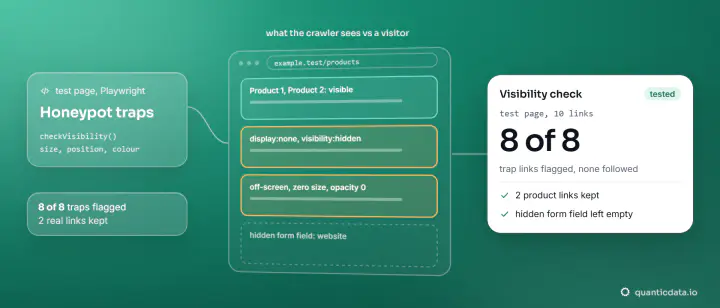
The last layer is what the visitor does: how many pages a minute, in what order, whether it loads images and scripts like a browser does, whether it follows links a person cannot see. honeypot traps exist only to catch that last behaviour. This layer is where polite crawlers win: a script that reads robots.txt, keeps one request per second per host and skips hidden links behaves within normal limits; our guide to crawl a website without getting blocked shows a run of 30 pages done that way, all answered 200. Some sites also measure mouse movement and typing rhythm on interactive pages.
Putting the layers together
Commercial bot management adds these signals into a score per request or per session and acts on thresholds: let it through, slow it down, show a challenge, or return a block page. That is why one fix rarely "solves" detection: changing the IP leaves four layers as they were, and a browser that hides one signal often creates a contradiction in another. If you run a site, our guide on how to stop web scraping covers the defender's side. If you collect public data, the honest way through is to look like what you are, a well-behaved client, and to slow down when a site asks.
Where our products fit
- residential proxies and mobile proxies give your own crawler home and carrier IPs in the country you choose: the first layer, done properly.
- For public pages that need a real browser, see the Web Unlocker.
- The web scraping API returns pages as clean Markdown or JSON when you would rather not run browsers at all.
None of them is a way into a login, a paywall or an account a site has closed, and the rules a site states in robots.txt and its terms still apply. To read a block page and find which system sent it, see block pages and the system behind each. The privacy and legal side of fingerprinting is in is browser fingerprinting legal.