Canvas fingerprinting is a tracking technique: a script draws text and shapes on an invisible HTML5 canvas, reads the pixels back and hashes them. Fonts, anti-aliasing, the graphics card and its driver make the result differ slightly between devices, and stay the same on one device. In our test the hash never changed through a proxy; switching the browser to headless did.
We ran it on 20 November 2026 on one Windows 11 PC with Chromium 149 driven by Playwright: headless and with a window, each directly and through QuanticData Residential Basic, Residential Premium and Mobile. Eight runs, the same drawing code each time.
How canvas fingerprinting works
- Draw. The script creates a canvas element that is never shown and draws on it: text in a given font, an emoji or two, overlapping shapes, a semi-transparent colour.
- Read back. It exports the pixels with
toDataURL()orgetImageData(). - Hash. It reduces the image to a short value and sends it home with the rest of the fingerprint.
The drawing instructions are identical everywhere; the pixels are not. Font rendering, sub-pixel smoothing and the graphics pipeline round colours and edges slightly differently from one machine to the next, so the same few lines of code give a value that separates devices without a cookie. This is the probe we ran, the canvas half of it as it stood in our script:
const c = document.createElement('canvas'); c.width = 280; c.height = 60;
const x = c.getContext('2d');
x.textBaseline = 'top'; x.font = '16px Arial'; x.fillStyle = '#f60'; x.fillRect(100, 1, 62, 20);
x.fillStyle = '#069'; x.fillText('QuanticData canvas test, 20 Nov', 2, 15);
x.fillStyle = 'rgba(102,204,0,0.7)'; x.fillText('QuanticData canvas test, 20 Nov', 4, 17);
const data = c.toDataURL();
let h = 0; for (let i = 0; i < data.length; i++) { h = ((h << 5) - h + data.charCodeAt(i)) | 0; }
(h >>> 0).toString(16)   // the canvas hash
Real fingerprinting scripts draw more and hash with a stronger function, but the mechanism is this one. WebGL fingerprinting is the 3D sibling: the script renders a scene and also reads the graphics card's vendor and renderer strings, which the WEBGL_debug_renderer_info extension exposes directly.
Our test: two hashes, eight runs
| Chromium 149 mode | Path | Canvas hash | Data URL length | WebGL renderer |
|---|---|---|---|---|
| Headless | Direct | 9a58f1e3 | 9,794 | ANGLE, SwiftShader (software) |
| Headless | Residential Basic, Premium, Mobile | 9a58f1e3 on all three | 9,794 | ANGLE, SwiftShader (software) |
| With a window | Direct | 84a1c0e4 | 9,746 | ANGLE, the PC's NVIDIA card |
| With a window | Residential Basic, Premium, Mobile | 84a1c0e4 on all three | 9,746 | ANGLE, the PC's NVIDIA card |
Each proxy path showed the test page a different US home or carrier IP, and not one pixel of the canvas changed. The data URL, the PNG the canvas was exported to, was 9,794 characters long in every headless run and 9,746 in every windowed run, so even its size gives the two modes away before any hash is computed. The WebGL vendor string told the same story: "Google Inc. (Google)" headless, "Google Inc. (NVIDIA)" with a window. A fingerprinting script reads those strings in one call, and a site that compares them with the User-Agent learns whether a browser that says it is desktop Chrome has a graphics card at all. Headless and windowed Chromium on the same PC disagreed, because headless mode drew with SwiftShader, a software renderer, instead of the graphics card: different rounding, different pixels, different hash. The WebGL strings said the same thing in words.
What changes a canvas fingerprint, and what does not
| Change | Effect on the canvas hash |
|---|---|
| A new IP, through any proxy | None in our test: the canvas is drawn on your machine |
| Headless instead of a window (Chromium) | Changed in our test: software renderer instead of the GPU |
| Another graphics card or driver | Expected to change: it is the main source of the differences |
| Installed fonts, browser version | Can change it when the drawn text uses them |
| A browser that adds noise on purpose | Changes per site and per session, by design |
The last row is how privacy browsers fight canvas tracking. Brave, for example, describes adding small random changes to canvas and WebGL output that differ between sites and between sessions, so the hash can no longer link two visits; it also removes canvas and WebGL from third-party scripts by default. Extensions sold as "canvas fingerprinting protection" use the same two ideas: block the read-back, or perturb it.
Why canvas fingerprinting matters for automation
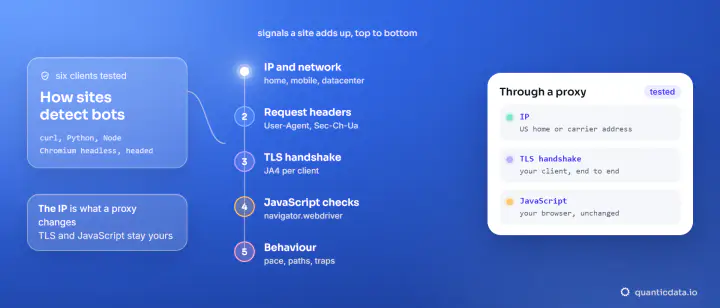
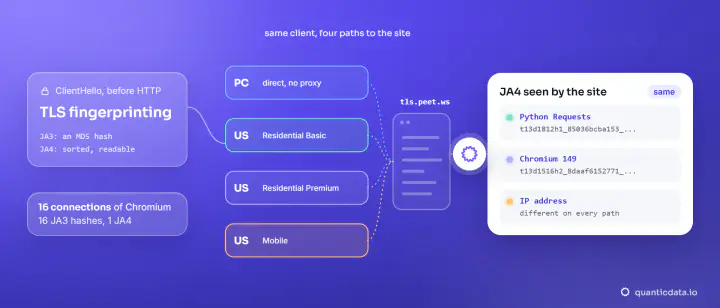
For tracking, a canvas hash is a cookie that survives clearing cookies. For bot detection it is a consistency check. A headless browser that claims to be a desktop Chrome but draws with a software renderer, or a thousand "different" visitors that all draw the same pixels from a thousand IPs, are both easy to spot. That is the lesson of our eight runs: rotating the IP leaves the drawing untouched: the canvas is drawn on the machine, so the network does not enter into it. The other signals a site combines with it, from headers to TLS fingerprinting, are in how websites detect bots; the full fingerprint surface is in how browser fingerprinting works.
If you automate a browser to collect public pages, run it the plain way, with a window where you can and a Playwright with a proxy setup for the network, and accept that it identifies itself as automated. Disguising a fingerprint to pass as a different person is not something we write recipes for. For public pages that need a real browser, see the Web Unlocker. For your own browser runs, residential proxies and mobile proxies cover the network side.
Test your own canvas fingerprint
- Paste the probe above into the browser console on any page and note the value; reload and run it again: on an ordinary browser it stays the same.
- Run it in a private window, then in another browser on the same machine, and compare.
- Run it through a proxy or VPN: if your browser does not add noise, the value will not move.
Whether a site may fingerprint you, and what it must tell you, depends on where you are: see is browser fingerprinting legal and device fingerprinting and the law.