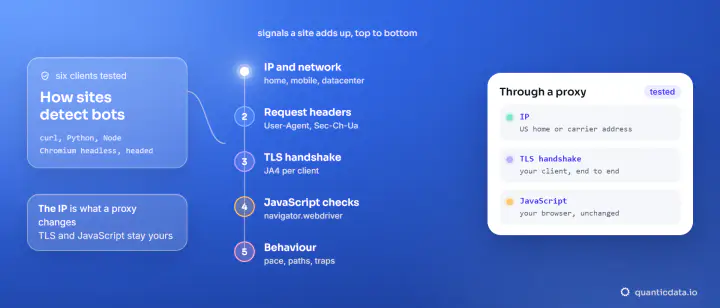
TLS fingerprinting identifies the software behind an HTTPS connection from its ClientHello, the first message of the handshake: the TLS version, cipher list, extensions and curves it offers. JA3 hashes those fields with MD5; JA4 sorts them and keeps a readable prefix. The site computes it before any HTTP header arrives, and a proxy does not change it.
We measured both on 20 November 2026 for five common clients, using tls.peet.ws, a public page that echoes the handshake it receives. curl, Python Requests, httpx and Chromium connected directly and then through three QuanticData networks: Residential Basic, Residential Premium and Mobile; Node connected directly. The results are below, unedited apart from shortening.
What is in a TLS fingerprint
When an HTTPS client opens a connection, it sends a ClientHello in clear text. Different TLS libraries fill it differently: OpenSSL in Python, Schannel in Windows curl, BoringSSL in Chrome. The order of ciphers, the extensions offered, the supported groups and the ALPN protocols (http/1.1 or h2) add up to a signature of the library and its settings. It says "this is Python's ssl module" or "this is Chrome", not who the user is.
| JA3 | JA4 | |
|---|---|---|
| Input | TLS version, ciphers, extensions, elliptic curves, point formats, in the order sent | Protocol, TLS version, SNI, counts of ciphers and extensions, ALPN, then hashes of the sorted cipher and extension lists |
| Output | 32-character MD5, e.g. a48c0d5f95b1ef98f560f324fd275da1 | Three parts, e.g. t13d1812h1_85036bcba153_b26ce05bbdd6 |
| Readable? | No | The first part is: t13d1812h1 = TCP, TLS 1.3, domain SNI, 18 ciphers, 12 extensions, HTTP/1.1 |
| Extension order shuffled | New hash every time | Same fingerprint |
Our measurements: one fingerprint per client
| Client | HTTP | JA3 | JA4 | Through Basic, Premium, Mobile |
|---|---|---|---|---|
| curl.exe 8.22.0 (Windows, Schannel) | HTTP/1.1 | fae0e5d973c96ae1888b99538efa0363 | t13d2013h1_2b729b4bf6f3_e24568c0d440 | Identical |
| Python Requests 2.34.2 | HTTP/1.1 | a48c0d5f95b1ef98f560f324fd275da1 | t13d1812h1_85036bcba153_b26ce05bbdd6 | Identical |
| Python httpx 0.28.1 | HTTP/1.1 | 304734bb1c086c3453b387400cf83f11 | t13d1812h1_85036bcba153_d41ae481755e | Identical |
| Node 22 fetch | HTTP/1.1 | d67b094811e5145139d7cea5f014309f | t13d5212h1_b262b3658495_8e6e362c5eac | |
| Chromium 149 (Playwright) | HTTP/2 | different on every connection | t13d1516h2_8daaf6152771_d8a2da3f94cd | Identical JA4 |
Three things stand out. Requests and httpx share the middle part of their JA4 (85036bcba153, the same cipher list from Python's ssl module) and differ in the extensions. Node offers 52 ciphers, far more than a browser. And every non-browser client spoke HTTP/1.1, while Chromium negotiated HTTP/2, so even the protocol separates them before the fingerprint is read.
Reading a JA4 prefix
The first part of a JA4 can be read without any lookup table, which is half of its appeal. Taking the four prefixes we measured:
| Prefix | Transport, TLS, SNI | Ciphers offered | Extensions | ALPN |
|---|---|---|---|---|
t13d2013h1 (curl.exe) | TCP, TLS 1.3, domain name sent | 20 | 13 | HTTP/1.1 |
t13d1812h1 (Python) | TCP, TLS 1.3, domain name sent | 18 | 12 | HTTP/1.1 |
t13d5212h1 (Node fetch) | TCP, TLS 1.3, domain name sent | 52 | 12 | HTTP/1.1 |
t13d1516h2 (Chromium) | TCP, TLS 1.3, domain name sent | 15 | 16 | HTTP/2 |
The second and third parts are truncated SHA-256 hashes of the sorted cipher list and of the sorted extensions with the signature algorithms. Two clients can share a prefix and still differ there, which is exactly what Requests and httpx do. A log line with the full JA4 is enough to say "this was Python's ssl module, not a browser" without storing anything about the person.
Why Chromium's JA3 changed every time and JA4 did not
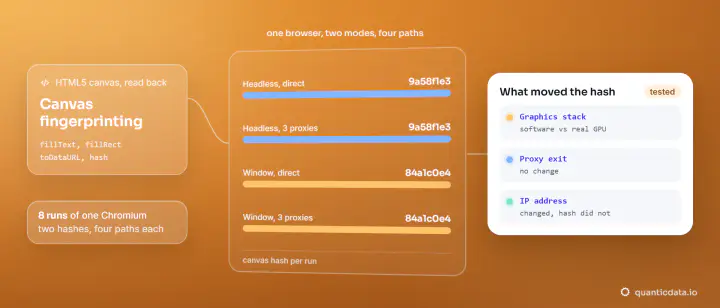
We opened two fresh connections from Chromium on each of four paths, headless and with a window: 16 connections, 16 different JA3 hashes, one JA4. Chrome shuffles the order of its TLS extensions on each connection, and JA3 hashes the order as sent, so its value is useless for Chrome. JA4 sorts the extensions before hashing, which is why its value stayed the same. The HTTP/2 settings Chromium sent (window size, header table size, the order of pseudo-headers) gave one more fingerprint, and it was also the same on all 8 runs: 52d84b11737d980aef856699f885ca86.
What a proxy does to the fingerprint: nothing
For an https:// URL, your client asks the proxy to open a tunnel with CONNECT, then performs the TLS handshake with the website through that tunnel. The proxy relays bytes; it does not terminate TLS and cannot change the ClientHello. Our numbers show it: the same JA4 directly, through Residential Basic, through Residential Premium and through Mobile, for the four clients we ran through the proxies. Only the IP the site saw changed, from our own line to a US home or carrier address.
Check it yourself through any proxy. This is the snippet we ran, through Residential Premium:
import requests
proxy = "http://USER:PASS@residentialpremium.quanticdata.io:8080"
d = requests.get("https://tls.peet.ws/api/all", proxies={"http": proxy, "https": proxy}).json()
print(d["http_version"], d["tls"]["ja3_hash"], d["tls"]["ja4"])

HTTP/1.1 a48c0d5f95b1ef98f560f324fd275da1 t13d1812h1_85036bcba153_b26ce05bbdd6
Run it again without proxies= and the last two values are the same. The same holds one layer up: the HTTP/2 frames Chromium sends after the handshake also travel inside the tunnel, which is why its HTTP/2 fingerprint was identical directly and on each of the three networks, in headless and windowed runs alike. The setup of a proxy in Python Requests and of Playwright with a proxy is in our guides.
How sites use TLS fingerprints
- Consistency checks. A request that claims to be Chrome in its User-Agent but arrives with Python's handshake and HTTP/1.1 contradicts itself. Contradictions between layers are a stronger signal than any single value; the other layers are in how websites detect bots.
- Grouping across IPs. The same rare fingerprint from thousands of addresses in an hour points to one tool, however many IPs it uses. That is what JA3 was built for: its authors at Salesforce show malware keeping one JA3 while destination IPs, ports and certificates change.
- Allow and deny lists. Some sites treat known library fingerprints as automation outright. A common browser fingerprint is shared by millions of people, so it identifies a browser family, not a person.
What this means if you collect public data
A proxy solves an IP problem: where the request comes from, which country, home or mobile network. It does not change what your client is. For most public pages that is fine, and a plain HTTP client through residential proxies or mobile proxies works. When a page expects a real browser, use one, and accept that it identifies itself as automated; we do not publish recipes for disguising a client's handshake. For public pages that need a real browser, see the Web Unlocker. The rest of the fingerprint surface, from fonts to canvas fingerprinting, is covered in our guide to browser fingerprinting; how sites spot the proxy itself is in how to detect residential proxies.