In Playwright, page.goto() already waits for the page's load event. To wait for the content you need, wait for that content: page.wait_for_selector("css") or expect(locator).to_be_visible() for an element, page.expect_response() for an API call, page.wait_for_url() after a click. networkidle and fixed sleeps are unreliable.
We timed every option on 20 November 2026 with Python 3.12.10, Playwright 1.64.1 and Chromium 156, through a QuanticData Residential Premium session in the US, on quotes.toscrape.com/js-delayed/, a public practice page that adds its quotes after a delay, like many real sites that load data after the first paint.
What goto() waits for, and why it was not enough
for wu in ("commit", "domcontentloaded", "load", "networkidle"):
    page.goto("https://quotes.toscrape.com/js-delayed/", wait_until=wu)
    print(wu, page.locator("div.quote").count())
wait_until | Returns when | Our time | Quotes on the page |
|---|---|---|---|
| commit | The response starts arriving | 1.11 s | 0 |
| domcontentloaded | The HTML is parsed | 1.36 s | 0 |
| load (default) | The page and its resources are loaded | 1.38 s | 0 |
| networkidle | No network activity for a short while | 1.67 s | 0 |
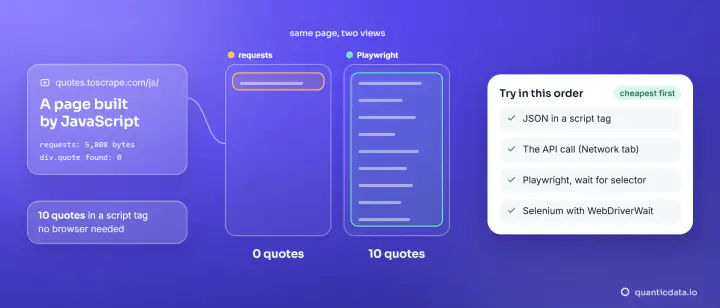
All four returned with nothing to scrape. The page waits on a timer before adding its quotes, so the network goes quiet first and the content comes later. Playwright's own documentation marks networkidle as discouraged and recommends waiting on the elements you need instead, which is what the next sections do.
Wait for the element
page.goto(URL, wait_until="domcontentloaded")
page.wait_for_selector("div.quote")                    # 11.24 s, then 10 quotes

from playwright.sync_api import expect
expect(page.locator("div.quote").first).to_be_visible(timeout=30000)   # 10.76 s

page.locator("div.quote").first.wait_for(state="visible")              # 10.01 s
All three returned once the quotes existed, and all 10 were there. Combine them with wait_until="domcontentloaded": there is no reason to also wait for images and fonts when the element is what you need. The element waits measured the real delay of the page, about ten seconds, instead of a guess, so they also tell you how slow a site is.
When one element is not enough, wait for a condition in the page: page.wait_for_function("document.querySelectorAll('div.quote').length >= 10") returned in 10.03 s with the full list.
Wait for the data itself: expect_response
Often the content comes from a JSON call. Waiting for that response gives you the data without parsing the page at all. On the infinite-scroll page of the same site:
page.goto("https://quotes.toscrape.com/scroll", wait_until="domcontentloaded")
with page.expect_response(lambda r: "/api/quotes" in r.url and r.status == 200) as info:
    page.mouse.wheel(0, 20000)
data = info.value.json()
print(info.value.url, data["page"], len(data["quotes"]))
# https://quotes.toscrape.com/api/quotes?page=1  1  10
Start the with block before the action that triggers the request, as above, or you can miss a fast response. More on finding these calls in scraping dynamic web pages in Python.
Wait after a click: wait_for_url
page.click("li.next a")
page.wait_for_url("**/page/2/")      # 0.66 s
print(page.url)                      # https://quotes.toscrape.com/page/2/
After a click that navigates, wait_for_url with a glob pattern waits until the address changes; in our run it returned in 0.66 s. Follow it with an element wait when you need the new page's content, since a changed address does not mean the data has arrived.
Why not just sleep?
page.wait_for_timeout(3000) paused three seconds and the page still had 0 quotes: the data came after about ten. A fixed sleep is either too short, and you scrape an empty page, or too long, and every page costs the full delay. Keep sleeps for debugging. The same goes for time.sleep() in Selenium, where WebDriverWait plays the role of wait_for_selector (see Selenium find_element).
Which wait for which job
- You scrape a list or a detail block:
goto(url, wait_until="domcontentloaded"), thenwait_for_selectoron the block. It returned the moment our quotes appeared and never earlier. - You need every item, not the first:
wait_for_functionwith a count, or wait for a "last item" or footer element that renders after the list. - The page loads its data from an API:
expect_response, and read the JSON instead of the DOM. - You clicked and the page changes:
wait_for_url, then an element wait on the new page. - You only need the HTML the server sent: the default
loadis enough, and a plain HTTP client would be cheaper still.
Each of these waits for evidence that the thing you want exists. That is the whole rule: a page is loaded, for a scraper, when the data is on it.
Timeouts
try:
    page.wait_for_selector("div.quote", timeout=2000)
except PlaywrightTimeoutError as e:
    print(e)   # Page.wait_for_selector: Timeout 2000ms exceeded.

page.set_default_timeout(45000)   # for every wait on this page
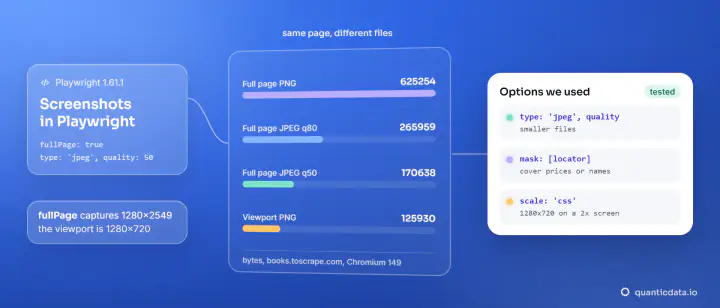
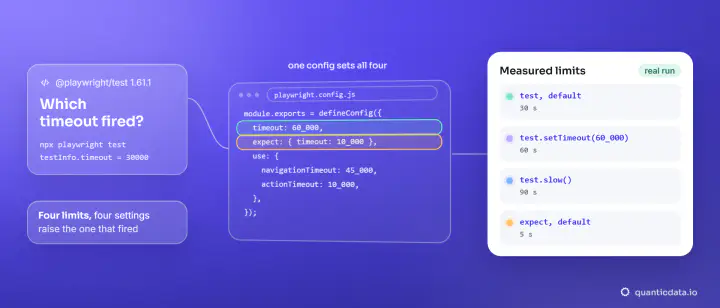
Waits default to 30 seconds; when one runs out, Playwright raises "Timeout 30000ms exceeded". Import the error with from playwright.sync_api import TimeoutError as PlaywrightTimeoutError. When a wait times out, take a screenshot before closing, page.screenshot(path="debug.png", full_page=True): it usually shows a consent banner, an error page or a block page where you expected content. We saved one of the rendered page and one of a single quote with locator.screenshot().
Waiting through a proxy
Pass the proxy once in chromium.launch(proxy={"server": ..., "username": ..., "password": ...}); see Playwright proxy setup. QuanticData residential proxies give a home IP by country, with a session ID in the username, and mobile proxies put the browser on a carrier network. When you need rendered pages at volume without running browsers, our web scraping API renders them for you. The rest of a Playwright scraper is in Playwright for scraping.