Playwright Test gives every test 30 seconds and every expect assertion 5 seconds by default. Change the first with timeout in playwright.config or test.setTimeout() in a test, and the second with expect: { timeout }. Actions and navigations have separate, optional limits: actionTimeout and navigationTimeout.
The error message tells you which of the four fired, and the fix is different for each. We reproduced all four on 20 November 2026 with @playwright/test 1.61.1 against a small local server that answers late on purpose, then fixed each one. The specs and the runner's output are below.
The four Playwright timeouts
| Timeout | Default | Set for all tests | Set in one place | Error text |
|---|---|---|---|---|
| Test | 30 s | timeout: 60_000 | test.setTimeout(60_000), test.slow() | Test timeout of 30000ms exceeded. |
| Expect | 5 s | expect: { timeout: 10_000 } | expect(x).toHaveText(t, { timeout: 10_000 }) | expect(locator).toHaveText(expected) failed ... Timeout: 5000ms |
| Action | None of its own | use: { actionTimeout: 10_000 } | locator.click({ timeout: 2000 }) | TimeoutError: locator.click: Timeout 2000ms exceeded. |
| Navigation | None of its own | use: { navigationTimeout: 45_000 } | page.goto(url, { timeout: 3000 }) | TimeoutError: page.goto: Timeout 3000ms exceeded. |
"None of its own" follows the Playwright documentation: an action or a navigation without a limit simply runs until the test timeout stops the whole test, which is the first error in the table.
The test setup
A server that can be slow in three ways: a page that answers after a chosen delay, a page that adds its content late with JavaScript, and a button that stays disabled.
// server.js
const http = require('node:http');
http.createServer((req, res) => {
  const u = new URL(req.url, 'http://localhost');
  const ms = Number(u.searchParams.get('ms') || 0);
  const html = (body) => { res.writeHead(200, { 'Content-Type': 'text/html' }); res.end('<!doctype html><title>t</title>' + body); };
  if (u.pathname === '/slow') return setTimeout(() => html('<h1>Slow page</h1>'), ms);
  if (u.pathname === '/late') return html('<h1>Report</h1><script>setTimeout(() => { document.body.insertAdjacentHTML("beforeend", "<p id=total>Total: 42</p>"); }, ' + ms + ')</script>');
  if (u.pathname === '/disabled') return html('<button id=buy disabled>Buy</button>');
  html('<h1>ok</h1>');
}).listen(4173);
// playwright.config.js
const { defineConfig } = require('@playwright/test');
module.exports = defineConfig({
testDir: './tests',
workers: 1,
reporter: 'list',
webServer: { command: 'node server.js', port: 4173, reuseExistingServer: true },
use: { baseURL: 'http://localhost:4173' },
});Each timeout error, reproduced
const { test, expect } = require('@playwright/test');

test('1 default test timeout: page answers after 40 s', async ({ page }, testInfo) => {
  console.log('testInfo.timeout =', testInfo.timeout);
  await page.goto('/slow?ms=40000');
});

test('2 default expect timeout: text appears after 7 s', async ({ page }) => {
  await page.goto('/late?ms=7000');
  await expect(page.locator('#total')).toHaveText('Total: 42');
});

test('3 action with its own timeout: button stays disabled', async ({ page }) => {
  await page.goto('/disabled');
  await page.locator('#buy').click({ timeout: 2000 });
});

test('4 navigation with its own timeout: page answers after 10 s', async ({ page }) => {
  await page.goto('/slow?ms=10000', { timeout: 3000 });
});
The runner's output for each, shortened to the lines that matter (in the listings on this page the runner's tick marks are written as "ok"):
testInfo.timeout = 30000

1) 1 default test timeout: page answers after 40 s
    Test timeout of 30000ms exceeded.
    Error: page.goto: net::ERR_ABORTED; maybe frame was detached?
      - navigating to "http://localhost:4173/slow?ms=40000", waiting until "load"

2) 2 default expect timeout: text appears after 7 s
    Error: expect(locator).toHaveText(expected) failed
    Locator: locator('#total')
    Expected: "Total: 42"
    Timeout: 5000ms
    Error: element(s) not found

3) 3 action with its own timeout: button stays disabled
    TimeoutError: locator.click: Timeout 2000ms exceeded.
      - locator resolved to <button id="buy" disabled>Buy</button>
      - attempting click action
        2 x waiting for element to be visible, enabled and stable
          - element is not enabled

4) 4 navigation with its own timeout: page answers after 10 s
    TimeoutError: page.goto: Timeout 3000ms exceeded.
      - navigating to "http://localhost:4173/slow?ms=10000", waiting until "load"
How to read them:
- "Test timeout of 30000ms exceeded." is the test limit. Whatever line was running when the 30 seconds ended is reported under it, here the
goto, with the confusing extra "net::ERR_ABORTED": that is Playwright closing the page, not a network fault. - "Timeout: 5000ms" inside an
expectblock is the assertion limit. The test had 25 seconds left; the assertion had used its own 5. - "TimeoutError: locator.click: Timeout 2000ms exceeded." names the action and the limit we gave it. The call log underneath is the useful part: the button was found and was "not enabled". The element exists; it was never clickable.
- "TimeoutError: page.goto: Timeout 3000ms exceeded." names the navigation and says what it was waiting for: the "load" event.
Each one fixed
test('1 test.setTimeout(60_000): page answers after 40 s', async ({ page }, testInfo) => {
  test.setTimeout(60_000);
  console.log('testInfo.timeout =', testInfo.timeout);
  await page.goto('/slow?ms=40000');
  await expect(page.locator('h1')).toHaveText('Slow page');
});

test('2 test.slow(): three times the timeout', async ({ page }, testInfo) => {
  test.slow();
  console.log('testInfo.timeout =', testInfo.timeout);
  await page.goto('/slow?ms=40000');
});

test('3 expect with timeout 10 s: text appears after 7 s', async ({ page }) => {
  await page.goto('/late?ms=7000');
  await expect(page.locator('#total')).toHaveText('Total: 42', { timeout: 10_000 });
});

test.describe('group with its own timeout', () => {
  test.describe.configure({ timeout: 45_000 });
  test('4 describe.configure({ timeout: 45_000 })', async ({ page }, testInfo) => {
    console.log('testInfo.timeout =', testInfo.timeout);
    await page.goto('/slow?ms=1000');
  });
});

test('5 test.setTimeout(0): no limit', async ({ page }, testInfo) => {
  test.setTimeout(0);
  console.log('testInfo.timeout =', testInfo.timeout);
  await page.goto('/slow?ms=1000');
});
Running 5 tests using 1 worker
testInfo.timeout = 60000
ok 1 test.setTimeout(60_000): page answers after 40 s (40.1s)
testInfo.timeout = 90000
ok 2 test.slow(): three times the timeout (40.1s)
ok 3 expect with timeout 10 s: text appears after 7 s (7.5s)
testInfo.timeout = 45000
ok 4 group with its own timeout, describe.configure({ timeout: 45_000 }) (1.3s)
testInfo.timeout = 0
ok 5 test.setTimeout(0): no limit (1.1s)
5 passed (1.5m)| Setting | testInfo.timeout it produced | Use it when |
|---|---|---|
| Nothing | 30000 | Most tests |
test.setTimeout(60_000) | 60000 | One test is known to need longer |
test.slow() | 90000, that is 90 s, three times the default | The same, without choosing a number |
test.describe.configure({ timeout: 45_000 }) | 45000 | A group of tests shares a slow dependency |
test.setTimeout(0) | 0, meaning no limit | Debugging by hand; not in CI, where a stuck test would hang the job |
The 40-second page passed with a 60-second limit and with test.slow(); the text that appears after 7 seconds passed once its assertion was allowed 10. The failing button from the first run has no timeout fix: the button is disabled, and the right change is in the test (enable it first) or in the application.
Set the timeouts in playwright.config
Defaults for the whole project go in the config file. This is the one we used for the proxy run in the next section:
const { defineConfig } = require('@playwright/test');
const u = new URL(process.env.PROXY_URL);    // http://USER:PASS@HOST:PORT of your proxy line
module.exports = defineConfig({
  testDir: './proxy-tests',
  workers: 1,
  reporter: 'list',
  timeout: 60_000,                 // each test
  expect: { timeout: 10_000 },     // each assertion
  use: {
    proxy: { server: u.protocol + '//' + u.host,
             username: decodeURIComponent(u.username), password: decodeURIComponent(u.password) },
    navigationTimeout: 45_000,     // goto, reload, waitForURL
    actionTimeout: 10_000,         // click, fill, check ...
  },
});
Keep the order sensible: an action or navigation limit longer than the test limit can never fire, because the test ends first. A useful shape is assertion and action limits of a few seconds, a navigation limit below the test limit, and a test limit that covers the whole flow. There is also globalTimeout for the entire run, which is worth setting in CI so that a broken environment ends the job instead of occupying a runner.
A real site through a proxy, with every timeout set
With that config, a test that opens a public practice shop through one residential proxy line in the United States, checks the 20 products of page one, clicks "next" and checks page two:
const { test, expect } = require('@playwright/test');

test('books.toscrape.com through the proxy, with every timeout set', async ({ page }, testInfo) => {
  console.log('test timeout =', testInfo.timeout);
  await page.goto('https://books.toscrape.com/', { waitUntil: 'domcontentloaded' });
  await expect(page.locator('article.product_pod')).toHaveCount(20);
  await page.getByRole('link', { name: 'next' }).click();
  await expect(page).toHaveURL(/page-2/);
  await expect(page.locator('article.product_pod')).toHaveCount(20);
  console.log('title =', await page.title());
});
Running 2 tests using 1 worker
test timeout = 60000
title = All products | Books to Scrape - Sandbox
ok 1 books.toscrape.com through the proxy, with every timeout set
exit = x.x.x.x
ok 2 exit IP check
2 passedBoth tests passed, well inside the limits of 45 and 60 seconds. The second test printed the exit address (masked here) to confirm the browser was going out through the proxy. The proxy block of the config is explained in Playwright proxy setup.
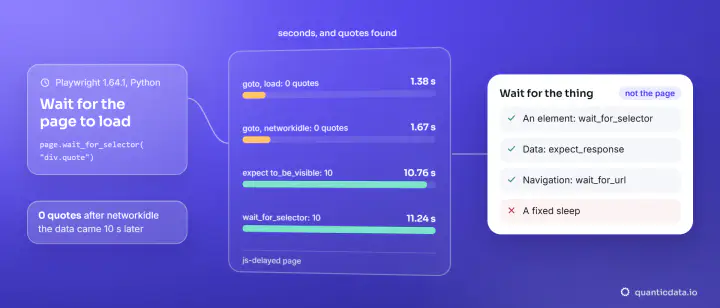
Two choices in that test do more for reliability than any number. waitUntil: 'domcontentloaded' stops goto from waiting for every image and tracker; the options are compared in waiting for a page to load in Playwright. And the checks are web-first assertions (toHaveCount, toHaveURL), which retry until they pass or their timeout ends, so there is no fixed waitForTimeout sleep anywhere.
Increase the timeout, or fix the wait?
- Raise the limit when the work is legitimately long: a report that takes 40 seconds to build, a multi-page flow, a first load in a cold environment.
- Fix the wait when the limit fired on something that would never happen: a selector that matches nothing, a button that stays disabled, a "load" event held back by a third-party script. The call log under the error says which.
- Do not paper over it with
setTimeout(0)or a long sleep. A test that can wait forever hides the failure you wrote it to catch.
The same reasoning applies to plain HTTP clients, where the limits are connect and total time: see curl timeouts and retries and timeouts in Python Requests. When Playwright is used to collect pages instead of testing them, the timeouts are the same options on the same calls, as in scraping dynamic pages and Playwright screenshots.
Timeouts and the network you test from
A test against a real site in another country depends on that site's response time, so give navigation its own explicit limit instead of leaning on the test timeout, as the config above does. Our residential proxies place the browser on home connections in the country you choose and our mobile proxies on carrier connections; both plug into the proxy option shown above.