IPv6 Proxies for YouTube
The world's largest video platform, whose search, recommendations, ads and availability are localized by country. www.youtube.com answers with 8 AAAA records, so QuanticData IPv6 proxies reach it: rotating or static sessions on /48 and /64 subnets, country in the username, from $0.20/GB down to $0.083/GB on 3 TB — for the public, high-volume side of YouTube, not for its accounts.
From $0.20/GB · Rotating or static sessions · HTTP, HTTPS and SOCKS5

Does YouTube accept IPv6? What we measured
In our 102-domain census of 14 September 2026, youtube.com published 8 AAAA records on the apex and 16 on www, and the host its homepage lands on, www.youtube.com, resolves over IPv6. Re-checked on 20 September 2026 from 1.1.1.1 and 8.8.8.8: www.youtube.com answers with 8 AAAA records, the first one 2001:4860:4827:400::. The hosts behind it: m.youtube.com (1 AAAA).
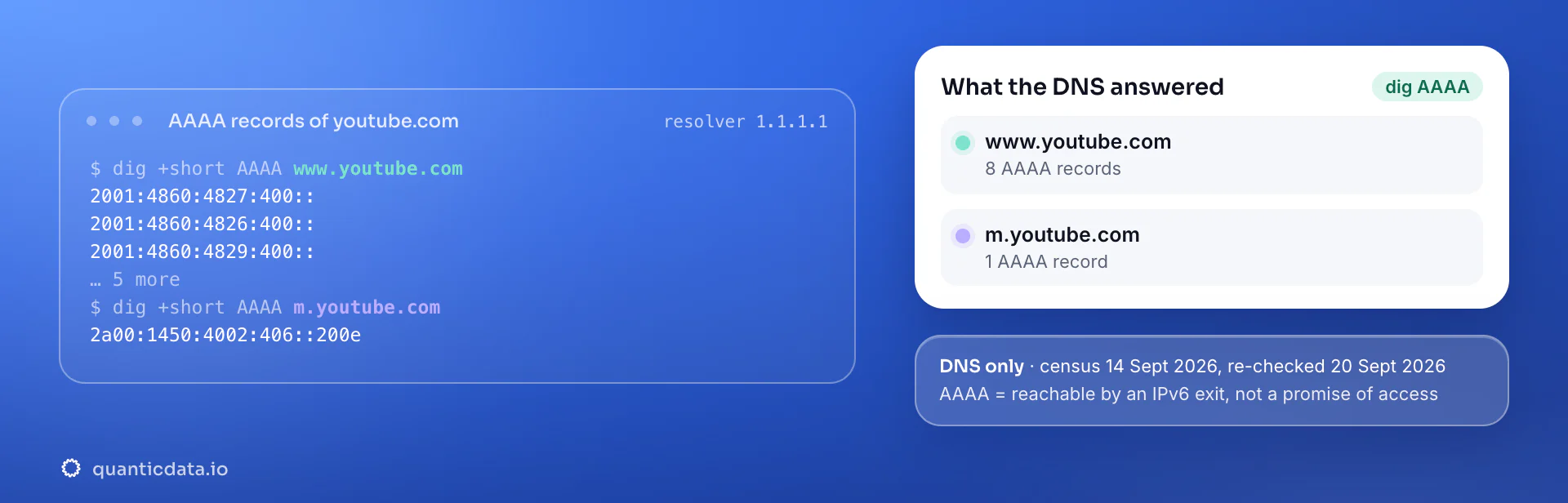
This is a DNS check, not a connection test: an AAAA record means an IPv6 exit can reach the host, and nothing more. What the platform serves to a given client is decided by its own rules, its rate limits per prefix and its anti-automation, which is why every page in this family says which jobs fit and which do not.
Why IPv6 proxies for YouTube
YouTube is the most bandwidth-hungry public target on the list, and that is exactly the case IPv6 was priced for. www.youtube.com publishes 8 to 16 AAAA records and m.youtube.com resolves over IPv6 as well, so search results, watch pages, channel pages and the public JSON they embed are all reachable from an IPv6 exit. A watch page as served to a non-JavaScript client is several hundred kilobytes; collecting video metadata, comments and search results for a research or monitoring pipeline burns gigabytes quickly, and the difference between $0.083 and $0.80 per gigabyte is the difference between a project that runs and one that does not.
What IPv6 does not do is make a client look like a viewer. YouTube decides what to serve by the shape of the request — headers, cookies, whether the player is initialised — far more than by the address family. Use IPv6 for the public data side, rotating on every request, and leave anything that involves watch time, an account or a channel to the mobile network.
What to run on IPv6 for YouTube, and what not to
Four jobs people bring to YouTube, and the network each one belongs on. "Yes" means a rotating IPv6 exit is the right and cheapest tool; "Partly" means IPv6 carries part of the job; "No" means residential or mobile, and the reason is in the notes.
| Job | IPv6? | Notes |
|---|---|---|
| Video metadata, titles, view counts, publish dates | Yes | Public watch pages and their embedded JSON, one rotating exit per request. |
| Search results and channel listings per country | Yes | Country in the username; results differ by market, and the pages are light enough to sample often. |
| Comments and transcripts at volume | Partly | Reachable over IPv6, but paginated endpoints are rate-limited per prefix: spread the work across /64s and keep the pace low. |
| Accounts, uploads, YouTube Studio, watch time | No | An account expects a phone or a household on a sticky session. Nothing on this page is for engagement or view manipulation. |
When IPv6 is the wrong network for YouTube
Channel management, uploads, YouTube Studio and anything measured in watch time stay on the mobile network with a sticky session per account. IPv6 is the wrong network for a login, and no proxy of any kind is a tool for inflating views.
The same account carries the other networks: mobile proxies for YouTube (carrier IPs, sticky up to 24 hours, from $5 for 1 GB) and residential proxies for YouTube (home-ISP IPs in 228 countries, from $1.00/GB, with a free 100 MB trial). A proxy makes the request originate in a country, which is what YouTube uses to localize search, ads and availability for logged-out visitors; it does not change your Google account, YouTube's terms, or the API quotas for data access.
Which session to use for YouTube on IPv6: rotating or static
Rotating for data, static when a flow must keep one IP. Rotating for logged-out research; sticky for signed-in channel or QA profiles. On the IPv6 network the username carries the country; leave the session out for a fresh address on every request, or set a static session in the endpoint generator when a flow must keep one. Host, port and password are in your dashboard after purchase.
# PROXY_HOST and PORT are shown in your dashboard
# no session in the username: a fresh IPv6 address on every request
curl --proxy "http://PROXY_HOST:PORT" \
  --proxy-user "USER-country-us:PASS" \
  --connect-timeout 10 --max-time 30 \
  -A "Mozilla/5.0 (Windows NT 10.0; Win64; x64) Chrome/128.0 Safari/537.36" \
  "https://www.youtube.com/results?search_query=ipv6+proxies"

# check the exit: the address in the answer is an IPv6 one
curl --proxy "http://PROXY_HOST:PORT" --proxy-user "USER-country-us:PASS" https://api64.ipify.org
Pacing by /64. A rotating exit per request, a few requests per second across the whole job rather than per exit, and respect for the paginated endpoints: YouTube answers a burst on comments or search pagination with empty results before it answers with a block.
Best countries for YouTube IPv6 proxies
The exits most often asked for with YouTube. Every IPv6 country page lists the username code and what that market is used for; 18 countries are available on the IPv6 network.
IPv6 proxy pricing for YouTube
Per GB, each pack valid 30 days, unlimited concurrent sessions, country targeting included, no port fees. Pay from balance, card, PayPal or crypto. The free trial is on the residential pool (100 MB, 5 days, no card).
The same pool at every tier — a small YouTube test costs exactly $20. Full ladder and terms on the pricing page; the honest comparison with IPv4 is on the IPv6 proxies page.
Set it up for YouTube
QuanticData IPv6 proxies are standard HTTP and SOCKS5 endpoints: a host, a port, a username and a password, shown in your dashboard the moment a pack is active. Below, a request to a public YouTube page through the IPv6 gateway with a rotating exit, in curl and in Python.
import requests

# host and port from your dashboard; country in the username
proxy = "http://USER-country-us:PASS@PROXY_HOST:PORT"
r = requests.get("https://www.youtube.com/results?search_query=ipv6+proxies",
                 proxies={"http": proxy, "https": proxy},
                 headers={"User-Agent": "Mozilla/5.0 (Windows NT 10.0; Win64; x64) Chrome/128.0 Safari/537.36"},
                 timeout=30)
print(r.status_code, len(r.content))
SOCKS5 works with the same username on the SOCKS5 port (socks5h:// in Python's proxies, --socks5-hostname in curl), so the hostname is resolved at the exit — which is what you want, because the exit is the one with IPv6 connectivity. Test with https://api64.ipify.org: the answer should be an IPv6 address in the country you set.
Prefer an API to a proxy for the data side? The YouTube scraper API returns YouTube data as JSON, billed per successful result.
FAQ
IPv6 Proxies for YouTube: does it accept IPv6, which session, IPv6 or residential, price, free options.
Something else? Ask usDoes YouTube accept IPv6 proxies?
QuanticData checked: www.youtube.com publishes 8 AAAA records (DNS from 1.1.1.1 and 8.8.8.8 on 20 September 2026, and youtube.com was dual-stack in our 102-domain census of 14 September 2026), so an IPv6 exit reaches YouTube. That is a DNS fact, not a promise of access: YouTube still decides what it serves, and this page lists the jobs that fit — video metadata, titles, view counts, publish dates and search results and channel listings per country — and the ones that do not.
Can I use IPv6 proxies for YouTube data collection?
QuanticData IPv6 proxies reach YouTube: www.youtube.com and m.youtube.com both publish AAAA records, and public watch, search and channel pages load from an IPv6 exit. It is the right network for collecting video metadata, search results and channel data at volume, from $0.20/GB down to $0.083/GB. It is the wrong network for accounts, uploads or anything involving watch time, which need a mobile or residential sticky session — and no proxy is a way to inflate views.
Which IPv6 proxy session should I use for YouTube: rotating or static?
QuanticData recommends rotating for data collection, and a static session only when a flow must keep one address on YouTube. Rotating for logged-out research; sticky for signed-in channel or QA profiles. On the IPv6 network a request with no session in the username gets a fresh address from the pool; a static session is set in the endpoint generator in your dashboard. Pace by /64, not by address: A rotating exit per request, a few requests per second across the whole job rather than per exit, and respect for the paginated endpoints: YouTube answers a burst on comments or search pagination with empty results before it answers with a block.
IPv6 or residential proxies for YouTube?
QuanticData's answer for YouTube is IPv6 for video metadata, titles, view counts, publish dates and search results and channel listings per country — rotating exits at $0.20/GB down to $0.083/GB — and residential or mobile for accounts, uploads, youtube studio, watch time. The two live on the same account, so a pipeline can send each request to the network that fits it. Channel management, uploads, YouTube Studio and anything measured in watch time stay on the mobile network with a sticky session per account.
How much do IPv6 proxies for YouTube cost?
QuanticData charges the same for every platform: $20 for 100 GB ($0.20/GB), $40 for 250 GB, $70 for 500 GB, $110 for 1 TB and $250 for 3 TB ($0.083/GB), each valid 30 days, with unlimited concurrent sessions and no per-port fees. Country targeting — the United States, India and Brazil are the exits most asked for with YouTube — costs nothing extra. Pay from balance, card, PayPal or crypto.
Is there a free IPv6 proxy for YouTube?
QuanticData does not give away IPv6 bandwidth: the smallest pack is $20 for 100 GB. What is free is the residential trial — 100 MB on Residential Basic for 5 days, no card — enough to check that your YouTube workflow behaves through a proxy before paying for IPv6 volume. Public "free IPv6 proxy" lists are shared addresses that the platforms already know and that disappear within days; nothing built on them keeps working.
Get IPv6 proxies for YouTube in minutes
Free account, pick a pack, credentials in your dashboard. IPv6 starts at $20 for 100 GB.
Buy IPv6 bandwidth Create a free account