Proxy protocols · Tested on 20 November 2026
HTTP vs SOCKS5 proxy: what each one carries, timed on our networks
An HTTP proxy speaks HTTP: it forwards web requests and opens a CONNECT tunnel for HTTPS. A SOCKS5 proxy relays any TCP connection after a short handshake, without reading it. On 20 November 2026 we sent the same 240 requests over both on Residential Basic, Premium and Mobile: HTTP answered first on every network, by 0.1 to 0.25 seconds per new connection.
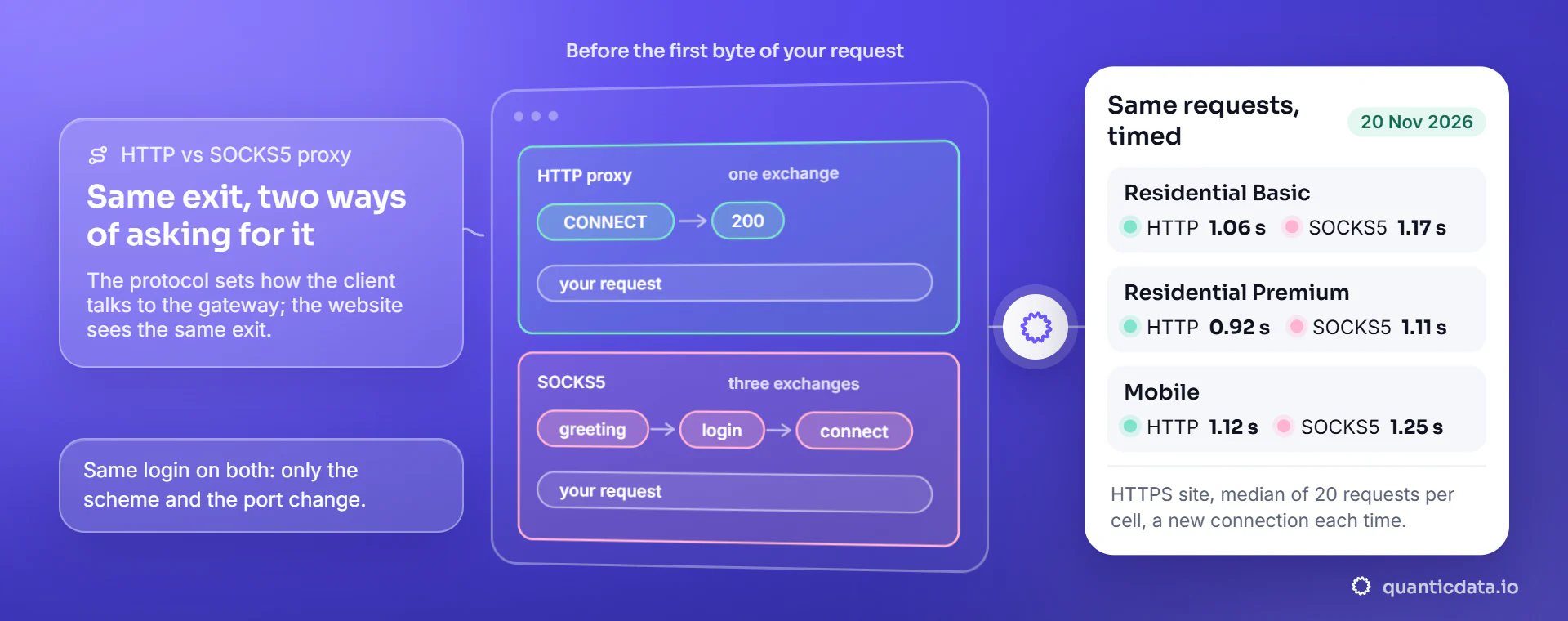
The difference in one table
Same exit, two ways of asking for it.
| HTTP proxy | SOCKS5 proxy | |
|---|---|---|
| What your client sends first | The request itself (plain HTTP) or CONNECT host:443 (HTTPS) | A greeting, the login, then "connect to host:port" |
| What the proxy can read | Plain HTTP: the whole request, URL and headers. HTTPS: only the host and port | Only the host and port; with socks5:// only the IP address |
| Traffic it carries | Web traffic; any TCP port through CONNECT where the gateway allows it | Any TCP connection; the standard (RFC 1928) also defines UDP |
| Who looks up the site's name | Always the proxy | The proxy with socks5h://, your machine with socks5:// |
| A wrong password gives | HTTP status 407, which every HTTP client can read | curl exit 97, "User was rejected by the SOCKS5 server" |
| Where it is the natural choice | curl, Python requests and most HTTP clients | Apps with only a SOCKS setting, and non-web tools |
Both end in the same place: the website sees the exit IP of the proxy, not yours. On HTTPS sites both carry the same encrypted bytes, so the page is end to end between your client and the site either way. The protocol decides how your client talks to the gateway, how fast a new connection opens and which tools can use it. On QuanticData, Residential Basic, Residential Premium and Mobile each answer both, with the same username and password on two different ports that the dashboard generator writes for you.
What goes over the wire
Three real curl traces, login redacted.
We ran each request with curl -v through Residential Basic and Mobile and kept the lines that show the conversation with the gateway. First an HTTPS site through the HTTP proxy: the client asks for a tunnel, the gateway answers 200, and everything after that is TLS the proxy cannot read.
> CONNECT api.ipify.org:443 HTTP/1.1
> Host: api.ipify.org:443
> Proxy-Authorization: Basic <base64 of USER:PASS>
< HTTP/1.1 200 Connection Established
* CONNECT tunnel established, response 200A plain HTTP site through the same HTTP proxy is different: the client hands the gateway the full URL in the request line, and the gateway fetches it. This is the only case where a proxy could read or add headers, which is why anonymity levels are tested on plain HTTP (our test is on proxy anonymity levels).
> GET http://ip-api.com/json/?fields=query,countryCode,isp HTTP/1.1
> Host: ip-api.com
> Proxy-Authorization: Basic <base64 of USER:PASS>
< HTTP/1.1 200 OKThrough SOCKS5 curl never sends an HTTP line to the gateway. It negotiates the login in binary, names the host and port, and then speaks to the site through the open connection exactly as it would without a proxy.
* Opened SOCKS connection from <your IP> to api.ipify.org port 443 (via <gateway>)
> GET /?format=json HTTP/1.1
> Host: api.ipify.org
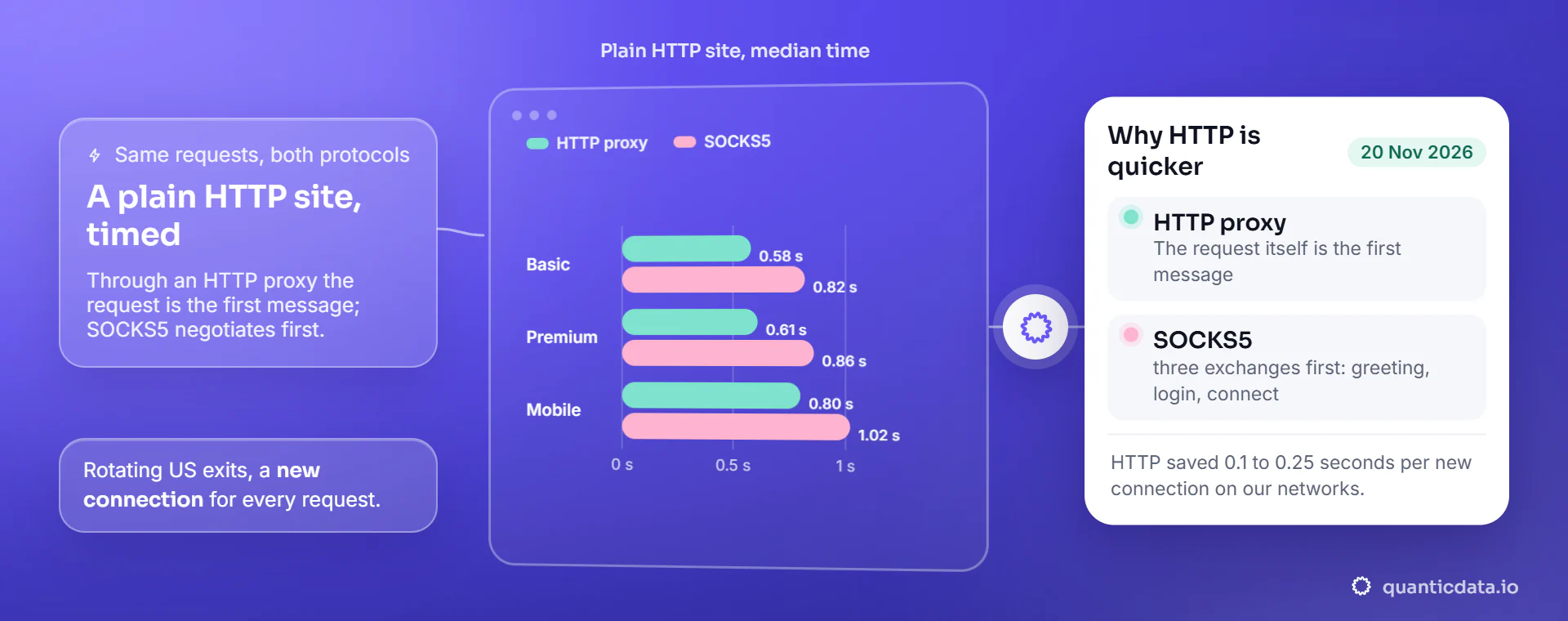
< HTTP/1.1 200 OKSame requests, both protocols
HTTP opened faster on all three networks.
| Network | HTTPS site, HTTP proxy | HTTPS site, SOCKS5 | Plain HTTP site, HTTP proxy | Plain HTTP site, SOCKS5 |
|---|---|---|---|---|
| Residential Basic | 1.06 s | 1.17 s | 0.58 s | 0.82 s |
| Residential Premium | 0.92 s | 1.11 s | 0.61 s | 0.86 s |
| Mobile | 1.12 s | 1.25 s | 0.80 s | 1.02 s |
The 240 requests went to two small endpoints, api.ipify.org over HTTPS and ip-api.com over plain HTTP, so the time is almost all connection setup and the trip to the US exit and back.
The gap is the handshake. SOCKS5 with a login costs three exchanges with the gateway (greeting, login, connect) before the first byte of your request; an HTTP proxy needs one, the CONNECT, and on plain HTTP not even that, because the request itself is the first message. That cost is paid once per connection. If your client keeps connections open, the difference is spread over every request on that connection; if every request opens a new one, as a rotating scraper usually does, HTTP saves 0.1 to 0.25 seconds each time on our networks.
Premium was the fastest of the three over HTTP on HTTPS sites, 0.92 seconds, and Basic the fastest on plain HTTP, 0.58 seconds. What Mobile adds is the carrier address itself, shown country by country on 5G mobile proxies.
socks5 or socks5h
One letter decides who looks up the site.
With socks5:// curl resolves the hostname on your own machine and sends the gateway an IP address. With socks5h:// it sends the hostname and the gateway resolves it near the exit. The traces show it: the first one has a local lookup line, the second has none.
# socks5://  (name resolved on your machine)
* Host api.ipify.org:443 was resolved.
* IPv4: 104.26.13.205, 104.26.12.205, 172.67.74.152
* Opened SOCKS connection ... to api.ipify.org port 443

# socks5h:// (name sent to the proxy)
* Opened SOCKS connection ... to api.ipify.org port 443Use socks5h:// for scraping. A local lookup tells your own DNS resolver every site you visit, and large sites answer with the server nearest to the resolver, so you may be sent to a European server while the exit is in the United States. An HTTP proxy always resolves on the proxy side, so this question does not exist there.
# HTTP proxy
curl -x "http://HOST:PORT" -U "USER:PASS" https://api.ipify.org

# SOCKS5, name resolved by the proxy
curl -x "socks5h://HOST:SOCKS_PORT" -U "USER:PASS" https://api.ipify.orgBeyond the web
A WHOIS query, TCP port 43, through both.
The usual reason to pick SOCKS5 is traffic that is not HTTP. We tested it with WHOIS, a plain-text protocol on TCP port 43: a script opened a connection to whois.iana.org through the gateway, sent a domain name and read the answer. Through SOCKS5 it worked 3 of 3 times on each network. Through the HTTP port it also worked, 3 of 3 on each network, using a CONNECT tunnel to port 43.
// Node.js, package "socks": WHOIS through the SOCKS5 port
import { SocksClient } from 'socks';
const { socket } = await SocksClient.createConnection({
  proxy: { host: 'HOST', port: SOCKS_PORT, type: 5, userId: 'USER', password: 'PASS' },
  command: 'connect',
  destination: { host: 'whois.iana.org', port: 43 },
});
socket.write('quanticdata.io\r\n');
socket.on('data', (d) => process.stdout.write(d));So on our gateways the protocol for non-web traffic is a question of what your client supports, not of what the network allows: a tool with only a SOCKS setting uses SOCKS5, a script that can send CONNECT can use either.
Which one to use
Pick by the client, then by the network.
| Your job | Protocol | Why |
|---|---|---|
| Scraping with curl or Python requests | HTTP | Nothing to install, a faster first byte on every new connection, readable 407 and status codes |
| An app or tool that only offers a SOCKS setting | SOCKS5 | Same exits and the same login on the SOCKS5 port |
| Non-web TCP: WHOIS, mail checks, custom protocols | SOCKS5 | Built for any TCP connection; HTTP CONNECT worked here too |
| Network | What it gave in this test | From |
|---|---|---|
| Residential Basic | Fastest on plain HTTP (0.58 s); household exits in many countries | $0.80 per GB |
| Residential Premium | Fastest on HTTPS over HTTP (0.92 s) and over SOCKS5 (1.11 s) | $2.20 per GB |
| Mobile | Carrier IPs on both protocols, operator by name | $2.30 per GB |
On Residential Basic, Residential Premium and Mobile, HTTP and SOCKS5 cost the same: the protocol is a port, not a product. To test both on your own targets, 100 MB of Residential Basic is free for 5 days with SMS verification and no card: see the free proxy trial.
Questions people ask
HTTP and SOCKS5, answered
Is SOCKS5 faster than an HTTP proxy?
Not in our test. With the same requests on Residential Basic, Premium and Mobile, the HTTP proxy answered 0.1 to 0.25 seconds sooner per new connection, because SOCKS5 needs a greeting, a login and a connect step before the request. On a kept-open connection the difference fades.
What is the difference between socks5 and socks5h?
Both are SOCKS5. With socks5h the hostname goes to the proxy, which resolves it near the exit; with socks5 your machine resolves it and sends an IP. Use socks5h for scraping, so your resolver does not see the sites and the site answers for the exit country.
SOCKS5 vs HTTPS proxy: which is better?
They answer different questions. An HTTPS site works through both: over an HTTP proxy with a CONNECT tunnel, over SOCKS5 with a plain relay. In both cases the page stays encrypted between your client and the site. Choose by what your client supports.
Is SOCKS5 more secure than HTTP?
Neither protocol is the secure one by itself: HTTPS pages stay encrypted end to end through both, between your client and the website. For anything sensitive, use HTTPS sites, whichever protocol you choose.
Can I use HTTP and SOCKS5 with the same QuanticData login?
Yes. Residential Basic, Residential Premium and Mobile accept the same username and password on an HTTP port and a SOCKS5 port; the dashboard generator writes both lines. We tested both on all three networks on 20 November 2026.
Which proxy protocol is best for web scraping?
HTTP for most scrapers: every client supports it, a new connection opens faster, and errors come back as status codes such as 407. Use SOCKS5 when the tool only has a SOCKS setting or the traffic is not web traffic.
Both protocols, one login, Residential and Mobile.
Test both ports on your own targets with 100 MB of Residential Basic, free for 5 days without a card. After that, residential from $0.80 per GB and mobile from $2.30 per GB, paid once.