
To add a proxy in Undetectable, open the profile's Main tab, choose New Proxy, pick http or socks5 to match the port, paste the line as host:port:login:password, click the arrows to check it and save. Give every profile its own sticky session. Below: each step, Residential Premium, ISP and mobile lines, bulk import and a fix for each failed check.
Undetectable keeps every browser profile apart: its own cookies, its own fingerprint configuration and, once you add one, its own proxy. The proxy decides which IP address and which country the sites see. The field names below are the ones in Undetectable's own documentation and in the current app, and the values come from the QuanticData endpoint generator. The screens are redrawn with our values; the result shown under the proxy field is a real check of an Irish line made on 23 October 2026.
What you need before you start
- Undetectable installed, with an account. It runs on Windows and macOS. Adding a proxy to a profile works on every plan; bulk proxy import and export in the Proxy Manager are on the paid plans.
- A proxy plan. Residential Premium, ISP or mobile: all of them work in Undetectable. The table further down says which one fits which profile.
- The four values: host, port, username and password. In the QuanticData dashboard they are under My proxies, on the plan's page, in the Endpoint generator (for ISP plans, under Assigned IPs).
The proxy formats Undetectable accepts
Undetectable reads a proxy as one line, and its documentation lists seven layouts. The type is not part of the line: you choose it in the list next to the field.
- host:port:login:password: what the QuanticData generator gives with the output format host:port:user:pass. Use this one.
- login:password@host:port, login:password:host:port, host:port@login:password, host:port|login:password and login:password|host:port: the same four values in other orders.
- host:port: only with IP whitelist authentication, where the plan recognises your IP and no login is sent.
The same QuanticData proxy in the two most common layouts:
# host:port:login:password
residentialpremium.quantumproxies.io:8080:USER-country-ie-sid-p01-ttl-60m:PASS

# login:password@host:port
USER-country-ie-sid-p01-ttl-60m:PASS@residentialpremium.quantumproxies.io:8080
The login is the whole username string, with everything after the first dash: -country-ie picks the exit country, -sid-p01 names the session and -ttl-60m keeps it for 60 minutes. Copy it whole. A login cut at the first dash still authenticates, but the profile then leaves from a random country on a new IP at every request.
Step by step: a Residential Premium proxy in an Undetectable profile
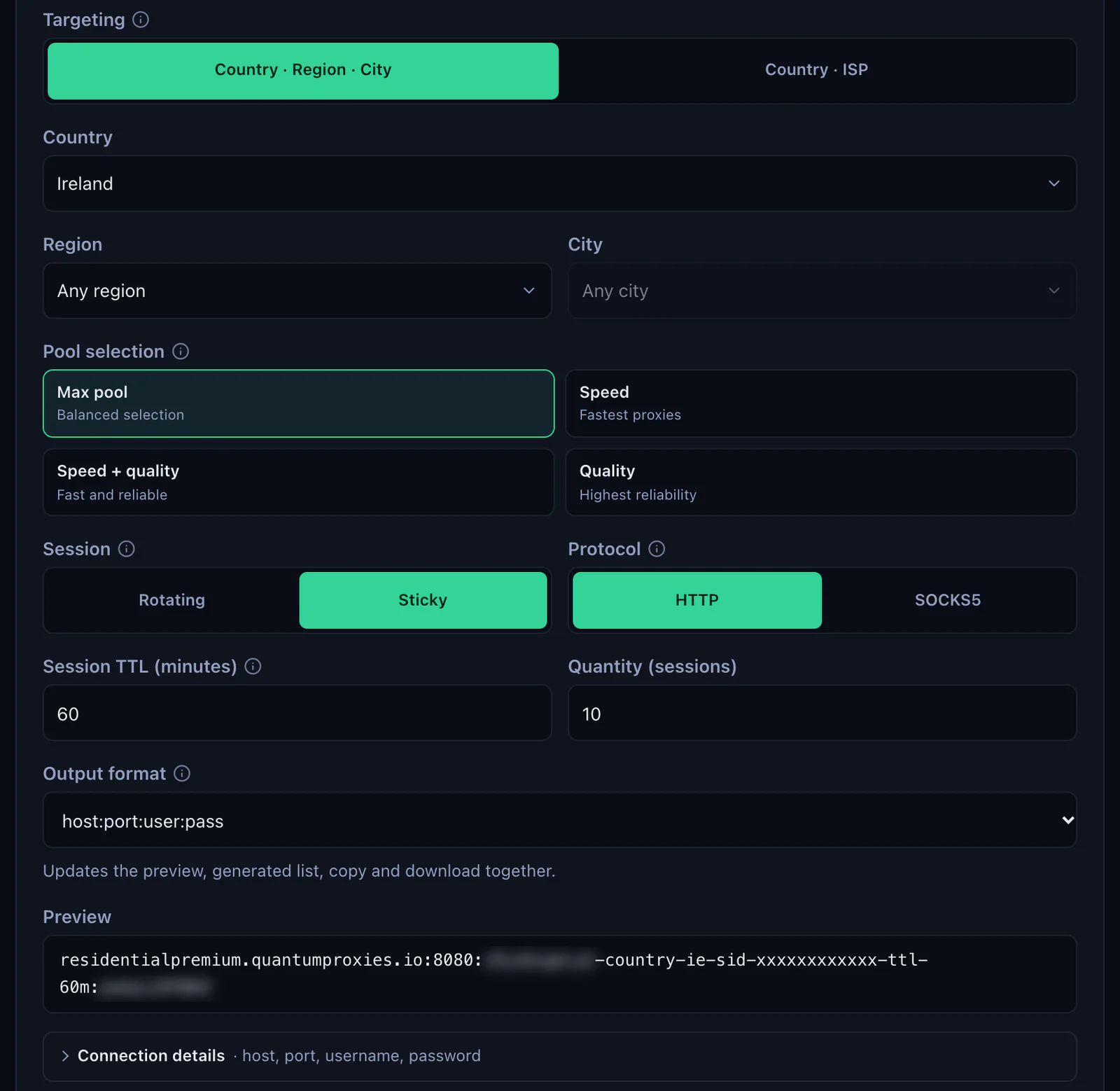
- Generate the line. In the QuanticData dashboard open My proxies, then your plan. In the Endpoint generator choose the Country (and a Region or City if the profile needs one), set Session to Sticky, set Session TTL (minutes) to at least the time the profile stays open, choose the Protocol and keep the Output format on host:port:user:pass. The Preview shows the line.
- Open the profile in Undetectable. Click New Profile, or open an existing profile's settings, and go to the second tab. The app labels it Main; Undetectable's documentation calls it General.
- Choose New Proxy in the Proxy list. The list also holds No Proxy and the proxies saved in the Proxy Manager.
- Pick the type that matches the port. The list next to the field has http and socks5: http for port 8080, socks5 for port 1080.
- Paste the line into the field next to it. One line, no spaces, nothing after the password.
- Check it. Click the arrows button at the right of the field. When the proxy works, a country icon and the exit IP appear under the field and the site checks turn green; in Undetectable's checker these are Google, Facebook and Yandex. The country has to match the
-country-in the login. Undetectable's documentation notes that the city can differ from the one a provider states, because location databases differ. - Leave IP Change Link empty. With QuanticData a new IP comes from a new session ID in the login, explained further down.
- Name the proxy and click Save, then Create, or Open to save the profile and start it at once. The profile's time zone and language should follow the proxy's country.
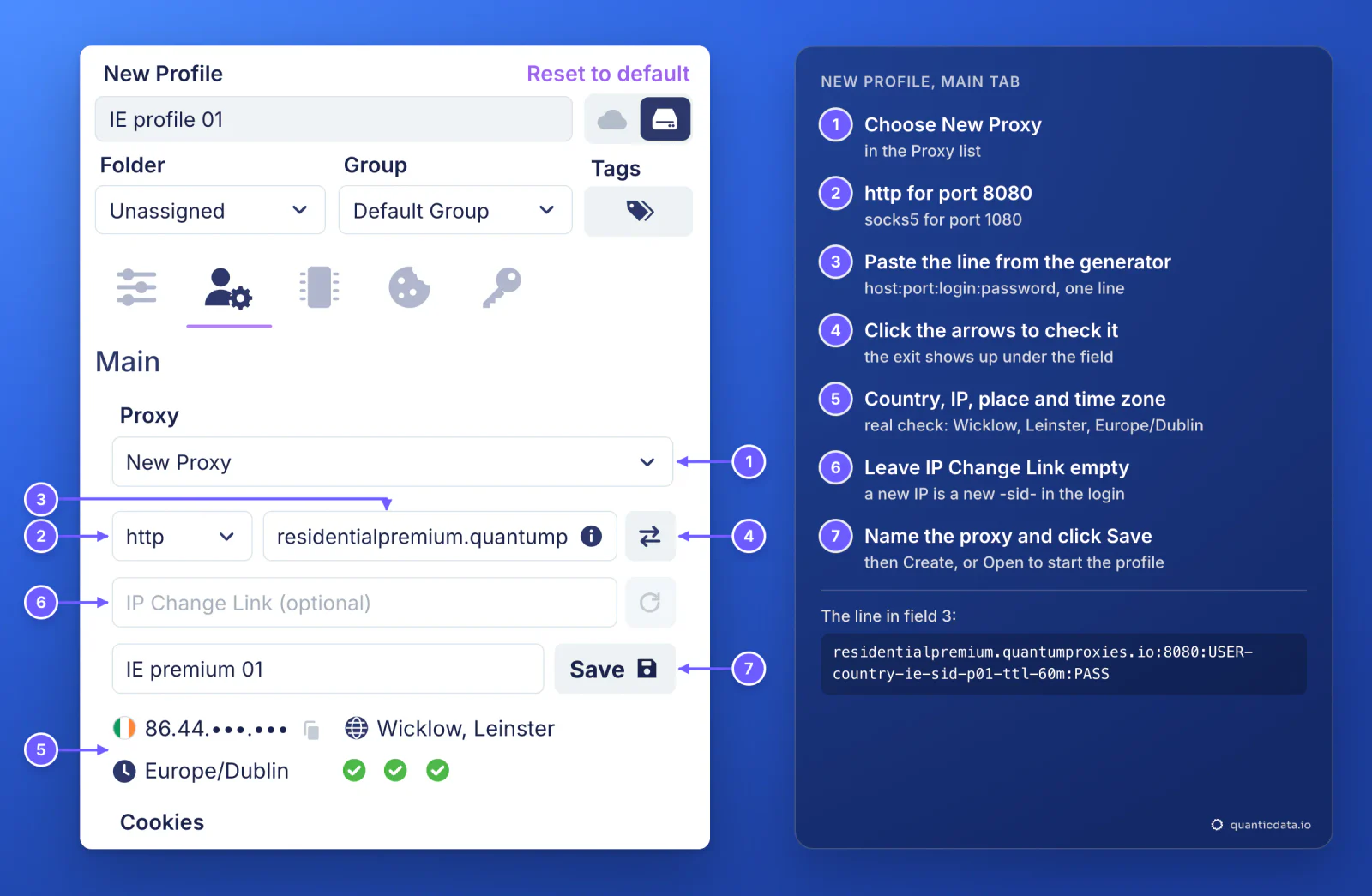
The same check runs in two other places: on the profile card in the main window, and in the Proxy Manager for one or many saved proxies at once.
One sticky session per profile
An antidetect profile is meant to look like one person on one connection. A rotating proxy changes IP on every request, which is fine for scraping and wrong for a profile that logs in. A sticky session keeps one IP for as long as the session lives, and the session lives in the username, so the line never has to change once it is saved in the profile.
# profile 1: Ireland, one session for a working day
residentialpremium.quantumproxies.io:8080:USER-country-ie-sid-p01-ttl-480m:PASS

# profile 2: same plan, its own session (never reuse p01)
residentialpremium.quantumproxies.io:8080:USER-country-ie-sid-p02-ttl-480m:PASS

# profile 3: Germany, open all day, over SOCKS5
residentialpremium.quantumproxies.io:1080:USER-country-de-sid-p03-ttl-1440m:PASS- A different session ID in every profile. Two profiles on the same line share one IP, which is exactly what an antidetect browser is there to avoid.
- A lifetime longer than the work. The generator accepts up to 1440 minutes, a full day. When the session ends, the next request gets a new IP, and a site can see that as a new login location.
- The country in the login. Without
-country-the exit can be anywhere, and the profile's time zone will not match.
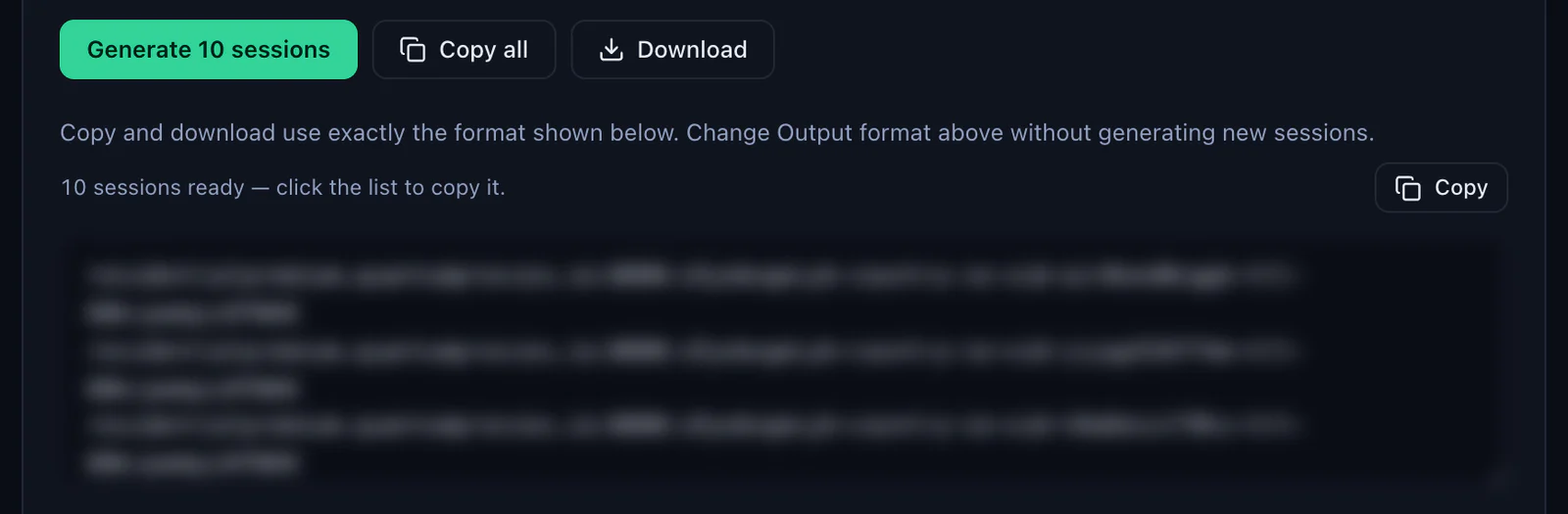
With Session set to Sticky, the generator makes as many lines as the Quantity field says, ten by default, each with its own session ID, and Copy all or Download takes them out in the same format. One line per profile.
ISP proxies in Undetectable
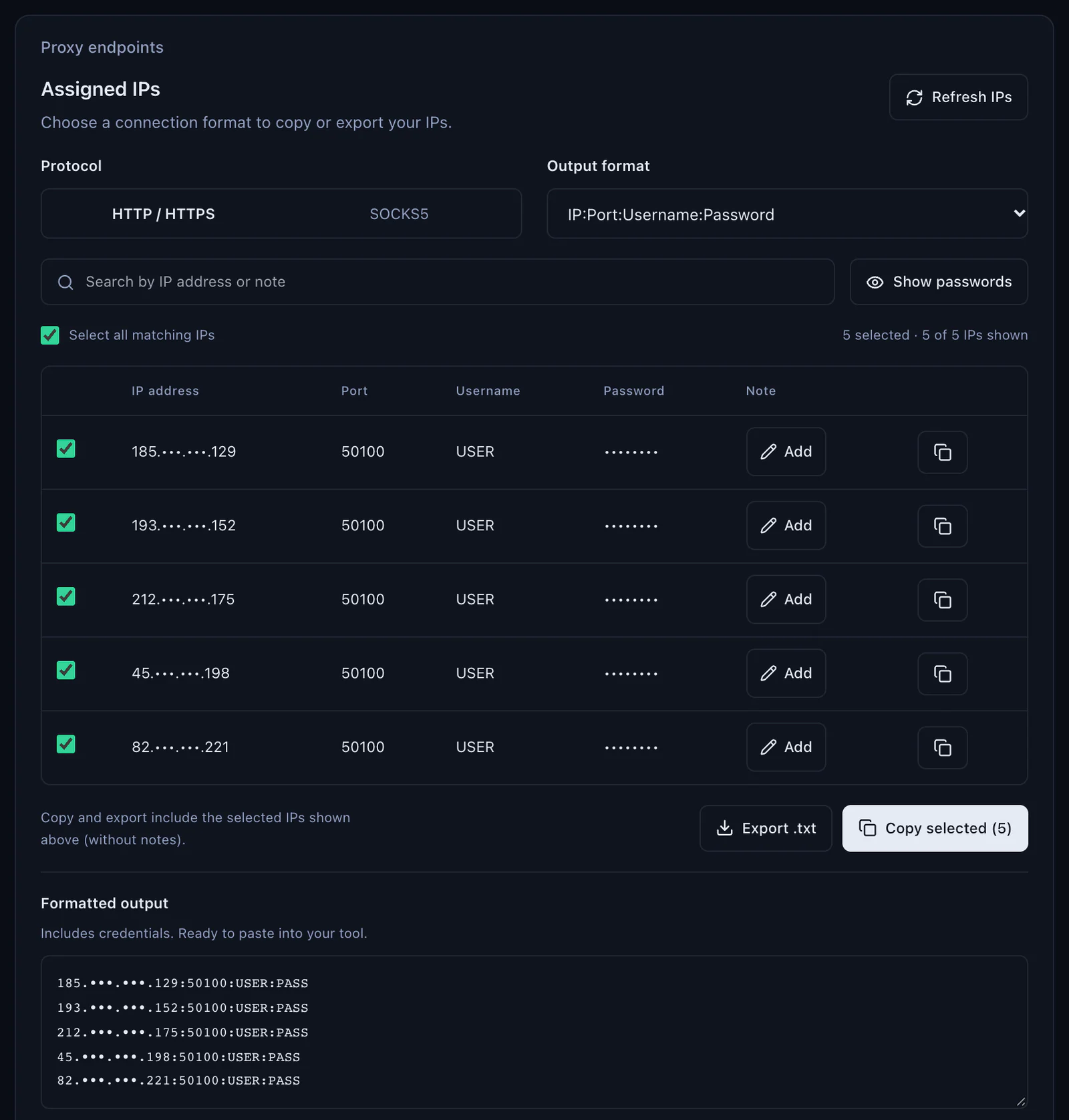
An ISP plan gives fixed IPs that stay the same for months, which suits accounts that should always log in from one address. In the QuanticData dashboard they are on the plan's page under Proxy endpoints, Assigned IPs: choose the Protocol (HTTP / HTTPS or SOCKS5), keep the Output format on IP:Port:Username:Password, then Copy selected or Export .txt.
- Open the Proxy Manager from the Proxy item in Undetectable's left menu and click New Proxy.
- Fill the window: Proxy Name, the type (http:// for HTTP / HTTPS, socks5:// for SOCKS5), then the IP and port, the username and the password from one row of Assigned IPs.
- Leave IP Change Link empty: an ISP IP is static and has no rotation.
- Click Check, then Save Proxy. In the profile's Main tab the saved proxy is now in the Proxy list, by name.
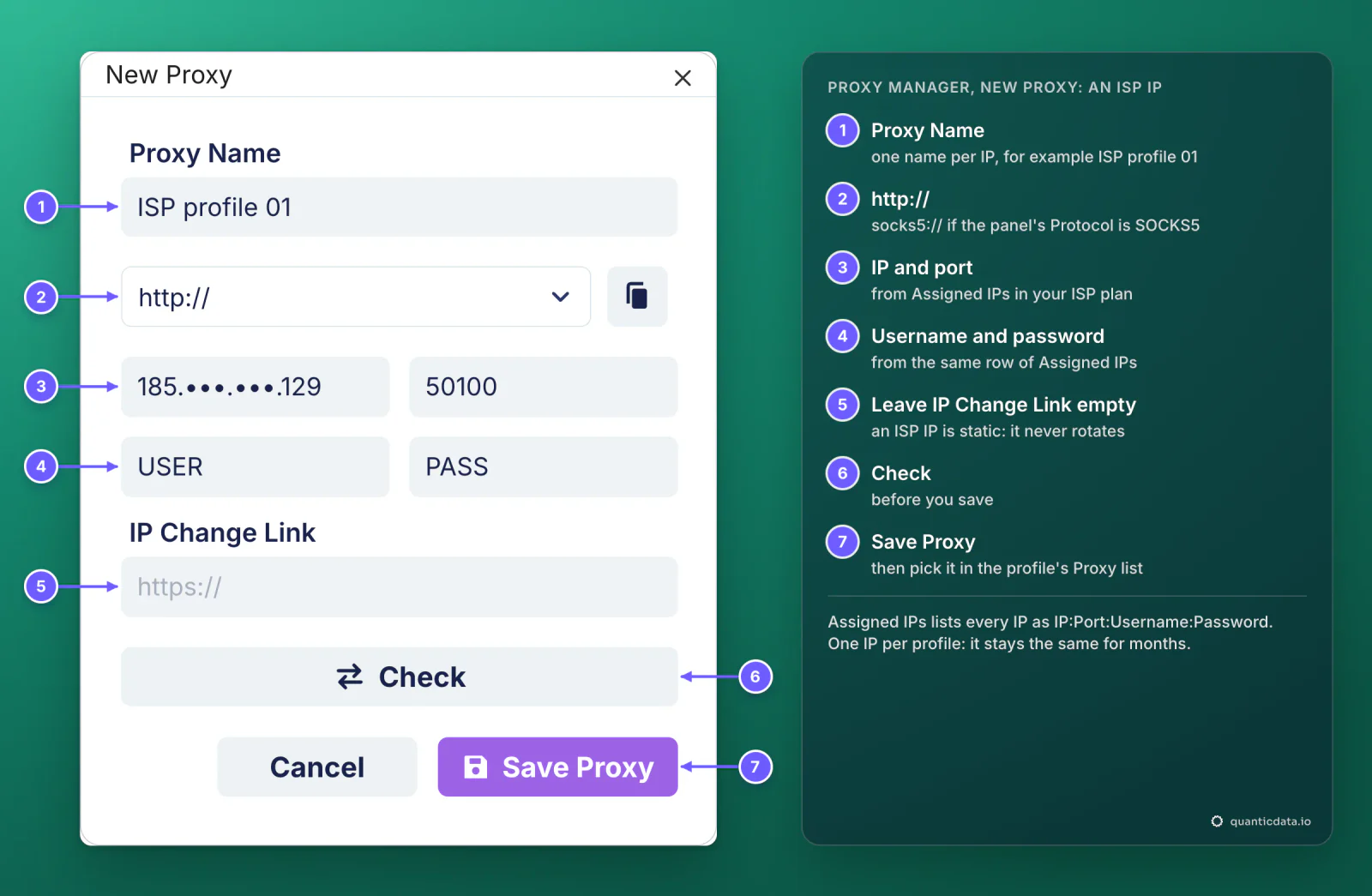
One IP per profile. Two profiles on one ISP IP are linked by it for as long as they share it.
Mobile proxies in Undetectable
A mobile line goes into Undetectable exactly like a Residential Premium one, with -type-mobile in the login. In the mobile plan's generator choose the gateway (Global, USA, EU or Asia), the country, Sticky and the protocol: HTTP on 8080 or SOCKS5 on 1080.
mobile.quantumproxies.io:8080:USER-country-ie-type-mobile-sid-m01-ttl-60m:PASS- IP Change Link stays empty. Undetectable fills it for providers that change the IP through a URL, and then shows a change-IP button. On a QuanticData mobile session a new IP is a new session ID:
-sid-m02instead of-sid-m01. - IP whitelist is available on mobile plans. Add your IP in the IP whitelist section of the plan, get the host:port list and paste a line with no login: Undetectable accepts the host:port layout.
For several mobile profiles, import the lines in one go: in the Proxy Manager click Import, choose the type, set the Format to {host}:{port}:{user}:{pass}, a Name Template such as IE mobile {id} with a Start ID, paste one line per profile and click Add Proxy.
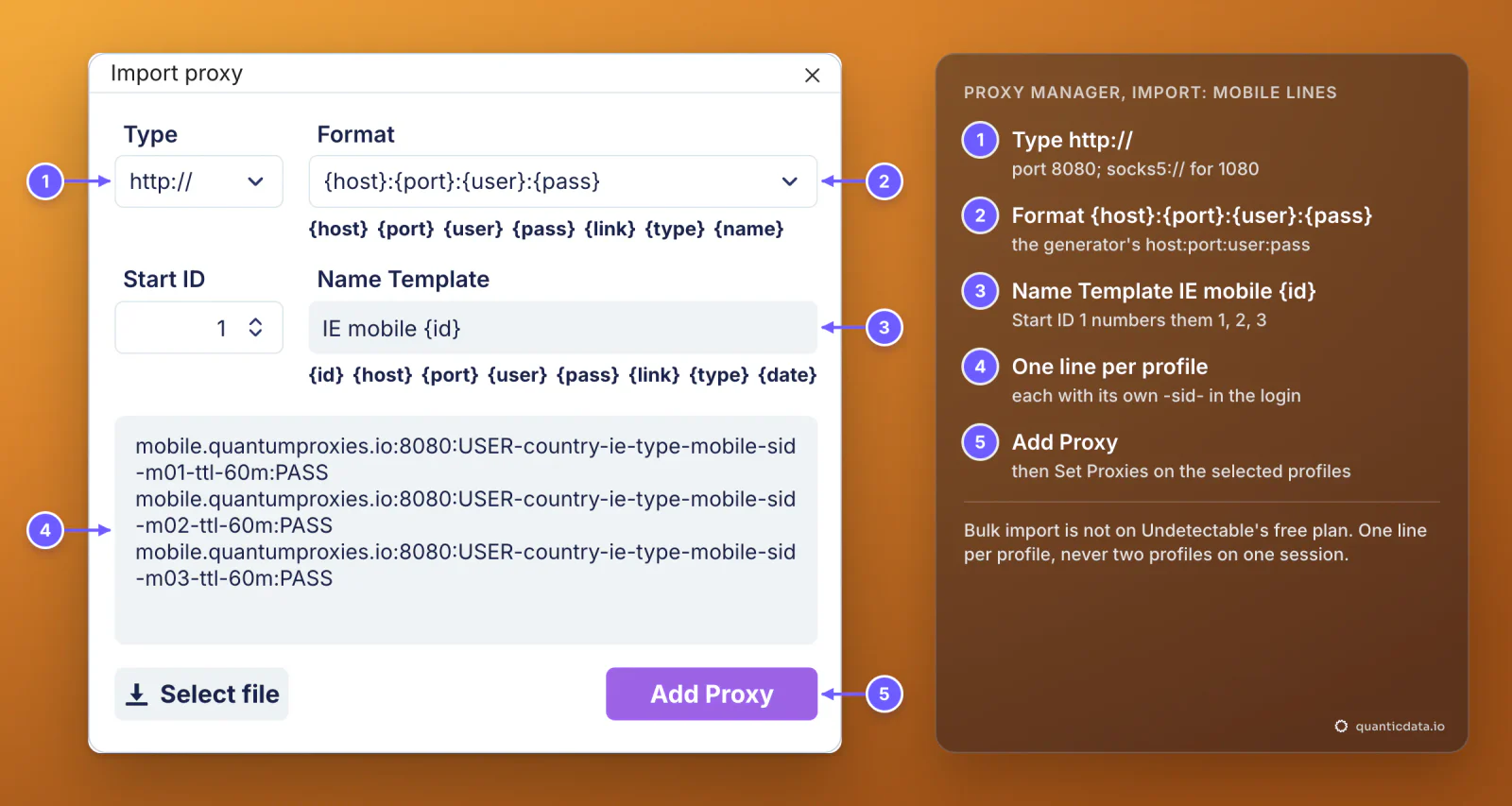
More on mobile IPs in profiles: mobile proxies for antidetect browsers.
Which proxy type for which profile
| Proxy type | In Undetectable | Good for |
|---|---|---|
| Residential Premium | New Proxy in the profile, one sticky line per profile; country, region, city or ISP in the login; username and password only | Most profiles: home IPs in the country you choose |
| ISP | New Proxy in the Proxy Manager with the IP, port, username and password of one row of Assigned IPs; one IP per profile | Long-lived accounts that should keep the same address for months |
| Mobile | One sticky line per profile with -type-mobile in the login; Global, USA, EU or Asia gateway; HTTP 8080 or SOCKS5 1080; IP whitelist available | Phone-first platforms and accounts tied to mobile networks |
For a wider view of why each profile needs its own address, see residential proxies for antidetect browsers. The plans themselves are on the pages for QuanticData residential proxies, ISP proxies and QuanticData mobile proxies.
Adding proxies to many profiles at once
- Make the lines. In the generator, set Session to Sticky and the quantity you need, generate, then Copy all or Download.
- Import them. In the Proxy Manager, Import takes a list in the format you set, names each proxy from the Name Template and numbers it from the Start ID. Import is not on the free plan.
- Assign them. In the Profile Manager select the profiles, right-click and use Set Proxies to pick a saved proxy. The same menu changes them later.
Mass profile creation can also take a proxy pool in its additional settings, so new profiles are created with their proxies already in place.
Undetectable proxy not working: errors and fixes
A failed check shows no country and no exit IP under the field, and the site checks do not turn green. The check runs in three places: the profile card, the profile settings and the Proxy Manager, where Check Proxies tests many saved proxies at once. These are the usual causes, in the order to check them.
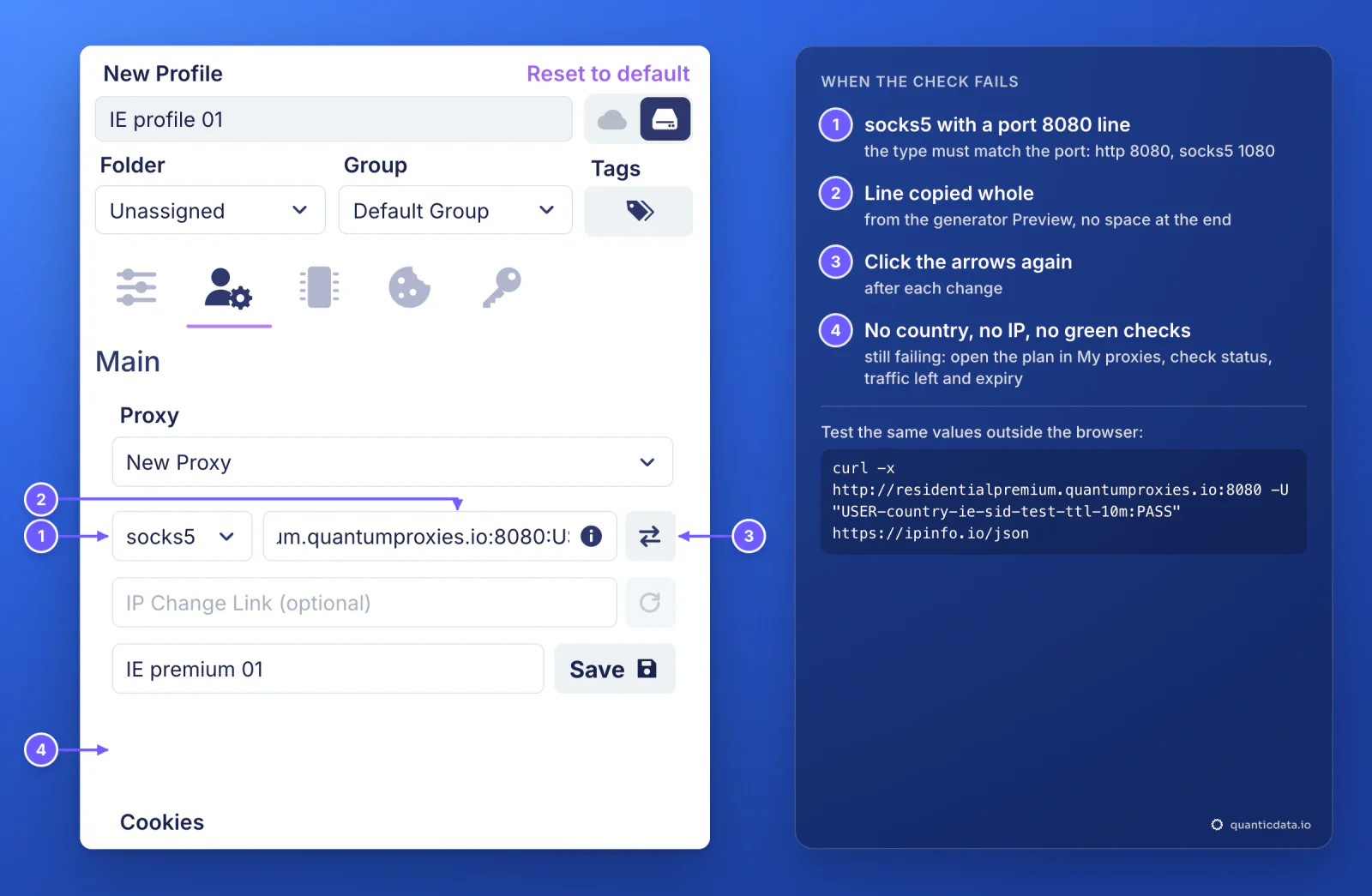
| What you see | Usual cause | Fix |
|---|---|---|
| The check shows no country and no IP | The type does not match the port: http on 1080 or socks5 on 8080 | http with 8080, socks5 with 1080 |
| The same, with the right type | The login was cut, a colon is missing, or a space came with the paste | Copy the line again from the generator's Preview and paste it whole |
| The check worked yesterday, fails today | The plan expired or its traffic is used up | Check the plan in My proxies: status, remaining traffic, expiry date |
| Wrong country or time zone | No -country- in the login, or Worldwide chosen in the generator | Generate the line with a country; let the profile take its time zone from the proxy |
| A different city than expected | Location databases differ, as Undetectable's documentation notes | Trust the country; for a city, set it in the generator and compare with a second checker |
| The IP changes in the middle of a session | The session lifetime ended, or two profiles share one session ID | A longer -ttl- and a different -sid- in every profile |
One test outside the browser settles most cases in a minute. If this returns an address in the right country, the proxy works and the problem is in the profile's fields:
curl -x http://residentialpremium.quantumproxies.io:8080 \
  -U "USER-country-ie-sid-test-ttl-10m:PASS" https://ipinfo.io/json
Our own run of this test through an Irish sticky line on 23 October 2026 answered from Wicklow, Leinster, time zone Europe/Dublin. If the same command fails on your network but works from another one, a firewall or your provider is blocking the connection to the proxy port.
HTTP or SOCKS5 in Undetectable
Both work for browsing, and every QuanticData network offers both. HTTP on port 8080 is the simpler choice and the one to start with. SOCKS5 on port 1080 passes any kind of connection, not only web pages, and Undetectable's documentation recommends private residential proxies with SOCKS5 support; the details are on the page for SOCKS5 proxies. What breaks a profile is never the choice itself, only a type that does not match its port.
Before you run accounts
A proxy changes where a profile's traffic comes from, not what the profile is allowed to do. Keep to each platform's terms and to the law where you work, and use one profile, one session and one identity per account.
Sources & further reading
- Undetectable documentation: connecting proxies
- Undetectable documentation: proxy checker
- Undetectable documentation: Proxy Manager
- Undetectable documentation: mobile proxies and IP change via link
- Undetectable documentation: Profile Manager
- Undetectable documentation: pricing plans overview
- RFC 1928: SOCKS Protocol Version 5