Residential Proxies for Antidetect Browsers
Residential proxies for antidetect browsers are home-ISP IP addresses that let you give each antidetect browser profile its own home address and sticky session. A sticky session holds one IP per profile for up to 24 hours. Plans start at $1.00/GB and fall to $0.80/GB, with a free 100 MB trial.
Home-ISP IPs in 228 countries · Rotating or sticky · HTTP and SOCKS5

What are antidetect browsers, and why does each profile need a proxy?
Antidetect browsers — GoLogin, Multilogin, AdsPower, Dolphin Anty, Incogniton and others — give each browser profile its own fingerprint, its own cookies and its own proxy, so that a team can manage many accounts from one machine without the accounts looking like one machine. Agencies use them for client social and ad accounts, e-commerce operators for multiple marketplace stores, affiliate marketers for ad accounts, and QA teams for testing as users in many regions. The proxy is the half of the setup the browser cannot provide: a profile with a perfect fingerprint and a datacenter IP is still a datacenter visitor. The question customers ask most is which proxy a profile should get, and the answer is a residential or mobile exit in the account's country, on a sticky session that lasts as long as the profile is open.
What people use residential proxies for in antidetect browsers
Four workflows we see in antidetect browsers. None of them needs a proxy to break the platforms' rules; all of them need a network location and a reputation the platform treats as ordinary.
One proxy per profile
Assign each profile its own sticky session in the account's country so the fingerprint and the network tell the same story.
Agency account management
Client social, ad and marketplace accounts, each in its own profile with its own consistent exit.
Multi-store e-commerce
Separate marketplace stores kept separate at the network level, within each platform's rules.
Regional QA
A profile per country to test your own sites and campaigns as local users see them.
Why residential proxies for antidetect browsers
For large numbers of profiles, residential sticky sessions are the economical choice: home ISP addresses with country, state and city targeting from $1.00/GB down to $0.80. Basic and Premium sticky sessions both last up to 24 hours, so a profile can stay open all day on one IP.
What a proxy does not do. A proxy supplies the network half of a profile's identity; it does not change the platforms' rules on multiple accounts, and an antidetect setup used to break them is still against those rules. QuanticData proxies are for keeping legitimately separate accounts separate and consistent. Carrier IPs for the same job are on the mobile proxies for antidetect browsers page.
Sources: AdsPower Help Center: proxy types and Multilogin knowledge base.
Best residential proxies for antidetect browsers
Each browser profile gets its own sticky exit with a long lifetime, entered once in the profile's proxy settings; the browser keeps the fingerprint, the proxy keeps the IP. The exit matches the country the profile is meant to represent. With QuanticData the exits asked for most are the United States, the United Kingdom and Germany, with state and city targeting in the username at no extra cost.
Bandwidth follows what the profile does: social feeds and marketplaces are heavy, dashboards and forms are light. On the residential network that means Residential Basic or Premium, rotating or sticky for up to 24 hours, from $1.00/GB with a free 100 MB trial. For antidetect browsers the residential network is the usual choice: each profile needs a stable exit in its country, and Residential Premium gives 24-hour sessions with city targeting, and a home-ISP exit in the right country is what that needs.
Which session to use for antidetect browsers: sticky or rotating
Sticky (one IP per account). One session ID per profile, never reused across profiles, TTL as long as the profile stays open, country fixed to the account's own. Country, session and targeting go in the username; credentials are in your dashboard after purchase.
# PROXY_HOST = host:port shown in your dashboard
# rotating: a new home IP on every request
curl -x "$PROXY_HOST" -U "USER-country-us:PASS" https://ipinfo.io/json

# sticky: keep one IP for a session (session ID and lifetime are set in the generator;
# up to 24 hours on Basic and Premium)
curl -x "$PROXY_HOST" -U "USER-country-us-sid-antide-ttl-30m:PASS" https://ipinfo.io/json

# state and city targeting
curl -x "$PROXY_HOST" -U "USER-country-us-region-REGION-city-CITY:PASS" https://ipinfo.io/json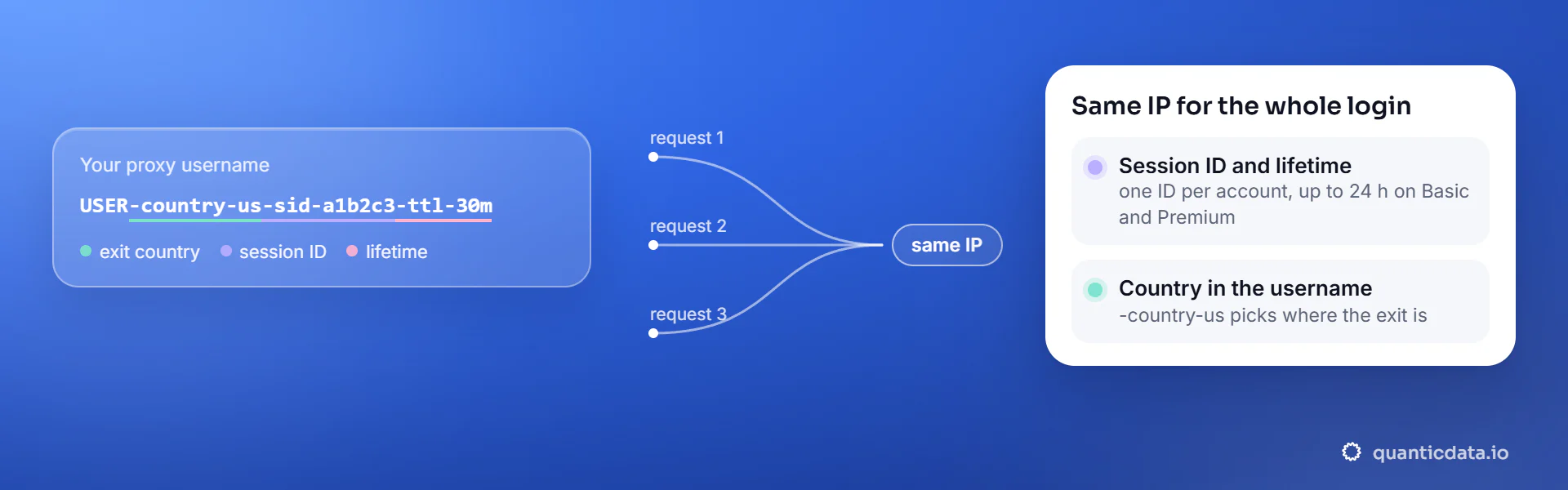
Best countries for antidetect browsers residential proxies
The exits most often asked for with antidetect browsers, and why. Every country page lists the networks available and the username codes.
Residential Proxies pricing for antidetect browsers
Residential Basic, per GB, bandwidth valid for the whole plan term. Intermediate bundles and the Premium line (from $2.20/GB, city and ISP catalog) are on the plans page. Free trial: 100 MB on Basic for 5 days, no card.
The same pool at every tier — a small test costs exactly $1.00/GB. Full ladder and terms on the pricing page.
How to start with antidetect browsers in minutes
- Create a free QuanticData account and open Plans → Residential; pick a bundle — $1.00/GB is enough to test antidetect browsers on your real workflow.
- Copy host, port, username and password from the dashboard. Put the country in the username (
-country-us), and state or city if the job is local (-region-…-city-…), and a session ID with a lifetime when the antidetect browsers flow must keep one IP. - In the profile's proxy settings choose HTTP or SOCKS5, enter host, port and a username that carries the country, the session ID and the TTL, and use the browser's checker to confirm the exit's country and time zone; set the profile's time zone and language to match.
- Run a small sample first and watch how antidetect browsers responds; a residential IP is not a promise of access, acceptance or a particular success rate, and the platforms' terms and the law apply to what you do through it.
Set it up for Antidetect Browsers
QuanticData residential proxies are standard HTTP and SOCKS5 endpoints: a host, a port, a username and a password, shown in your dashboard the moment a plan is active. The username carries the country, the state and the city, and the session; host, port and password never change. The proxy goes into the profile, not into the browser: each profile carries its own fingerprint and its own exit. The steps are the same in GoLogin, Multilogin, AdsPower, Dolphin Anty and Incogniton; only the names of the tabs differ.
host      PROXY_HOST                     # from your dashboard
port      PORT                           # the HTTP port, or the SOCKS5 port for a SOCKS5 node
username  USER-country-us-sid-antide-ttl-120m
password PASS- Get the four values. In your QuanticData dashboard pick the plan and use the endpoint generator: host, HTTP and SOCKS5 port, username with the country and — for a profile — a session ID and a lifetime, and the password.
- Create the profile and open its proxy tab. New profile → Proxy (or Connection). Type: HTTP or SOCKS5. Host and port from the dashboard, login = the username string, password = the password. Every antidetect browser has a "Check proxy" button next to the fields: press it, it should print the exit's IP, country and time zone.
- One sticky session per profile. The username of a profile is USER-country-<cc>-sid-<unique id>-ttl-<minutes>: a different session ID for every profile, never shared, and a lifetime that covers the time the profile stays open (up to 1440 minutes on mobile and Residential Premium, 120 on Residential Basic). Two profiles with the same session ID get the same IP, which is exactly what the browser was bought to avoid.
- Match the profile to the exit. Set the profile's time zone, language and geolocation from the proxy — every antidetect browser has a "based on IP" option for the three — so that the fingerprint and the network tell the same story. Set WebRTC to the IP-based or altered mode so the browser does not announce a second address.
- Test inside the profile. Open the profile and load https://ipinfo.io/json: the country must be the one in the username, the org a carrier (mobile) or a home ISP (residential). Then open the platform and log in once; the session keeps that IP for the whole lifetime.
- Typical errors. "Proxy check failed": the port belongs to the other protocol, or the type is wrong (an HTTP port on a SOCKS5 profile). Authentication error: a typo in the username string or a password regenerated after the profile was created. The platform asks to log in again mid-session: the lifetime expired and the profile got a new IP — raise the ttl, or on Residential Basic move account work to Premium or mobile. Two profiles show the same IP: they share a session ID.
FAQ
Residential Proxies for antidetect browsers: does it work, which session, how to set it up, proxy clients, free options, what to check when it stops working.
Something else? Ask usDo residential proxies work with antidetect browsers?
QuanticData residential proxies work with antidetect browsers the way any proxy does: they change the network your traffic leaves from, to real home-ISP IPs in 228 countries. A proxy supplies the network half of a profile's identity; it does not change the platforms' rules on multiple accounts, and an antidetect setup used to break them is still against those rules. QuanticData proxies are for keeping legitimately separate accounts separate and consistent.
Which proxy session should I use for antidetect browsers: sticky or rotating?
QuanticData recommends a sticky session for antidetect browsers. One session ID per profile, never reused across profiles, TTL as long as the profile stays open, country fixed to the account's own. Sessions are set in the username (a session ID and a lifetime, up to 24 hours on Basic and Premium), so no proxy list is needed.
Which proxy should I put in a GoLogin, Multilogin or AdsPower profile?
QuanticData's recommendation is the same for every antidetect browser: a residential or mobile exit in the account's country, one sticky session per profile with its own session ID, and a TTL that covers the time the profile stays open. Use mobile for the accounts you cannot afford to lose and residential for volume; never share one session between two profiles.
How do I set up a residential proxy for antidetect browsers?
QuanticData gives you host, port, username and password the moment a plan is active: create a free account, open Plans → Residential, pick a bundle ($1.00/GB to start) and copy the credentials from the dashboard. In the profile's proxy settings choose HTTP or SOCKS5, enter host, port and a username that carries the country, the session ID and the TTL, and use the browser's checker to confirm the exit's country and time zone; set the profile's time zone and language to match. For antidetect browsers, the countries asked for most are the United States, the United Kingdom and Germany.
Can I use Proxifier with QuanticData for antidetect browsers?
QuanticData residential proxies are standard HTTP and SOCKS5 endpoints with a host, a port, a username and a password, so any client that accepts a proxy node works, Proxifier included: enter those four values as a proxy server of type HTTPS or SOCKS5 in Proxifier on the desktop, with a rule for the application, and antidetect browsers traffic from the applications matched by the rule leaves through the exit set in the username. For antidetect browsers give each account its own sticky session — a session ID and a lifetime in the username — so the traffic keeps one IP for the whole login. Host and port are in your dashboard; the HTTP and the SOCKS5 port are different, so pick the one that matches the node type.
Is there a free residential proxy for antidetect browsers?
QuanticData does not give away residential proxies for antidetect browsers: what is free is the trial — 100 MB on Residential Basic for 5 days, no card — enough to run a small antidetect browsers test before the $5 starter. Public "free proxy" lists are shared by many people at once, slow and gone within days; they also change daily, so nothing built on them keeps working for long.
Antidetect browsers proxy not working: what to check
QuanticData support sees the same four causes when antidetect browsers stops working behind a proxy. First, the sticky session expired: its lifetime ended, the next request left from a new IP and antidetect browsers asked to log in again — set a longer lifetime or a new session ID per login, up to 24 hours on Basic and Premium. Second, the wrong country: the exit does not match the account's or the storefront's country. Third, the app ignores the system proxy, which many mobile apps do; route the whole device through a proxy client, or use a desktop or antidetect profile. Fourth, authentication: a typo in the username string, or IP whitelist auth after your own public IP changed. If antidetect browsers itself says it detects a proxy, that is the platform's policy, not a setting to work around.
Get residential proxies for antidetect browsers in minutes
Free account, pick a bundle, credentials in your dashboard. Residential starts at $1.00/GB.
Buy residential bandwidth Create a free account