Scrapy vs Beautiful Soup is not a like-for-like choice. Beautiful Soup is a parser: it reads HTML you already downloaded. Scrapy is a crawling framework: it downloads, schedules, retries, follows links, parses and exports. For a few pages, use requests with Beautiful Soup. For a whole site or thousands of pages, use Scrapy.
To put numbers on it, on 20 November 2026 we scraped the same 50 catalogue pages of books.toscrape.com, a public shop made for scraping practice, both ways, through the same QuanticData proxy, with Python 3.12.10, Scrapy 2.20.0 and beautifulsoup4 4.14.3. This was its own run: the requests figure here (14.9 s) and the one in our async scraping comparison (15.6 s) come from separate runs of the same kind of test, each with its own date and time.
The result: 4.6 s against 14.9 s
| Setup | Items | Time |
|---|---|---|
| Scrapy, 50 start URLs, 16 requests at a time | 1,000 | 4.6 s |
| requests + Beautiful Soup (lxml), one page after another | 1,000 | 14.9 s |
Same pages, same items, same proxy. The gap is not parsing speed but waiting: requests waits for each page before asking for the next, while Scrapy keeps 16 downloads in flight. Parsing is the smaller part either way: to parse and extract one page, Beautiful Soup with lxml took 12.91 ms and parsel, the selector library inside Scrapy, 1.58 ms.
The requests + Beautiful Soup version
import requests
from bs4 import BeautifulSoup

PROXY = "http://USER:PASS@HOST:PORT"   # your QuanticData proxy line
URLS = [f"https://books.toscrape.com/catalogue/page-{i}.html" for i in range(1, 51)]

s = requests.Session()
s.proxies = {"http": PROXY, "https": PROXY}
items = []
for u in URLS:
    soup = BeautifulSoup(s.get(u, timeout=30).content, "lxml")
    for a in soup.select("article.product_pod"):
        items.append({"title": a.h3.a["title"],
                      "price": a.select_one(".price_color").text})
print(len(items))   # 1000, in 14.9 s
Twelve lines, no project, easy to read and to debug in a notebook. Everything else (retries, saving, resuming after a crash, concurrency) is yours to write. The details of the parsing side are in Beautiful Soup web scraping.
The Scrapy version
import scrapy
from scrapy.crawler import CrawlerProcess

class Books(scrapy.Spider):
    name = "books"
    custom_settings = {"CONCURRENT_REQUESTS": 16,
                       "CONCURRENT_REQUESTS_PER_DOMAIN": 16,
                       "FEEDS": {"books.json": {"format": "json"}}}

    async def start(self):
        for u in URLS:
            yield scrapy.Request(u, meta={"proxy": PROXY})

    def parse(self, r):
        for b in r.css("article.product_pod"):
            yield {"title": b.css("h3 a::attr(title)").get(),
                   "price": b.css("p.price_color::text").get()}

process = CrawlerProcess()
process.crawl(Books)
process.start()     # 1,000 items in 4.6 s
More setup, but the output file, retries of failed requests, concurrency, throttling and the request queue come with it. The proxy rides on each request in meta; to set it once for every request, see Scrapy proxy middleware. We used async def start(), the entry point of recent Scrapy versions; start_requests(), which older guides use, also ran in our test on 2.20.0.
Scrapy can also follow links instead of a list of URLs. Yield the items, then response.follow(next_href, self.parse): started on page 1 with only the Next link to go on, our spider read the same 50 pages and 1,000 items. Each page reveals the next one, so a crawl like that runs one page at a time; when you can build the list of URLs up front, as above, Scrapy can fetch them in parallel.
Side by side
| Beautiful Soup (+ requests) | Scrapy | |
|---|---|---|
| What it is | An HTML/XML parser | A crawling framework |
| Downloads pages | No, requests or httpx does | Yes |
| Concurrency | Yours to add (threads or asyncio) | Built in (16 in our run) |
| Selectors | find, find_all, CSS | CSS and XPath (parsel) |
| Retries, throttling, link following | Yours to write | Built in, set in settings |
| Export to JSON or CSV | Yours to write | FEEDS setting |
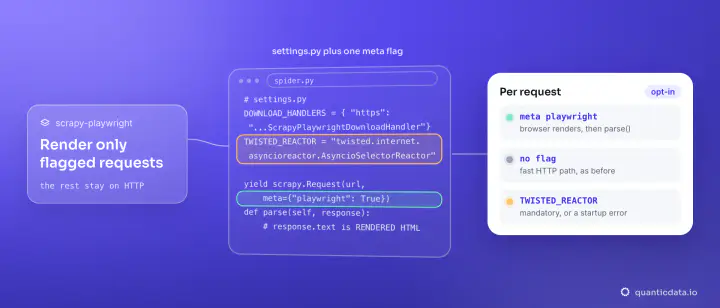
| JavaScript pages | No | No, unless you add scrapy-playwright |
| Learning curve | Minutes | An afternoon |
| Best for | Scripts, notebooks, a few hundred pages | Whole sites, scheduled crawls, large volumes |
How to choose in three questions
- How many pages? Up to a few hundred, run once: requests and Beautiful Soup. Thousands, or the same crawl every day: Scrapy, whose concurrency and retries you would otherwise rebuild by hand.
- Do you know the URLs? A fixed list runs fine in a loop. If the scraper has to discover pages by following links, Scrapy's scheduler and link following save the most code.
- Where does the data go? Into a notebook or a pandas DataFrame: Beautiful Soup keeps everything in one script. Into files or a database on a schedule: Scrapy's feed exports and item pipelines are built for it.
Using them together
Nothing stops you from parsing inside a Scrapy callback with Beautiful Soup: BeautifulSoup(response.body, "lxml"). We ran it that way on 5 pages through the same proxy: 100 items, written to books.json by the FEEDS setting. You keep Scrapy's downloading and scheduling and lose only the faster selectors. And when you outgrow the requests loop but not the code, httpx or aiohttp can run the same Beautiful Soup parsing concurrently; the comparison of all the options is in Python web scraping libraries.
What about Selenium?
Selenium (and Playwright) drive a real browser, which neither Scrapy nor Beautiful Soup does. Use one when the data appears only after JavaScript runs. It is far heavier per page, so the usual pattern is to render only the pages that need it and parse the HTML it returns with Beautiful Soup or parsel.
Proxies for each approach
Scrapy's 16 parallel requests are 16 connections at once from your machine. QuanticData mobile proxies and residential proxies take their settings from the username: the rotating gateway, or a session ID when a crawl needs one. The same proxy URL works in Scrapy's meta and in the proxies dictionary of requests. More on rotation settings: rotating proxies.