A proxy port number is the port on the proxy server that your app connects to: often 8080 or 3128 for HTTP proxies and 1080 for SOCKS5. A second set of ports matters just as much: the destination ports the proxy carries your traffic to, such as 80 and 443 for the web or 22 for SSH.
The two get mixed up all the time, so this page keeps them apart, lists the usual numbers, and shows a run from 20 November 2026 in which we opened 16 tunnels through one static ISP proxy and read what answered on each port. The exit address is masked.
The port you connect to
A proxy line has four parts: host, port, username and password. The port in that line is where the proxy listens. It says nothing about the sites you can reach; it is only the door you knock on.
| Port | Where you usually meet it |
|---|---|
| 8080 | The most common HTTP proxy port; registered as the alternate HTTP port |
| 3128 | The default of the Squid proxy, common in offices and schools |
| 1080 | The port registered for SOCKS |
| 80, 8888, 8000 | Other ports HTTP proxies are often set to listen on |
| Any high port | Providers that give each IP or each session its own port |
There is no rule that forces one number. A proxy listens where its operator put it, which is why the only reliable source is the line your provider gives you. On our network the dashboard writes the full line for each plan; for example, a Mobile SOCKS5 line uses port 1080 and a Residential Premium HTTP line uses port 8080, the two we used in our test of proxy chaining. If you are looking for the proxy that a Windows PC is already set to use, that is a different question, answered in how to find your proxy server address.
The ports a proxy carries
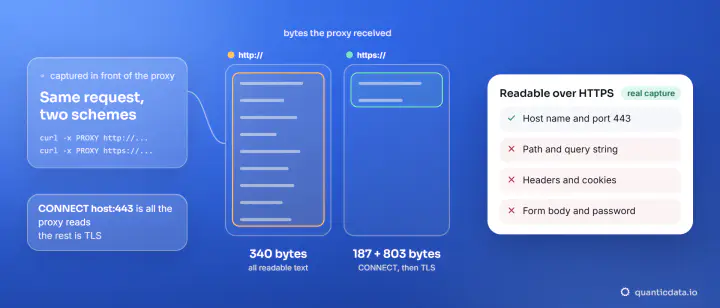
When your app wants a page over HTTPS, it sends the proxy one line: CONNECT example.com:443. The proxy opens a TCP connection to that host on that port and then passes bytes in both directions. Port 443 here is the destination port. A SOCKS5 proxy does the same with a binary request; the difference between the two is in HTTP vs SOCKS5 proxy.
Nothing in the protocol limits the destination to web ports. The same CONNECT works for github.com:22 (SSH) or for a mail server on 587. Whether the tunnel opens depends on what the proxy plan carries, so that is the thing to check before you build on it.
| Destination port | Service |
|---|---|
| 80, 443 | Web: HTTP and HTTPS |
| 8080, 8443 | Web on alternate ports: admin panels, APIs, test servers |
| 22 | SSH and SFTP |
| 21 | FTP control connection |
| 465, 587 | Mail submission to your own mail provider, with a login |
| 993 | IMAP over TLS, reading a mailbox |
| 3389 | Remote Desktop |
Which ports our ISP proxies carry
Our ISP proxies are static IPs registered to internet providers, sold in three ways. Each plan states what it carries on the product page, and that page is the reference for the current list of each plan; this is a summary as it reads on 20 November 2026.
| Plan | Ports |
|---|---|
| Standard ISP, by country | Web ports (see the plan page) |
| Premium pools: Retail, Social, Ticket, Sneaker | Web ports, plus mail and SSH |
| Premium by city and carrier | Web, mail submission and SSH ports |
For browsing, scraping and anything that speaks HTTP or HTTPS, Standard ISP by country is the plan, from $2.50 per IP. For SSH or a mail client, the plan page lists the Retail, Social, Ticket and Sneaker pools and the city plans; test the port you need with the command below. city and carrier plans also let you choose the city and the provider.
Our run: 16 ports through one static IP
On 20 November 2026 we took one line of a Retail pool in the United States and asked it for 16 tunnels, one after the other. For 12 of them the target was portquiz.net, a public test host that answers on any TCP port; the other four were real services, where we read the first thing the server says.
| Target | Port | What came back through the proxy |
|---|---|---|
| portquiz.net | 80, 443, 8080, 8443 | "Port test successful!" on all four |
| portquiz.net | 21, 465, 587, 993 | "Port test successful!" on all four |
| portquiz.net | 3389, 5222, 1337, 25565 | "Port test successful!" on all four |
| github.com | 22 | The SSH banner, SSH-2.0-... |
| smtp.gmail.com | 587 | The greeting, 220 smtp.gmail.com ESMTP |
| test.rebex.net | 21 | The FTP welcome, 220-Welcome to test.rebex.net! |
| example.com | 443 | Tunnel open, ready for TLS |
In this run, 16 of 16 tunnels opened, and on every portquiz.net answer the address it reported was the static exit of the line, not ours. It is one line of one pool on one day: run the same check on your own line for the ports your work needs.
How to test a port through your proxy
curl can do it in one line. The -p option tells curl to tunnel through the proxy with CONNECT even for a plain HTTP address, so you can point it at any port. This is the command we ran for port 8443, with its output:
curl -s -p -x http://USER:PASS@HOST:PORT http://portquiz.net:8443/
Port test successful!
Your IP: x.x.x.x
For a service that speaks first, such as SSH, ask curl for a raw connection and read the banner. The command waits for more data, so give it a time limit with -m:
curl -s -m 6 -p -x http://USER:PASS@HOST:PORT telnet://github.com:22
SSH-2.0-78629e90
We ran both with curl 8.21.0 on Windows 11, where the program is called curl.exe. More options are in how to use a proxy with curl. To check that the proxy line itself works before testing ports, paste it in the proxy tester.
SSH through a proxy
Once the tunnel to port 22 opens, an SSH client can use it. OpenSSH takes a helper command that makes the connection for it, set with ProxyCommand in ~/.ssh/config. The helper is any program that can speak CONNECT or SOCKS5 to the proxy and hand the stream to ssh; on Linux and macOS that is usually nc with its proxy options, on Windows a small connect tool. The server then sees the static IP of the proxy as the client address, which is what you want when a firewall accepts only listed addresses.
Check the banner with the curl command above first. If the banner comes back, the port is carried and the rest is client configuration.
Which plan for which port
- Web only: any plan. Standard ISP for a fixed IP, or residential proxies and mobile proxies per GB when you want many addresses in many countries.
- SSH and SFTP: the plan page lists SSH on city plans and on the Retail, Social, Ticket and Sneaker pools. In our run a Retail pool line returned the SSH banner on port 22.
- A mail client that submits on 465 or 587: the plan page lists mail submission on city plans and mail on the Retail, Social, Ticket and Sneaker pools. In our run a Retail pool line returned the 220 greeting on port 587.
- An app on its own port: test it on a short plan first with the curl command; city plans start at 1 day (from 5 IPs).