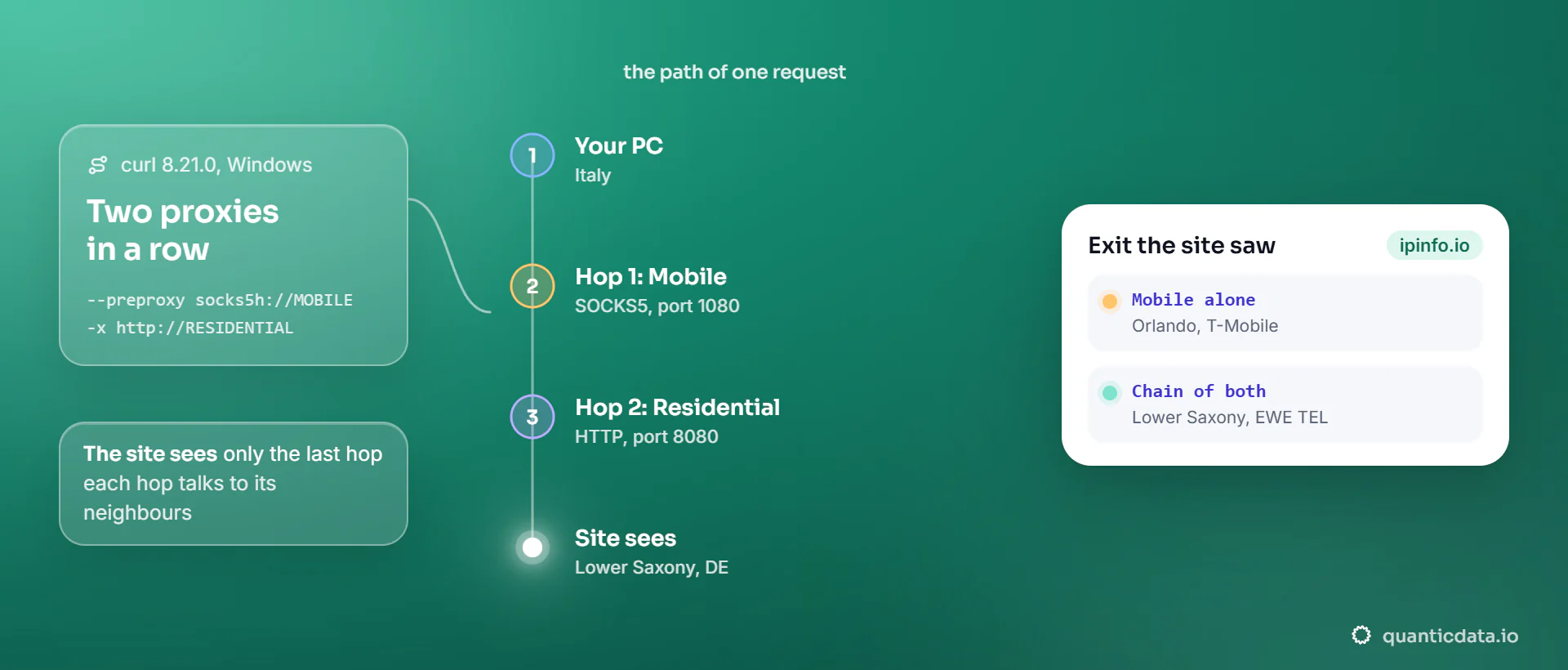
Proxy chaining sends a request through two or more proxy servers in a row. Your device connects to the first proxy, which connects to the second, which reaches the site. The site sees only the last proxy's IP, and each proxy talks only to its neighbours. In curl, --preproxy plus -x builds a two-hop chain.
We built one on a Windows 11 PC on 20 November 2026 with curl 8.21.0, chaining a QuanticData mobile proxy and a residential proxy, and read which exit the site saw. Exit IPs are masked.
How a proxy chain works
Each hop opens a tunnel inside the previous one. With an HTTP proxy, the client sends CONNECT host:port and the proxy opens a TCP connection there; with SOCKS5 the request is the same in binary form. In a chain, the "host" of the first request is the second proxy:
- Your PC opens a SOCKS5 connection to proxy 1 and asks it to connect to proxy 2.
- Through that tunnel, your PC sends proxy 2 a
CONNECT ipinfo.io:443with proxy 2's login. - Proxy 2 connects to the site. TLS runs end to end, from your PC to the site, through both tunnels.
| Who | Sees your IP | Sees the site name | Sees the page content (HTTPS) |
|---|---|---|---|
| Proxy 1 | Yes | It connects to proxy 2's address; the CONNECT line for the site passes through it unencrypted | No |
| Proxy 2 | No, it sees proxy 1's exit | Yes | No |
| The site | No, it sees proxy 2's exit | Yes | Yes |
Chain two proxies with one curl command
curl takes a first hop with --preproxy (a SOCKS proxy) and a second hop with -x. We put a Mobile line first, over SOCKS5, and a Residential Premium line in Germany second, over HTTP:
curl --preproxy socks5h://USER:PASS@mobile.quanticdata.io:1080 \
     -x http://USER-country-de-sid-cn01-ttl-30m:PASS@residentialpremium.quanticdata.io:8080 \
     https://ipinfo.io/json
{
  "ip": "x.x.x.x",
  "city": "Wallenhorst",
  "region": "Lower Saxony",
  "country": "DE",
  "org": "AS9145 EWE TEL GmbH",
  "timezone": "Europe/Berlin"
}
The site saw a German home line, the exit of the second hop. The mobile hop in front of it, which on its own had left from a T-Mobile IP in Orlando, Florida, did not appear anywhere in the answer. socks5h lets the first proxy resolve the second proxy's name, so the lookup does not happen on your line either; why that matters is in our DNS leak test through a proxy.
Mistakes to avoid when chaining in curl
- An HTTP proxy in
--preproxy. The first hop must be SOCKS. When we put an HTTP proxy there, curl stopped withcurl: (5) Unsupported pre-proxy type for 'http://...'and sent nothing. Use a SOCKS5 line first, as in our test with Mobile, and an HTTP line second. - Two logins in one place. Each hop has its own username and password, written in its own URL. The second login travels through the first hop inside the tunnel, unencrypted, so put only proxies you trust in a chain.
- Checking the wrong IP. The exit you read on ipinfo.io is the last hop's. To check the first hop alone, run the same request with only
-xand the first proxy, as we did before building the chain. socks5instead ofsocks5hin the first hop. The chain still works, and our test with plain socks5 still reached a German exit, but your own line then looks up the second proxy's name.
Each hop adds its own time, so add a hop only when it does a job.
When chaining proxies is useful
- A company network that only lets traffic out through its own proxy. That proxy becomes hop 1 and your proxy service hop 2; the "proxy chaining" settings of corporate gateways exist for this.
- Testing. Checking how a site or an app behaves when traffic arrives through more than one intermediary.
For the usual goals, one good hop is enough. To make a site see a home or mobile IP in a given country, a single residential or mobile proxy already does it; how to hide your IP address shows that with real output. A chain also does not encrypt anything a single HTTPS connection does not already encrypt.
Proxy chaining vs VPN
A VPN carries all of a device's traffic through one server, encrypted to that server. A proxy chain carries the traffic of the app you point at it, through several servers. You can combine them: a VPN on the device and a proxy in the app makes the VPN the first hop. The single-hop comparison is in residential proxy vs VPN.
Proxy chaining on Windows and Linux
- Windows, command line: curl with
--preproxyand-x, as above. curl ships with Windows 11 ascurl.exe. More options are in how to use a proxy with curl. - Linux: ProxyChains forces any program's TCP connections through a list of proxies. It is a Linux tool.
- Your own code: open a tunnel to proxy 1, send a CONNECT to proxy 2 through it, then speak TLS to the site, in that order.
Every hop needs its address, port and login; how to find your proxy server address shows where those live on Windows.
Which networks to put in a chain
The last hop decides what the site sees, so make it the network the site should see: Residential Basic or Premium for a home IP in a chosen country, Mobile for a carrier IP. curl's --preproxy needs a SOCKS5 line for the first hop; in our test that was a Mobile line on port 1080, and our page on SOCKS5 covers the other networks. The plans are on our pages for residential proxies, mobile proxies and SOCKS5 proxies; there is a Residential Basic free trial to start.