An ISP proxy is a static IP leased from an internet provider and held for you alone, so it is not handed out as a free sample. You test it in two stages: before paying, with the choices you make when you order; after delivery, with six checks that take about ten minutes on a short first plan.
This guide covers both stages for our ISP proxies. The first part comes from our product pages and API reference as they read on 20 November 2026; the second is a run we did the same day on one of our own static IPs, with the exit address masked.
What you can check before paying
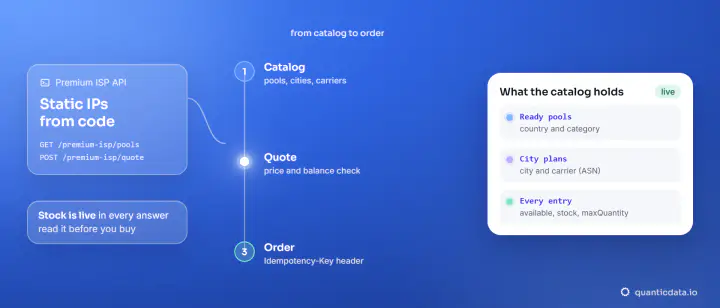
Most of what people want to learn from a sample IP can be fixed in advance on a city plan, where the configurator shows the live stock and the total before you pay.
| You want to know | Where it is settled before payment |
|---|---|
| Which provider the IP belongs to | Pick the carrier by its ASN; each city page lists the carriers with their ASN and the IPs on sale |
| Whether my site opens from it | Site test, the siteCheck option of the API: every IP must open your address before it is delivered |
| Its fraud score | Fraud score 0 option: each IP is checked on IPQualityScore right before delivery |
| Whether UDP works | UDP only filter |
The details of each choice are on the page about city and carrier plans. For reputation in the United States, the United Kingdom and Germany there is also a ready-made selection, low fraud score ISP proxies.
The site test: only IPs that open your site
The site test is the closest thing to trying an IP on your target before you own it. City plans can be ordered with a site test: it is the siteCheck option of the API, with a url and an expectedStatus, 200 by default, and it does not change the price. As the API reference describes it, every IP has to open that address and answer with that status before delivery, and IPs that do not pass are not assigned. If none passes, the order is not delivered and the payment goes back to your balance by itself.
Choose the address with care: use a public page your work depends on, such as the product page, not the home page of a different service.
Start with a short plan
City plans are sold from 1 day (from 5 IPs), then 7 days and 1, 2 or 3 months. A short first plan is the test: it costs a fraction of a month, the IPs are ready seconds after payment, and when the checks below pass you extend the same plan and keep the same addresses, as explained in renewing an ISP proxy on the same IP. Standard ISP by country starts at 30 days, from $3.80 for one IP.
If what you want to try is the network in general, the free trial is on Residential Basic: 100 MB for 5 days with no card. It tells you how our dashboard, logins and lines work; a static IP you test on a static plan.
Six checks for the first ten minutes
We ran these on 20 November 2026 on one of our own static IPs in the United States, with curl 8.21.0 on Windows 11 and our free tools.
| Check | How | Our result |
|---|---|---|
| 1. Exit and provider | ipinfo through the proxy | US, Virginia, Ashburn; AS5650 Verizon Business |
| 2. Location across databases | The exit address in the location checker | United States in 7 of 7 databases |
| 3. Reputation, from outside | The exit address in the fraud score check | 4 out of 100 on our IP fraud score check; datacenter No; on none of five blacklists |
| 4. Static | An IP echo, 5 times in a row and 20 at once | The same address on 25 of 25 |
| 5. Your target | Load the real page and read the status and the size | Status 200 and the full 518,938 bytes on 3 of 3 |
| 6. Ports | A tunnel to each port your work needs | 16 of 16 opened |
The first check is one command; the fields of the answer tell you the country, the city and the provider the IP is registered to:
curl -s -x http://USER:PASS@HOST:PORT https://ipinfo.io/json
{
  "ip": "x.x.x.x",
  "city": "Ashburn",
  "region": "Virginia",
  "country": "US",
  "org": "AS5650 Verizon Business",
  "timezone": "America/New_York"
}
For check 5 we used a long Wikipedia article as the stand-in for a target; use your own page. Ask curl for the status and the size, and compare the size with what you get without the proxy:
curl -s -o /dev/null -x http://USER:PASS@HOST:PORT -w "%{http_code} %{size_download}\n" https://en.wikipedia.org/wiki/Internet_service_provider
200 518938
A page counts as loaded when the HTML holds the real content, not just when the status is 200, so open the saved page once and look. Check 6, with the commands for any port, is in proxy port numbers. To run check 1 on a whole list of lines at once, paste them in the proxy tester.
Check reputation from outside the proxy
For checks 2 and 3, take the address from check 1 and look it up from another connection. Fraud scoring sites log every visit: open one in a browser that is using the proxy and the proxy's address becomes one more visitor in their data, which can raise its score. Our proxy location checker and IP fraud score check take the address as text and look it up from our servers, so the IP you are testing never connects to a scoring site.
Each service scores in its own way, and the country is the field they agree on; what each one measures, with the same addresses read on four of them, is in IP checkers compared. For our plans the references are written in the Terms: ipinfo for the location, IPQualityScore for the Fraud score 0 option.
Keep a record
Write down the six results with the date and the address. If you extend the plan you can repeat the checks in a month and compare like with like; if you ask us about an IP, the checker, the time and the result are what we need to look at it. Keep the proxy password out of the message.