Residential Proxies for Yahoo
Residential proxies for Yahoo are home-ISP IP addresses that let you track Yahoo search, Finance and News results by country, Japan included. Rotate them for data, or keep one IP per account for up to 24 hours. Plans start at $1.00/GB and fall to $0.80/GB, with a free 100 MB trial.
On 14 September 2026 we loaded yahoo.com in a real-browser test through a QuanticData residential exit on Comcast Cable Communications, LLC (AS7922) in the United States: HTTP 200, page settled in 6,053 ms.
Home-ISP IPs in 228 countries · Rotating or sticky · HTTP and SOCKS5

What is Yahoo, and why put a proxy in front of it?
Yahoo is two things. In most of the world it is a portal, a mail service, Yahoo Finance and a search engine that draws its results from Bing. In Japan it is Yahoo Japan, a separate company and the country's second search engine with its own index, shopping and auctions. Teams that touch Yahoo with a proxy are usually doing one of three things: verifying Yahoo search ads and rankings by market, collecting Yahoo Finance or News pages that are localized, or working with Yahoo Japan, where results and services only make sense from a Japanese address. All of it requires an exit in the right country.
What people use residential proxies for on Yahoo
Four workflows we see on Yahoo. None of them needs a proxy to break Yahoo's rules; all of them need a network location and a reputation the platform treats as ordinary.
Rank and ad verification
Check Yahoo Search positions and sponsored results per country, mirroring your Bing tracking.
Yahoo Japan search and shopping
Collect Japanese results, product listings and auction data as a user in Japan would see them.
Finance and News collection
Gather localized market and news pages at volume through rotating exits.
Mail deliverability QA
Test how your transactional emails render in Yahoo Mail from the regions your customers live in.
Why residential proxies for Yahoo
Search, Finance and News collection is volume work: rotating residential exits with country targeting from $1.00/GB down to $0.80 cover it, including Japanese home IPs for Yahoo Japan.
What a proxy does not do. A proxy sets the country Yahoo localizes for and makes Yahoo Japan reachable as a domestic user; it does not change your account, its region or Yahoo's terms. Carrier IPs for the same job are on the mobile proxies for Yahoo page.
Source: Yahoo Terms of Service.
Best residential proxies for Yahoo
Yahoo Mail and Yahoo Finance sessions want one exit for the length of the login; search and finance data collection can rotate. Yahoo's properties differ by country (Yahoo Japan most of all), so the exit has to match the edition. With QuanticData the exits asked for most are Japan, the United States and China, Taiwan, with state and city targeting in the username at no extra cost.
Mail and finance pages are moderate; a logged-in mailbox open all day uses more than a data run. On the residential network that means Residential Basic or Premium, rotating or sticky for up to 24 hours, from $1.00/GB with a free 100 MB trial. For Yahoo the residential network is the usual choice: the work is SERP collection at volume, one exit per query, and a home-ISP exit in the right country is what that needs.
Which session to use for Yahoo: sticky or rotating
Rotating for data, sticky for accounts. Rotating for search and page collection; sticky for signed-in accounts (Mail, Yahoo Japan) used in QA. Country, session and targeting go in the username; credentials are in your dashboard after purchase.
# PROXY_HOST = host:port shown in your dashboard
# rotating: a new home IP on every request
curl -x "$PROXY_HOST" -U "USER-country-jp:PASS" https://ipinfo.io/json

# sticky: keep one IP for a session (session ID and lifetime are set in the generator;
# up to 24 hours on Basic and Premium)
curl -x "$PROXY_HOST" -U "USER-country-jp-sid-yahoo-ttl-30m:PASS" https://ipinfo.io/json

# state and city targeting
curl -x "$PROXY_HOST" -U "USER-country-jp-region-REGION-city-CITY:PASS" https://ipinfo.io/json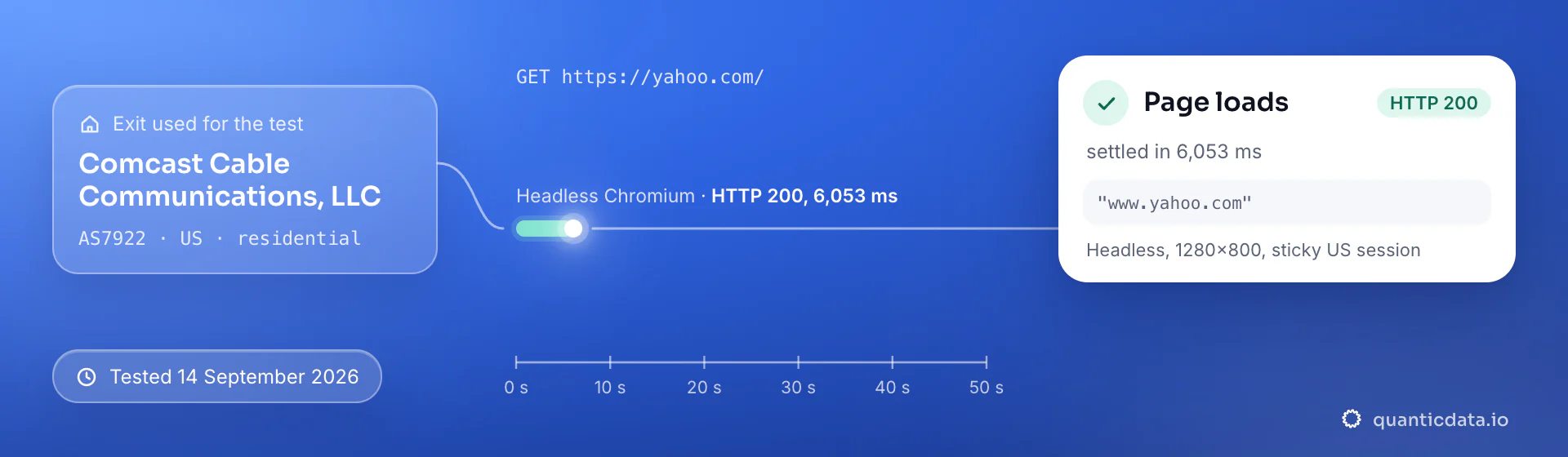
Best countries for Yahoo residential proxies
The exits most often asked for with Yahoo, and why. Every country page lists the networks available and the username codes.
Residential Proxies pricing for Yahoo
Residential Basic, per GB, bandwidth valid for the whole plan term. Intermediate bundles and the Premium line (from $2.20/GB, city and ISP catalog) are on the plans page. Free trial: 100 MB on Basic for 5 days, no card.
The same pool at every tier — a small test costs exactly $1.00/GB. Full ladder and terms on the pricing page.
How to start with Yahoo in minutes
- Create a free QuanticData account and open Plans → Residential; pick a bundle — $1.00/GB is enough to test Yahoo on your real workflow.
- Copy host, port, username and password from the dashboard. Put the country in the username (
-country-jp), and state or city if the job is local (-region-…-city-…), and a session ID with a lifetime when the Yahoo flow must keep one IP. - Set the proxy per request for collection; for Yahoo Japan use a Japanese exit and Accept-Language: ja. Signed-in QA works best in a browser profile bound to one sticky session.
- Run a small sample first and watch how Yahoo responds; a residential IP is not a promise of access, acceptance or a particular success rate, and Yahoo's terms and the law apply to what you do through it.
Set it up for Yahoo
QuanticData residential proxies are standard HTTP and SOCKS5 endpoints: a host, a port, a username and a password, shown in your dashboard the moment a plan is active. The username carries the country, the state and the city, and the session; host, port and password never change. Below, a request to a public Yahoo page through the residential gateway, with rotating — no session ID — for collection; add a session ID and a lifetime when a Yahoo flow must keep one IP. Rotate per query at a query every couple of seconds per exit, with Accept-Language set for the market.
# PROXY_HOST and PORT are shown in your dashboard
curl --proxy "http://PROXY_HOST:PORT" \
  --proxy-user "USER-country-jp:PASS" \
  --connect-timeout 10 --max-time 30 \
  -A "Mozilla/5.0 (Windows NT 10.0; Win64; x64) Chrome/128.0 Safari/537.36" \
  "https://search.yahoo.com/search?p=mobile+proxies"
import requests
# host and port from your dashboard; country and session in the username
proxy = "http://USER-country-jp:PASS@PROXY_HOST:PORT"
r = requests.get("https://search.yahoo.com/search?p=mobile+proxies",
proxies={"http": proxy, "https": proxy},
headers={"User-Agent": "Mozilla/5.0 (Windows NT 10.0; Win64; x64) Chrome/128.0 Safari/537.36"},
timeout=30)
print(r.status_code, len(r.text))SOCKS5 works with the same username on the SOCKS5 port (socks5h:// in Python's proxies, --socks5-hostname in curl), so the hostname is resolved at the exit.
FAQ
Residential Proxies for Yahoo: does it work, which session, how to set it up, proxy clients, free options, mobile or residential.
Something else? Ask usDo residential proxies work with Yahoo?
QuanticData residential proxies work with Yahoo the way any proxy does: they change the network your traffic leaves from, to real home-ISP IPs in 228 countries. A proxy sets the country Yahoo localizes for and makes Yahoo Japan reachable as a domestic user; it does not change your account, its region or Yahoo's terms.
Which proxy session should I use for Yahoo: sticky or rotating?
QuanticData recommends rotating IPs for data and a sticky session for accounts for Yahoo. Rotating for search and page collection; sticky for signed-in accounts (Mail, Yahoo Japan) used in QA. Sessions are set in the username (a session ID and a lifetime, up to 24 hours on Basic and Premium), so no proxy list is needed.
Do I need a Japanese IP for Yahoo Japan?
QuanticData customers working with Yahoo Japan use Japanese exits because the service is built for domestic users: search results, shopping and auctions are localized, and some features behave differently for foreign addresses. A Japan mobile or residential proxy makes your requests look like they come from a Japanese subscriber.
How do I set up a residential proxy for Yahoo?
QuanticData gives you host, port, username and password the moment a plan is active: create a free account, open Plans → Residential, pick a bundle ($1.00/GB to start) and copy the credentials from the dashboard. Set the proxy per request for collection; for Yahoo Japan use a Japanese exit and Accept-Language: ja. Signed-in QA works best in a browser profile bound to one sticky session. For Yahoo, the countries asked for most are Japan, the United States and China, Taiwan.
Can I use OpenClash with QuanticData for Yahoo?
QuanticData residential proxies are standard HTTP and SOCKS5 endpoints with a host, a port, a username and a password, so any client that accepts a proxy node works, OpenClash included: enter those four values as an http or socks5 node in OpenClash on the router, or in Clash on Android and desktop, and Yahoo traffic from every device the rules send to that node leaves through the exit set in the username. For Yahoo give each account its own sticky session — a session ID and a lifetime in the username — so the traffic keeps one IP for the whole login. Host and port are in your dashboard; the HTTP and the SOCKS5 port are different, so pick the one that matches the node type.
Is there a free residential proxy for Yahoo?
QuanticData does not give away residential proxies for Yahoo: what is free is the trial — 100 MB on Residential Basic for 5 days, no card — enough to run a small Yahoo test before the $5 starter. Public "free proxy" lists are shared addresses that have already sent thousands of queries, which is why a challenge page appears after a handful of searches; they also change daily, so nothing built on them keeps working for long.
Mobile or residential proxies for Yahoo?
QuanticData's answer for Yahoo is residential for most jobs, the network this page is about: the work is SERP collection at volume, one exit per query, and home-ISP addresses in 228 countries with state and city targeting cost from $1.00/GB. Mobile is worth its higher price only when a Yahoo account or app expects a phone; the mobile page for Yahoo covers that case.
Get residential proxies for Yahoo in minutes
Free account, pick a bundle, credentials in your dashboard. Residential starts at $1.00/GB.
Buy residential bandwidth Create a free account