Residential Proxies for DuckDuckGo
Residential proxies for DuckDuckGo are home-ISP IP addresses that let you compare DuckDuckGo results and ads by country. Each request can leave from a new home IP, with the state and city set in the username. Plans start at $1.00/GB and fall to $0.80/GB, with a free 100 MB trial.
On 14 September 2026 we loaded duckduckgo.com in a real-browser test through a QuanticData residential exit on Charter Communications Inc (AS10796) in the United States: HTTP 200, page settled in 5,209 ms.
Home-ISP IPs in 228 countries · Rotating or sticky · HTTP and SOCKS5

What is DuckDuckGo, and why put a proxy in front of it?
DuckDuckGo is the search engine people choose when they do not want to be tracked, and it has grown into a meaningful share of English-language search. Because it does not personalize, it is also a favourite of researchers who want a clean baseline SERP: the same query returns the same results for everyone in a region. That regional part is the catch — results still depend on where the request comes from — so comparing what users in the US, Germany and Australia see requires exits in those countries. A proxy provides them, and DuckDuckGo's request-based friendliness makes it one of the simplest engines to collect.
What people use residential proxies for on DuckDuckGo
Four workflows we see on DuckDuckGo. None of them needs a proxy to break DuckDuckGo's rules; all of them need a network location and a reputation the platform treats as ordinary.
Baseline rank tracking
Track positions without personalization noise, per country, as a reference for your Google and Bing reports.
Regional result comparison
Compare the organic set for the same query across markets to spot localization gaps in your content.
Privacy-audience research
Understand what the privacy-conscious segment sees when they search your category.
Ad verification
Check DuckDuckGo's search ads (served through the Microsoft network) by country.
Why residential proxies for DuckDuckGo
Collection at volume belongs on residential exits: rotating home IPs with country and city targeting from $1.00/GB down to $0.80, against an engine that accepts request-based clients. Most teams need nothing more.
What a proxy does not do. A proxy sets the region DuckDuckGo localizes for; it does not add personalization and it does not change the engine's terms for automated access. Carrier IPs for the same job are on the mobile proxies for DuckDuckGo page.
Source: DuckDuckGo Terms of Service.
Best residential proxies for DuckDuckGo
No account, no session: rotate per query, and keep a sticky exit only when a browser session must persist. DuckDuckGo localizes by region parameter more than by IP, but the exit still decides the ads and local results. With QuanticData the exits asked for most are the United States, Germany and Australia, with state and city targeting in the username at no extra cost.
Results pages are small; the HTML endpoint is lighter still. On the residential network that means Residential Basic or Premium, rotating or sticky for up to 24 hours, from $1.00/GB with a free 100 MB trial. For DuckDuckGo the residential network is the usual choice: the work is SERP collection at volume, one exit per query, and a home-ISP exit in the right country is what that needs.
Which session to use for DuckDuckGo: sticky or rotating
Rotating (new IP per request). Independent queries from fresh IPs; there is rarely a reason for a sticky session against DuckDuckGo. Country, session and targeting go in the username; credentials are in your dashboard after purchase.
# PROXY_HOST = host:port shown in your dashboard
# rotating: a new home IP on every request
curl -x "$PROXY_HOST" -U "USER-country-us:PASS" https://ipinfo.io/json

# sticky: keep one IP for a session (session ID and lifetime are set in the generator;
# up to 24 hours on Basic and Premium)
curl -x "$PROXY_HOST" -U "USER-country-us-sid-duckdu-ttl-30m:PASS" https://ipinfo.io/json

# state and city targeting
curl -x "$PROXY_HOST" -U "USER-country-us-region-REGION-city-CITY:PASS" https://ipinfo.io/json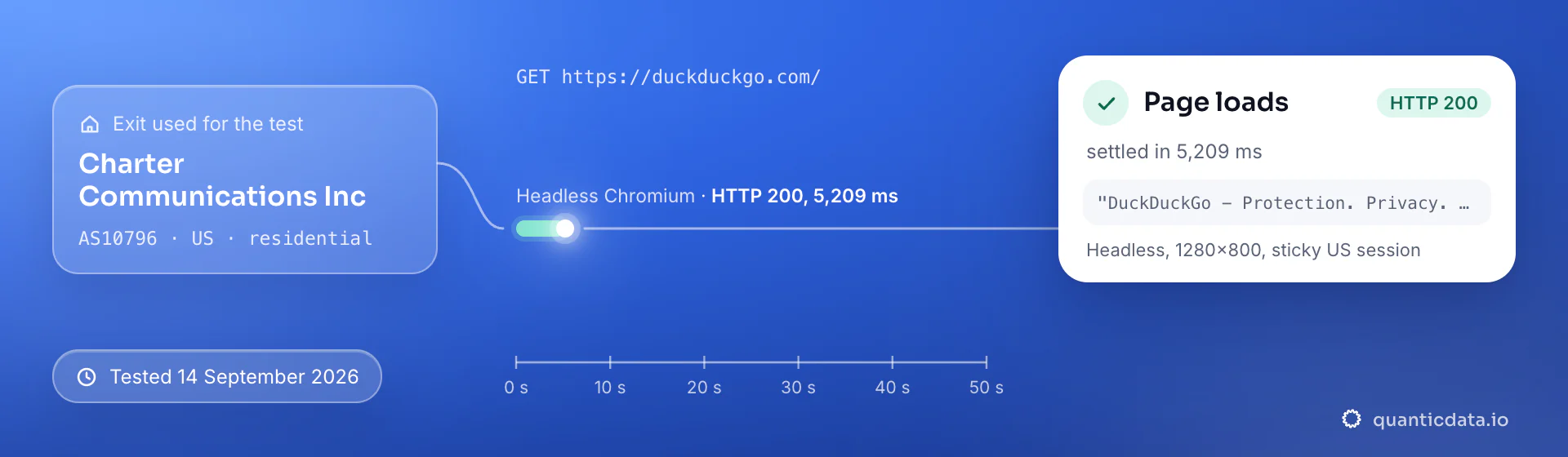
Best countries for DuckDuckGo residential proxies
The exits most often asked for with DuckDuckGo, and why. Every country page lists the networks available and the username codes.
Residential Proxies pricing for DuckDuckGo
Residential Basic, per GB, bandwidth valid for the whole plan term. Intermediate bundles and the Premium line (from $2.20/GB, city and ISP catalog) are on the plans page. Free trial: 100 MB on Basic for 5 days, no card.
The same pool at every tier — a small test costs exactly $1.00/GB. Full ladder and terms on the pricing page.
How to start with DuckDuckGo in minutes
- Create a free QuanticData account and open Plans → Residential; pick a bundle — $1.00/GB is enough to test DuckDuckGo on your real workflow.
- Copy host, port, username and password from the dashboard. Put the country in the username (
-country-us), and state or city if the job is local (-region-…-city-…), and a session ID with a lifetime when the DuckDuckGo flow must keep one IP. - Use the HTML endpoint with the kl region parameter and the proxy set per request; QuanticData's SERP API also returns DuckDuckGo results as JSON.
- Run a small sample first and watch how DuckDuckGo responds; a residential IP is not a promise of access, acceptance or a particular success rate, and DuckDuckGo's terms and the law apply to what you do through it.
Prefer an API to a proxy for the data side? The SERP API returns DuckDuckGo results as JSON with the country and city as parameters, billed per successful search.
Set it up for DuckDuckGo
QuanticData residential proxies are standard HTTP and SOCKS5 endpoints: a host, a port, a username and a password, shown in your dashboard the moment a plan is active. The username carries the country, the state and the city, and the session; host, port and password never change. Below, a request to a public DuckDuckGo page through the residential gateway, with no session ID in the username, so every request to DuckDuckGo leaves from a different home IP. The HTML endpoint tolerates a query every second or two per exit; rotate per query and keep kl aligned with the country.
# PROXY_HOST and PORT are shown in your dashboard
curl --proxy "http://PROXY_HOST:PORT" \
  --proxy-user "USER-country-us:PASS" \
  --connect-timeout 10 --max-time 30 \
  -A "Mozilla/5.0 (Windows NT 10.0; Win64; x64) Chrome/128.0 Safari/537.36" \
  "https://html.duckduckgo.com/html/?q=mobile+proxies&kl=us-en"
import requests
# host and port from your dashboard; country and session in the username
proxy = "http://USER-country-us:PASS@PROXY_HOST:PORT"
r = requests.get("https://html.duckduckgo.com/html/?q=mobile+proxies&kl=us-en",
proxies={"http": proxy, "https": proxy},
headers={"User-Agent": "Mozilla/5.0 (Windows NT 10.0; Win64; x64) Chrome/128.0 Safari/537.36"},
timeout=30)
print(r.status_code, len(r.text))SOCKS5 works with the same username on the SOCKS5 port (socks5h:// in Python's proxies, --socks5-hostname in curl), so the hostname is resolved at the exit.
FAQ
Residential Proxies for DuckDuckGo: does it work, which session, how to set it up, proxy clients, free options, mobile or residential.
Something else? Ask usDo residential proxies work with DuckDuckGo?
QuanticData residential proxies work with DuckDuckGo the way any proxy does: they change the network your traffic leaves from, to real home-ISP IPs in 228 countries. A proxy sets the region DuckDuckGo localizes for; it does not add personalization and it does not change the engine's terms for automated access.
Which proxy session should I use for DuckDuckGo: sticky or rotating?
QuanticData recommends rotating IPs for DuckDuckGo. Independent queries from fresh IPs; there is rarely a reason for a sticky session against DuckDuckGo. Sessions are set in the username (a session ID and a lifetime, up to 24 hours on Basic and Premium), so no proxy list is needed.
Why use a proxy at all with a search engine that does not track me?
QuanticData customers use proxies with DuckDuckGo for geography, not privacy: results are still localized to the region of the request, so measuring what users in another country see requires an exit there. The lack of personalization is what makes those measurements clean.
How do I set up a residential proxy for DuckDuckGo?
QuanticData gives you host, port, username and password the moment a plan is active: create a free account, open Plans → Residential, pick a bundle ($1.00/GB to start) and copy the credentials from the dashboard. Use the HTML endpoint with the kl region parameter and the proxy set per request; QuanticData's SERP API also returns DuckDuckGo results as JSON. For DuckDuckGo, the countries asked for most are the United States, Germany and Australia.
Can I use OpenClash with QuanticData for DuckDuckGo?
QuanticData residential proxies are standard HTTP and SOCKS5 endpoints with a host, a port, a username and a password, so any client that accepts a proxy node works, OpenClash included: enter those four values as an http or socks5 node in OpenClash on the router, or in Clash on Android and desktop, and DuckDuckGo traffic from every device the rules send to that node leaves through the exit set in the username. For DuckDuckGo leave the session out of the username so every new connection rotates to a fresh IP, or add a session ID when a flow must keep one. Host and port are in your dashboard; the HTTP and the SOCKS5 port are different, so pick the one that matches the node type.
Is there a free residential proxy for DuckDuckGo?
QuanticData does not give away residential proxies for DuckDuckGo: what is free is the trial — 100 MB on Residential Basic for 5 days, no card — enough to run a small DuckDuckGo test before the $5 starter. Public "free proxy" lists are shared addresses that have already sent thousands of queries, which is why a challenge page appears after a handful of searches; they also change daily, so nothing built on them keeps working for long.
Mobile or residential proxies for DuckDuckGo?
QuanticData's answer for DuckDuckGo is residential for most jobs, the network this page is about: the work is SERP collection at volume, one exit per query, and home-ISP addresses in 228 countries with state and city targeting cost from $1.00/GB. Mobile is worth its higher price only when a DuckDuckGo account or app expects a phone; the mobile page for DuckDuckGo covers that case.
Get residential proxies for DuckDuckGo in minutes
Free account, pick a bundle, credentials in your dashboard. Residential starts at $1.00/GB.
Buy residential bandwidth Create a free account