Residential Proxies for Patreon
Residential proxies for Patreon are home-ISP IP addresses that let you read Patreon's public creator pages from the country you choose. The exits rotate, and the country goes in the username. Plans start at $1.00/GB and fall to $0.80/GB, with a free 100 MB trial.
On 20 November 2026 (UTC) we loaded a public Patreon creator page 40 times from the United Kingdom and 40 times from the United States through Residential Basic: 40 of 40 loads in each country held the creator's name and membership tiers, with median times of 1.42 s and 2.05 s.
Home-ISP IPs in 228 countries · Rotating or sticky · HTTP and SOCKS5

What is Patreon, and why put a proxy in front of it?
Patreon is a membership platform: every creator runs a public page that says what they make and lists the membership tiers a fan can join. Agencies, creator-economy analysts and brands read those pages to compare how creators structure their tiers, follow changes over time and check how their own page appears. The public creator pages carry this in the HTML: on the page we tested on 20 November 2026 (UTC) the HTML held the creator's name, the line that says what they create, the description and the membership tiers with their amounts. A proxy network lets that reading leave from ordinary home or carrier connections in the country you choose, at a steady, polite pace.
What people use residential proxies for on Patreon
Four jobs that read public Patreon pages from a chosen country.
Tier and pricing research
Read public creator pages and compare how membership tiers are structured and priced.
Change tracking
Read the same creator pages on a schedule and keep the dated tiers and descriptions.
Own-page QA
Check how your own creator page appears to a logged-out visitor in another country.
Creator-economy datasets
Collect public creator names, descriptions and tiers for market analysis.
Why residential proxies for Patreon
A home-ISP exit reaches Patreon the way a fan at home does. Through Residential Basic the public creator page we tested came back with the creator's name and membership tiers on 40 of 40 requests from the United Kingdom (median 1.42 s) and 40 of 40 from the United States (median 2.05 s) on 20 November 2026 (UTC), over plain HTTP. Bandwidth is billed per GB from $1.00, and with compression the page was about a quarter of its full size.
What a proxy does not do. A proxy changes the network a request comes from; it does not change Patreon's terms of use, what its robots.txt allows, or what a page shows without an account. Carrier IPs for the same job are on the mobile proxies for Patreon page.
Source: patreon.com/robots.txt.
Best residential proxies for Patreon
This job needs volume at a steady pace. On the creator page we tested, the creator's name, what they create, the description and the membership tiers with their amounts were all in the HTML, so a plain HTTP client was enough. On 20 November 2026 (UTC) that page weighed about 238 KB compressed and came back complete on 40 of 40 requests from the United Kingdom and 40 of 40 from the United States through Residential Basic.
Pick the exit country for where your team and your audience are. On the residential network that means rotating home-ISP exits with the country in the username, from $1.00/GB with a free 100 MB trial. Keep to the paths Patreon's robots.txt allows, put a delay between pages, and store what you have already read instead of asking for it again.
Which session to use for Patreon: sticky or rotating
Rotating exits. Reading public pages needs no session: leave it out and the gateway rotates the exit. The requests of our 20 November 2026 (UTC) run were sent this way. Country, session and targeting go in the username; credentials are in your dashboard after purchase.
# PROXY_HOST = host:port shown in your dashboard
# rotating exits: the country in the username, no session
curl -x "$PROXY_HOST" -U "USER-country-gb:PASS" https://ipinfo.io/json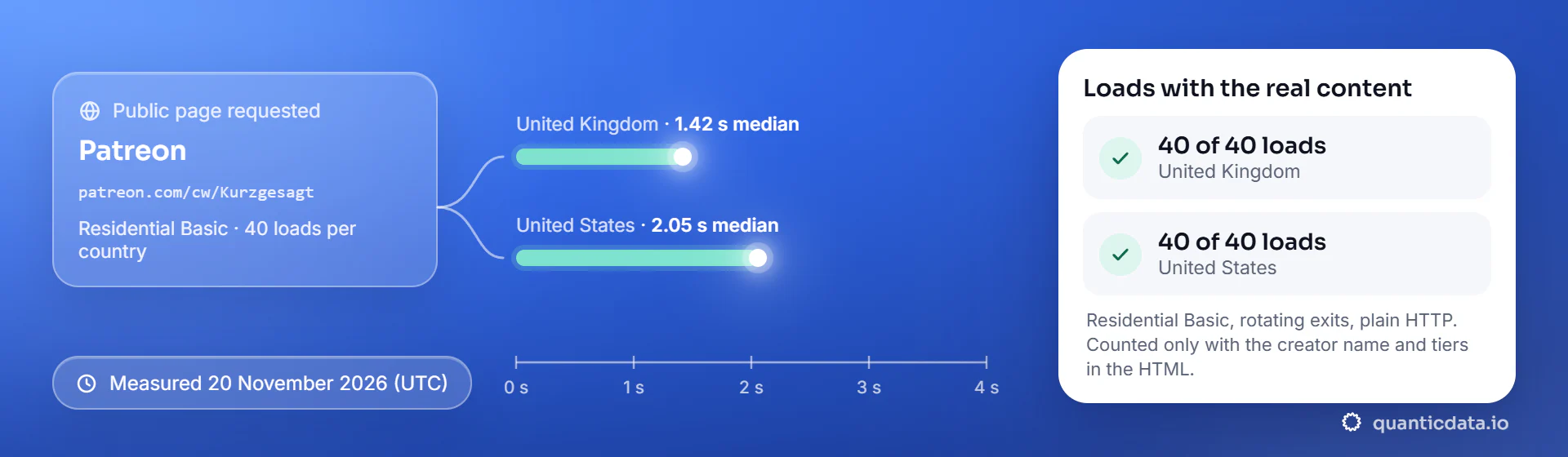
| Exit country | Loads with the real content | Median time, full HTML |
|---|---|---|
| United Kingdom | 40 of 40 | 1.42 s |
| United States | 40 of 40 | 2.05 s |
Best countries for Patreon residential proxies
The countries we measured Patreon from, and why they matter. Every country page lists the networks available and the username codes.
Residential Proxies pricing for Patreon
Residential Basic, per GB, bandwidth valid for the whole plan term. Intermediate bundles and the Premium line (from $2.20/GB, city and ISP catalog) are on the plans page. Free trial: 100 MB on Basic for 5 days, no card.
The same pool at every tier — a small test costs exactly $1.00/GB. Full ladder and terms on the pricing page.
How to start with Patreon in minutes
- Create a free QuanticData account and open Plans → Residential; pick a bundle — $1.00/GB is enough to test Patreon on your real workflow.
- Copy host, port, username and password from the dashboard. Put the country in the username (
-country-gb), and state or city if the job is local (-region-…-city-…), and a session name with a lifetime when a job needs one. - Set the proxy per request, ask for compression, and keep a delay between pages; on the creator page we tested the data is in the HTML, so no browser is needed.
- Run a small sample first and watch how Patreon responds; a residential IP is not a promise of access, acceptance or a particular success rate, and Patreon's terms and the law apply to what you do through it.
Set it up for Patreon
QuanticData residential proxies are standard HTTP and SOCKS5 endpoints: a host, a port, a username and a password, shown in your dashboard the moment a plan is active. The username carries the country, the state and the city, and the session; host, port and password never change. Below, a request to a public Patreon creator page through the residential gateway, with no session ID in the username, so the gateway rotates the exit. Stay on the paths robots.txt allows and keep a delay of a few seconds between pages.
# PROXY_HOST and PORT are shown in your dashboard
curl --proxy "http://PROXY_HOST:PORT" \
  --proxy-user "USER-country-gb:PASS" \
  --connect-timeout 10 --max-time 30 \
  -A "Mozilla/5.0 (Windows NT 10.0; Win64; x64) Chrome/128.0 Safari/537.36" \
  "https://www.patreon.com/cw/Kurzgesagt"
import requests
# host and port from your dashboard; country and session in the username
proxy = "http://USER-country-gb:PASS@PROXY_HOST:PORT"
r = requests.get("https://www.patreon.com/cw/Kurzgesagt",
proxies={"http": proxy, "https": proxy},
headers={"User-Agent": "Mozilla/5.0 (Windows NT 10.0; Win64; x64) Chrome/128.0 Safari/537.36"},
timeout=30)
print(r.status_code, len(r.text))Add --compressed to the curl line (Python's requests asks for compression by itself): in our run of 20 November 2026 (UTC) this page was about 238 KB compressed and about 1,000 KB without, and bandwidth is billed per GB.
FAQ
Residential Proxies for Patreon: does it work, how fast it loads, which session, reading without a browser, robots.txt, price.
Something else? Ask usDo residential proxies work with Patreon?
QuanticData residential proxies loaded the public Patreon creator page we tested on 40 of 40 requests from the United Kingdom and 40 of 40 from the United States on 20 November 2026 (UTC), each load checked for the creator's name and membership tiers. A proxy changes the network a request comes from; Patreon's terms of use still apply to what you do through it.
How fast does Patreon load through a residential proxy?
QuanticData measured it on 20 November 2026 (UTC): through Residential Basic the full HTML of a public Patreon creator page arrived in a median of 1.42 seconds from the United Kingdom and 2.05 seconds from the United States, over 40 loads per country started from our office line in Italy. It is one run on one day; your own times depend on your line and the page.
Which proxy session should I use for Patreon: sticky or rotating?
QuanticData recommends rotating exits for reading public Patreon pages: leave the session out of the username and put only the country in it. That is how the 80 requests of our 20 November 2026 (UTC) run were sent. A session, when a job needs one, is set in the username too.
Can I read a Patreon creator page without a browser?
QuanticData's test used plain HTTP with curl, no browser: the page patreon.com/cw/Kurzgesagt returned the creator's name, the line that says what they create, the description and the membership tiers with their amounts in the HTML itself, about 238 KB compressed. Pages that build their content with JavaScript need a browser instead; this one did not on 20 November 2026 (UTC).
What does Patreon's robots.txt allow?
QuanticData read patreon.com/robots.txt on 20 November 2026 (UTC): under User-agent: * the creator pages are not disallowed, while /api/, /rss/, /checkout/, /settings, /logout and /file are; a few named crawlers are disallowed from the whole site. Follow it, keep a delay between pages and cache what you already have.
How much do residential proxies for Patreon cost?
QuanticData residential bandwidth starts at $1.00/GB on the $5 starter and falls to $0.80/GB on 1,000 GB, with a free 100 MB trial on Residential Basic. At the size we measured for a compressed Patreon creator page, 1 GB is roughly 4,000 pages.
Get residential proxies for Patreon in minutes
Free account, pick a bundle, credentials in your dashboard. Residential starts at $1.00/GB.
Buy residential bandwidth Create a free account