Residential Proxies for iPhone & Shadowrocket
Residential proxies for iPhone and Shadowrocket are home-ISP IP addresses that let you route an iPhone's traffic through a home address in a chosen country. Each node is an HTTP or SOCKS5 endpoint holding one IP for up to 24 hours. Plans start at $1.00/GB and fall to $0.80/GB, with a free 100 MB trial.
Home-ISP IPs in 228 countries · Rotating or sticky · HTTP and SOCKS5

What is Shadowrocket on iPhone, and why put a proxy in it?
An iPhone can send all of its traffic — apps included — through a proxy with a client such as Shadowrocket, Potatso or Quantumult X, which supports SOCKS5 and HTTP with authentication and works the same on Wi-Fi and on cellular. That is what social-media managers use to run an account from the phone as if it were in the client's country, what QA teams use to test apps as users abroad, what streaming and ad-verification teams use to check what an app shows in a market, and what travellers use to keep a stable network identity at home. The proxy has to be one the client can authenticate to and one that looks like a phone: a mobile or residential exit with username and password, held on a sticky session.
What people use residential proxies for on iPhone and Shadowrocket
Four workflows we see on iPhone and Shadowrocket. None of them needs a proxy to break the apps' rules; all of them need a network location and a reputation the platform treats as ordinary.
App QA from another country
Test your own iOS app, its store listing and its localized content as users in another market.
Social accounts run from the phone
Keep an account's app session on a sticky exit in the account's country.
App-side verification
Check what streaming, shopping and ad-supported apps show in a market, from a phone.
Stable identity while travelling
Keep your apps on a consistent exit in your home country from anywhere.
Why residential proxies for iPhone and Shadowrocket
For QA and verification at lower cost, a residential exit through the same client gives the phone a home-ISP address in the target country from $1.00/GB down to $0.80; Premium sticky sessions last up to 24 hours. Use it for testing and checks, mobile for accounts.
What a proxy does not do. A proxy changes the network the phone's traffic leaves from; it does not change the Apple ID's region, the App Store country, or the SIM's country, which some apps also read. Apps' and platforms' terms apply to what you do through the proxy. Carrier IPs for the same job are on the mobile proxies for iPhone and Shadowrocket page.
Source: Shadowrocket on the App Store.
Best residential proxies for iPhone and Shadowrocket
Shadowrocket holds one proxy configuration for the whole device, so one sticky exit per phone, with a lifetime long enough for the day. The exit country matches the accounts used on that phone. With QuanticData the exits asked for most are the United States, the United Kingdom and the United Arab Emirates, with state and city targeting in the username at no extra cost.
Everything the phone does goes through the proxy, so bandwidth is that of the apps used — light for messaging, heavy for video. On the residential network that means Residential Basic or Premium, rotating or sticky for up to 24 hours, from $1.00/GB with a free 100 MB trial. For iPhone and Shadowrocket the residential network is the usual choice: the phone needs one stable exit with a long session, which Residential Premium provides at a lower price per GB, and a home-ISP exit in the right country is what that needs.
Which proxy an iPhone needs, Residential Premium, ISP or mobile, and which app takes it: proxies for iPhone, compared. Every Shadowrocket field, step by step: Shadowrocket proxy setup.
Which session to use for iPhone and Shadowrocket: sticky or rotating
Sticky (one IP per account). One sticky session for the phone with a TTL up to 24 hours; a new session only when you deliberately change identity. Country, session and targeting go in the username; credentials are in your dashboard after purchase.
# PROXY_HOST = host:port shown in your dashboard
# rotating: a new home IP on every request
curl -x "$PROXY_HOST" -U "USER-country-us:PASS" https://ipinfo.io/json

# sticky: keep one IP for a session (session ID and lifetime are set in the generator;
# up to 24 hours on Basic and Premium)
curl -x "$PROXY_HOST" -U "USER-country-us-sid-iphone-ttl-30m:PASS" https://ipinfo.io/json

# state and city targeting
curl -x "$PROXY_HOST" -U "USER-country-us-region-REGION-city-CITY:PASS" https://ipinfo.io/json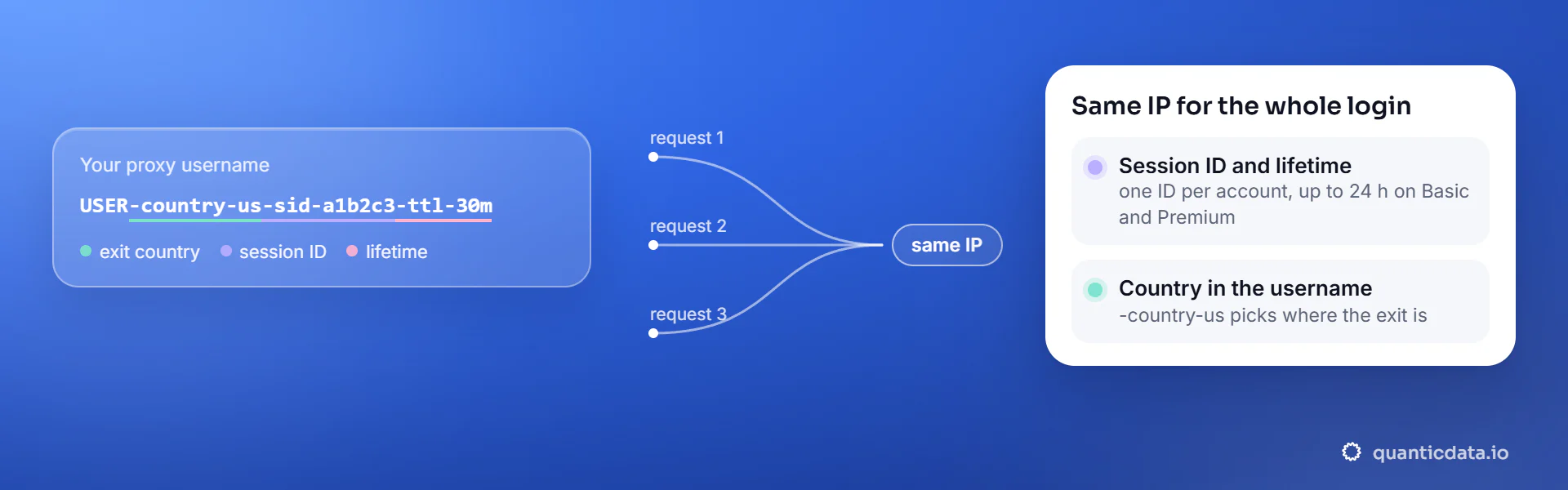
Best countries for iPhone and Shadowrocket residential proxies
The exits most often asked for with iPhone and Shadowrocket, and why. Every country page lists the networks available and the username codes.
Residential Proxies pricing for iPhone and Shadowrocket
Residential Basic, per GB, bandwidth valid for the whole plan term. Intermediate bundles and the Premium line (from $2.20/GB, city and ISP catalog) are on the plans page. Free trial: 100 MB on Basic for 5 days, no card.
The same pool at every tier — a small test costs exactly $1.00/GB. Full ladder and terms on the pricing page.
How to start with iPhone and Shadowrocket in minutes
- Create a free QuanticData account and open Plans → Residential; pick a bundle — $1.00/GB is enough to test iPhone and Shadowrocket on your real workflow.
- Copy host, port, username and password from the dashboard. Put the country in the username (
-country-us), and state or city if the job is local (-region-…-city-…), and a session ID with a lifetime when the iPhone and Shadowrocket flow must keep one IP. - In Shadowrocket add a server of type HTTP or SOCKS5 with the QuanticData host, port, username (country, session ID, TTL) and password, enable it, and confirm the exit with a geolocation check; Potatso and other iOS proxy apps take the same four values.
- Run a small sample first and watch how iPhone and Shadowrocket responds; a residential IP is not a promise of access, acceptance or a particular success rate, and the apps' terms and the law apply to what you do through it.
Set it up for iPhone & Shadowrocket
QuanticData residential proxies are standard HTTP and SOCKS5 endpoints: a host, a port, a username and a password, shown in your dashboard the moment a plan is active. The username carries the country, the state and the city, and the session; host, port and password never change. Shadowrocket takes an HTTP or SOCKS5 server with authentication and routes every app on the phone through it, on Wi-Fi and on cellular. Potatso and other iOS proxy apps that take a username and password work the same way.
host      PROXY_HOST                     # from your dashboard
port      PORT                           # the HTTP port, or the SOCKS5 port for a SOCKS5 node
username  USER-country-us-sid-iphone-ttl-120m
password PASS- Get the four values. In your QuanticData dashboard pick the plan and use the endpoint generator: host, HTTP and SOCKS5 port, username with the country and a session ID with a lifetime (the whole phone will share it), and the password.
- Add the server in Shadowrocket. Tap + on the home screen. Type: HTTP (for the HTTP port) or Socks5 (for the SOCKS5 port). Address: the host. Port: the port of that type. User: the username string, Password: the password. Leave TLS off. Save.
- Select it and connect. Tap the new server so it becomes the active one, then switch Connected on; iOS asks once to add the VPN configuration. Global Routing: Proxy sends every app through the server; Config lets rules send some domains DIRECT.
- One sticky session for the phone. The username carries USER-country-<cc>-sid-<id>-ttl-<minutes>: one session ID per phone, a lifetime that covers the day (up to 1440 minutes on mobile and Residential Premium, 120 on Residential Basic). A second identity is a second server entry with a different session ID; switch between them from the list.
- DNS. Shadowrocket sends the hostname to the proxy, so the site is resolved at the exit; leave the DNS override at its default unless you have a reason. A domain listed as DIRECT in a Config rule bypasses the proxy for that domain.
- Test the exit. Open https://ipinfo.io/json in Safari: the org should be a carrier (mobile) or a home ISP (residential), the country the one in the username. Then open the apps you care about; they see the same exit.
- Potatso and other apps. Potatso takes the same four values: add an HTTP or SOCKS5 proxy with server, port, user name and password, or import the generator line in the http://user:pass@host:port format as a link, then pick Global mode so every app goes through it. Any iOS proxy app that accepts a server with a username and password works the same way.
- Typical errors. "Connection failed" or a timeout: the port belongs to the other protocol (HTTP port on a Socks5 entry, or the reverse), or the host is misspelled. HTTP 407 / authentication failed: a typo in the username, a password regenerated since, or a plan with no bandwidth left. Apps log you out at the same time every day: the ttl expired, raise it.
FAQ
Residential Proxies for iPhone and Shadowrocket: does it work, which session, how to set it up, proxy clients, free options, mobile or residential.
Something else? Ask usDo residential proxies work with iPhone and Shadowrocket?
QuanticData residential proxies work with iPhone and Shadowrocket the way any proxy does: they change the network your traffic leaves from, to real home-ISP IPs in 228 countries. A proxy changes the network the phone's traffic leaves from; it does not change the Apple ID's region, the App Store country, or the SIM's country, which some apps also read. Apps' and platforms' terms apply to what you do through the proxy.
Which proxy session should I use for iPhone and Shadowrocket: sticky or rotating?
QuanticData recommends a sticky session for iPhone and Shadowrocket. One sticky session for the phone with a TTL up to 24 hours; a new session only when you deliberately change identity. Sessions are set in the username (a session ID and a lifetime, up to 24 hours on Basic and Premium), so no proxy list is needed.
Does Shadowrocket work with username-and-password proxies?
QuanticData exits work in Shadowrocket as HTTP or SOCKS5 servers with authentication: enter the host, port, your username with the country and session parameters, and your password. Traffic from every app then leaves from that exit, on Wi-Fi or cellular, until you switch it off.
How do I set up a residential proxy for iPhone and Shadowrocket?
QuanticData gives you host, port, username and password the moment a plan is active: create a free account, open Plans → Residential, pick a bundle ($1.00/GB to start) and copy the credentials from the dashboard. In Shadowrocket add a server of type HTTP or SOCKS5 with the QuanticData host, port, username (country, session ID, TTL) and password, enable it, and confirm the exit with a geolocation check; Potatso and other iOS proxy apps take the same four values. For iPhone and Shadowrocket, the countries asked for most are the United States, the United Kingdom and the United Arab Emirates.
Can I use OpenClash with QuanticData for iPhone and Shadowrocket?
QuanticData residential proxies are standard HTTP and SOCKS5 endpoints with a host, a port, a username and a password, so any client that accepts a proxy node works, OpenClash included: enter those four values as an http or socks5 node in OpenClash on the router, or in Clash on Android and desktop, and iPhone and Shadowrocket traffic from every device the rules send to that node leaves through the exit set in the username. For iPhone and Shadowrocket give each account its own sticky session — a session ID and a lifetime in the username — so the traffic keeps one IP for the whole login. Host and port are in your dashboard; the HTTP and the SOCKS5 port are different, so pick the one that matches the node type.
Is there a free residential proxy for iPhone and Shadowrocket?
QuanticData does not give away residential proxies for iPhone and Shadowrocket: what is free is the trial — 100 MB on Residential Basic for 5 days, no card — enough to run a small iPhone and Shadowrocket test before the $5 starter. Public "free proxy" lists are shared by many people at once, slow and gone within days; they also change daily, so nothing built on them keeps working for long.
Mobile or residential proxies for iPhone and Shadowrocket?
QuanticData's answer for iPhone and Shadowrocket is residential for most jobs, the network this page is about: the phone needs one stable exit with a long session, which Residential Premium provides at a lower price per GB, and home-ISP addresses in 228 countries with state and city targeting cost from $1.00/GB. Mobile is worth its higher price only when an iPhone and Shadowrocket account or app expects a phone; the mobile page for iPhone and Shadowrocket covers that case.
Get residential proxies for iPhone and Shadowrocket in minutes
Free account, pick a bundle, credentials in your dashboard. Residential starts at $1.00/GB.
Buy residential bandwidth Create a free account