
Shadowrocket proxy setup takes four fields and one switch: tap + on the Home tab, set Type to HTTP (or Socks5), fill Address, Port, User and Password, and tap Save. Then tap the server, set Global Routing to Proxy, run the Connectivity Test and switch Shadowrocket on. Below: every field, the routing modes, ISP and mobile proxies, and a fix for each error.
Shadowrocket is a rule-based proxy client for iPhone and iPad, made by Shadow Launch Technology Limited. It takes the traffic of the apps on the phone, on Wi-Fi and on cellular, and sends it to the proxy server you add. It comes with no servers of its own: its App Store notes say users provide their own configuration. Everything below happens inside the app. The field names are the ones in Shadowrocket's own App Store screenshots, and the values come from the QuanticData endpoint generator.
What you need before you start
- Shadowrocket on the iPhone. It is a paid app on the App Store and needs iOS 13.0 or later; the same listing covers iPad, Mac and Apple TV.
- A proxy plan. Residential Premium, ISP or mobile. The table further down says which one fits which job.
- Four values: host, port, username and password. In the QuanticData dashboard they are under My proxies, on the plan's page, in the Endpoint generator. Open Connection details there and each value has its own copy button, so the four Shadowrocket fields can be filled by copy and paste on the iPhone itself.
From the generator line to Shadowrocket's four fields
The generator gives one line in the format host:port:user:pass. Shadowrocket has no single field for it: the line splits at the colons into the fields of the Add Server screen.
# the line from the generator (output format host:port:user:pass)
residentialpremium.quantumproxies.io:8080:USER-country-jp-sid-p01-ttl-60m:PASS

# the same proxy in Shadowrocket's Add Server screen
Type      HTTP
Address   residentialpremium.quantumproxies.io
Port      8080
User      USER-country-jp-sid-p01-ttl-60m
Password  PASS
User takes the whole username, with everything after the first dash: -country-jp picks Japan as the exit country, -sid-p01 names the session and -ttl-60m keeps the same IP for 60 minutes. Cut it at the first dash and the proxy still answers, but the phone leaves from a random country on a new IP at every connection. USER and PASS stand for your own credentials.
Step by step: add a proxy in Shadowrocket
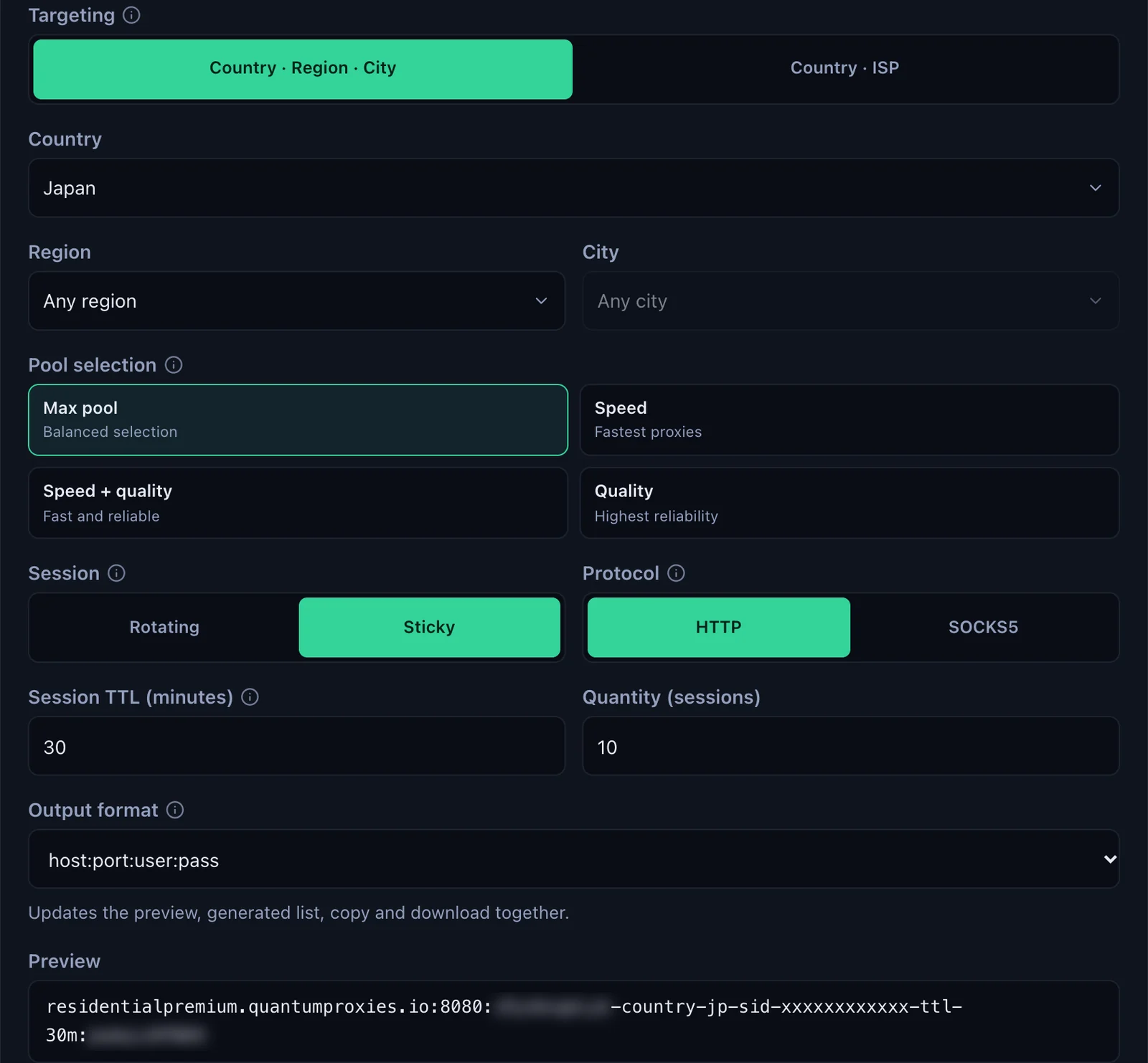
- Generate the line. In the QuanticData dashboard open My proxies, then your Residential Premium plan. In the Endpoint generator choose the Country (Japan in this guide, plus a Region or City if you need one), set Session to Sticky, set Session TTL (minutes) to at least the time you will use the phone, choose the Protocol and keep Output format on host:port:user:pass.
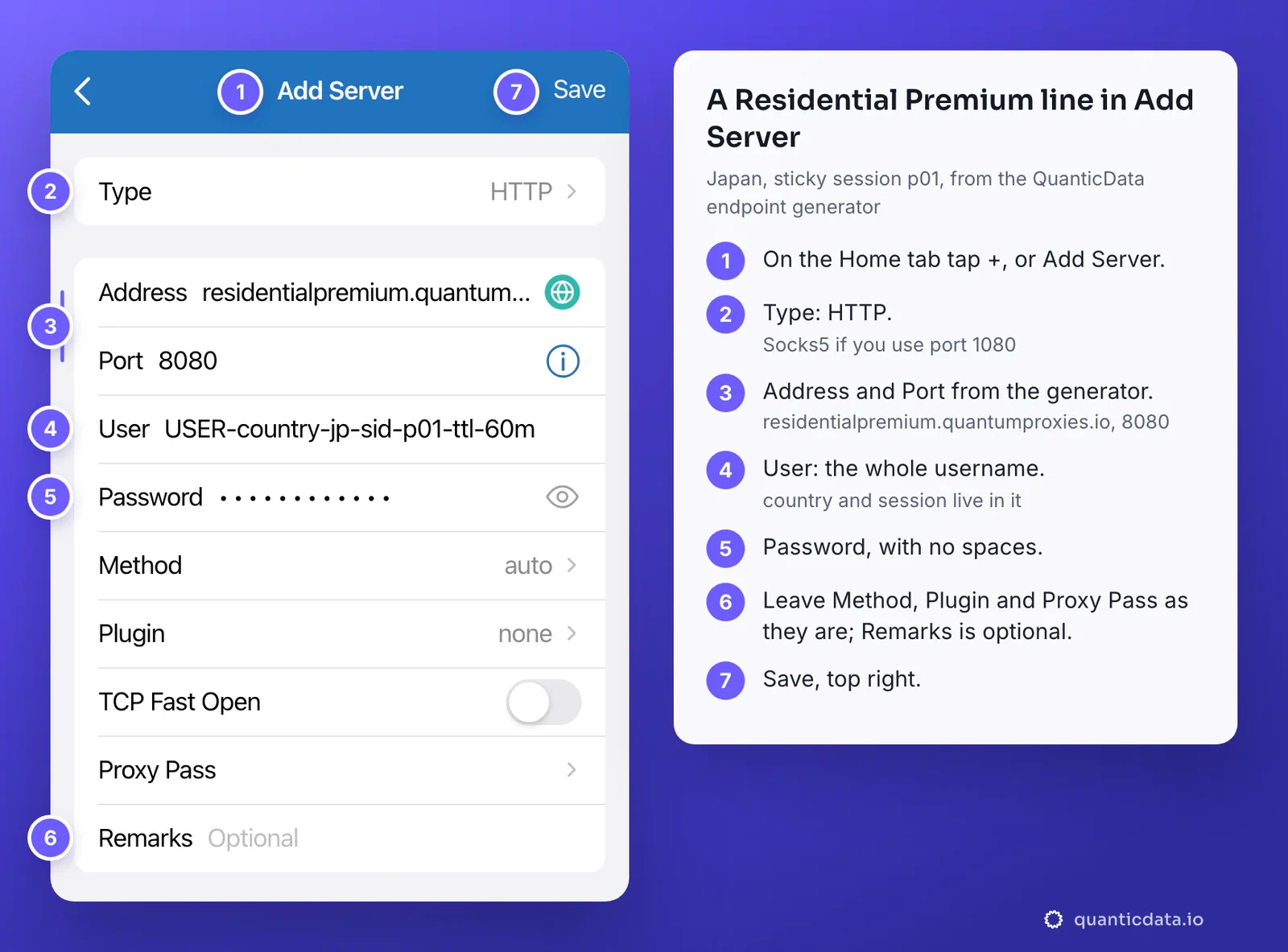
- Open Shadowrocket and tap + in the top right corner of the Home tab, or tap Add Server.
- Set Type. Tap Type and choose HTTP for port 8080, or Socks5 for port 1080. The list is long; these are the two to use.
- Fill Address and Port. Address takes a domain or an IP: residentialpremium.quantumproxies.io. Port is 8080 for HTTP and 1080 for Socks5.
- Fill User and Password. Paste the whole username into User and the password into Password, with no space before or after.
- Leave the other rows as they are. Method, Plugin, TCP Fast Open and Proxy Pass stay on their defaults. Remarks is an optional name for the server.
- Tap Save. The server appears on the Home tab, under Local Servers.
Global Routing: what goes through the proxy
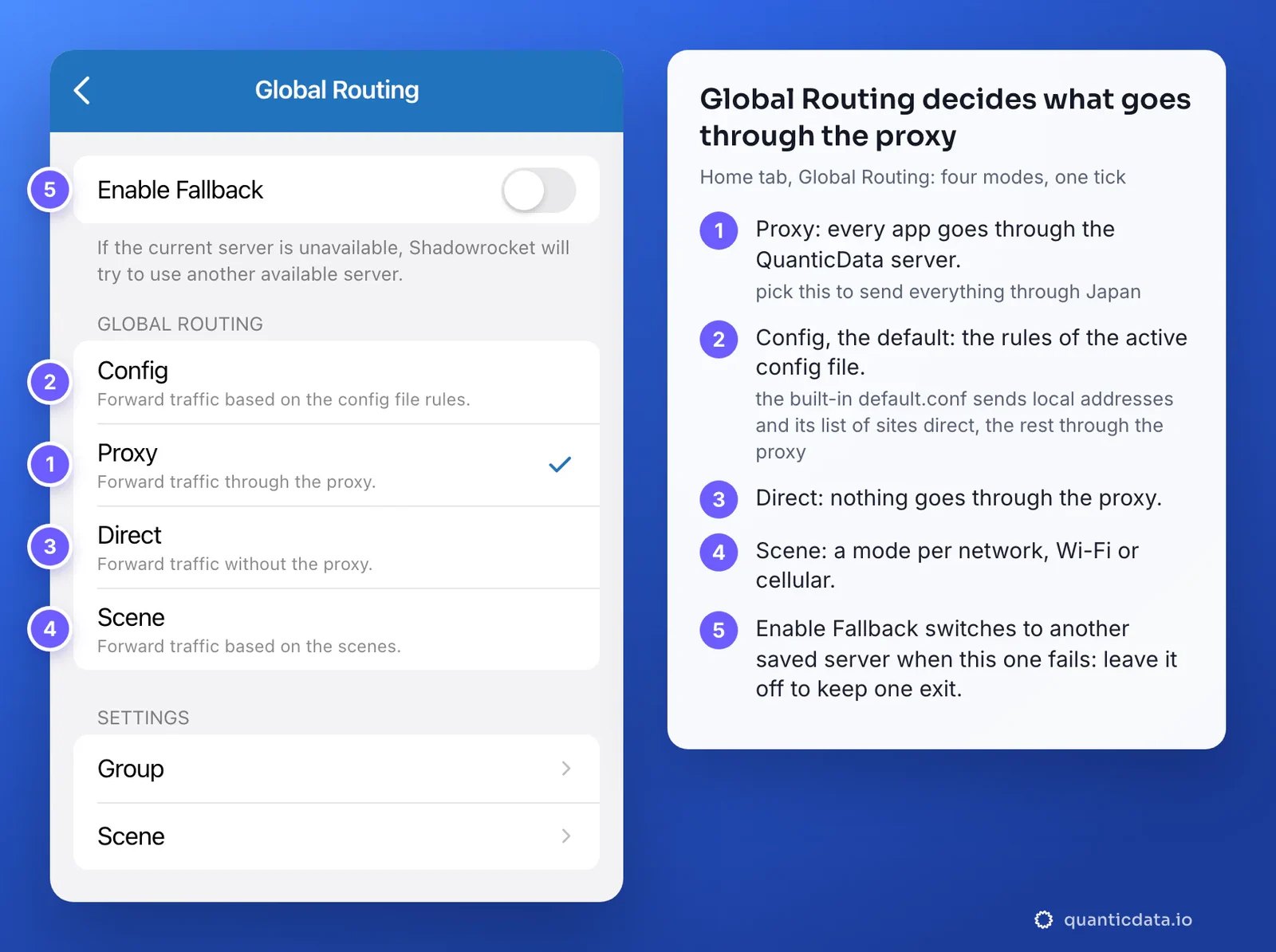
A saved server does nothing until Shadowrocket is told what to send through it. That is Global Routing, the second row of the Home tab, and the setting behind most "connected but nothing changed" questions. Tap it and four modes appear, one ticked:
| Mode | What it does | When to pick it |
|---|---|---|
| Proxy | Every app's traffic goes through the selected server | To send the whole phone through QuanticData, and for the first check |
| Config | The rules of the active config file decide, site by site, proxy or direct | When only some sites or apps should use the proxy |
| Direct | Nothing goes through the server | To pause the proxy without switching Shadowrocket off |
| Scene | A different mode per network type, Wi-Fi or cellular | When the phone should use the proxy on one network only |
- Tap Global Routing on the Home tab.
- Tick Proxy to send everything through the QuanticData server. This is the mode to start with: nothing is decided by rules, so the exit check shows the proxy or a real error.
- Leave Enable Fallback off with one server. When it is on and the server fails, Shadowrocket moves to another saved server, which may be a different exit.
- Go back to the Home tab. The Global Routing row now reads Proxy.
Config is the default, and it is why a fresh setup can look half-working. In Config mode Shadowrocket follows the active config file, on the Config tab. The built-in one, default.conf, sends local network addresses and its list of sites direct and only the rest through the proxy, so a site on that list keeps seeing your own IP while others see the proxy. Keep Config when you want that split, with your own rules; pick Proxy when everything should leave from the QuanticData exit.
Switch it on and check where it exits
- Tap the server. The dot next to it marks the default server, the one Shadowrocket uses.
- Check that Global Routing reads Proxy.
- Run the Connectivity Test. A time in milliseconds next to the server means it answered; timeout means it did not. In the Settings tab, set Test Method to CONNECT: the test then sends a request through the proxy, so a wrong username fails it. With TCP it only opens a connection to the gateway, and a wrong password can still show a time.
- Switch Shadowrocket on with the switch at the top of the Home tab. The first time, iOS asks to add a VPN configuration: tap Allow and confirm with your passcode or Face ID. That is how Shadowrocket takes over the phone's traffic; the proxy itself is not a VPN.
- Check the exit. Open Safari and load ipinfo.io/json. The country, region and time zone have to match the country in User.
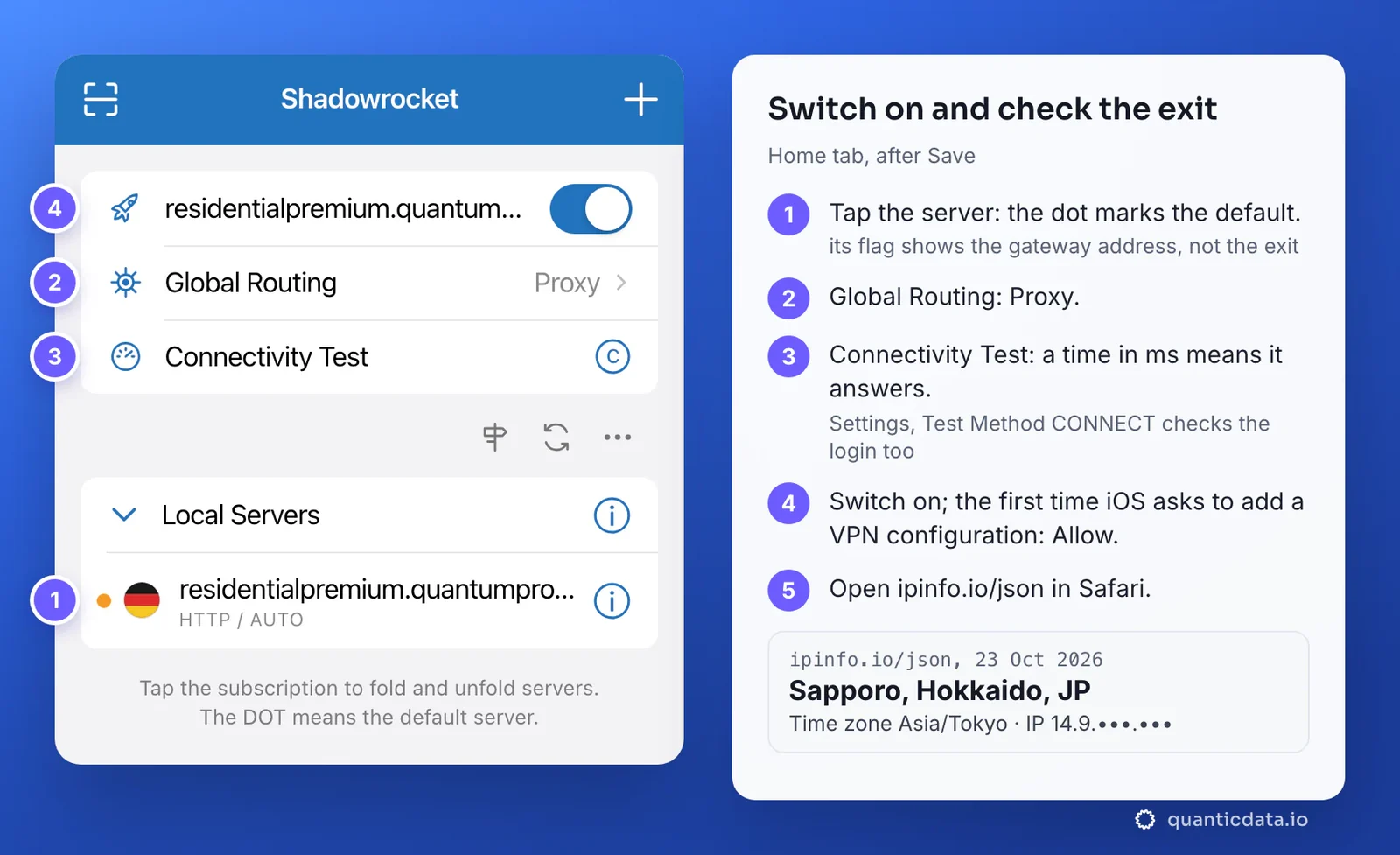
Our check, on 23 October 2026, through a Residential Premium sticky line with -country-jp: the site saw an address in Sapporo, Hokkaido, with the time zone Asia/Tokyo. With only the country in the username, the city is wherever in Japan the session lands; choose a Region or City in the generator when the city matters. More Japanese exits are on the page for proxies in Japan.
Do not judge the exit by the flag next to the server. Shadowrocket takes the flag from the server's name or from its address, which is the gateway, so a Japanese line can show another country's flag. The IP page is the check that counts.
HTTP, HTTPS or Socks5 in Shadowrocket
| Type in Shadowrocket | QuanticData port | Use it for |
|---|---|---|
| HTTP | 8080 | The default: web pages and most apps. HTTPS sites stay encrypted end to end, because the proxy relays them with the CONNECT method without reading them. |
| Socks5 | 1080 | Apps that open connections other than web pages. |
| HTTPS | not used | In Shadowrocket this type means an encrypted connection to the proxy itself, which ports 8080 and 1080 do not speak. Choosing it is a common cause of timeout. |
Both HTTP and Socks5 work on every QuanticData network. What breaks a server is never the choice itself, only a Type that does not match its Port.
One sticky session per iPhone
A phone that stays logged in to apps should look like one person on one connection. A rotating proxy changes IP on every connection, which is wrong for that. A sticky session keeps one IP for as long as the session lives, and the session lives in the username, so the server never has to change once it is saved.
# the iPhone, all day in Japan
User  USER-country-jp-sid-p01-ttl-1440m

# an iPad on the same plan: its own session, never p01
User USER-country-jp-sid-p02-ttl-1440m- A lifetime longer than the day. The generator accepts up to 1440 minutes. When the session ends, the next connection gets a new IP, and an app can read that as a new login location.
- A new IP when you want one. Change the value after
-sid-: tap the (i) next to the server, edit User and save. Or keep two or three servers with different session IDs and tap the one you want; the dot moves and the exit moves with it. - One session per device. Two devices on the same line share one IP.
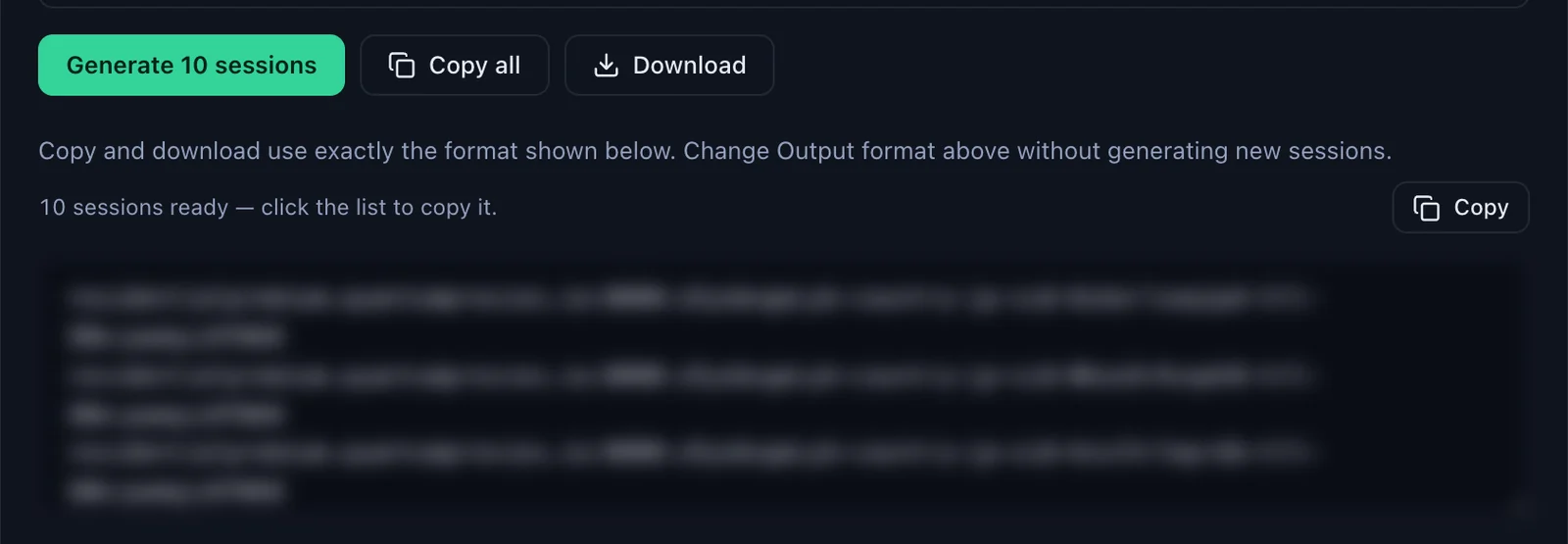
With Session set to Sticky, the generator makes as many lines as the Quantity field says, ten by default, each with its own session ID, and Copy all or Download takes them out together.
Residential Premium, ISP and mobile proxies in Shadowrocket
| Proxy type | In Shadowrocket | Good for |
|---|---|---|
| Residential Premium | One server per sticky session; HTTP 8080 or Socks5 1080; country, region, city or ISP in User; username and password only | Most uses: a home IP in Japan or in the country you choose |
| ISP | The fixed IP from Assigned IPs in Address, its own User and Password; HTTP on port 50100, Socks5 on port 50101 | Accounts that should keep the same address for the whole plan |
| Mobile | The gateway host in Address (Global, USA, EU or Asia); HTTP 8080 or Socks5 1080; a sticky session in User, with -type-mobile | Apps that expect a phone on a carrier network |
| Datacenter | The same four fields, from the plan's page | Quick tests where the type of IP matters less |
Residential Premium
The steps above are the Residential Premium setup. The targeting goes in User: country, region and city, or country and ISP. The Premium generator authenticates by username and password only, which is also what a phone needs. More on the network on the page for QuanticData residential proxies.
ISP proxies
ISP plans give fixed IPs, listed on the plan's page under Proxy endpoints, Assigned IPs. Keep Output format on IP:Port:Username:Password and every line maps to Shadowrocket the same way as the generator line: the IP goes in Address, then Port, User and Password.
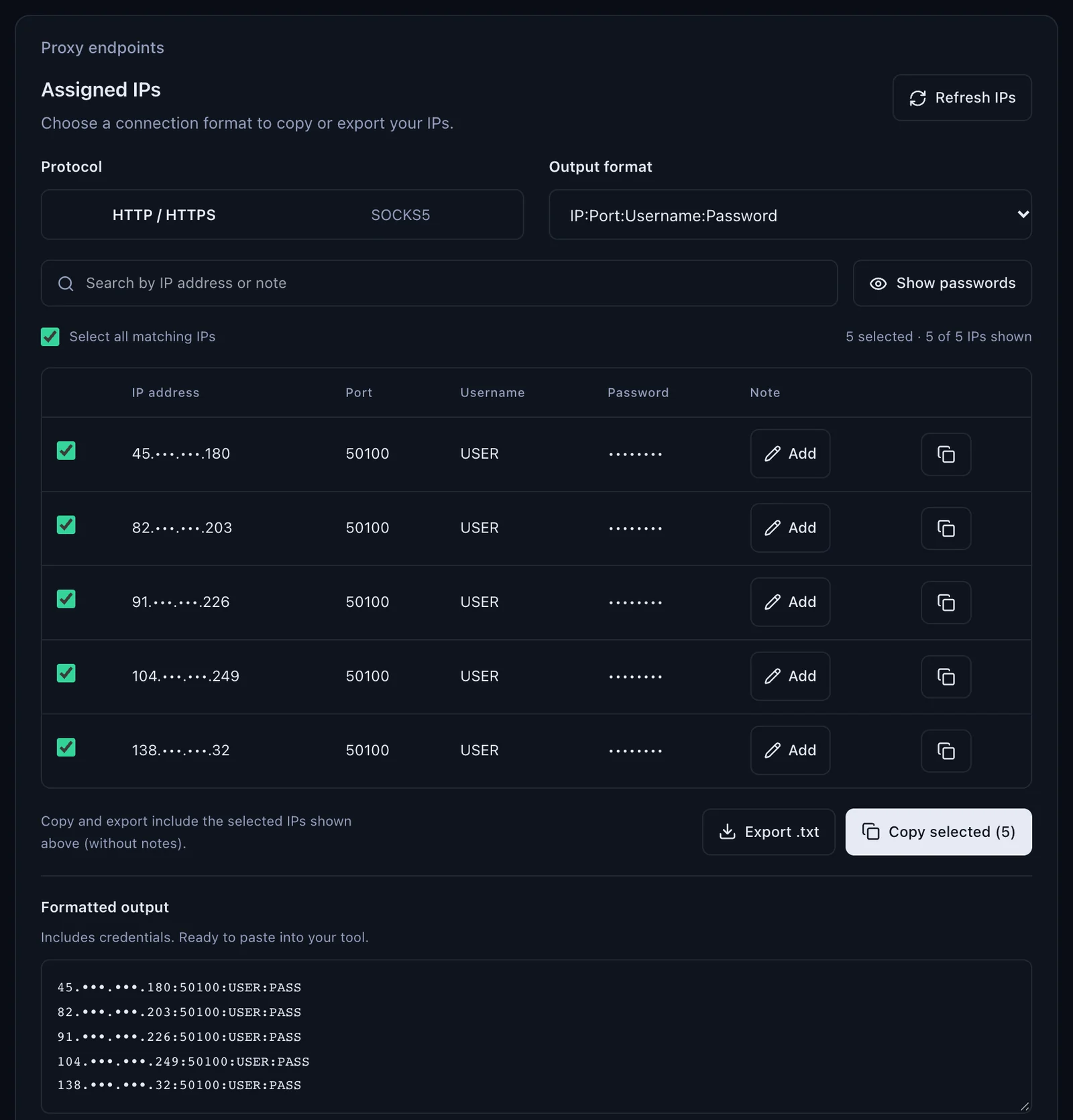
# one line from Assigned IPs (IP:Port:Username:Password)
82.•••.•••.203:50100:USER:PASS

# the same IP in Shadowrocket's Add Server screen
Type      HTTP
Address   82.•••.•••.203
Port      50100
User      USER
Password  PASS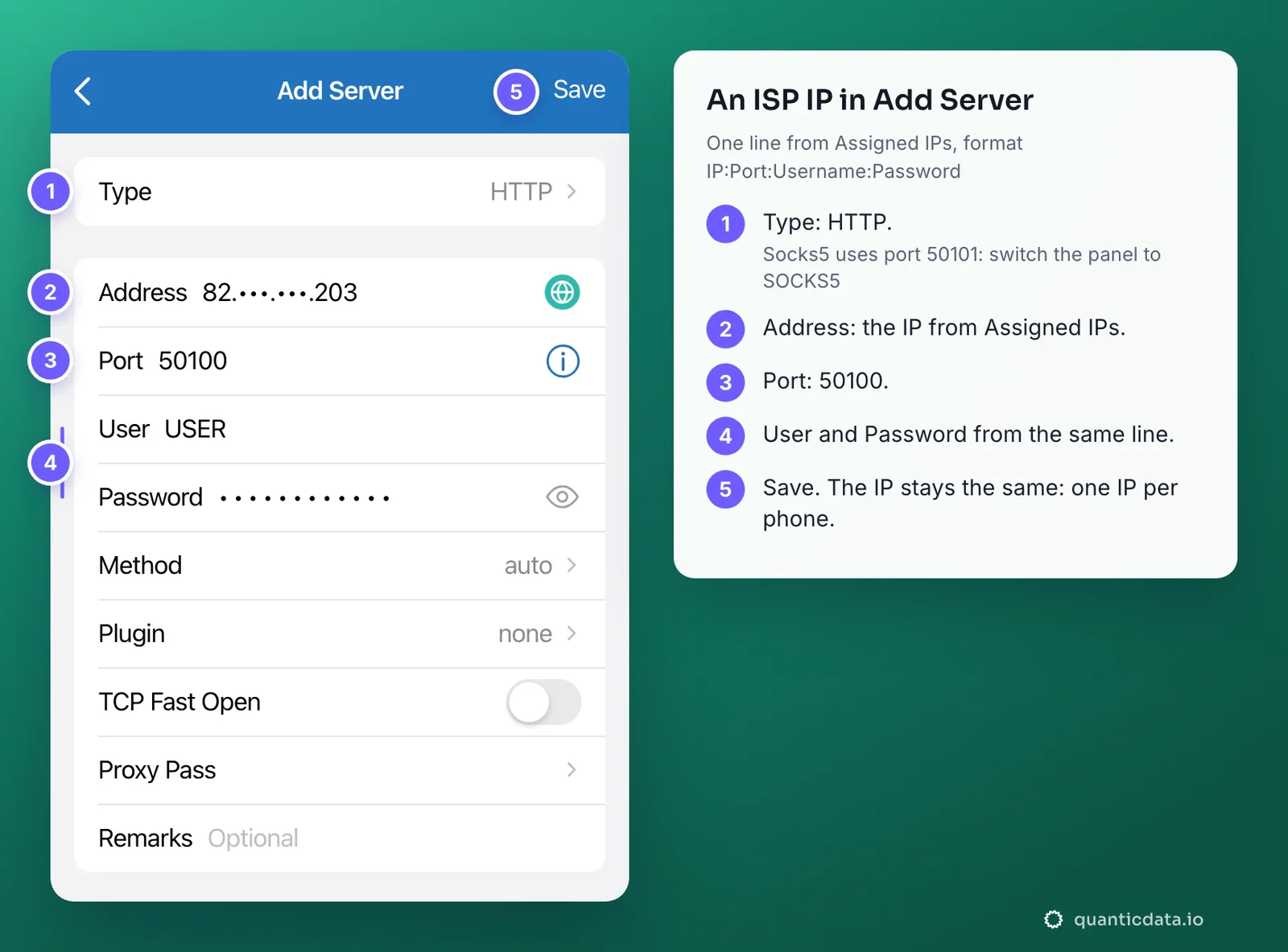
Each IP has its own login. Type HTTP goes with port 50100; for Socks5, switch the panel's Protocol to SOCKS5 and the list shows the same IPs on port 50101. The address does not change, so there is nothing to rotate: one IP per phone, for as long as the plan runs. Japanese addresses are on the page for ISP proxies in Japan.
Mobile proxies
Mobile plans go in exactly the same way. In the Mobile Endpoint generator choose the Proxy host (gateway), Global, USA, EU or Asia, then the Session and the Protocol, HTTP on 8080 or SOCKS5 on 1080, and copy the four values from Connection details. The Global gateway is mobile.quantumproxies.io. Keep Session on Sticky for a phone that stays logged in: the username then carries -type-mobile and the session, and a new session ID gives a new carrier IP.
# a mobile sticky line in Shadowrocket's Add Server screen
Type      HTTP
Address   mobile.quantumproxies.io
Port      8080
User      USER-country-jp-type-mobile-sid-m01-ttl-60m
Password  PASS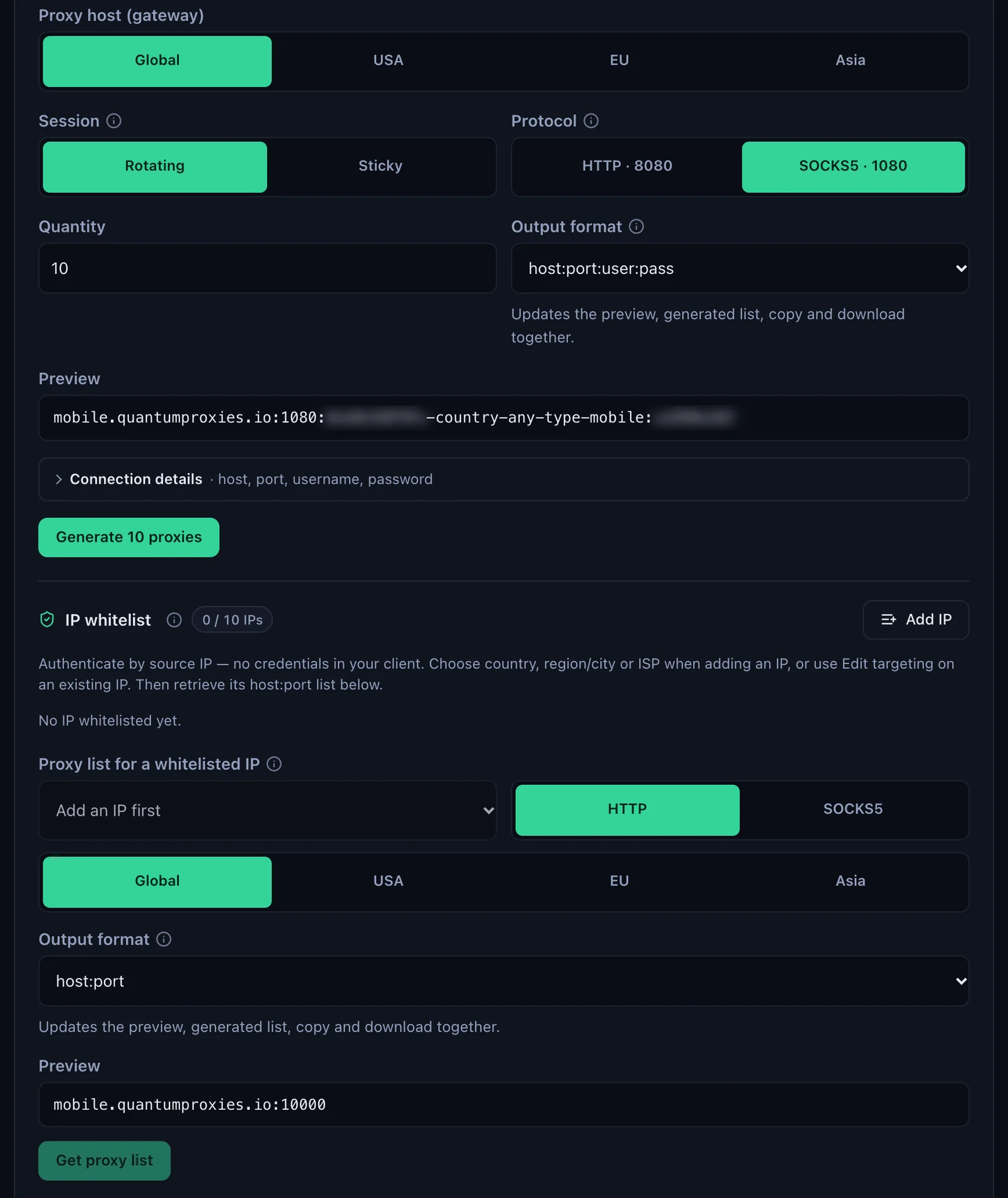
Mobile plans also offer an IP whitelist: the proxy recognises your public IP and no login is sent. In Shadowrocket, User and Password are optional, so they stay empty. It only suits a connection whose public IP never changes. An iPhone that moves between Wi-Fi and cellular changes its public IP with every network, so on the phone keep username and password. Japanese carriers are on the page for mobile proxies in Japan.
Shadowrocket proxy not working: errors and fixes
Shadowrocket shows a problem in three ways: the Connectivity Test prints timeout next to the server instead of a time, the switch is on and pages do not load, or everything loads but the IP is still yours. These are the cases behind them, in the order to check.
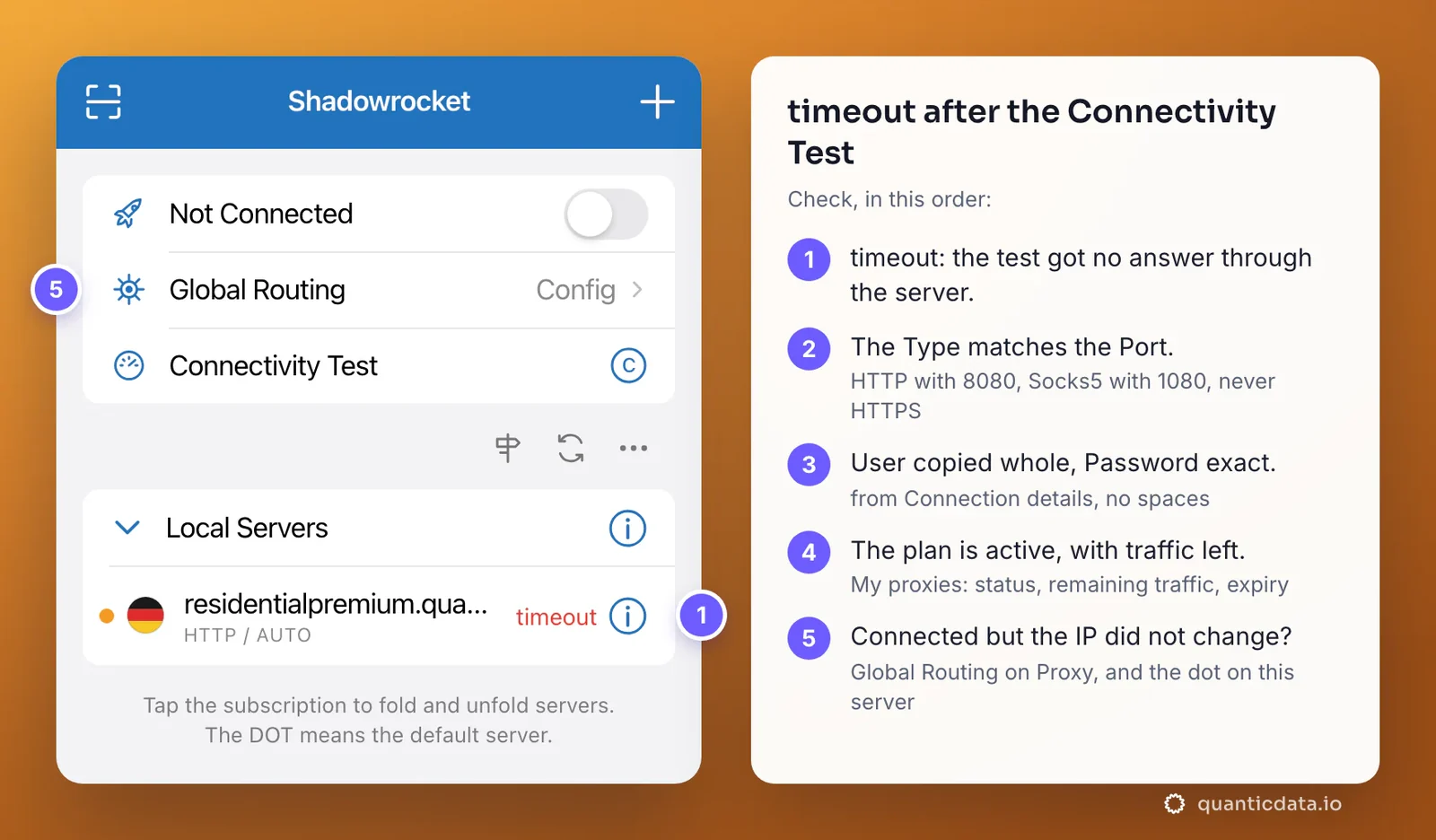
| What you see | Usual cause | Fix |
|---|---|---|
| timeout after the Connectivity Test | The Type does not match the Port: HTTP on 1080, Socks5 on 8080, or HTTPS chosen | HTTP with 8080, Socks5 with 1080 |
| timeout with the right Type, or a time but no pages | User cut at the first dash, a typo in Password, or a space from the paste | Copy each value again from Connection details; set Test Method to CONNECT so the test checks the login |
| It worked yesterday, fails today | The plan expired or its traffic is used up | Check the plan in My proxies: status, remaining traffic, expiry date |
| Connected, but the IP did not change | Global Routing is on Config and the config rules send that site direct, or on Direct; or another server has the dot | Global Routing: Proxy; tap the QuanticData server so the dot is on it; reload the page |
| Wrong country | No -country- in User, or Worldwide chosen in the generator | Generate the line with a country; the flag next to the server does not count |
| The IP changes during the day | The session lifetime ended | A longer -ttl-, up to 1440m; a new -sid- only when you want a new IP |
If the switch turns itself off right after you turn it on, Shadowrocket could not start the connection: run the Connectivity Test with Test Method CONNECT and go down the table from the first row.
Before you use it
A proxy changes where the phone's traffic comes from, not what its apps allow. Keep to each app's terms and to the law where you are. With Global Routing on Proxy every app on the phone goes through the server and every byte counts against the plan's traffic; when the phone does not need the exit, switch Shadowrocket off or set Global Routing to Config with your own rules.