Residential Proxies for ChatGPT
Residential proxies for ChatGPT are home-ISP IP addresses that let you check what ChatGPT answers about your brand and market in each country. A sticky session holds one IP per account for up to 24 hours. Plans start at $1.00/GB and fall to $0.80/GB, with a free 100 MB trial.
On 14 September 2026 we loaded chatgpt.com in a real-browser test through a QuanticData residential exit on Charter Communications Inc (AS12271) in the United States: HTTP 200, page settled in 5,424 ms.
Home-ISP IPs in 228 countries · Rotating or sticky · HTTP and SOCKS5

What is ChatGPT, and why put a proxy in front of it?
ChatGPT is the assistant most people mean when they say "ask the AI": a chat interface on chatgpt.com, native apps, and the API behind thousands of products. Three kinds of teams put a proxy in front of it. Marketing and SEO teams monitor what the assistant answers about their brand, their category and their competitors in different countries, because answers are localized and change by market. Product and QA teams test their own GPTs, plugins and browsing flows from the regions their customers live in. And developers who run agents that browse the web want the agent's outgoing traffic to come from a clean, stable, geographically correct address rather than a datacenter range that many sites refuse.
What people use residential proxies for on ChatGPT
Four workflows we see on ChatGPT. None of them needs a proxy to break ChatGPT's rules; all of them need a network location and a reputation the platform treats as ordinary.
AI visibility monitoring by country
Ask the same prompts about your brand, products and category from the United States, Germany or Japan and record which companies and sources the assistant names. The answers depend on the market the request comes from, so the check has to be made from that market.
QA of custom GPTs and localized answers
Test how a custom GPT or a browsing-enabled conversation behaves for a user in another region: language, units, currency, local sources and which links it opens.
Egress for browsing agents
Agents built on the API fetch pages, search and fill forms. Route that traffic through a proxy so the agent looks like a normal visitor from one country instead of a cloud IP that many sites throttle.
Ad and content verification
Check the sponsored placements and cited pages that appear in answers for a given region, the same way ad-verification teams check search results.
Why residential proxies for ChatGPT
For volume work — hundreds of prompts a day per country, or an agent that fetches many pages — a residential proxy is the economical choice: home ISP addresses in 228 countries, priced per GB from $1.00 down to $0.80, and rotating exits so no single address carries all the traffic. It is the network to use when the question is "what does the assistant say in Brazil" and the answer has to be sampled many times.
What a proxy does not do. A proxy changes the network location of the request; it does not change your OpenAI account, its plan, its rate limits or the terms you agreed to. Availability of the service in a country and the platform's rules are the user's responsibility. Carrier IPs for the same job are on the mobile proxies for ChatGPT page.
Sources: OpenAI Terms of Use and ChatGPT supported countries.
Best residential proxies for ChatGPT
A logged-in ChatGPT account needs one exit for the whole conversation: a change of IP in the middle of a chat is what brings the login page back. The exit country decides which sources and which localized answers you see, so brand-monitoring runs need one exit per market you care about. With QuanticData the exits asked for most are the United States, Germany and Japan, with state and city targeting in the username at no extra cost.
Chat traffic is text and small JSON, so a monitoring run is light on bandwidth; a browsing agent that opens the pages it cites costs far more than the chat itself. On the residential network that means Residential Basic or Premium, rotating or sticky for up to 24 hours, from $1.00/GB with a free 100 MB trial. For ChatGPT accounts the mobile network is the better fit, because the platform is used from phones; residential is the economical choice for reading its public data at volume.
Which session to use for ChatGPT: sticky or rotating
Sticky (one IP per account). A logged-in ChatGPT session should keep one IP for its whole life: switching addresses mid-conversation is what triggers re-authentication. Use a sticky session with a TTL long enough for the run, and a separate session ID per account. For unauthenticated monitoring through the API, rotating is fine. Country, session and targeting go in the username; credentials are in your dashboard after purchase.
# PROXY_HOST = host:port shown in your dashboard
# rotating: a new home IP on every request
curl -x "$PROXY_HOST" -U "USER-country-us:PASS" https://ipinfo.io/json

# sticky: keep one IP for a session (session ID and lifetime are set in the generator;
# up to 24 hours on Basic and Premium)
curl -x "$PROXY_HOST" -U "USER-country-us-sid-chatgp-ttl-30m:PASS" https://ipinfo.io/json

# state and city targeting
curl -x "$PROXY_HOST" -U "USER-country-us-region-REGION-city-CITY:PASS" https://ipinfo.io/json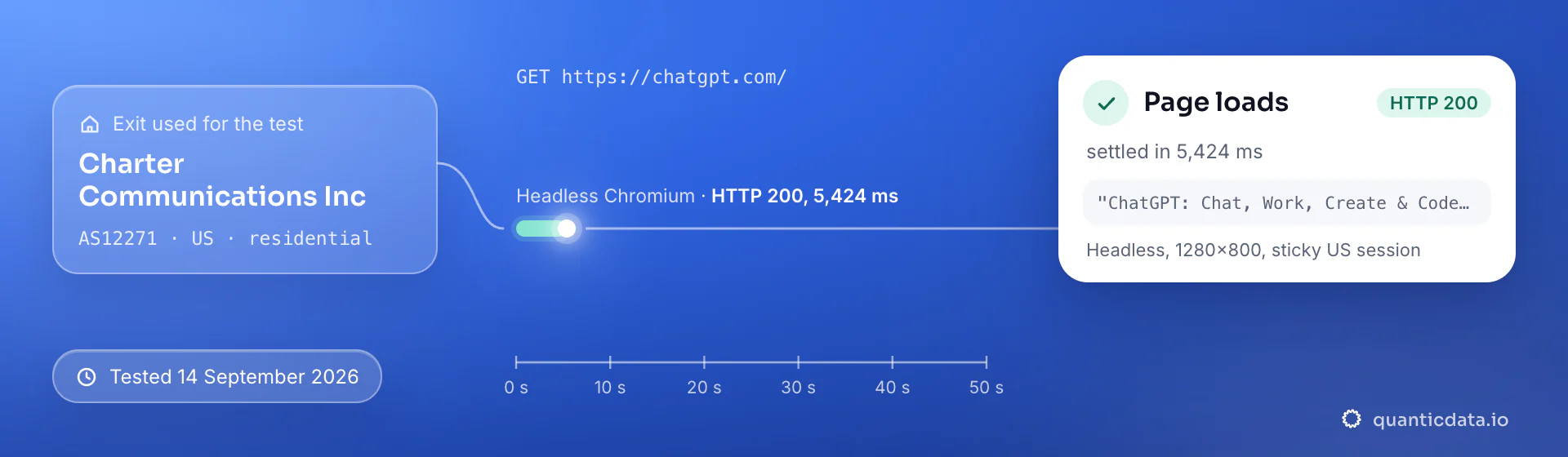
Best countries for ChatGPT residential proxies
The exits most often asked for with ChatGPT, and why. Every country page lists the networks available and the username codes.
Residential Proxies pricing for ChatGPT
Residential Basic, per GB, bandwidth valid for the whole plan term. Intermediate bundles and the Premium line (from $2.20/GB, city and ISP catalog) are on the plans page. Free trial: 100 MB on Basic for 5 days, no card.
The same pool at every tier — a small test costs exactly $1.00/GB. Full ladder and terms on the pricing page.
How to start with ChatGPT in minutes
- Create a free QuanticData account and open Plans → Residential; pick a bundle — $1.00/GB is enough to test ChatGPT on your real workflow.
- Copy host, port, username and password from the dashboard. Put the country in the username (
-country-us), and state or city if the job is local (-region-…-city-…), and a session ID with a lifetime when the ChatGPT flow must keep one IP. - Set the proxy at the operating-system or browser level for the web app (a browser profile per account), or pass it as the HTTP proxy of the SDK when the traffic is your own agent's browsing.
- Run a small sample first and watch how ChatGPT responds; a residential IP is not a promise of access, acceptance or a particular success rate, and ChatGPT's terms and the law apply to what you do through it.
Set it up for ChatGPT
QuanticData residential proxies are standard HTTP and SOCKS5 endpoints: a host, a port, a username and a password, shown in your dashboard the moment a plan is active. The username carries the country, the state and the city, and the session; host, port and password never change. Below, a request to a public ChatGPT page through the residential gateway, with a session ID and a lifetime in the username, so the whole run keeps one home IP (a separate session ID per account). Logged-out fetches of chatgpt.com are light; keep one session per monitoring account and a human pace of a few prompts a minute.
# PROXY_HOST and PORT are shown in your dashboard
curl --proxy "http://PROXY_HOST:PORT" \
  --proxy-user "USER-country-us-sid-chatgp-ttl-120m:PASS" \
  --connect-timeout 10 --max-time 30 \
  -A "Mozilla/5.0 (Windows NT 10.0; Win64; x64) Chrome/128.0 Safari/537.36" \
  "https://chatgpt.com/"
import requests
# host and port from your dashboard; country and session in the username
proxy = "http://USER-country-us-sid-chatgp-ttl-120m:PASS@PROXY_HOST:PORT"
r = requests.get("https://chatgpt.com/",
proxies={"http": proxy, "https": proxy},
headers={"User-Agent": "Mozilla/5.0 (Windows NT 10.0; Win64; x64) Chrome/128.0 Safari/537.36"},
timeout=30)
print(r.status_code, len(r.text))SOCKS5 works with the same username on the SOCKS5 port (socks5h:// in Python's proxies, --socks5-hostname in curl), so the hostname is resolved at the exit.
FAQ
Residential Proxies for ChatGPT: does it work, Android and iPhone, which session, how to set it up, proxy clients, free options, what to check when it stops working.
Something else? Ask usDo residential proxies work with ChatGPT on Android and iPhone?
QuanticData residential proxies work with the ChatGPT app on Android and iPhone: the phone's traffic leaves through the proxy and ChatGPT sees the home IP, with country and session set in the username exactly as on a desktop. On iPhone the proxy goes into an app such as Shadowrocket or Potatso, which takes HTTP or SOCKS5 with your username and password and carries every app on the phone, on Wi-Fi and on cellular; on Android a proxy client app that takes a username and password, such as SocksDroid for SOCKS5, does the same.
Which proxy session should I use for ChatGPT: sticky or rotating?
QuanticData recommends a sticky session for ChatGPT. A logged-in ChatGPT session should keep one IP for its whole life: switching addresses mid-conversation is what triggers re-authentication. Use a sticky session with a TTL long enough for the run, and a separate session ID per account. For unauthenticated monitoring through the API, rotating is fine. Sessions are set in the username (a session ID and a lifetime, up to 24 hours on Basic and Premium), so no proxy list is needed.
Can I use a proxy to see what ChatGPT answers about my brand in another country?
QuanticData customers do exactly this: they route a browser profile or an API client through an exit in the target country, ask the same set of prompts, and log which brands, products and sources the assistant cites. Because answers are localized, the sample has to come from the market itself; a proxy is the only way to do it without an office there.
How do I set up a residential proxy for ChatGPT?
QuanticData gives you host, port, username and password the moment a plan is active: create a free account, open Plans → Residential, pick a bundle ($1.00/GB to start) and copy the credentials from the dashboard. Set the proxy at the operating-system or browser level for the web app (a browser profile per account), or pass it as the HTTP proxy of the SDK when the traffic is your own agent's browsing. For ChatGPT, the countries asked for most are the United States, Germany and Japan.
Can I use Shadowrocket with QuanticData for ChatGPT?
QuanticData residential proxies are standard HTTP and SOCKS5 endpoints with a host, a port, a username and a password, so any client that accepts a proxy node works, Shadowrocket included: enter those four values as a server of type HTTP or Socks5 in Shadowrocket on the iPhone, and ChatGPT traffic from the phone leaves through the exit set in the username. For ChatGPT give each account its own sticky session — a session ID and a lifetime in the username — so the phone keeps one IP for the whole login. Host and port are in your dashboard; the HTTP and the SOCKS5 port are different, so pick the one that matches the node type.
Is there a free residential proxy for ChatGPT?
QuanticData does not give away residential proxies for ChatGPT: what is free is the trial — 100 MB on Residential Basic for 5 days, no card — enough to run a small ChatGPT test before the $5 starter. Public "free proxy" lists are shared datacenter addresses that many people used before you, which is why a login through one lands in a verification loop; they also change daily, so nothing built on them keeps working for long.
ChatGPT proxy not working: what to check
QuanticData support sees the same four causes when ChatGPT stops working behind a proxy. First, the sticky session expired: its lifetime ended, the next request left from a new IP and ChatGPT asked to log in again — set a longer lifetime or a new session ID per login, up to 24 hours on Basic and Premium. Second, the wrong country: the exit does not match the account's or the storefront's country. Third, the app ignores the system proxy, which many mobile apps do; route the whole device through a proxy client, or use a desktop or antidetect profile. Fourth, authentication: a typo in the username string, or IP whitelist auth after your own public IP changed. If ChatGPT itself says it detects a proxy, that is the platform's policy, not a setting to work around.
Get residential proxies for ChatGPT in minutes
Free account, pick a bundle, credentials in your dashboard. Residential starts at $1.00/GB.
Buy residential bandwidth Create a free account