Mobile Proxies for Yandex
Mobile proxies for Yandex are 4G/5G carrier IPs, shared with real phones, that let you check Yandex's mobile results and Market app as local phone users see them. Each request can leave from a new carrier IP, and the username can pick the carrier. Plans start at $5 for 1 GB and fall to $2.30/GB, with no subscription.
On 14 September 2026 we loaded yandex.ru in a real-browser test through a QuanticData mobile exit on T-Mobile USA, Inc. (AS21928) in the United States: HTTP 200.
Real carrier IPs · Rotating or sticky · HTTP, HTTPS and SOCKS5

What is Yandex, and why put a proxy in front of it?
Yandex is the search engine of the Russian-speaking internet and a serious technology company: Search, Maps, Market, Direct advertising and one of the best reverse-image searches on the web. Companies that sell in Russia, Kazakhstan, Belarus or to Russian speakers elsewhere track their Yandex rankings and Direct ads; investigators and brand-protection teams use its image search; marketplace analysts collect Yandex Market prices. Yandex is aggressive about non-Russian and datacenter traffic, and it localizes heavily by region, so this work needs exits inside the relevant countries — which is exactly what a proxy provides.
What people use mobile proxies for on Yandex
Four workflows we see on Yandex. None of them needs a proxy to break Yandex's rules; all of them need a network location and a reputation the platform treats as ordinary.
Rank tracking by region
Positions differ between Moscow, Saint Petersburg and Almaty; measure each from an exit in that region.
Yandex Direct verification
Confirm ad placements and competitor bidding on your brand terms per city.
Yandex Market price monitoring
Collect product prices and seller offers as domestic shoppers see them.
Reverse-image search at scale
Brand-protection and OSINT teams run image lookups through rotating exits.
Why mobile proxies for Yandex
Yandex's services are phone-first in their home markets, and its mobile SERP, Maps and Market apps are what most users see. A mobile proxy on a real carrier IP in Russia or Kazakhstan gives the handset view, and a sticky session keeps a signed-in Yandex account stable for QA and Direct checks.
What a proxy does not do. A proxy makes the request originate in the region Yandex localizes for; it does not change your Yandex account or the terms for automated access, and the platform's captcha for suspicious traffic still applies if you send too much from one address. Household IPs for the same job are on the residential proxies for Yandex page.
Sources: User Agreement for Yandex Services and RFC 6598 (IETF), the shared address space used behind carrier-grade NAT.
Best mobile proxies for Yandex
SERP and maps collection rotates per query; a Yandex account for Direct or Webmaster keeps a sticky session. Yandex results are tied to Russia and the CIS, so the exit is Russia or a neighbouring market, with Turkey for the Turkish edition. With QuanticData the exits asked for most are Russian Federation, Kazakhstan and Belarus, with carriers such as MTS and Megafon selectable in the username for Russian Federation.
Results pages are light; map tiles and images are the heavier part. On the mobile network that means a session ID with a lifetime of up to 24 hours per Yandex account, or no session at all to rotate through carrier IPs, from $5 for 1 GB with no subscription. For Yandex the residential network covers most jobs at a lower price per GB; mobile earns its price when an account or the app itself expects a phone.
Which session to use for Yandex: sticky or rotating
Rotating (new IP per request). Fresh IPs per query with a moderate rate; sticky only for signed-in accounts. Country, session and targeting go in the username; credentials are in your dashboard after purchase.
# PROXY_HOST = host:port shown in your dashboard
# rotating: a new carrier IP on every request
curl -x "$PROXY_HOST" -U "USER-country-ru-type-mobile:PASS" https://ipinfo.io/json

# sticky: one carrier IP for 30 minutes (up to 1440m), one session ID per account
curl -x "$PROXY_HOST" -U "USER-country-ru-type-mobile-sid-yandex-ttl-30m:PASS" https://ipinfo.io/json

# one carrier (code from the country page)
curl -x "$PROXY_HOST" -U "USER-country-ru-isp-CARRIER-type-mobile:PASS" https://ipinfo.io/json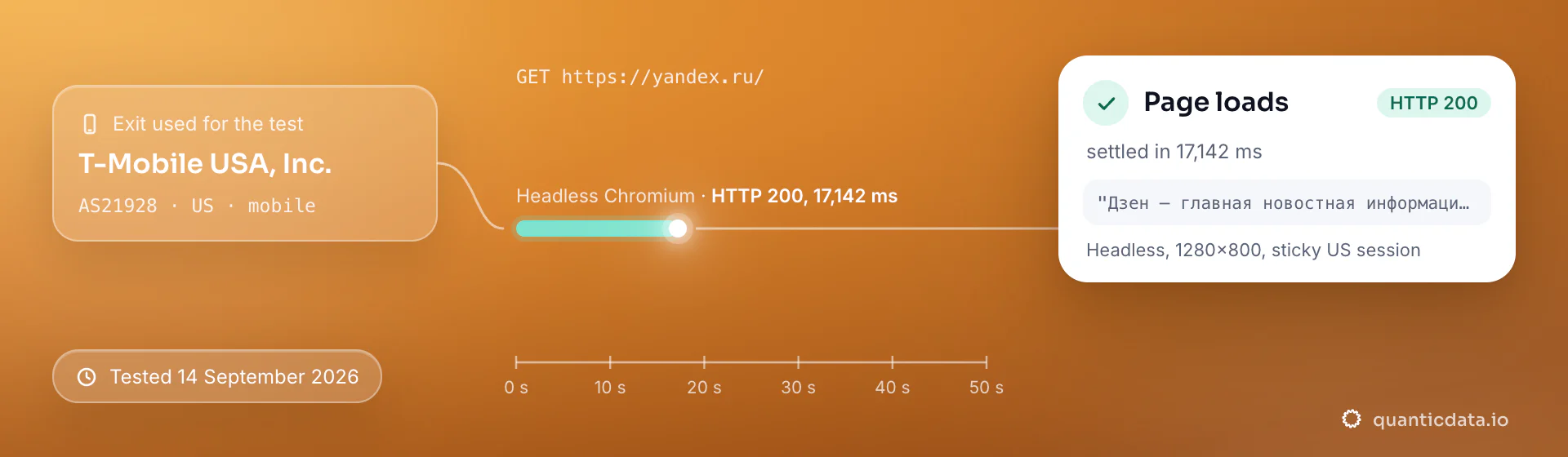
Best countries and carriers for Yandex mobile proxies
The exits most often asked for with Yandex, and why. Carriers are named only where the mobile catalog lists them; every country page shows the full list.
Russian Federation
The home market and the bulk of Yandex traffic.
MTS, Megafon, Beeline · -country-ru
Kazakhstan
The second-largest Yandex market.
Tele2 Kazakhstan, JSC Kazakhtelecom, Beeline Kazakhstan · -country-kz
Belarus
Russian-language market with separate localization.
MTS Belarus, Best CJSC, A1 Belarus · -country-by
Mobile Proxies pricing for Yandex
Per GB, valid 90 days, carrier and city targeting included, no port fees. Pay from balance, card, PayPal or crypto.
The same pool at every tier — a small test costs exactly $5 for 1 GB. Full ladder and terms on the pricing page.
How to start with Yandex in minutes
- Create a free QuanticData account and open Plans → Mobile; pick a bundle — $5 for 1 GB is enough to test Yandex on your real workflow.
- Copy host, port, username and password from the dashboard. Put the country in the username (
-country-ru), a carrier if you need one (-isp-…), then-type-mobile, and a session ID with a lifetime when the Yandex flow must keep one IP. - Pass the lr region parameter alongside an exit in that region; set Accept-Language: ru. For image search, use the direct upload flow and rotate per lookup. QuanticData's reverse-image collector also covers lookups if you prefer an API.
- Run a small sample first and watch how Yandex responds; a mobile IP is not a promise of access, acceptance or a particular success rate, and Yandex's terms and the law apply to what you do through it.
Set it up for Yandex
QuanticData mobile proxies are standard HTTP and SOCKS5 endpoints: a host, a port, a username and a password, shown in your dashboard the moment a plan is active. The username carries the country and the carrier, and the session; host, port and password never change. Below, a request to a public Yandex page through the mobile gateway, with no session ID in the username, so every request to Yandex leaves from a different carrier IP. Rotate per query and keep lr and the exit region aligned; Yandex challenges quickly, so a few queries a minute per exit is the safe pace.
# PROXY_HOST = host:port shown in your dashboard
curl -x "$PROXY_HOST" -U "USER-country-ru-type-mobile:PASS" \
  -A "Mozilla/5.0 (Windows NT 10.0; Win64; x64) Chrome/128.0 Safari/537.36" \
  "https://yandex.ru/search/?text=mobile+proxies&lr=213"
import requests
# host and port from your dashboard; country and session in the username
proxy = "http://USER-country-ru-type-mobile:PASS@PROXY_HOST:PORT"
r = requests.get("https://yandex.ru/search/?text=mobile+proxies&lr=213",
proxies={"http": proxy, "https": proxy},
headers={"User-Agent": "Mozilla/5.0 (Windows NT 10.0; Win64; x64) Chrome/128.0 Safari/537.36"},
timeout=30)
print(r.status_code, len(r.text))SOCKS5 works with the same username on the SOCKS5 port (socks5h:// in Python's proxies, --socks5-hostname in curl), so the hostname is resolved at the exit.
FAQ
Mobile Proxies for Yandex: does it work, which session, how to set it up, proxy clients, mobile or residential.
Something else? Ask usDo mobile proxies work with Yandex?
QuanticData mobile proxies work with Yandex the way any proxy does: they change the network your traffic leaves from, to real 4G/5G carrier IPs. A proxy makes the request originate in the region Yandex localizes for; it does not change your Yandex account or the terms for automated access, and the platform's captcha for suspicious traffic still applies if you send too much from one address.
Which proxy session should I use for Yandex: sticky or rotating?
QuanticData recommends rotating IPs for Yandex. Fresh IPs per query with a moderate rate; sticky only for signed-in accounts. Sessions are set in the username (a session ID and a lifetime, up to 1,440 minutes (24 hours)), so no proxy list is needed.
Why does Yandex show a captcha to my scraper?
QuanticData customers hit the Yandex captcha when too many requests leave from one address or from a datacenter range. Rotating residential exits inside Russia, a realistic request rate and the correct region parameter remove most of it; a mobile exit helps for signed-in sessions. No network makes an unreasonable rate acceptable.
How do I set up a mobile proxy for Yandex?
QuanticData gives you host, port, username and password the moment a plan is active: create a free account, open Plans → Mobile, pick a bundle ($5 for 1 GB to start) and copy the credentials from the dashboard. Pass the lr region parameter alongside an exit in that region; set Accept-Language: ru. For image search, use the direct upload flow and rotate per lookup. QuanticData's reverse-image collector also covers lookups if you prefer an API. For Yandex, the countries asked for most are Russian Federation, Kazakhstan and Belarus, with carriers such as MTS and Megafon selectable in the username for Russian Federation.
Can I use OpenClash with QuanticData for Yandex?
QuanticData mobile proxies are standard HTTP and SOCKS5 endpoints with a host, a port, a username and a password, so any client that accepts a proxy node works, OpenClash included: enter those four values as an http or socks5 node in OpenClash on the router, or in Clash on Android and desktop, and Yandex traffic from every device the rules send to that node leaves through the exit set in the username. For Yandex leave the session out of the username so every new connection rotates to a fresh IP, or add a session ID when a flow must keep one. Host and port are in your dashboard; the HTTP and the SOCKS5 port are different, so pick the one that matches the node type.
Mobile or residential proxies for Yandex?
QuanticData's answer for Yandex is residential for most jobs: the work is SERP collection at volume, one exit per query, and home-ISP addresses in 228 countries with state and city targeting cost from $1.00/GB. Mobile is worth its higher price only when a Yandex account or app expects a phone, which is what this page is about.
Get mobile proxies for Yandex in minutes
Free account, pick a bundle, credentials in your dashboard. Mobile starts at $5 for 1 GB.
Buy mobile bandwidth Create a free account