To download images from a website with Python, fetch the page with requests, find every <img> with Beautiful Soup, turn each src into a full URL with urljoin, then download each one with requests.get(url, stream=True) and write the bytes to a file. Check the content-type and skip duplicates.
We ran the script below on 20 November 2026 with Python 3.12.10 on a category page of books.toscrape.com, a public shop made for scraping practice, through a QuanticData Residential Basic session in the UK. It saved 11 images, 109,927 bytes, in 2.7 s.
The script
import hashlib, os, requests
from urllib.parse import urljoin, urlparse
from bs4 import BeautifulSoup

PROXY = "http://USER-type-residential-country-gb-session-img02-lifetime-30:PASS@residentialboson.quanticdata.io:10000"
s = requests.Session()
s.proxies = {"http": PROXY, "https": PROXY}
s.headers["User-Agent"] = "image-fetch-example/1.0 (+https://example.com/contact)"

page = "https://books.toscrape.com/catalogue/category/books/travel_2/index.html"
soup = BeautifulSoup(s.get(page, timeout=30).text, "lxml")
os.makedirs("imgs", exist_ok=True)

seen = set()
for img in soup.select("img"):
    src = img.get("src") or img.get("data-src")
    if not src:
        continue
    url = urljoin(page, src)
    with s.get(url, timeout=30, stream=True) as r:
        if r.status_code != 200 or not r.headers.get("content-type", "").startswith("image/"):
            continue
        data = r.content
    h = hashlib.sha1(data).hexdigest()
    if h in seen:
        continue
    seen.add(h)
    ext = os.path.splitext(urlparse(url).path)[1] or ".jpg"
    with open(os.path.join("imgs", h[:12] + ext), "wb") as f:
        f.write(data)
print(len(seen))   # 11
What each step does, and why
- Find the tags.
soup.select("img")found 11 on this page, one per book cover. - Resolve the URL. The first src was
../../../../media/cache/27/a5/...jpg. Requesting that string fails;urljoin(page, src)turned it intohttps://books.toscrape.com/media/cache/27/a5/...jpg. Always join against the URL of the page the tag came from. - Stream the download.
stream=Truelets you read the headers before the body. Every response here wasimage/jpeg; an HTML error page served under an image URL would be skipped instead of saved as a broken .jpg. - Name by content. A SHA-1 of the bytes as the file name means the same image saved twice under two URLs is kept once, and reruns do not create copies.
The files opened fine in Pillow: the last thumbnail measured 106 x 155 pixels.
Get the full-size image, not the thumbnail
List pages usually show thumbnails. The large file is on the product page, or in a srcset. Following the first book's link and reading #product_gallery img gave a 274 x 400 pixel cover of 51,619 bytes, against 106 x 155 in the list.
product = urljoin(page, soup.select_one("article.product_pod h3 a")["href"])
ps = BeautifulSoup(s.get(product, timeout=30).text, "lxml")
big = urljoin(product, ps.select_one("#product_gallery img")["src"])srcset and lazy-loaded images
Modern pages list several sizes in srcset and keep a placeholder in src until the image scrolls into view, with the real URL in data-src. This helper picks the widest candidate, then falls back to data-src, then src:
def best_image_url(img, base):
    if img.get("srcset"):
        cands = [c.strip().split() for c in img["srcset"].split(",")]
        url = max(cands, key=lambda c: int(c[1].rstrip("w"))
                  if len(c) > 1 and c[1].endswith("w") else 0)[0]
    else:
        url = img.get("data-src") or img.get("src")
    return urljoin(base, url)
On a test tag with 400w, 1200w, 800w candidates it returned the 1200w file, and on a tag whose src was a data: placeholder it returned the data-src URL. Some lazy loaders use other attribute names (data-lazy-src, data-original); print one tag before you write the selector. Images inserted entirely by JavaScript need a rendered page: see scraping dynamic web pages.
Images in CSS and in other tags
- <picture> holds
<source srcset>elements next to the img;soup.select("picture source")read them on our test markup. Their srcset may use density descriptors (1x, 2x) instead of widths; the helper above only rankswvalues, so for those take the last candidate, which is normally the largest. - Background images live in
style="background-image: url(...)"or in CSS files; a regular expression onurl\((.*?)\)finds them. - Open Graph images sit in
<meta property="og:image">, often the best single picture of a page.
Many pages, many images
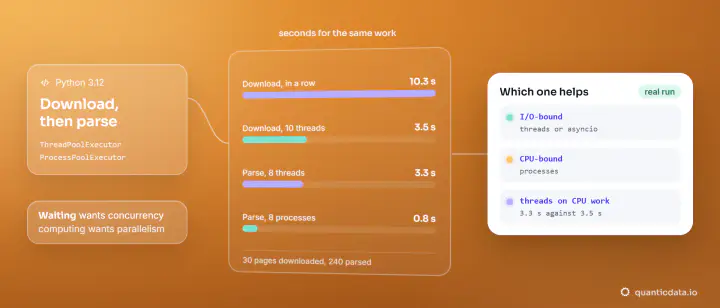
Images are bigger than HTML, so downloads dominate the time. Run them concurrently with a thread pool or asyncio (patterns in async web scraping in Python), keep a timeout on every request, and write files as they arrive. Send a User-Agent that names your script and a way to reach you, as in the code above, and keep the pace modest. We ran it on one session, set in the username; QuanticData residential proxies take the country, the rotating gateway or a session ID there, and mobile proxies put the run on carrier IPs. To try it, there is a Residential Basic free trial.
Rights and good manners
Being able to download an image does not give you the right to reuse it: most images are protected by copyright, and site terms often limit automated downloading. Download what you are allowed to use, keep the request rate modest, and read is web scraping legal in the US for the legal background. The parsing side of the script is explained in Beautiful Soup web scraping.