
To use a proxy in Postman, open Settings > Proxy, turn on Use custom proxy configuration, choose http, enter the host and port 8080, turn on Proxy auth with the whole username and the password, then send GET https://ipinfo.io/json to see where your requests come from. Hosts listed in Proxy bypass skip the proxy.
Postman sends API requests from your own connection unless you tell it otherwise. With a proxy, the API you test sees the proxy's IP address and its country: that is how you check geo rules, local content and per-IP rate limits from your desk. What trips people up is which requests actually use the proxy, the login, and error messages that never say "proxy". The field names below are the ones in Postman's documentation for the current desktop app (version 12); the values come from the QuanticData endpoint generator.
What you need before you start
- The Postman desktop app. The steps below are for the desktop app on Windows, macOS or Linux.
- A proxy plan: Residential Premium, ISP or mobile. All of them go in the same box; the table further down says which one fits which test.
- Four values: host, port, username and password. In the QuanticData dashboard they are under My proxies, on the plan's page, in the Endpoint generator: Connection details shows them one by one, which is how Postman asks for them.
Postman's three proxy options, and the one to use
The Proxy tab of Postman's settings has three switches under Proxy configurations for sending requests:
- Use system proxy sends requests through the proxy configured in your operating system, with an extra switch to respect the HTTP_PROXY, HTTPS_PROXY and NO_PROXY environment variables.
- Use custom proxy configuration sends requests through a proxy you type into Postman itself. This is the one to use: it changes only Postman, not every program on the computer, and it has its own login fields.
- Default proxy configuration, higher on the same tab, only adds a username and password for a system proxy and restarts Postman. It is not needed for a custom proxy.
If both the system proxy and the custom proxy are on, Postman uses the custom proxy. Turning the system proxy off anyway keeps the setup easy to read.
Step by step: Residential Premium in Postman
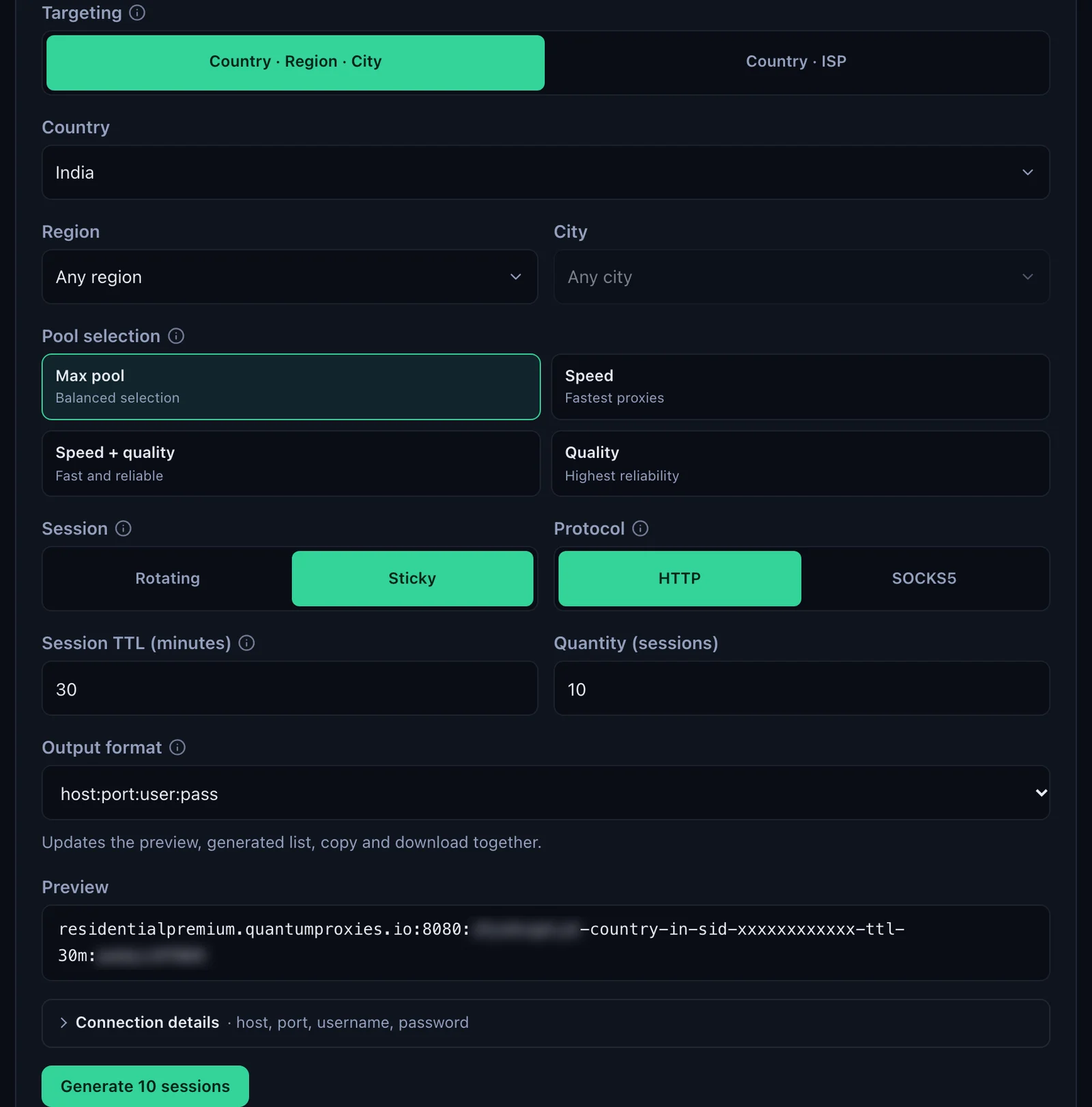
- Generate the line. In the QuanticData dashboard open My proxies, then your plan. In the Endpoint generator choose the Country (India in this example, with a Region or City if you need one), set Session to Sticky with a Session TTL (minutes) longer than your test, and keep Protocol on HTTP.
- Open Connection details. It lists Host, Port, Username and Password with a copy button each. Postman wants them in separate fields.
- Open the proxy settings. In Postman click the Settings icon in the header, then Settings, then the Proxy tab.
- Turn on Use custom proxy configuration. Turn off Use system proxy and the environment variables switch.
- Use proxy for: HTTP and HTTPS. Both are ticked by default. Leave them that way so every request goes through the proxy.
- Proxy server. Choose
httpin the list, typeresidentialpremium.quantumproxies.ioafter the :// (without http:// in front) and8080as the port. - Turn on Proxy auth. Paste the username whole, for example
USER-country-in-sid-pm01-ttl-60m, then the password. - Close Settings and send a request. The proxy applies to the next request you send from the Builder.
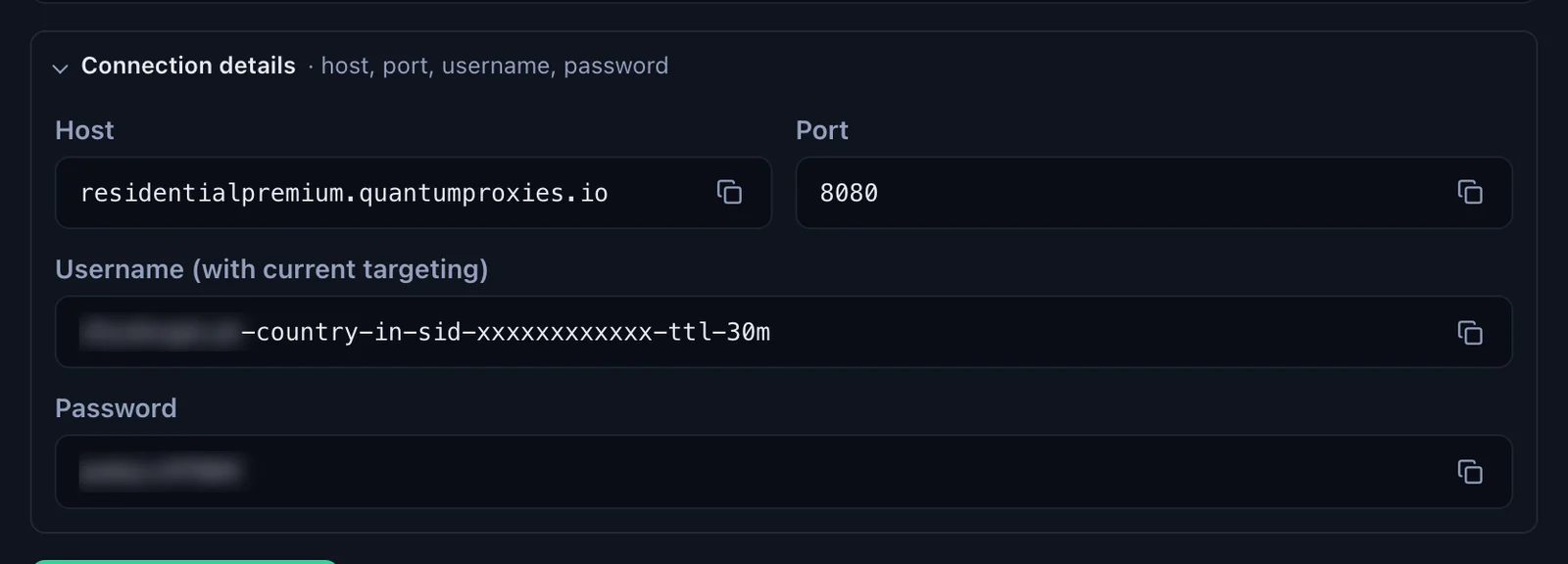
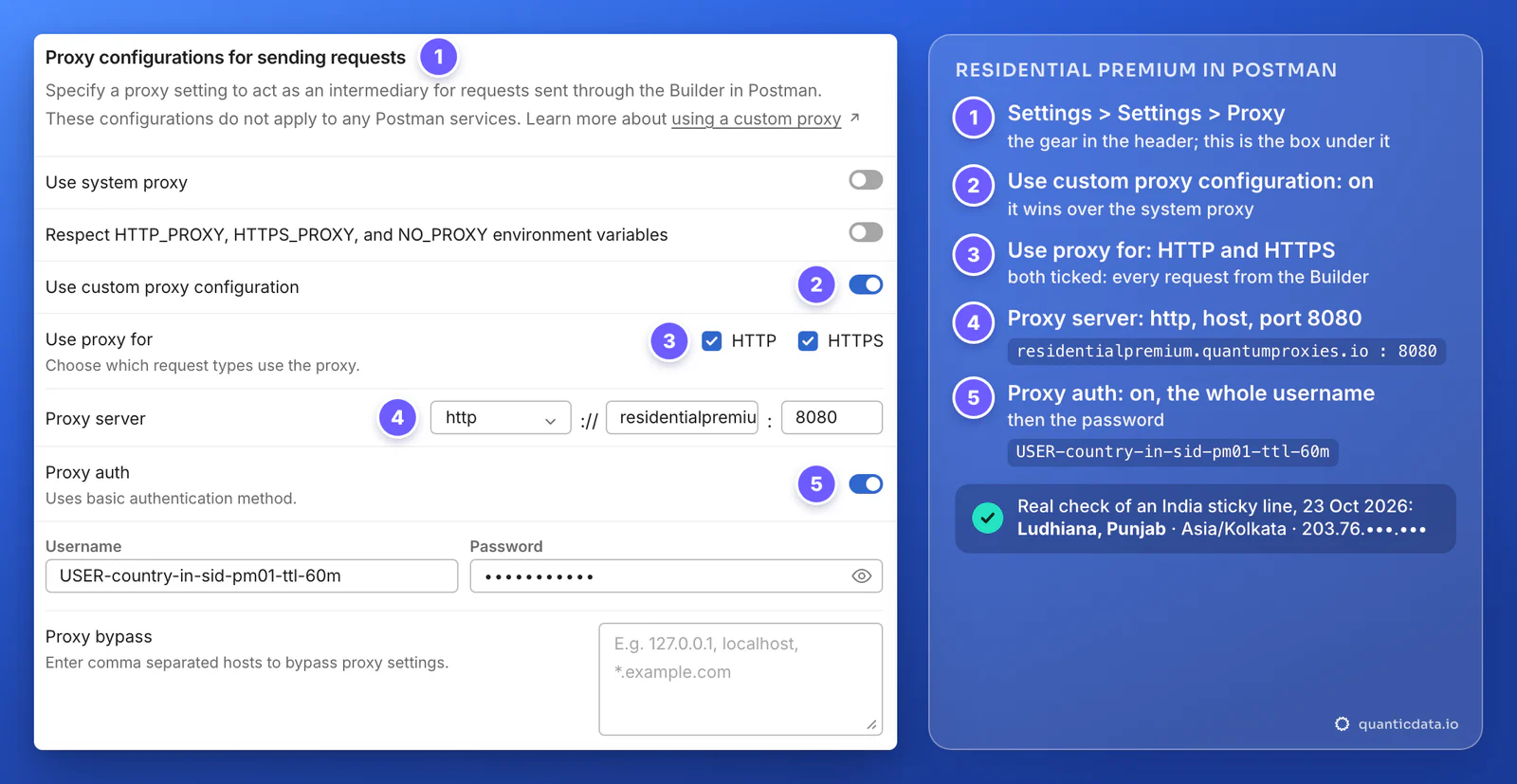
The username carries the targeting: -country-in picks the exit country, -sid-pm01 names the session and -ttl-60m keeps the same IP for 60 minutes. Copy it whole. A username cut at the first dash still logs in, but your requests then leave from a random country.
Check where your requests come from
Postman has no proxy test button, so send a request that answers with your IP and its location:
- Open a new request, keep the method on GET and enter
https://ipinfo.io/json. - Click Send.
- A 200 OK means the proxy accepted the login. The body shows the IP the API saw, with its city, region, country and time zone.
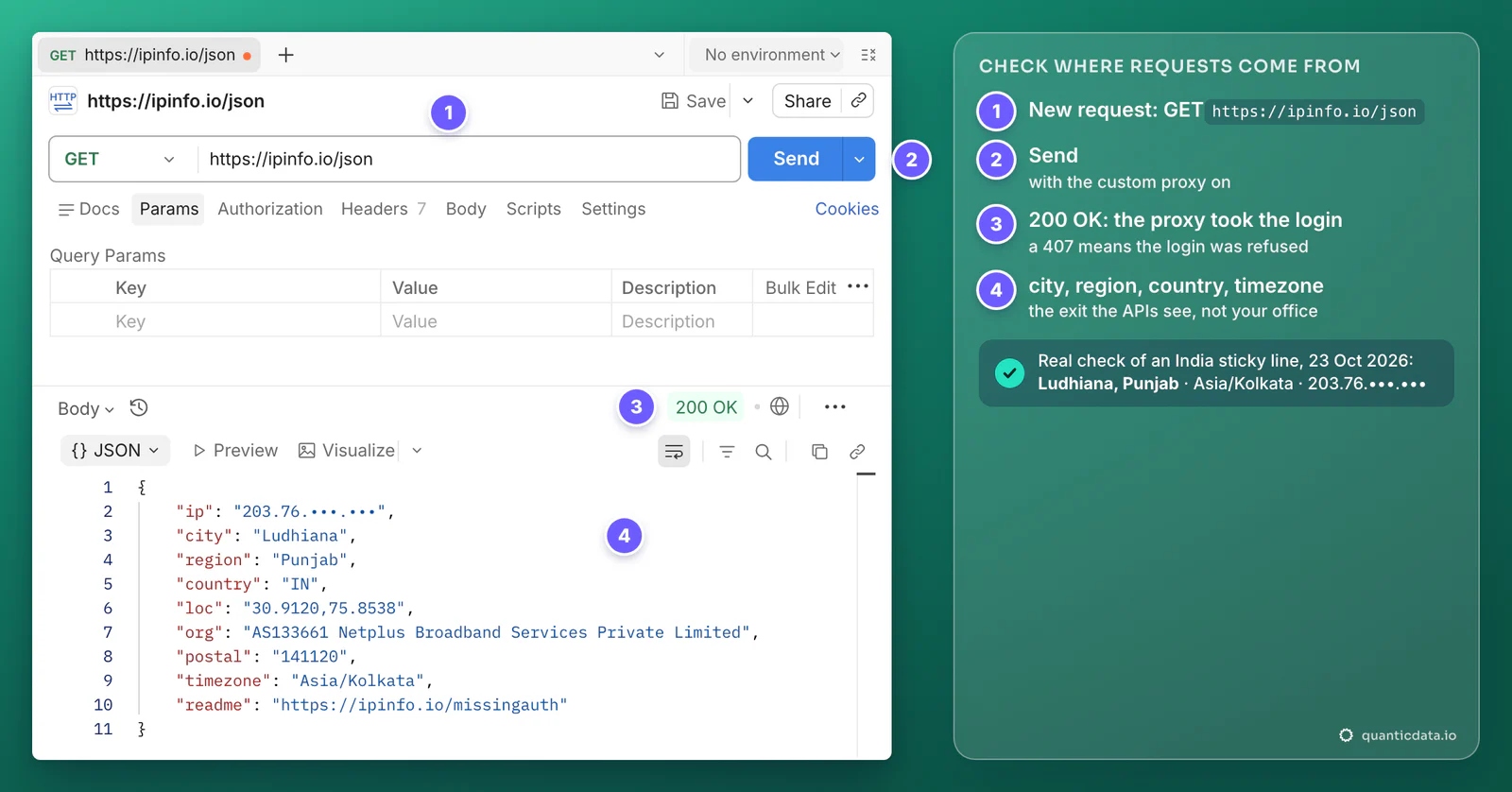
Our own run of this check with an India sticky line on 23 October 2026 answered from Ludhiana, region Punjab, country IN, time zone Asia/Kolkata, on an Indian home broadband network (AS133661). That is the location every API you call from Postman sees until the session ends. If the answer shows your own IP instead, the request did not go through the proxy: the next section says why.
Which requests go through the proxy
The custom proxy is set for the whole app, not per request; there is no proxy field in a request's own Settings tab. Four rules decide what goes through it:
- Use custom proxy configuration is on. It wins over Use system proxy when both are on.
- Use proxy for picks the schemes. With HTTP and HTTPS both ticked, every request goes through the proxy; untick HTTP and requests to
http://URLs go direct. - Proxy bypass lists hosts that always go direct, separated by commas. A star covers subdomains, as in Postman's own example
*.example.com. Put your local and internal APIs here, for examplelocalhost, 127.0.0.1, *.corp.example.com, so they keep working while the proxy is on. - Only requests sent through the Builder use it. The box says so itself: "These configurations do not apply to any Postman services".
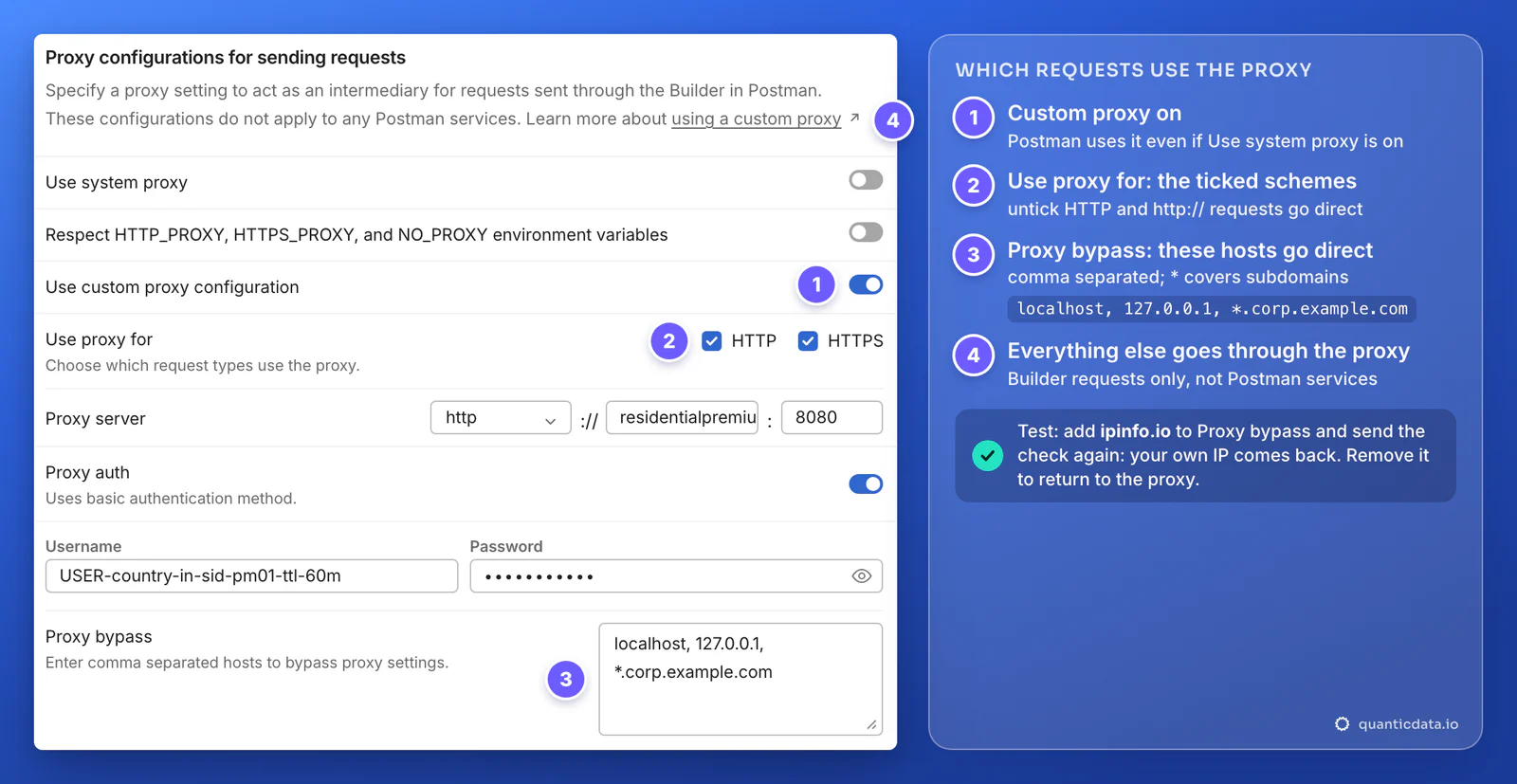
To see the rules at work, add ipinfo.io to Proxy bypass and send the check again: your own IP comes back. Remove it and the proxy's IP returns. To test one request without the proxy, the bypass list is the quickest way; to stop using the proxy altogether, turn off Use custom proxy configuration.
Two more things change with a proxy on. Postman sends the requests over HTTP/1.x, whatever HTTP version is set in its settings. And the Console, opened from the Postman footer, logs the proxy configuration used for every request, which is the first place to look when a request does not go where you expect.
One session or a new IP for each request
The username decides how the IP behaves across your requests:
| Username | What the API sees | Use it for |
|---|---|---|
USER-country-in-sid-pm01-ttl-60m | One IP in India for up to 60 minutes; up to 1440 minutes with -ttl-1440m | Logins, sessions, collections whose requests depend on each other |
USER-country-in | A new IP in India for each request | Checking what different visitors in one country get, rate limits per IP |
USER-country-de-sid-pm02-ttl-60m | One IP in Germany | The same API as German users see it: change the username, send again |
Postman holds one custom proxy at a time, so switching country means editing the username in Settings > Proxy. For a new IP on Residential Premium or mobile, change the session ID, -sid-pm02 instead of -sid-pm01.
ISP proxies in Postman
An ISP proxy is one fixed IP address that stays the same for months. In Postman it is the answer when an API, a partner's sandbox or a staging server only accepts calls from addresses on its allowlist: give them the ISP IP and send your requests through it.
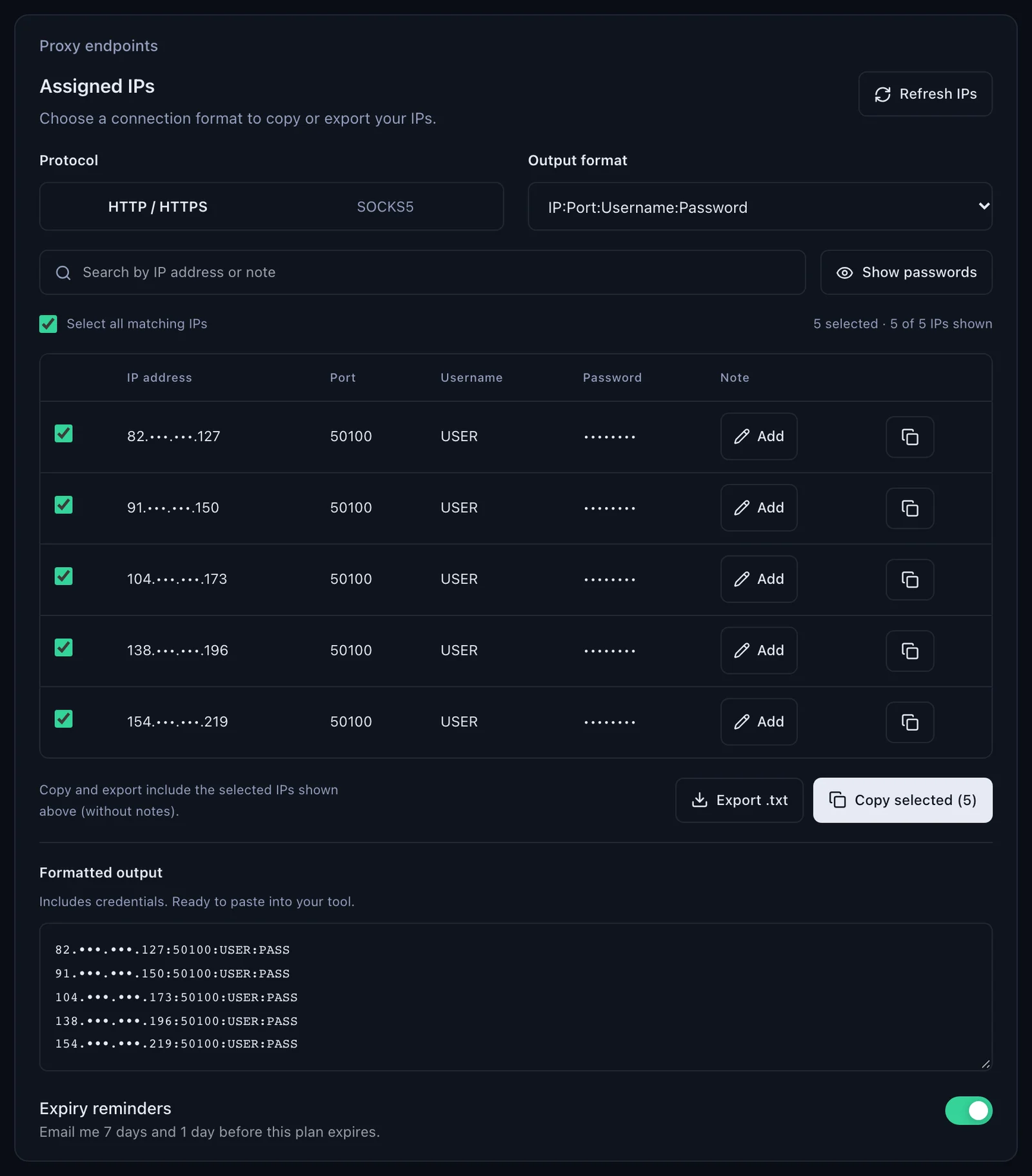
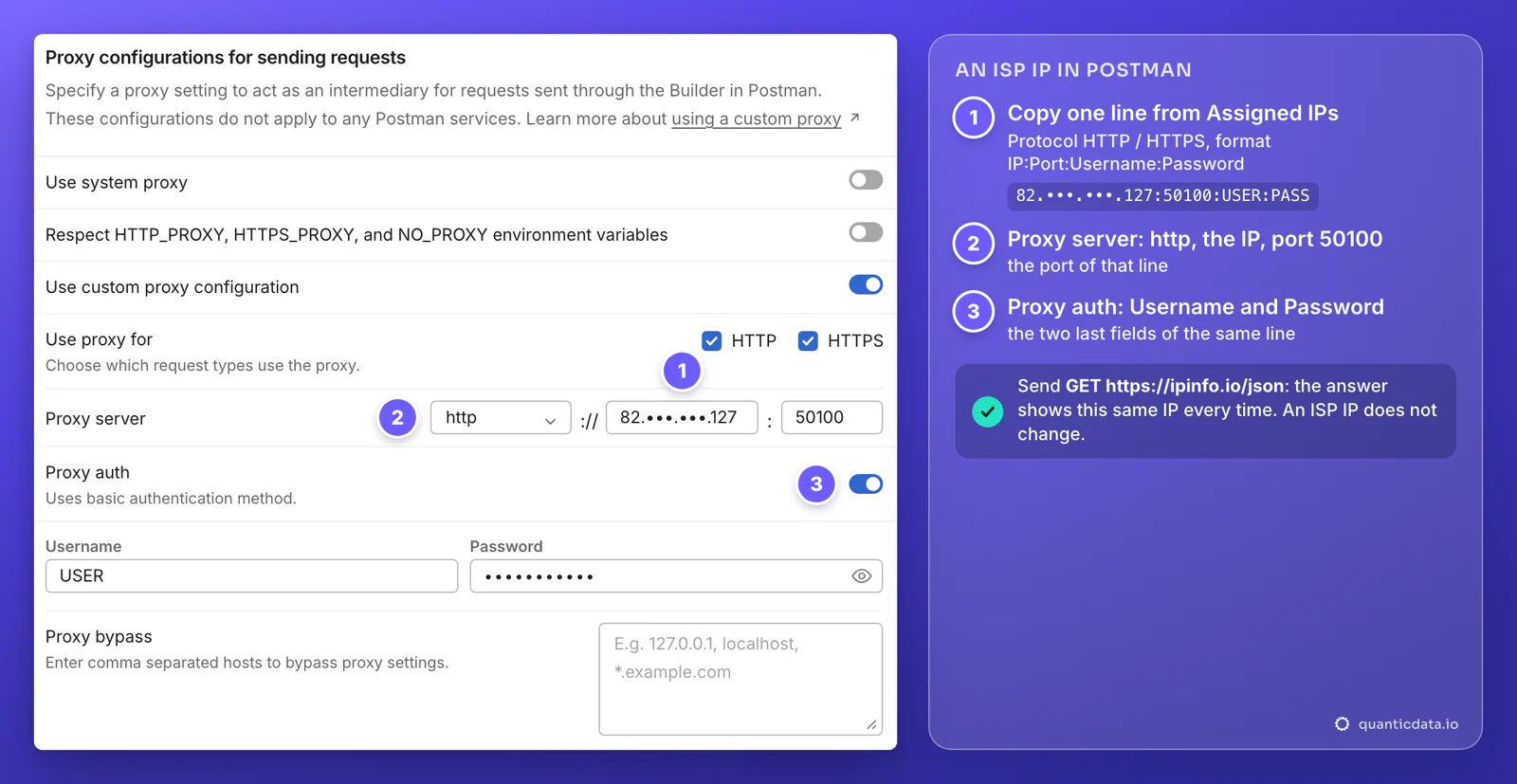
- Copy one line from Assigned IPs, with Protocol on HTTP / HTTPS and the format IP:Port:Username:Password.
- Proxy server:
http, the IP after the ://, and the port of that line, 50100 in the example. - Proxy auth: the Username and Password of the same line.
- Send the check. ipinfo.io answers with that same IP every time.
Mobile proxies in Postman
Mobile lines go in the same fields. The host is mobile.quantumproxies.io on the Global gateway (USA, EU and Asia gateways are in the generator too), the port is 8080, and the username carries -type-mobile, for example USER-country-in-type-mobile-sid-pm02-ttl-60m. Use them to test an API the way an app on a phone on a carrier network reaches it.
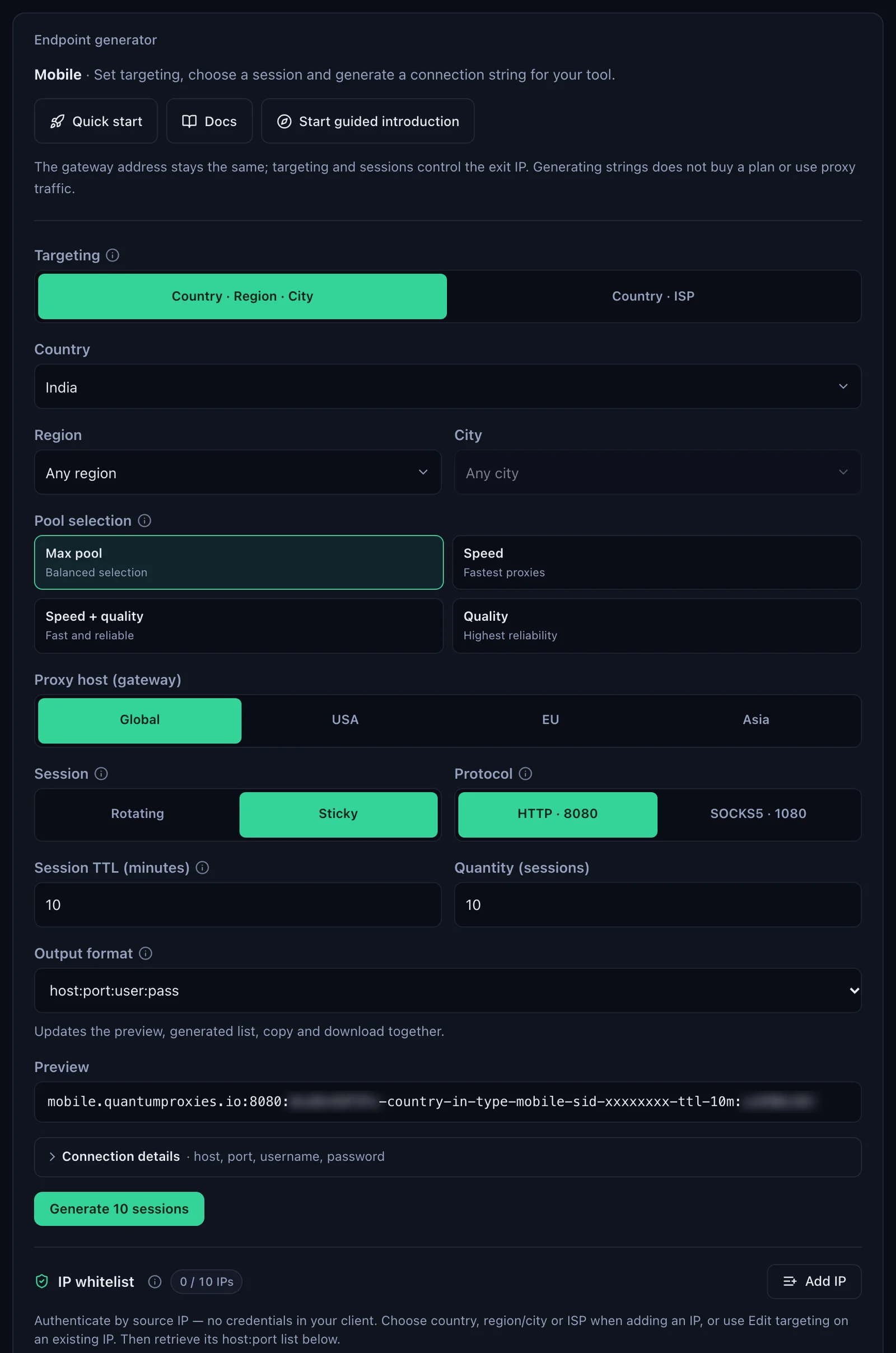
Mobile plans also offer IP whitelist authentication: add your own IP in the generator, take the host and port it gives you, and leave Proxy auth off. Residential Premium and ISP lines always log in with username and password.
Which proxy for which test
| Proxy type | In Postman's Proxy server | Good for |
|---|---|---|
| Residential Premium | http :// residentialpremium.quantumproxies.io : 8080, the whole username with country, region, city or ISP | An API as users in a given country reach it: geo rules, local prices and content |
| ISP | http :// the IP of one Assigned IPs line : 50100, its username and password | One fixed address to put on an API allowlist |
| Mobile | http :// mobile.quantumproxies.io : 8080, -type-mobile in the username, or IP whitelist without Proxy auth | APIs that answer phones on carrier networks differently |
The plans are on the pages for QuanticData residential proxies, ISP proxies, mobile proxies and India residential proxies.
HTTP or SOCKS5 in Postman
Postman's Proxy server list offers HTTP, SOCKS5, SOCKS5H, SOCKS4 and SOCKS4A, and Postman only sends HTTP and HTTPS requests through a SOCKS proxy. Its documentation describes Proxy auth as basic authentication, the login scheme of HTTP proxies, so this guide uses http with the HTTP port: 8080 on Residential Premium and mobile, 50100 on ISP. HTTPS requests still travel encrypted end to end: Postman opens a tunnel through the proxy to the API, which is what "tunneling socket" in its error messages refers to. If you need SOCKS5 for another reason, QuanticData's SOCKS5 ports are 1080 on Residential Premium and mobile and 50101 on ISP (see SOCKS5 proxies). What breaks a setup is a type that does not match its port.
Postman proxy not working: errors and fixes
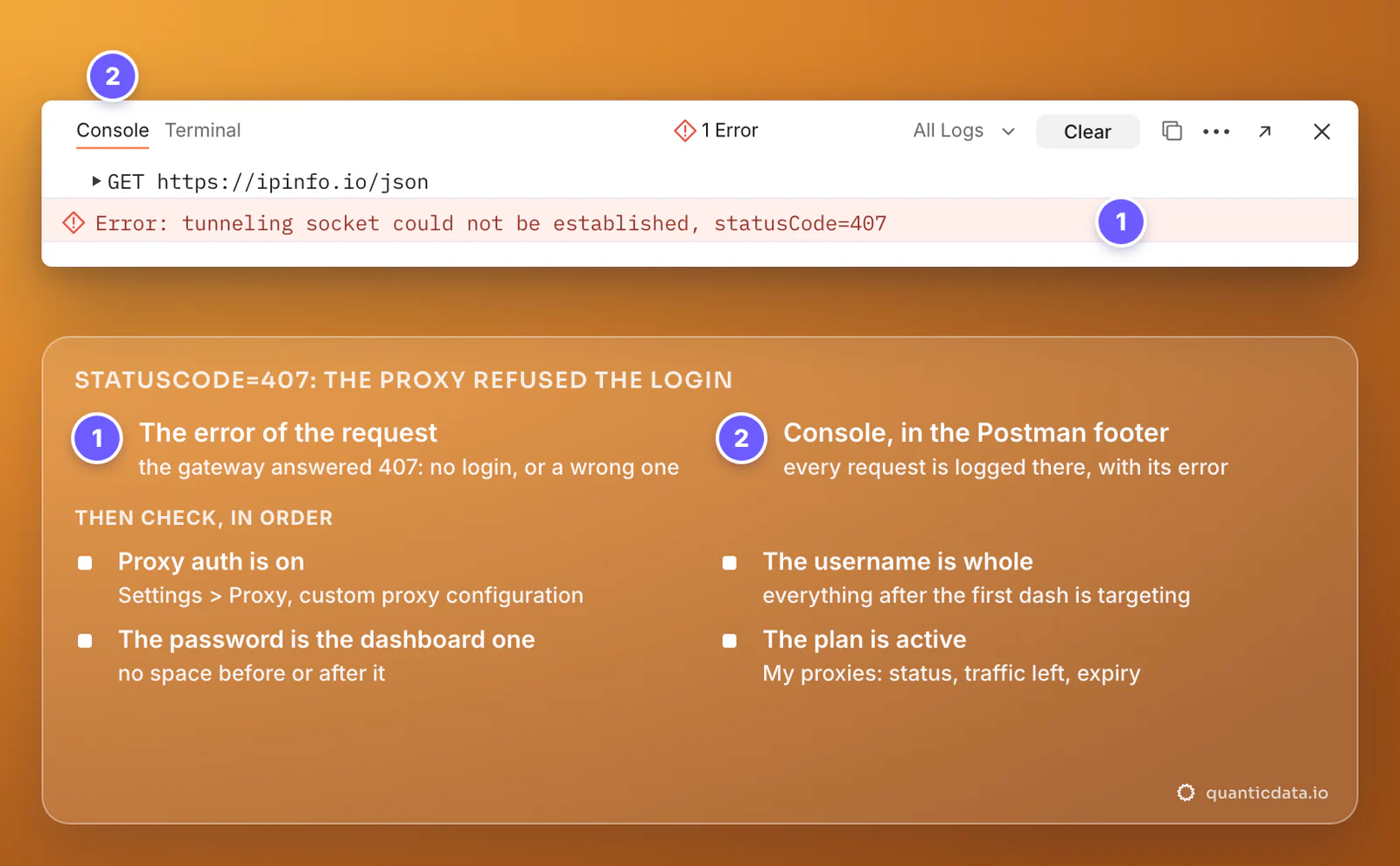
When a request fails, the response area shows the error and the Console in the Postman footer shows it again with the request. The most common one with a proxy is Error: tunneling socket could not be established, statusCode=407: the proxy answered 407 Proxy Authentication Required to the tunnel Postman opens for an https:// URL. On QuanticData that means no login was sent or a wrong one: Proxy auth is off, the username is cut, or the password is not the one in the dashboard.
| What you see | Usual cause | Fix |
|---|---|---|
| tunneling socket could not be established, statusCode=407 | Proxy auth off, a cut username or a wrong password: the gateway answers 407 | Turn on Proxy auth, paste the whole username and the password again from Connection details |
| 407 Proxy Authentication Required as the response status | The same refused login, on a request to an http:// URL | The same fix; see also how to fix 407 Proxy Authentication Required |
| tunneling socket could not be established, cause=getaddrinfo ENOTFOUND | The proxy host cannot be found: a typo, or a protocol typed in front of it | Copy the host again, alone, as Postman's docs ask: residentialpremium.quantumproxies.io |
| An error ending in ECONNRESET or socket hang up | The type does not match the port: http on 1080, the SOCKS5 port, is reset at once | http with 8080 (ISP: the port of the line), or socks5 with 1080 |
| Requests still come from your own IP | The host is in Proxy bypass, the scheme is unticked in Use proxy for, or proxy environment variables are set | Check both fields; remove HTTP_PROXY and HTTPS_PROXY from your system, or start Postman without them |
| 502 Bad Gateway | The proxy reached out, but the API's server did not answer properly | Check the URL, send again; with a sticky line try a new session ID |
| Worked yesterday, fails today | The plan expired or its traffic is used up | Check status, remaining traffic and expiry in My proxies |
One test outside Postman settles most cases in a minute. If this returns an address in the right country, the proxy works and the problem is in Postman's fields; more on this in how to use a proxy with curl:
curl -x http://residentialpremium.quantumproxies.io:8080 \
  -U "USER-country-in-sid-pm01-ttl-60m:PASS" https://ipinfo.io/json
The same values work in code once a collection moves out of Postman, for example in Python Requests.
Not the same thing: Postman's built-in proxy
Postman also has a built-in proxy for capturing traffic, the subject of its pages on capturing API requests and of the searches for a "Postman proxy certificate". It works the other way round: other apps or a phone send their traffic through Postman so it can record the requests. It has nothing to do with sending your requests out through a proxy server, and you do not need its certificate for anything in this guide.
Before you test
A proxy changes where your requests come from, not what an API allows. Test APIs you own or are allowed to call, keep to their terms and rate limits, and use test accounts for anything that logs in.