UNITED STATES
Seattle residential proxies
From $2.20/GB
Seattle residential proxies give you household IPs inside the city, picked with -city-seattle in the proxy username.
- 300+ cryptocurrencies
Pay as you go · No subscription · No KYC
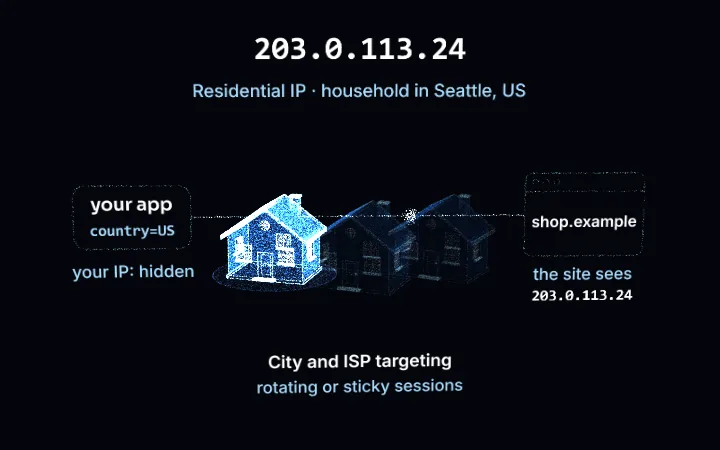
Country, state, city
Pick a place in the United States in the generator and it is written into the username, so every request can leave from somewhere else.
Pin the ISP or the ASN
When the provider matters, keep the exit on one network in the United States: pick its ISP or ASN in the generator.
Rotating: a new IP each requestSticky: same IP
Rotating or sticky
A fresh home IP on every request, or the same one held through a login, a cart or a checkout.
Pool filtersPremium
Choose one of 3 home ISPs (Starlink, CenturyLink, Comcast Cable), rotate on every request or keep one IP for up to 1,440 minutes. Residential Premium, from $4 for 1 GB down to $2.20/GB.
City and ISP targeting · Rotating or sticky · One payment, no subscription
Target Seattle from any client
Region, city and ISP go in the username, with the codes from the dashboard generator. Credentials are in your dashboard.
# PROXY_HOST = host:port shown in your dashboard
# any Seattle exit, a new IP on every request
curl -x "$PROXY_HOST" -U "USER-country-us-region-washington-city-seattle:PASS" https://ipinfo.io/json

# one home ISP in Seattle
curl -x "$PROXY_HOST" -U "USER-country-us-region-washington-city-seattle-isp-centurylink:PASS" https://ipinfo.io/json

# keep the same IP for 30 minutes
curl -x "$PROXY_HOST" -U "USER-country-us-region-washington-city-seattle-sid-a1b2c3-ttl-30m:PASS" https://ipinfo.io/json
Internet providers you can pick in Seattle
3 home internet providers are listed for Seattle in the Residential Premium location list. Leave -isp- out to rotate across all of them, or pin one.
| ISP | Username code |
|---|---|
| Starlink | -isp-starlink |
| CenturyLink | -isp-centurylink |
| Comcast Cable | -isp-comcast_cable |
Tested on 16 November 2026, one rotating request each through a Premium plan, exit read from ipinfo.io: Seattle on Space Exploration Technologies Corporation (AS14593); Seattle on CenturyLink Communications (AS209); Seattle on CenturyLink Communications (AS209); Seattle on Comcast Cable Communications (AS7922); Seattle on CenturyLink Communications (AS209).
Seattle residential proxy pricing
Residential Premium, the line with city and ISP targeting. Every card opens the plans page.
Photon
- 1 GB premium bandwidth
- $4.00 / GB
- 30-day term
Quark
- 5 GB premium bandwidth
- $3.50 / GB
- 90-day term
Neutrino
- 10 GB premium bandwidth
- $3.00 / GB
- 90-day term
Boson
- 25 GB premium bandwidth
- $2.80 / GB
- 90-day term
Larger packages: $250 for 100 GB and $1,100 for 500 GB ($2.20/GB), 90 days. Pay from balance, card, PayPal or crypto.
Static and mobile IPs in Seattle
Static ISP IPs. Dedicated IPs that never rotate are sold per IP in Seattle: the Seattle ISP proxies page lists the carriers and the IPs available, as of its own date.
Country-level US traffic at a lower price per GB: US residential proxies.
What Seattle exits are used for
A request from a Seattle household gets the answers a local gets: the local pack, delivery slots and prices for city zip codes, local listings and ads. Typical uses: Seattle local search, retail and delivery availability in the Puget Sound area, housing listings, tech job boards.
- Rank tracking for "near me" and Seattle keywords from inside the city
- Price and availability checks for Seattle delivery zones
- Ad and landing-page checks on the ISP your Seattle audience uses
FAQ
Seattle residential proxies: targeting, ISPs, price, static and mobile.
Something else? Ask us →Do you have residential proxies in Seattle?
Yes. Seattle is a city in the Residential Premium location list, with 3 home internet providers to choose from: Starlink, CenturyLink, Comcast Cable. Put -region-washington-city-seattle in the username. On 16 November 2026 our test requests left from Seattle on Space Exploration Technologies Corporation and CenturyLink Communications and Comcast Cable Communications.
How do I get a Seattle IP address?
Use the username USER-country-us-region-washington-city-seattle. Each request gets a new household IP in Seattle; add a session id with a TTL, such as -sid-a1b2c3-ttl-30m, to keep one IP for up to 1,440 minutes.
Can I choose the internet provider in Seattle?
Yes: add -isp-<code> after the city, for example -isp-centurylink for CenturyLink. The codes for Seattle: Starlink -isp-starlink, CenturyLink -isp-centurylink, Comcast Cable -isp-comcast_cable.
How much do Seattle residential proxies cost?
City targeting is part of Residential Premium: $4 for 1 GB, $17.50 for 5 GB, $30 for 10 GB, $70 for 25 GB, down to $2.20/GB on 500 GB. No extra fee for the city or the ISP; you pay for traffic.
Is there a free Seattle proxy?
Free Seattle proxy lists are open proxies shared by many people and blocked quickly; we do not publish one. The smallest Premium package is 1 GB for $4 with the same city targeting.
Do you sell static Seattle IPs?
Yes, as ISP proxies: dedicated static IPs in Seattle are listed by carrier on the Seattle ISP proxies page. For a residential IP that stays the same for hours, a sticky session holds it for up to 1,440 minutes.
Residential proxies in other US cities
Same pool, same username format: change the region and city codes.
Atlanta
7 home ISPs · -city-atlanta
Boston
2 home ISPs · -city-boston
Denver
3 home ISPs · -city-denver
Philadelphia
4 home ISPs · -city-philadelphia
Charlotte
4 home ISPs · -city-charlotte
Portland
4 home ISPs · -city-portland
Los Angeles
city page
New York City
city page
Chicago
city page
Houston
city page
Miami
city page
San Francisco
city page
Start with Seattle exits
Create an account, buy any Premium package from 1 GB and put -city-seattle in the username.
Create an account Buy a package