Mobile Proxies for Epic Games
Mobile proxies for Epic Games are 4G/5G carrier IPs, shared with real phones, that let you run Epic Games QA accounts from a carrier IP in a chosen region. Rotate them for data, or hold one carrier IP per account for up to 24 hours. Plans start at $5 for 1 GB and fall to $2.30/GB, with no subscription.
On 14 September 2026 we loaded epicgames.com in a real-browser test through a QuanticData mobile exit on T-Mobile USA, Inc. (AS21928) in the United States: HTTP 200, page settled in 9,473 ms.
Real carrier IPs · Rotating or sticky · HTTP, HTTPS and SOCKS5

What is Epic Games, and why put a proxy in front of it?
Epic Games is a store, a launcher and the publisher of Fortnite, and its store is one of the clearest cases of regional pricing on the internet: prices, promotions and even availability differ by country, and the store enforces the region of the account. Publishers verify their listings and prices per country; analysts track regional pricing and free-game promotions; studios test Fortnite and Unreal-based titles from different regions; and QA teams test launcher and purchase flows abroad. Epic's store and launcher are sensitive to datacenter traffic and to accounts whose location jumps, so the work runs on home and carrier addresses in the target countries.
What people use mobile proxies for on Epic Games
Four workflows we see on Epic Games. None of them needs a proxy to break Epic Games's rules; all of them need a network location and a reputation the platform treats as ordinary.
Regional pricing and listing verification
Confirm your titles' prices, promotions and availability in each country's store.
Promotion and catalog research
Track free-game promotions, sales and catalog differences across regions.
Game QA by region
Test your own titles and launcher flows from exits in other countries.
Public store data
Collect public store pages and ratings for research through rotating exits.
Why mobile proxies for Epic Games
Fortnite on mobile and the Epic mobile store are growing surfaces, and a QA account on a carrier IP held on a sticky session looks like an ordinary player. Use mobile for test accounts whose stability matters.
What a proxy does not do. A proxy makes the request originate in a country, which is what the store uses for logged-out localization; the account's registered region still governs purchases. A proxy does not change Epic's terms and QuanticData proxies are not for buying in a region your account does not belong to. Household IPs for the same job are on the residential proxies for Epic Games page.
Sources: Epic Games Terms of Service and RFC 6598 (IETF), the shared address space used behind carrier-grade NAT.
Best mobile proxies for Epic Games
An Epic account or the launcher keeps a sticky session; store pricing checks by region rotate. Store prices and availability differ by region, so each check leaves from the region under test. With QuanticData the exits asked for most are the United States, Turkey and Brazil, with carriers such as T-Mobile and AT&T Wireless selectable in the username for the United States.
Store pages are moderate; downloads and gameplay through the proxy are heavy and rarely worth routing. On the mobile network that means a session ID with a lifetime of up to 24 hours per Epic Games account, or no session at all to rotate through carrier IPs, from $5 for 1 GB with no subscription. For Epic Games the residential network covers most jobs at a lower price per GB; mobile earns its price when an account or the app itself expects a phone.
Which session to use for Epic Games: sticky or rotating
Rotating for data, sticky for accounts. Rotating for logged-out store research; sticky per QA account. Country, session and targeting go in the username; credentials are in your dashboard after purchase.
# PROXY_HOST = host:port shown in your dashboard
# rotating: a new carrier IP on every request
curl -x "$PROXY_HOST" -U "USER-country-us-type-mobile:PASS" https://ipinfo.io/json

# sticky: one carrier IP for 30 minutes (up to 1440m), one session ID per account
curl -x "$PROXY_HOST" -U "USER-country-us-type-mobile-sid-epicga-ttl-30m:PASS" https://ipinfo.io/json

# one carrier (code from the country page)
curl -x "$PROXY_HOST" -U "USER-country-us-isp-CARRIER-type-mobile:PASS" https://ipinfo.io/json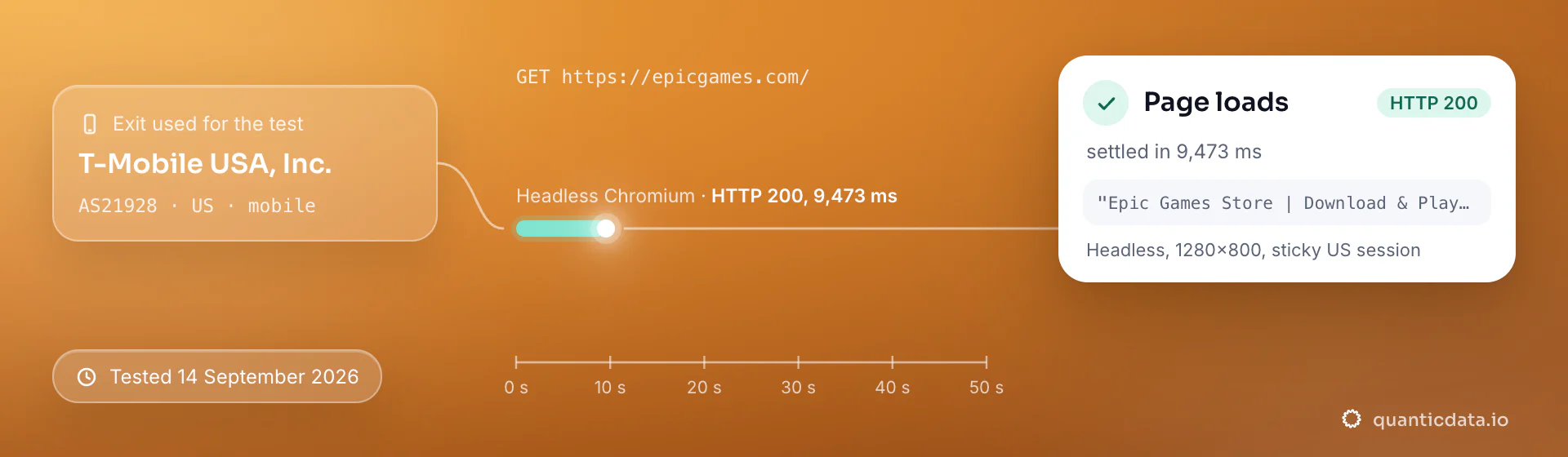
Best countries and carriers for Epic Games mobile proxies
The exits most often asked for with Epic Games, and why. Carriers are named only where the mobile catalog lists them; every country page shows the full list.
United States
The reference store and the largest audience.
T-Mobile, AT&T Wireless, Verizon Wireless · -country-us
Turkey
One of the most-cited regional pricing tiers.
Turk Telekom, Vodafone Turkey, Turkcell · -country-tr
Brazil
A large market with its own pricing tier.
Claro, Vivo, TIM Brasil · -country-br
Mobile Proxies pricing for Epic Games
Per GB, valid 90 days, carrier and city targeting included, no port fees. Pay from balance, card, PayPal or crypto.
The same pool at every tier — a small test costs exactly $5 for 1 GB. Full ladder and terms on the pricing page.
How to start with Epic Games in minutes
- Create a free QuanticData account and open Plans → Mobile; pick a bundle — $5 for 1 GB is enough to test Epic Games on your real workflow.
- Copy host, port, username and password from the dashboard. Put the country in the username (
-country-us), a carrier if you need one (-isp-…), then-type-mobile, and a session ID with a lifetime when the Epic Games flow must keep one IP. - Fetch logged-out store pages through rotating exits with the country in the URL; for QA accounts use a system-level proxy for the launcher and one sticky session per account.
- Run a small sample first and watch how Epic Games responds; a mobile IP is not a promise of access, acceptance or a particular success rate, and Epic Games's terms and the law apply to what you do through it.
Set it up for Epic Games
QuanticData mobile proxies are standard HTTP and SOCKS5 endpoints: a host, a port, a username and a password, shown in your dashboard the moment a plan is active. The username carries the country and the carrier, and the session; host, port and password never change. For Epic Games use one sticky session per account: a session ID that no other account shares, and a lifetime that covers the login (up to 1440 minutes on mobile). Whatever the client, the four values are these:
host      PROXY_HOST                     # from your dashboard
port      PORT                           # the HTTP port, or the SOCKS5 port for a SOCKS5 node
username  USER-country-us-type-mobile-sid-epicga-ttl-120m
password  PASS
Where to enter the four values
- iPhone and iPad → Shadowrocket. Add a server of type HTTP or Socks5 with the four values, select it, connect: every app on the phone, Epic Games included, leaves through the exit. Step-by-step guide.
- Android, or the whole network → OpenClash or Clash. An http or socks5 node with the same four values, on an OpenWrt router (every device behind it) or in Clash on the phone, which runs as a VPN so apps that ignore the system proxy still go through. Step-by-step guide.
- Desktop → Proxifier, or the browser's own proxy setting. Proxifier takes an HTTPS or SOCKS5 server with authentication and a rule for the Epic Games application; for web-only work the browser's proxy setting with the same four values is enough.
- Several accounts → one profile per session in an antidetect browser. Each profile gets its own username with its own session ID, so each account keeps its own IP; never share a session between two profiles. Step-by-step guide.
Test from the client with https://ipinfo.io/json: the org should be a carrier and the country the one in the username. A proxy changes where the traffic leaves from, nothing else; Epic Games's terms apply to what you do through it.
FAQ
Mobile Proxies for Epic Games: does it work, which session, how to set it up, proxy clients, free options, what to check when it stops working.
Something else? Ask usDo mobile proxies work with Epic Games?
QuanticData mobile proxies work with Epic Games the way any proxy does: they change the network your traffic leaves from, to real 4G/5G carrier IPs. A proxy makes the request originate in a country, which is what the store uses for logged-out localization; the account's registered region still governs purchases. A proxy does not change Epic's terms and QuanticData proxies are not for buying in a region your account does not belong to.
Which proxy session should I use for Epic Games: sticky or rotating?
QuanticData recommends rotating IPs for data and a sticky session for accounts for Epic Games. Rotating for logged-out store research; sticky per QA account. Sessions are set in the username (a session ID and a lifetime, up to 1,440 minutes (24 hours)), so no proxy list is needed.
Can I use a proxy to see Epic Games Store prices in other countries?
QuanticData customers in publishing and analytics fetch logged-out store pages through residential exits in each country and log prices and promotions on a schedule. That is what the store shows visitors there. Purchasing is governed by the account's region and Epic's terms, and the proxies are not for changing it.
How do I set up a mobile proxy for Epic Games?
QuanticData gives you host, port, username and password the moment a plan is active: create a free account, open Plans → Mobile, pick a bundle ($5 for 1 GB to start) and copy the credentials from the dashboard. Fetch logged-out store pages through rotating exits with the country in the URL; for QA accounts use a system-level proxy for the launcher and one sticky session per account. For Epic Games, the countries asked for most are the United States, Turkey and Brazil, with carriers such as T-Mobile and AT&T Wireless selectable in the username for the United States.
Can I use Proxifier with QuanticData for Epic Games?
QuanticData mobile proxies are standard HTTP and SOCKS5 endpoints with a host, a port, a username and a password, so any client that accepts a proxy node works, Proxifier included: enter those four values as a proxy server of type HTTPS or SOCKS5 in Proxifier on the desktop, with a rule for the application, and Epic Games traffic from the applications matched by the rule leaves through the exit set in the username. For Epic Games give each account its own sticky session — a session ID and a lifetime in the username — so the traffic keeps one IP for the whole login. Host and port are in your dashboard; the HTTP and the SOCKS5 port are different, so pick the one that matches the node type.
Is there a free mobile proxy for Epic Games?
QuanticData does not give away mobile proxies for Epic Games: the smallest mobile bundle is $5 for 1 GB, and the free option is the residential trial — 100 MB on Residential Basic for 5 days, no card — enough to test your setup against Epic Games from a home IP before paying for carrier IPs. Public "free proxy" lists are shared, slow and often already flagged, which shows up as latency and disconnects; they also change daily, so nothing built on them keeps working for long.
Epic Games proxy not working: what to check
QuanticData support sees the same four causes when Epic Games stops working behind a proxy. First, the sticky session expired: its lifetime ended, the next request left from a new IP and Epic Games asked to log in again — set a longer lifetime or a new session ID per login. Second, the wrong country: the exit does not match the account's or the storefront's country. Third, the app ignores the system proxy, which many mobile apps do; route the whole device through a proxy client, or use a desktop or antidetect profile. Fourth, authentication: a typo in the username string, or IP whitelist auth after your own public IP changed. If Epic Games itself says it detects a proxy, that is the platform's policy, not a setting to work around.
Get mobile proxies for Epic Games in minutes
Free account, pick a bundle, credentials in your dashboard. Mobile starts at $5 for 1 GB.
Buy mobile bandwidth Create a free account