Mobile Proxies for AutoTrader
Mobile proxies for AutoTrader are 4G/5G carrier IPs, shared with real phones, that let you check AutoTrader's mobile listings from a chosen country. Each request can leave from a new carrier IP, and the username can pick the carrier. Plans start at $5 for 1 GB and fall to $2.30/GB, with no subscription.
On 14 September 2026 we loaded autotrader.com in a real-browser test through a QuanticData mobile exit on T-Mobile USA, Inc. (AS21928) in the United States: HTTP 200.
Real carrier IPs · Rotating or sticky · HTTP, HTTPS and SOCKS5

What is AutoTrader, and why put a proxy in front of it?
AutoTrader is where used-car prices are set in the English-speaking world: dealers list inventory, buyers compare, and the asking prices on the site become the market. Dealers and dealer groups monitor competitors' listings and price positions in their area; valuation and fintech companies build pricing models from listings at scale; rental and fleet companies watch residual values. The site is regional by design — search results depend on the postcode or ZIP and the country site — and it is well defended against datacenter scrapers. Collecting it means looking like a local buyer from the right region, which is what a proxy in that country and city provides.
What people use mobile proxies for on AutoTrader
Four workflows we see on AutoTrader. None of them needs a proxy to break AutoTrader's rules; all of them need a network location and a reputation the platform treats as ordinary.
Dealer competitive pricing
Track asking prices and days-on-lot for comparable vehicles within your radius, from an exit in your own area.
Valuation datasets
Collect listings across regions to build residual-value and pricing models.
Inventory monitoring
Watch a dealer group's or a brand's listed stock by region over time.
Lead and listing QA
Check how your own listings render and rank for buyers in different cities.
Why mobile proxies for AutoTrader
Car buyers browse on phones, and AutoTrader's app and mobile site are the primary surface. A mobile proxy on a real carrier IP gives the handset experience for QA, and a sticky session keeps a dealer or monitoring account on one address across a working day.
What a proxy does not do. A proxy makes the request originate in the region the site localizes for; it does not change the site's terms for automated collection or give access to dealer-only data you are not entitled to. Household IPs for the same job are on the residential proxies for AutoTrader page.
Sources: Autotrader Visitor Agreement and RFC 6598 (IETF), the shared address space used behind carrier-grade NAT.
Best mobile proxies for AutoTrader
Listing research rotates per page; a dealer account keeps a sticky session for the length of the login. AutoTrader is a different site in the United Kingdom and the United States, each with its own inventory, so the exit matches the edition. With QuanticData the exits asked for most are the United States, the United Kingdom and Canada, with carriers such as T-Mobile and AT&T Wireless selectable in the username for the United States.
Listing pages carry many photos; the JSON behind the listing grid is much lighter than the rendered page. On the mobile network that means a session ID with a lifetime of up to 24 hours per AutoTrader account, or no session at all to rotate through carrier IPs, from $5 for 1 GB with no subscription. The searches and the workflows around AutoTrader both point to mobile: accounts live on phones, and a carrier IP is what they expect.
Which session to use for AutoTrader: sticky or rotating
Rotating (new IP per request). Rotate per search or listing page; use a sticky session with city targeting when a run must keep one search location constant. Country, session and targeting go in the username; credentials are in your dashboard after purchase.
# PROXY_HOST = host:port shown in your dashboard
# rotating: a new carrier IP on every request
curl -x "$PROXY_HOST" -U "USER-country-us-type-mobile:PASS" https://ipinfo.io/json

# sticky: one carrier IP for 30 minutes (up to 1440m), one session ID per account
curl -x "$PROXY_HOST" -U "USER-country-us-type-mobile-sid-autotr-ttl-30m:PASS" https://ipinfo.io/json

# one carrier (code from the country page)
curl -x "$PROXY_HOST" -U "USER-country-us-isp-CARRIER-type-mobile:PASS" https://ipinfo.io/json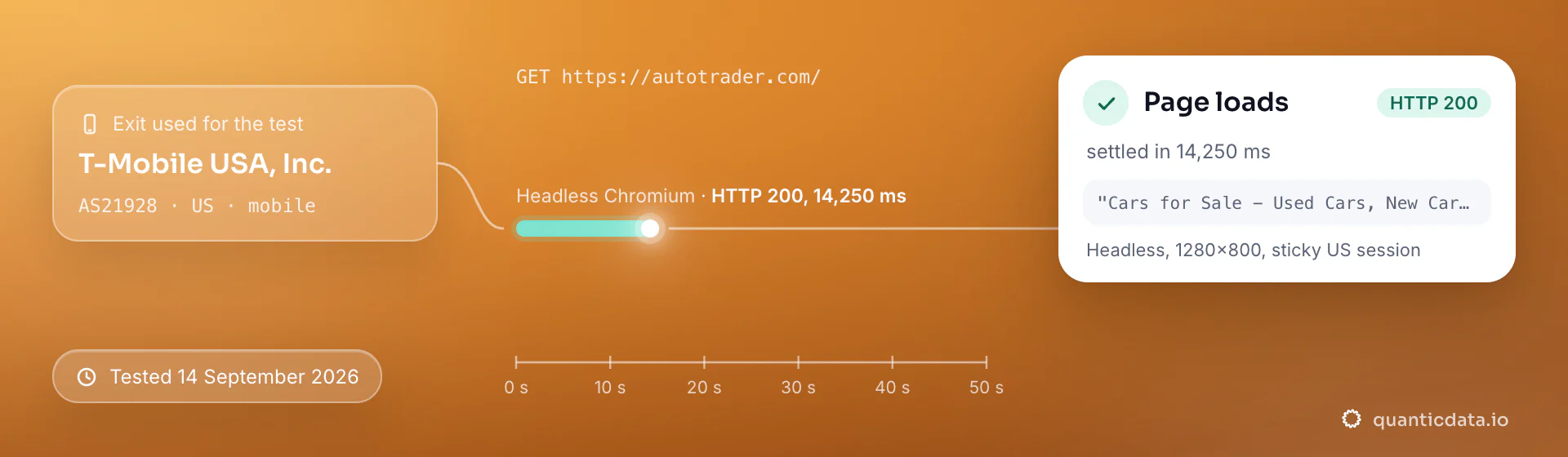
Best countries and carriers for AutoTrader mobile proxies
The exits most often asked for with AutoTrader, and why. Carriers are named only where the mobile catalog lists them; every country page shows the full list.
United States
Autotrader.com and the largest dealer market.
T-Mobile, AT&T Wireless, Verizon Wireless · -country-us
United Kingdom
Autotrader.co.uk, effectively the UK used-car price index.
Three, BT, O2 · -country-gb
Canada
Autotrader.ca with province-level markets.
Telus Communications, Rogers Wireless, Bell DSL Internet · -country-ca
Mobile Proxies pricing for AutoTrader
Per GB, valid 90 days, carrier and city targeting included, no port fees. Pay from balance, card, PayPal or crypto.
The same pool at every tier — a small test costs exactly $5 for 1 GB. Full ladder and terms on the pricing page.
How to start with AutoTrader in minutes
- Create a free QuanticData account and open Plans → Mobile; pick a bundle — $5 for 1 GB is enough to test AutoTrader on your real workflow.
- Copy host, port, username and password from the dashboard. Put the country in the username (
-country-us), a carrier if you need one (-isp-…), then-type-mobile, and a session ID with a lifetime when the AutoTrader flow must keep one IP. - Set the proxy per request with city targeting matching the postcode or ZIP in the search; render with a headless browser where the listing grid loads dynamically.
- Run a small sample first and watch how AutoTrader responds; a mobile IP is not a promise of access, acceptance or a particular success rate, and AutoTrader's terms and the law apply to what you do through it.
Set it up for AutoTrader
QuanticData mobile proxies are standard HTTP and SOCKS5 endpoints: a host, a port, a username and a password, shown in your dashboard the moment a plan is active. The username carries the country and the carrier, and the session; host, port and password never change. Below, a request to a public AutoTrader page through the mobile gateway, with no session ID in the username, so every request to AutoTrader leaves from a different carrier IP. Match the exit's state or city to the ZIP in the search and keep a page every few seconds per exit.
# PROXY_HOST = host:port shown in your dashboard
curl -x "$PROXY_HOST" -U "USER-country-us-type-mobile:PASS" \
  -A "Mozilla/5.0 (Windows NT 10.0; Win64; x64) Chrome/128.0 Safari/537.36" \
  "https://www.autotrader.com/cars-for-sale/all-cars"
import requests
# host and port from your dashboard; country and session in the username
proxy = "http://USER-country-us-type-mobile:PASS@PROXY_HOST:PORT"
r = requests.get("https://www.autotrader.com/cars-for-sale/all-cars",
proxies={"http": proxy, "https": proxy},
headers={"User-Agent": "Mozilla/5.0 (Windows NT 10.0; Win64; x64) Chrome/128.0 Safari/537.36"},
timeout=30)
print(r.status_code, len(r.text))SOCKS5 works with the same username on the SOCKS5 port (socks5h:// in Python's proxies, --socks5-hostname in curl), so the hostname is resolved at the exit.
FAQ
Mobile Proxies for AutoTrader: does it work, Android and iPhone, which session, how to set it up, proxy clients, free options, mobile or residential.
Something else? Ask usDo mobile proxies work with AutoTrader on Android and iPhone?
QuanticData mobile proxies work with the AutoTrader app on Android and iPhone: the phone's traffic leaves through the proxy and AutoTrader sees the carrier IP, with country and session set in the username exactly as on a desktop. On iPhone the proxy goes into an app such as Shadowrocket or Potatso, which takes HTTP or SOCKS5 with your username and password and carries every app on the phone, on Wi-Fi and on cellular; on Android a proxy client app that takes a username and password, such as SocksDroid for SOCKS5, does the same.
Which proxy session should I use for AutoTrader: sticky or rotating?
QuanticData recommends rotating IPs for AutoTrader. Rotate per search or listing page; use a sticky session with city targeting when a run must keep one search location constant. Sessions are set in the username (a session ID and a lifetime, up to 1,440 minutes (24 hours)), so no proxy list is needed.
Do AutoTrader results change with my location?
QuanticData customers confirm that both the country site and the search location shape what AutoTrader returns: distance sorting, local dealers and regional pricing. A residential exit in the buyer's city, paired with the matching postcode or ZIP in the query, is what makes collected prices comparable to what a local buyer sees.
How do I set up a mobile proxy for AutoTrader?
QuanticData gives you host, port, username and password the moment a plan is active: create a free account, open Plans → Mobile, pick a bundle ($5 for 1 GB to start) and copy the credentials from the dashboard. Set the proxy per request with city targeting matching the postcode or ZIP in the search; render with a headless browser where the listing grid loads dynamically. For AutoTrader, the countries asked for most are the United States, the United Kingdom and Canada, with carriers such as T-Mobile and AT&T Wireless selectable in the username for the United States.
Can I use Proxifier with QuanticData for AutoTrader?
QuanticData mobile proxies are standard HTTP and SOCKS5 endpoints with a host, a port, a username and a password, so any client that accepts a proxy node works, Proxifier included: enter those four values as a proxy server of type HTTPS or SOCKS5 in Proxifier on the desktop, with a rule for the application, and AutoTrader traffic from the applications matched by the rule leaves through the exit set in the username. For AutoTrader leave the session out of the username so every new connection rotates to a fresh IP, or add a session ID when a flow must keep one. Host and port are in your dashboard; the HTTP and the SOCKS5 port are different, so pick the one that matches the node type.
Is there a free mobile proxy for AutoTrader?
QuanticData does not give away mobile proxies for AutoTrader: the smallest mobile bundle is $5 for 1 GB, and the free option is the residential trial — 100 MB on Residential Basic for 5 days, no card — enough to test your setup against AutoTrader from a home IP before paying for carrier IPs. Public "free proxy" lists are shared addresses the storefronts already know, which is why they answer with captchas or empty pages; they also change daily, so nothing built on them keeps working for long.
Mobile or residential proxies for AutoTrader?
QuanticData's answer for AutoTrader is mobile, the network this page is about: AutoTrader is used mostly from phones, and a carrier IP shared with real handsets behind CGNAT, held on a sticky session for up to 24 hours, is what its accounts expect. Residential is the cheaper choice for reading public AutoTrader data at volume, from $1.00/GB; the residential page for AutoTrader covers that side.
Get mobile proxies for AutoTrader in minutes
Free account, pick a bundle, credentials in your dashboard. Mobile starts at $5 for 1 GB.
Buy mobile bandwidth Create a free account