Chrome and EdgeFree extension
Proxy manager extension for Chrome and Edge
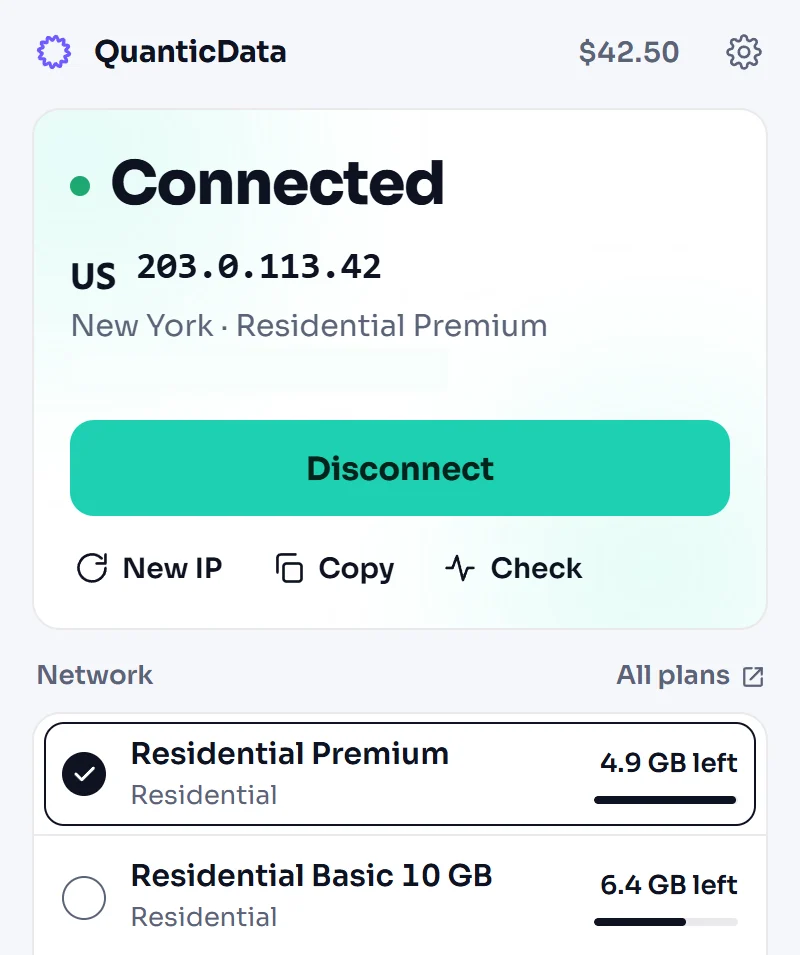
QuanticData Proxy Manager is a free extension for Chrome and Edge. It puts the browser behind the proxy plans in your QuanticData account from a side panel that stays next to the page: pick a plan, choose where your traffic exits, connect. There is no manual proxy setup, and the rest of the computer keeps its own connection.
Install QuanticData Proxy Manager
 Install in Microsoft Edge from the Chrome Web Store
Version 2.0 · Chrome or Edge 116 and later, on a computer · the extension is free
Install, sign in, connect
- Add the extension. Install QuanticData Proxy Manager from the Chrome Web Store, in Chrome or in Edge. Its icon opens a side panel next to the page you are on.
- Sign in. Continue with the dashboard session already open in the same browser, or paste an API key from the API keys page of your dashboard. The key stays on your device.
- Connect. Pick one of your plans, choose where the traffic exits and the kind of session, then press Connect. The panel shows the exit IP and its country, and Disconnect puts the browser back on your own connection.

What the extension does
Everything below runs in the side panel, on the plans you already have. Nothing is bought from the extension: plans are managed on the dashboard.
| Plans | Residential, mobile, ISP, Premium ISP, datacenter and IPv6 plans from your account, with what is left on each one. |
|---|---|
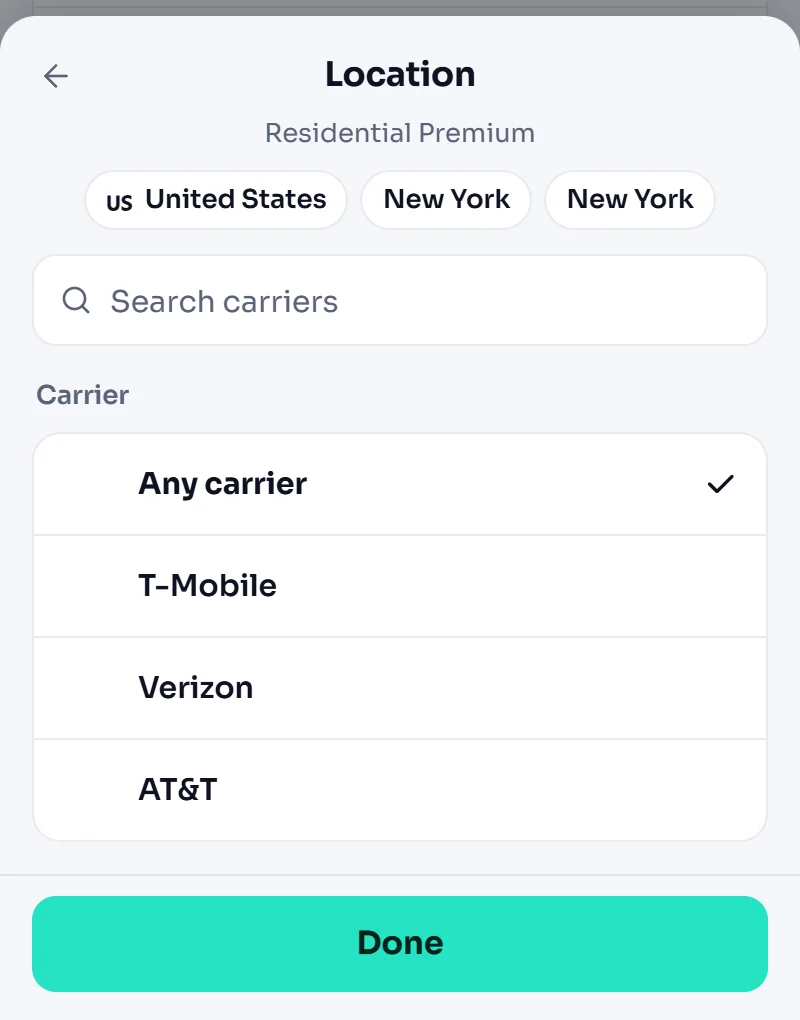
| Location | Country, state, city, and the carrier or ISP where the plan allows it. Datacenter plans pick a gateway by location. |
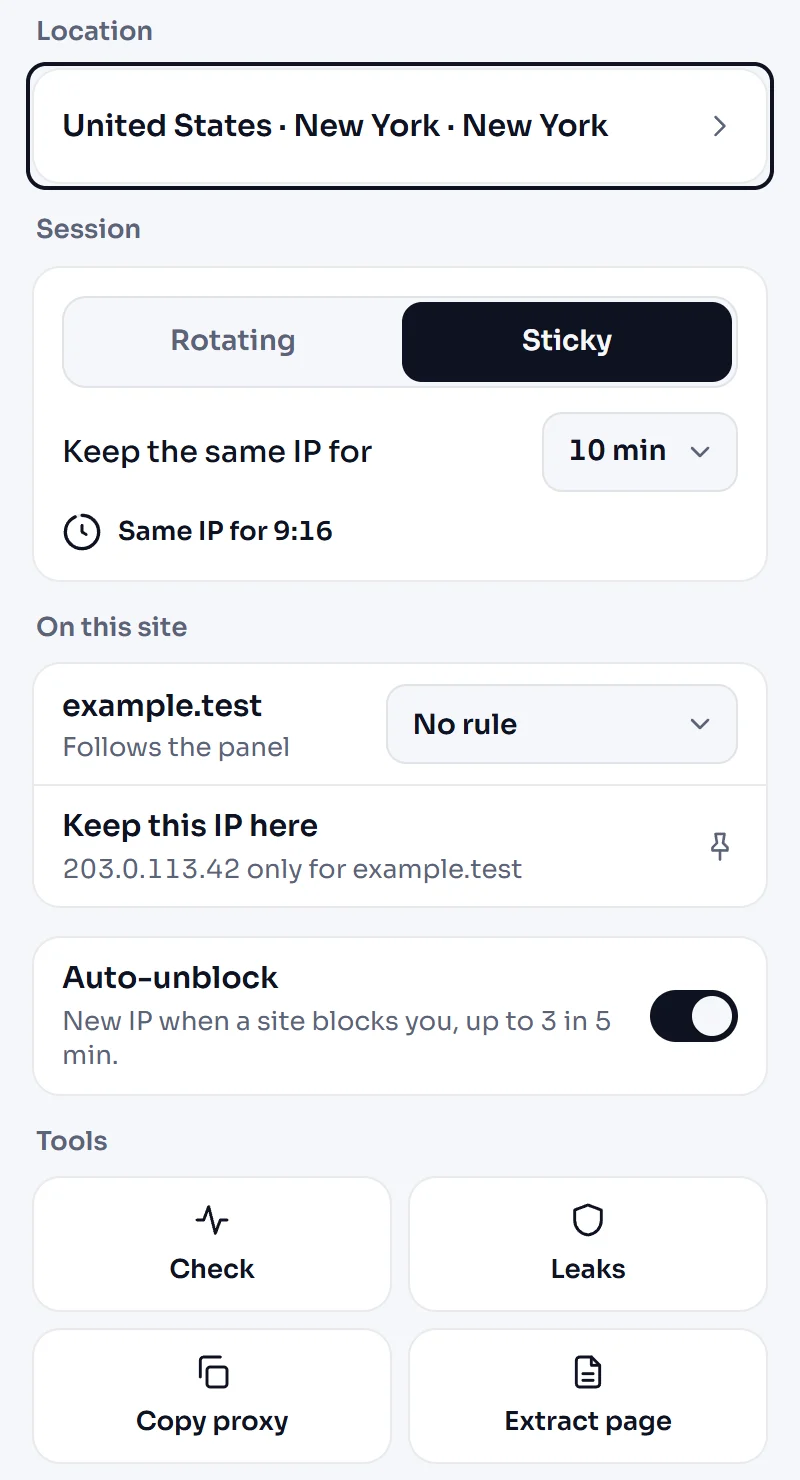
| Sessions | Rotating, a new IP per request; sticky, the same IP for a time you choose, with a countdown; or static where the plan has it. ISP and gateway plans rotate their IPs on a timer or on every page. |
| Site rules | Send one site through another plan, keep a site direct (your bank, your mail), or pin a site to the IP you are on. |
| Auto-unblock | When a site answers 403, 429 or 503, or the proxy stops responding, the extension gets a new IP on the same plan and shows what happened: up to three times in five minutes, then it pauses and tells you. |
| Extract page | The page you are looking at becomes Markdown in one tap, through the QuanticData Data API, which uses Data API credit. |
| Tools | Exit IP and latency, a leak test (WebRTC, time zone, language, DNS, incognito access), the proxy line to copy into other tools, a rotation link for sticky sessions, or any proxy line pasted in and used. |
| Keyboard | Alt+Shift+P connects or disconnects, Alt+Shift+N gets a new IP. |
| Leak protection | WebRTC leak protection while a session is live. Your dashboard and localhost never go through the proxy. |
Location down to the city and the carrier
The location sheet lists what the selected plan can target, so you never pick a place the plan cannot reach: a country on every plan that targets by country, then the state, the city and the carrier or ISP where the plan allows it. The screenshot shows a Residential Premium plan in New York with its carriers.
The session decides how long you keep an IP. Rotating gives a new IP on every request, which suits pages you only read. Sticky keeps the same IP for the time you set, with a countdown in the panel, which suits a login or a checkout. The plans themselves are on the residential, mobile, ISP, datacenter and IPv6 pages.
HTTP in the browser, SOCKS5 in your apps
The extension connects over HTTP, the protocol a browser can use to answer a proxy that asks for a username and a password, and it answers that sign-in for you. For apps that work with SOCKS5, the dashboard shows the connection lines of each plan, and the proxy tester checks a line before you use it.
Privacy
The extension does not use the browser's history or upload a log of the sites you visit, and it does not read form input, passwords typed into websites or request bodies. It reads the address of the site you are on to apply your site rules, keeps its settings and a short event history on your device, and sends a page to the Data API only when you press Extract page. It signs in with your dashboard session or an API key, and the key stays on your device. The full text is in the QuanticData Proxy Manager privacy policy.
Questions about the extension
Is QuanticData Proxy Manager free?
Does it work in Microsoft Edge?
How do I use a proxy extension in Chrome?
Does the extension support SOCKS5?
Does it change the proxy for the whole computer?
What happens when a site blocks the IP?
Does it work on Android or iPhone?
Your plans, one click from any page
Every plan you buy shows up in the side panel with what is left on it: residential from $0.80/GB with country, state and city targeting, plus mobile, ISP, datacenter and IPv6.
Create my free accountFree key, $2 of usage credit every month, no credit card.