If a crypto payment arrives short, QuanticData does not activate the order or credit the balance. A support ticket with the amount expected and the amount received opens by itself, and a dashboard notice, Crypto payment received in part, asks you not to send the whole payment again. A person settles it. Overpaying still activates the order.
Crypto payments are exact by design: the payment page turns the dollar total into a precise coin amount and watches the address for it. Most short payments are not a mistake in the amount typed but a fee taken out of it on the way. This page covers what counts as short, what the dashboard shows, what to do, overpaying, who pays the network fee and why confirmations take the time they take.
What counts as an underpayment
When you choose Crypto at checkout, the payment page shows the order total in dollars and, once you pick a coin and its network, the exact amount of that coin to send. What arrives at the payment address is compared with that coin amount, not with dollars. A payment a little short, from rounding or a price move while the transaction confirms, is accepted within a small margin and the order is activated normally. Beyond that margin the payment is an underpayment, whatever the reason.
A worked example, with an illustrative fee (every exchange sets its own):
| Step | Amount | What it means |
|---|---|---|
| Amount shown on the payment page | 25.00 USDT | What must arrive at the address |
| Amount typed in the exchange's withdrawal form | 25.00 USDT | The exchange takes its fee from this amount |
| Exchange withdrawal fee | 1.00 USDT | Kept by the exchange, never sent |
| Amount that arrives | 24.00 USDT | 4% short: the order is not activated and a ticket opens |
The fix in that case is simple: when an exchange asks for the amount to withdraw, enter the amount to receive plus its fee, or use its "amount received" field if it has one, so that the full 25.00 USDT lands.
What you see in the dashboard
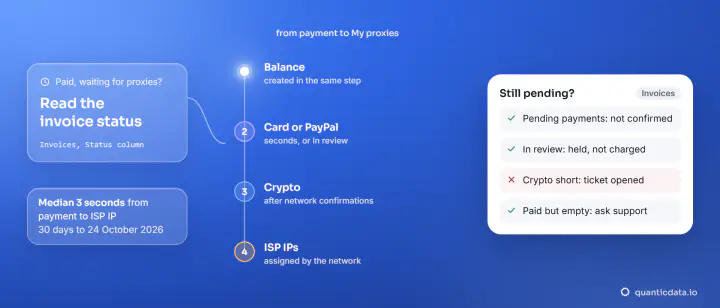
Two places follow a crypto payment: the payment page, which shows whether it is waiting for your transaction, confirming it or done, and the Invoices page in the dashboard, where an order not confirmed yet waits under Pending payments. This is what each outcome looks like:
| What arrives | What you see | The order | What you do |
|---|---|---|---|
| Nothing yet | The payment page waits; the order is under Pending payments, with "Expires in" | Waiting | Send the exact coin amount |
| Full amount, still confirming | The payment page says it is confirming; the order is still under Pending payments | Created when it confirms | Nothing; do not send again |
| Full amount, or a little short within the margin | The invoice says Paid | Created automatically, email sent | Nothing |
| Clearly less than asked | The notice Crypto payment received in part, and a ticket; the invoice is not Paid (Partially paid on the row once the short amount is confirmed) | Not created; nothing credited | Reply in the ticket; do not resend the whole amount |
| More than asked | The invoice says Paid | Created automatically | Tell us if it was a mistake (see below) |
| Nothing before the payment page timed out | The order is still under Pending payments | Not created | Pay opens the payment page again |
An unpaid checkout stays under Pending payments for 24 hours after you start it. If the payment page times out before you send anything, nothing is lost: Pay on the same checkout opens the payment page again, and Discard removes a checkout you no longer want. Nothing is charged by either.
The ticket that opens by itself
Since 21 October 2026, a short crypto payment opens a ticket in your support conversation without anyone writing it. It carries the invoice, the coin, the amount expected, the amount received and the payment ID, so the team does not need to ask. At the same time the dashboard shows a notice, Crypto payment received in part, which says how much arrived of the total, that the team has the details and replies in the dashboard assistant and by email, and asks you not to send the whole payment again.
Nothing is credited or activated automatically on a short payment: a person settles it. What helps the reply come faster:
- The transaction hash (TXID) from your wallet or exchange, and the network you sent on.
- The invoice number from the Invoices page.
- No second transfer until the team says how the invoice will be settled. A second full payment is a second payment, not a correction.
If you cannot find the ticket, open the assistant in the dashboard, or write to hello@quanticdata.io with the invoice number and the transaction hash.
Why crypto payments arrive short
- The exchange took its withdrawal fee out of the amount. The most common case, as in the example above. Exchanges charge their own withdrawal fee on top of the network's, and many subtract it from the amount you type.
- The dollar value was sent instead of the coin amount. Wallets and exchanges use their own exchange rates. Typing "$25 of USDT" or "$25 of BTC" in a wallet can send a different coin amount from the one the payment page asked for. Copy the coin amount, not the price.
- The wrong network. USDT exists on several networks, and the payment page gives one address for the network you picked. A coin sent on another network is not seen by that payment. Pick the same coin and network in your wallet as on the page, and write to us before sending anything else if it happened.
- A slow confirmation on a fast-moving coin. The amount is fixed when the payment page quotes it. A small move while the transaction confirms falls inside the margin; a long wait on a volatile coin can fall outside it.
Overpaying a crypto invoice
If more arrives than the payment page asked for, the invoice is marked Paid and the order is created as usual: an overpayment never holds up a plan. The difference is not added to your balance automatically. If you sent more by mistake, for example twice, open a ticket with the invoice number and the transaction hashes so the team can look at it.
Network fees: who pays them
The amount on the payment page is the amount that must arrive. The network fee is paid by the sender, on top of it, in the network's own coin, and an exchange's withdrawal fee comes on top of that. How each network charges:
| Network | Fee paid in | How the fee works | Block interval |
|---|---|---|---|
| Tron (USDT TRC20) | TRX | A token transfer is a smart contract call: it uses Energy and Bandwidth, and TRX is burned for what the account does not have | One slot every 3 seconds |
| Ethereum (ETH, USDT ERC20) | ETH | Gas for every transaction, paid by the sender | One slot every 12 seconds |
| Bitcoin | BTC | The difference between inputs and outputs goes to the miner | About 10 minutes on average |
Two practical consequences. Sending USDT from your own wallet needs some TRX (on Tron) or ETH (on Ethereum) in the same wallet for the fee; without it the transfer does not leave. And the amount on the payment page is already what the order needs: a payment arrives short only when less was sent, or when a fee was taken out of it before it left.
Confirmations: why a crypto payment takes a while
A transaction is seen on the network before it is final. The payment processor waits for its own number of confirmations on each network, then reports the payment as confirmed, and only then is the order created. On Tron, with a slot every 3 seconds, that is quick; Bitcoin targets 2,016 blocks every two weeks, about one every 10 minutes, so a Bitcoin payment usually waits longer. While it confirms, the payment page says so and the order stays under Pending payments: the money is on its way and nothing needs to be sent again.
How to pay the exact amount the first time
- Choose the coin and network on the payment page first, then set the same coin and network in your wallet.
- Copy the coin amount from the page, not the dollar total.
- From an exchange, add its withdrawal fee so the full amount arrives.
- From your own wallet, keep a little TRX or ETH for the network fee.
- Do not split the payment into several transfers, and keep the transaction hash.
USDT is offered on any network the payment page lists, for payments of $11 or more; for smaller amounts pick another coin, or pay by card or PayPal. All the options are in the coins and methods we accept. Once paid, plans for residential proxies or mobile proxies are created as soon as the invoice says Paid; the timing for every method is in how long it takes to get proxies after payment. Crypto payments need no identity documents from us for an ordinary order, as our KYC policy explains.