
To send Node.js fetch requests through a proxy, attach an agent. node-fetch takes an HttpsProxyAgent in its agent option. Node's built-in fetch takes an undici ProxyAgent as dispatcher, installed at the same major version as Node's own undici. Node 24 and 22.21 or later can instead read HTTPS_PROXY when NODE_USE_ENV_PROXY=1 is set.
Every example on this page was run on 24 October 2026 with Node.js 24.21.0 through a QuanticData Residential Premium line for Chile, and the outputs shown are the real ones, with the exit IP masked. The version numbers come from the Node.js and undici documentation and from the npm registry, so you can check which method your Node version supports before you write a line. For a wider overview that also covers axios, see proxies in Node.js with fetch and axios.
Which method for which Node version
| Method | What you install | Where the proxy goes | Node versions |
|---|---|---|---|
| node-fetch + https-proxy-agent | node-fetch 3, https-proxy-agent 9 | agent option | https-proxy-agent 9 needs Node 20 or later |
| Built-in fetch + undici ProxyAgent | undici at Node's own major: 6 on Node 22, 7 on Node 24, 8 on Node 26 | dispatcher option | fetch is built in since 18.0.0, stable since 21.0.0 |
| NODE_USE_ENV_PROXY=1 | nothing | HTTPS_PROXY, NO_PROXY | 24.0.0 and later, 22.21.0 and later |
| node --use-env-proxy | nothing | the same variables | 24.5.0 and later, 22.21.0 and later |
| http.setGlobalProxyFromEnv() | nothing | one call at startup | 25.4.0 and later, 24.14.0 and later |
| SOCKS5: socks-proxy-agent, or undici's SOCKS5 support | socks-proxy-agent 10, or undici 7.23 or later | agent or dispatcher | socks-proxy-agent 10 needs Node 20 or later |
The built-in route through environment variables only takes HTTP or HTTPS proxy URLs, so SOCKS5 always goes through an agent. On a Node version older than the ones in the table, the variables are ignored without a warning: we ran the same command on Node 22.6.0 and the request left from our own IP.
Before you start: the proxy URL
All the methods below take the proxy as one URL: http://username:password@host:port. In the QuanticData dashboard open My proxies, then your plan; in the Endpoint generator choose the Country, set Session to Sticky, choose a Session TTL, keep the Protocol on HTTP and set Output format to http://user:pass@host:port. The Preview is the URL to paste.
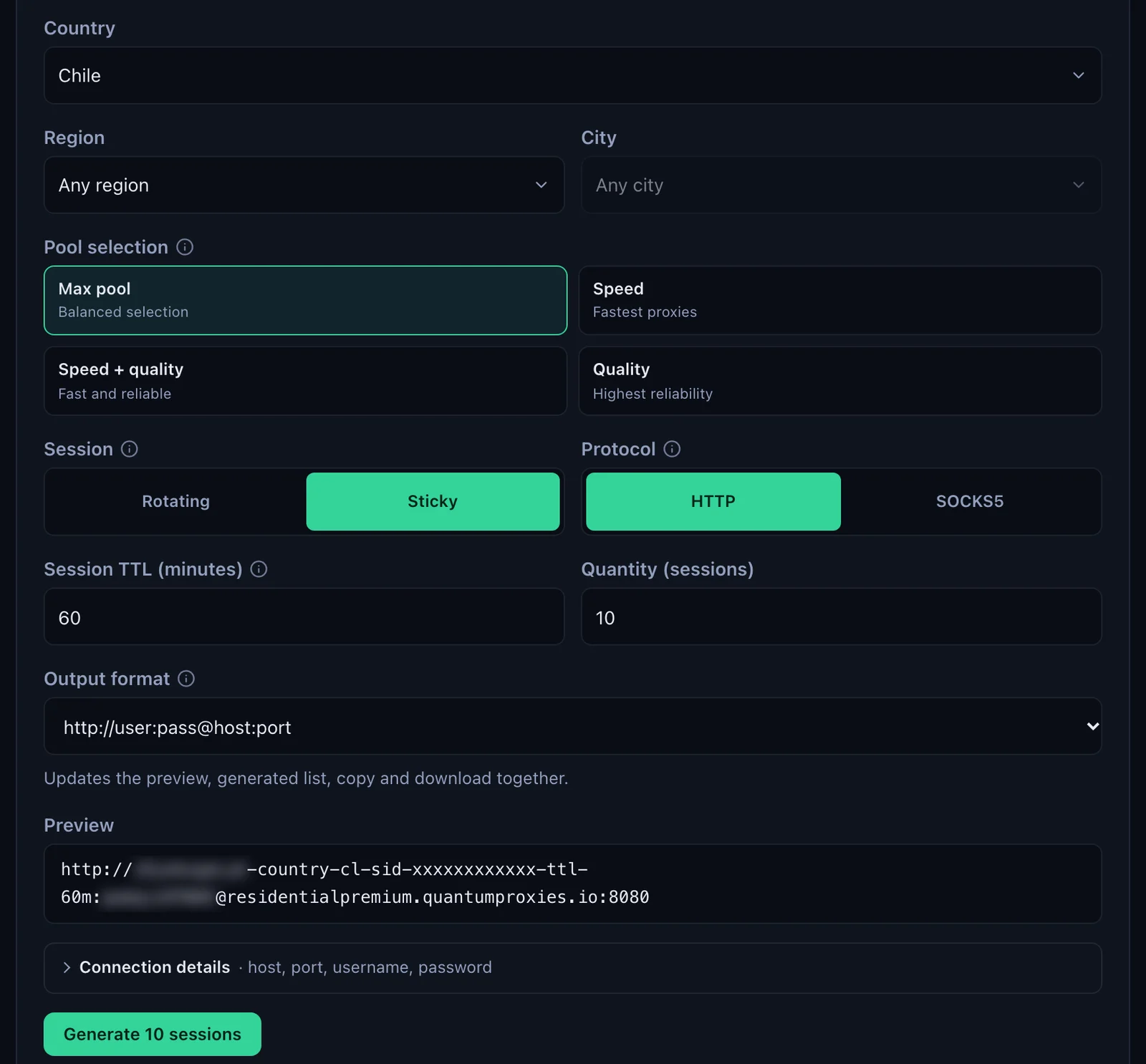
- Host and port:
residentialpremium.quantumproxies.io, port 8080 for HTTP and 1080 for SOCKS5. - The username carries the targeting:
USER-country-cl-sid-nf01-ttl-60mexits in Chile (-country-cl), keeps one IP for the session named nf01 (-sid-nf01) for 60 minutes (-ttl-60m). Copy it whole. - Special characters: if the password holds
@,:,/or#, wrap it inencodeURIComponent()before it goes into the URL. undici decodes it again before it sends the credentials to the proxy.
In real code keep the username and password in environment variables or a secrets store; the examples write them inline as USER and PASS so the whole line is visible.
node-fetch with https-proxy-agent
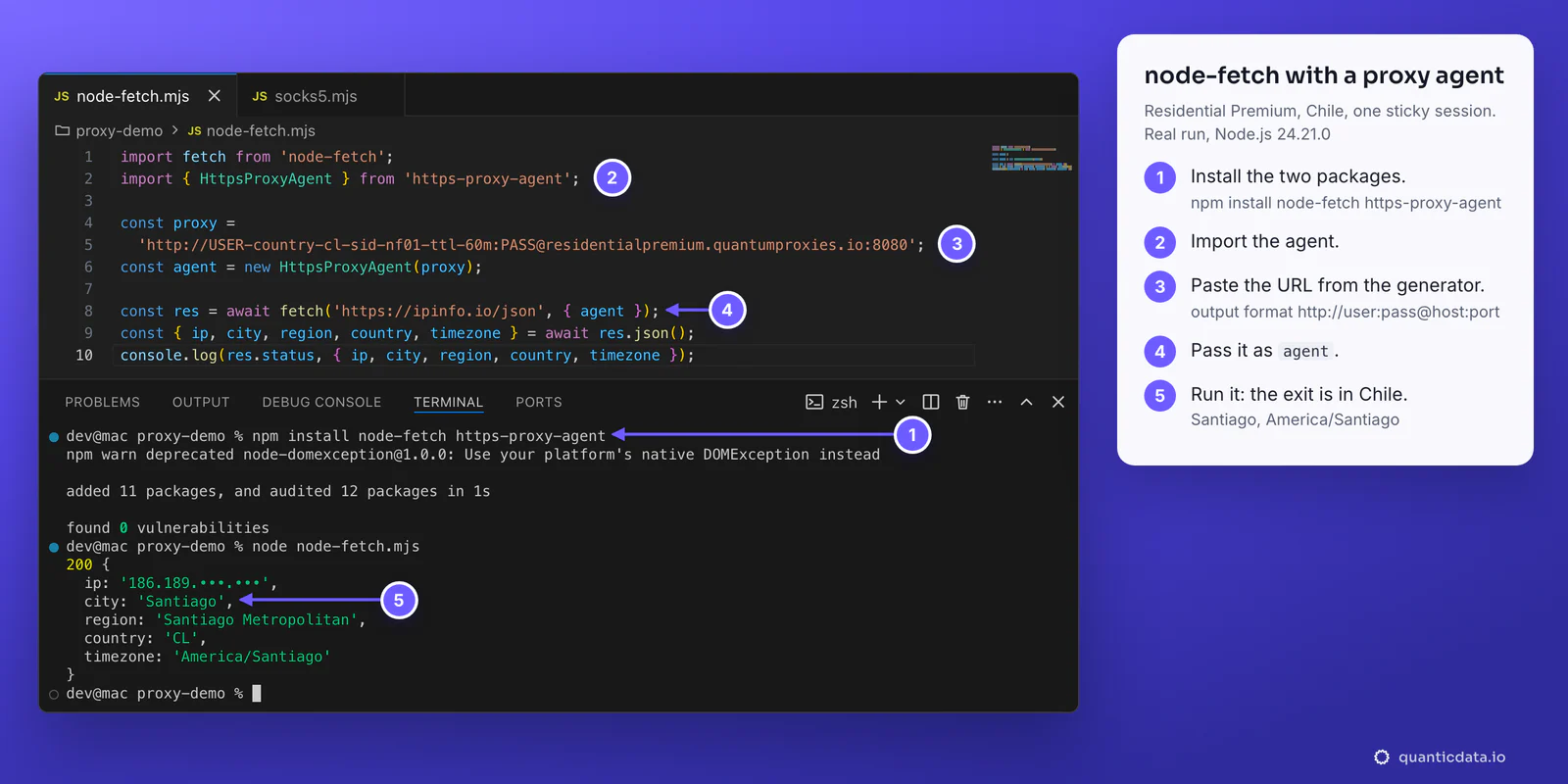
node-fetch has no proxy setting of its own. It takes an agent, and https-proxy-agent is an agent that opens a CONNECT tunnel through an HTTP or HTTPS proxy. node-fetch 3 is an ES module: use import, or stay on node-fetch 2 if the project still loads modules with require().
npm install node-fetch https-proxy-agentimport fetch from 'node-fetch';
import { HttpsProxyAgent } from 'https-proxy-agent';
const proxy =
'http://USER-country-cl-sid-nf01-ttl-60m:PASS@residentialpremium.quantumproxies.io:8080';
const agent = new HttpsProxyAgent(proxy);
const res = await fetch('https://ipinfo.io/json', { agent });
const { ip, city, region, country, timezone } = await res.json();
console.log(res.status, { ip, city, region, country, timezone });200 {
ip: '186.189.•••.•••',
city: 'Santiago',
region: 'Santiago Metropolitan',
country: 'CL',
timezone: 'America/Santiago'
}
Create the agent once and pass the same one to every request that should use that line; https-proxy-agent takes the usual http.Agent options as a second argument, such as { keepAlive: true } to reuse connections. The agent option also accepts a function that receives the URL and returns an agent, which is how one script can send https:// and http:// targets through different agents.
Node's built-in fetch with undici's ProxyAgent
Node's own fetch has no agent option. It runs on undici, and the Node.js documentation says a custom dispatcher can be passed in the options object; undici's ProxyAgent is that dispatcher. The class comes from the undici package on npm, and here is the step most guides skip: install the undici major that Node itself runs, or the two do not fit together.
node -p process.versions.undici
7.29.1

npm install undici@7
import { ProxyAgent } from 'undici';
const proxy =
'http://USER-country-cl-sid-nf02-ttl-60m:[email protected]:8080';
const dispatcher = new ProxyAgent(proxy);
// fetch is Node's built-in global: no import
const res = await fetch('https://ipinfo.io/json', { dispatcher });
const { ip, city, region, country, timezone } = await res.json();
console.log(res.status, { ip, city, region, country, timezone });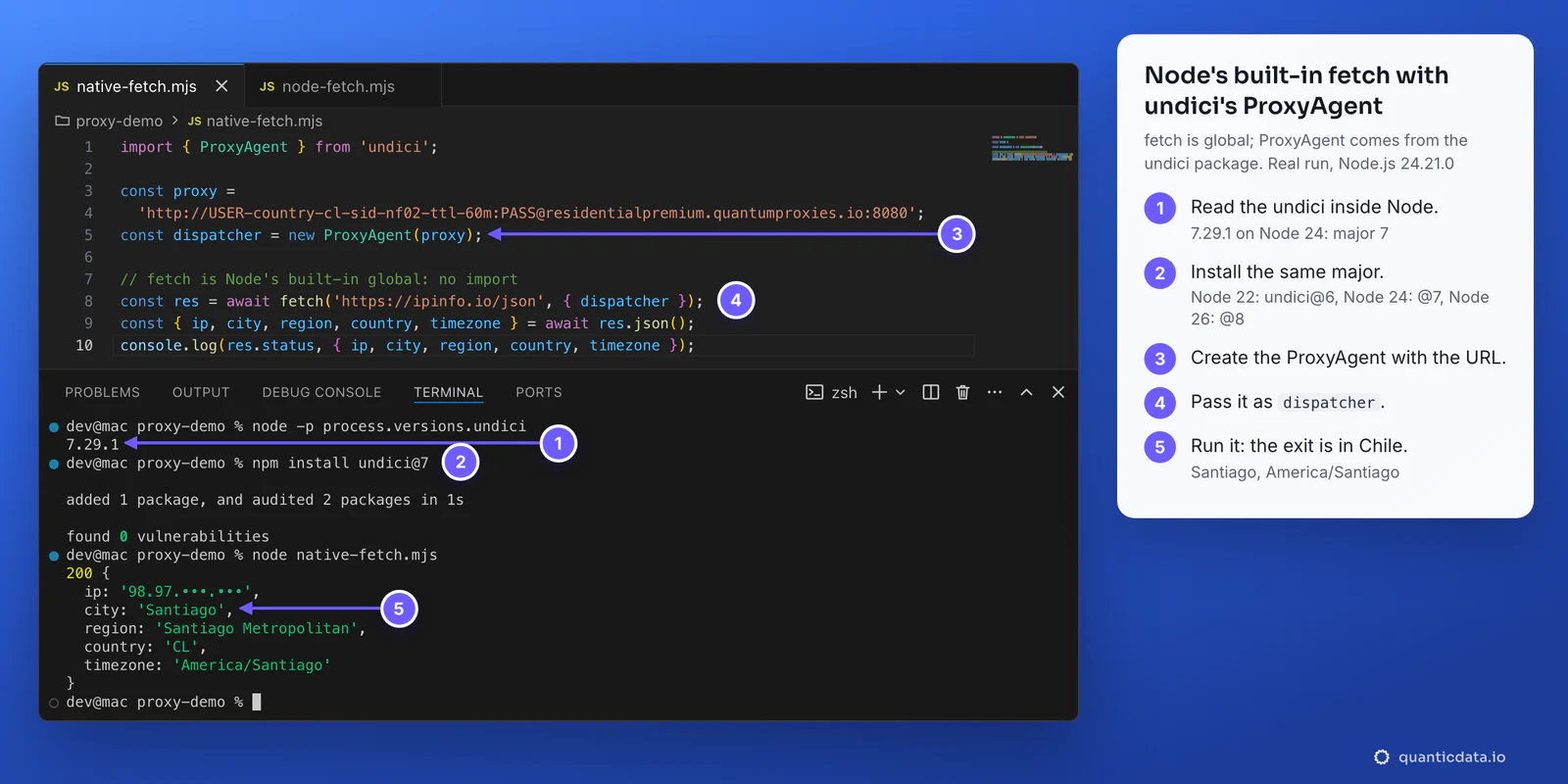
| Node line | undici inside Node (latest release, October 2026) | Install |
|---|---|---|
| Node 22 | 6.29.1 in 22.23.4 | npm install undici@6 |
| Node 24 | 7.30.1 in 24.22.1 | npm install undici@7 |
| Node 26 | 8.12.2 in 26.12.1 | npm install undici@8 |
The same file ran on Node 22.6.0 with undici 6 and gave the same Chile exit. Two other ways avoid the version question entirely: import fetch from undici together with ProxyAgent (import { fetch, ProxyAgent } from 'undici'), so both come from the same package, or make the proxy the default for every request with setGlobalDispatcher(dispatcher), which the Node.js documentation says affects both undici and Node's fetch.
No code changes: NODE_USE_ENV_PROXY and --use-env-proxy
Since Node 24.0.0 and 22.21.0, Node can read the proxy from the environment by itself. Set HTTPS_PROXY (and HTTP_PROXY for plain http:// targets), list the hosts that must skip the proxy in NO_PROXY, and turn the feature on with NODE_USE_ENV_PROXY=1 or, from 24.5.0 and 22.21.0, the --use-env-proxy flag. The Node.js documentation marks it Stability 1.1, active development.
export HTTPS_PROXY='http://USER-country-cl-sid-nf04-ttl-60m:PASS@residentialpremium.quantumproxies.io:8080'
export NO_PROXY='localhost,127.0.0.1'
NODE_USE_ENV_PROXY=1 node env-proxy.mjs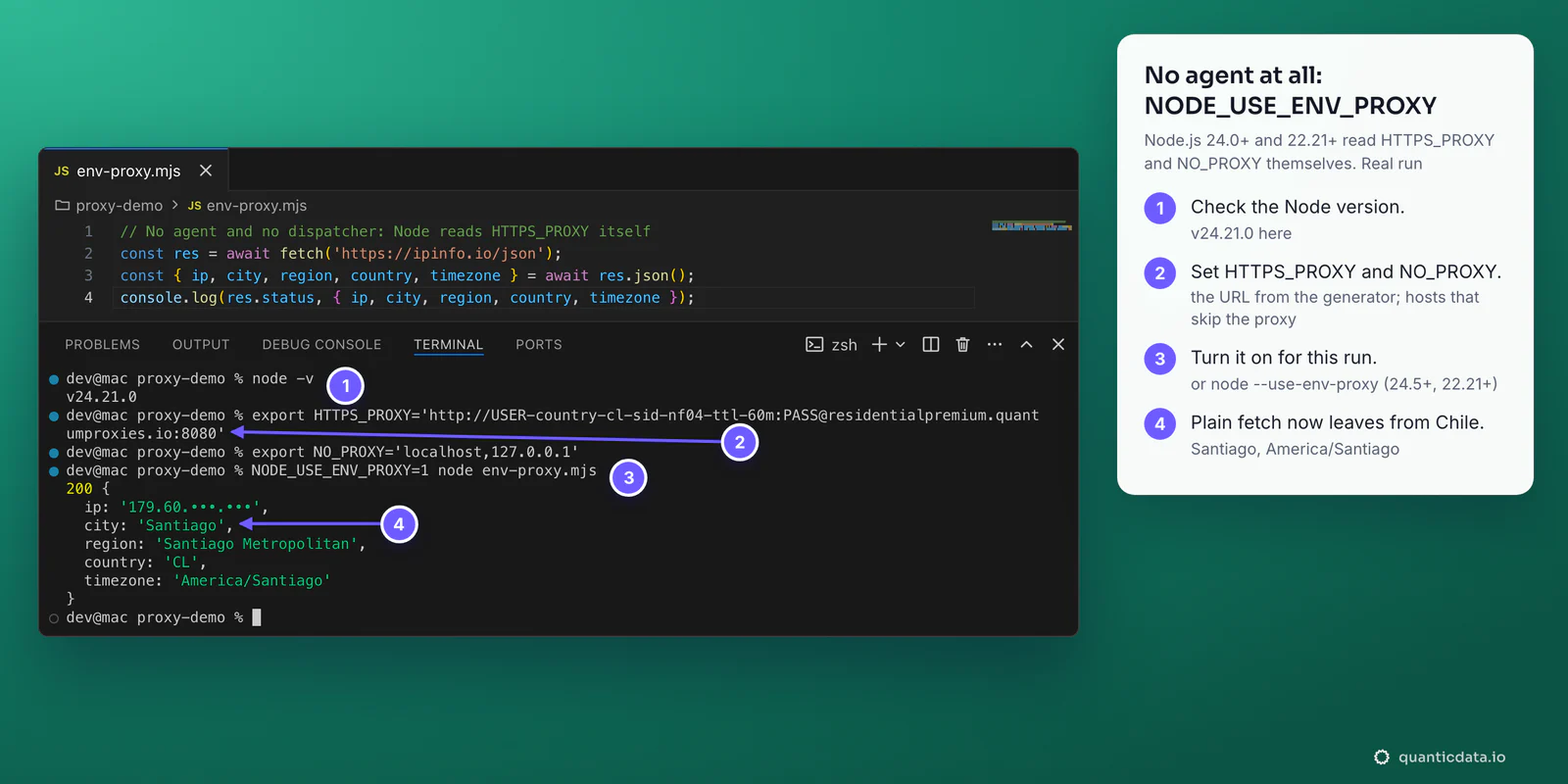
- It covers more than fetch. From 24.5.0 and 22.21.0 the http and https global agents use the same variables, so node-fetch with no agent at all also went out through the proxy in our run.
- NO_PROXY formats:
*, an exact host (example.com), a suffix (.example.comor*.example.com), an IP, an IP range (192.168.1.1-192.168.1.100) or a host with a port, separated by commas. If both forms are set, the lowercase variable wins. - From code:
http.setGlobalProxyFromEnv()(25.4.0 and 24.14.0) turns the same thing on at runtime, for fetch and for http.request, and returns a function that restores the previous agents. - On older Node versions: undici's
EnvHttpProxyAgentreads the same variables; pass it as the dispatcher or install it withsetGlobalDispatcher(), from the undici major that matches Node, as above.
SOCKS5 in Node.js fetch
The environment route and https-proxy-agent speak HTTP to the proxy. For SOCKS5, use port 1080 with socks-proxy-agent in node-fetch. Write the URL as socks5h://: with socks5h the proxy resolves the host name, with socks5 your machine does, which can make a site in Chile resolve to a server near you.
import fetch from 'node-fetch';
import { SocksProxyAgent } from 'socks-proxy-agent';

// socks5h: the proxy resolves the host name, not your machine
const proxy = 'socks5h://USER-country-cl-sid-nf03-ttl-60m:PASS@residentialpremium.quantumproxies.io:1080';
const agent = new SocksProxyAgent(proxy);

const res = await fetch('https://ipinfo.io/json', { agent });
const { ip, city, region, country, timezone } = await res.json();
console.log(res.status, { ip, city, region, country, timezone });
200 {
ip: '179.60.•••.•••',
city: 'Santiago',
region: 'Santiago Metropolitan',
country: 'CL',
timezone: 'America/Santiago'
}With undici, recent releases accept a socks5:// URL in ProxyAgent and hand it to Socks5ProxyAgent, added in undici 7.23.0 and still experimental. It lets the proxy resolve the host name, and Node prints a one-time warning that is not an error. Our run with undici 8.12.3 answered from Chépica, O'Higgins Region:
(node:48991) ExperimentalWarning: SOCKS5 proxy support is experimental and subject to changeMore on when SOCKS5 is worth it is on the page for SOCKS5 proxies.
One sticky IP per worker
The IP is chosen by the session ID in the username, not by the agent object. The same -sid- keeps the same exit for as long as its TTL lasts, up to 1440 minutes; a new -sid- is a new IP. This script opens a fresh connection for each request:
import { ProxyAgent } from 'undici';

const gateway = 'residentialpremium.quantumproxies.io:8080';
const line = (sid) => `http://USER-country-cl-sid-${sid}-ttl-60m:PASS@${gateway}`;

let last;
for (const sid of ['w01', 'w01', 'w02']) {
  const dispatcher = new ProxyAgent(line(sid)); // a new connection each time
  const res = await fetch('https://ipinfo.io/json', { dispatcher });
  const { ip, city } = await res.json();
  console.log(sid, ip, city, ip === last ? '(same IP)' : '(new IP)');
  last = ip;
  await dispatcher.close();
}
w01 179.57.•••.••• Puerto Montt (new IP)
w01 179.57.•••.••• Puerto Montt (same IP)
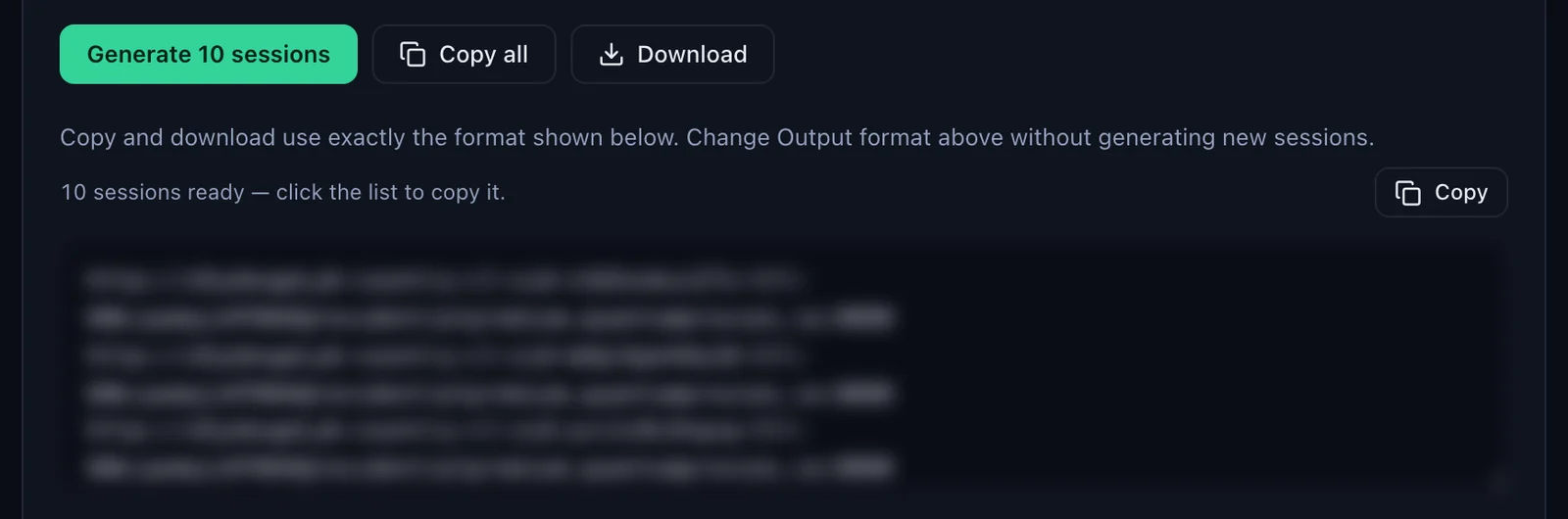
w02 181.42.•••.••• Santiago (new IP)For a pool of workers, give each one its own session ID and one agent for its whole life. The generator makes the lines for you: with Session set to Sticky, Generate makes as many URLs as the Quantity field says, ten by default, each with its own session, and Copy all or Download takes them out in the same format.
Residential Premium, ISP and mobile proxies in Node
| Proxy type | URL in Node | Good for |
|---|---|---|
| Residential Premium | http://USER-country-cl-sid-…:[email protected]:8080, SOCKS5 on 1080 | Most scripts: home IPs in the country, region, city or ISP in the username |
| ISP | http://USER:PASS@<IP>:50100, one fixed IP per line, SOCKS5 on 50101 | Accounts and sessions that should keep the same address for months |
| Mobile | http://USER-country-cl-type-mobile-sid-…:PASS@mobile.quantumproxies.io:8080, SOCKS5 on 1080 | Platforms that expect phone traffic |
Residential Premium
Every example above is Residential Premium: the gateway stays the same and the username picks the exit, by country, region, city or ISP, rotating or sticky. The plans are on the pages for QuanticData residential proxies and Chile residential proxies.
ISP proxies
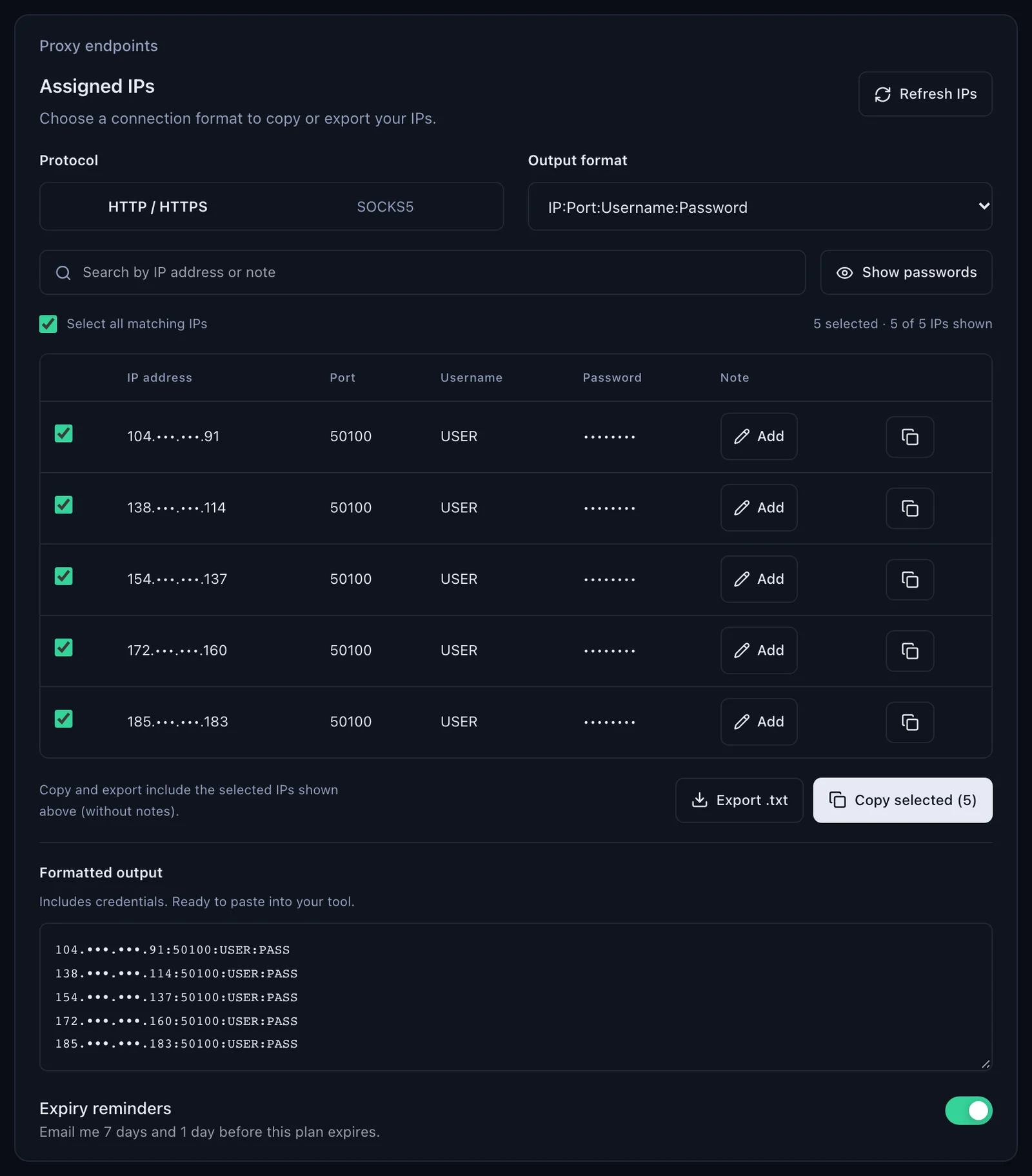
An ISP plan lists fixed IPs under Proxy endpoints, Assigned IPs. Choose the Protocol (HTTP / HTTPS uses port 50100, SOCKS5 port 50101) and the Output format IP:Port:Username:Password, then Copy selected or Export .txt. Each line becomes one agent, and each account or worker keeps its agent:
import { ProxyAgent } from 'undici';

// Assigned IPs, format IP:Port:Username:Password (one fixed IP per line)
const lines = [
  '104.•••.•••.91:50100:USER:PASS',
  '138.•••.•••.114:50100:USER:PASS',
  '154.•••.•••.137:50100:USER:PASS',
];

const agents = lines.map((line) => {
  const [ip, port, user, pass] = line.split(':');
  const auth = `${encodeURIComponent(user)}:${encodeURIComponent(pass)}`;
  return new ProxyAgent(`http://${auth}@${ip}:${port}`);
});

// the same account always leaves from the same IP: agents[0], agents[1]...
const res = await fetch('https://ipinfo.io/json', { dispatcher: agents[0] });
console.log(res.status, (await res.json()).ip);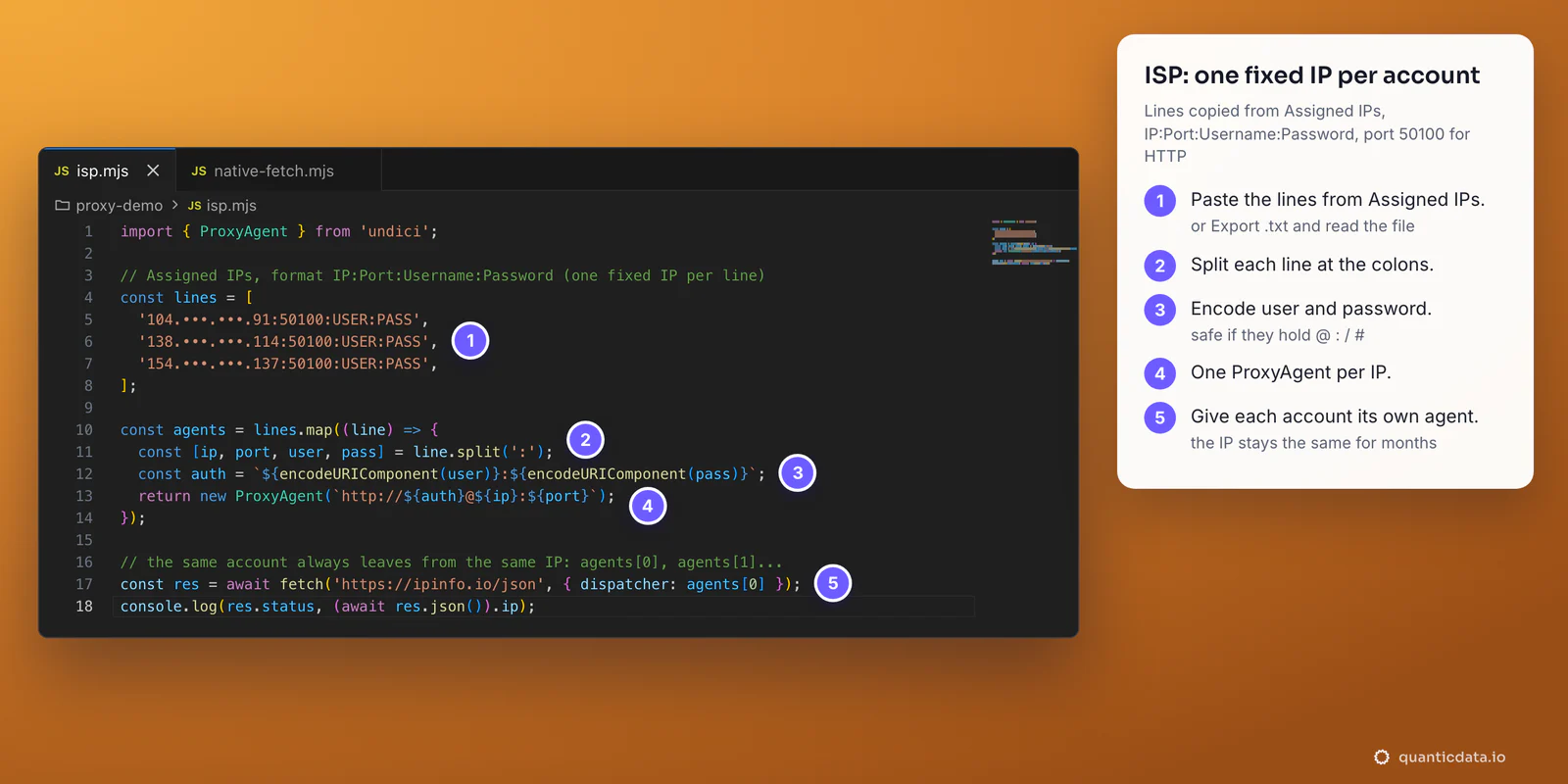
With node-fetch the same URL goes into new HttpsProxyAgent(...) instead. A check through an ISP line shows the IP of the line itself, and it stays the same: there is nothing to rotate. More on the plans: ISP proxies.
Mobile proxies
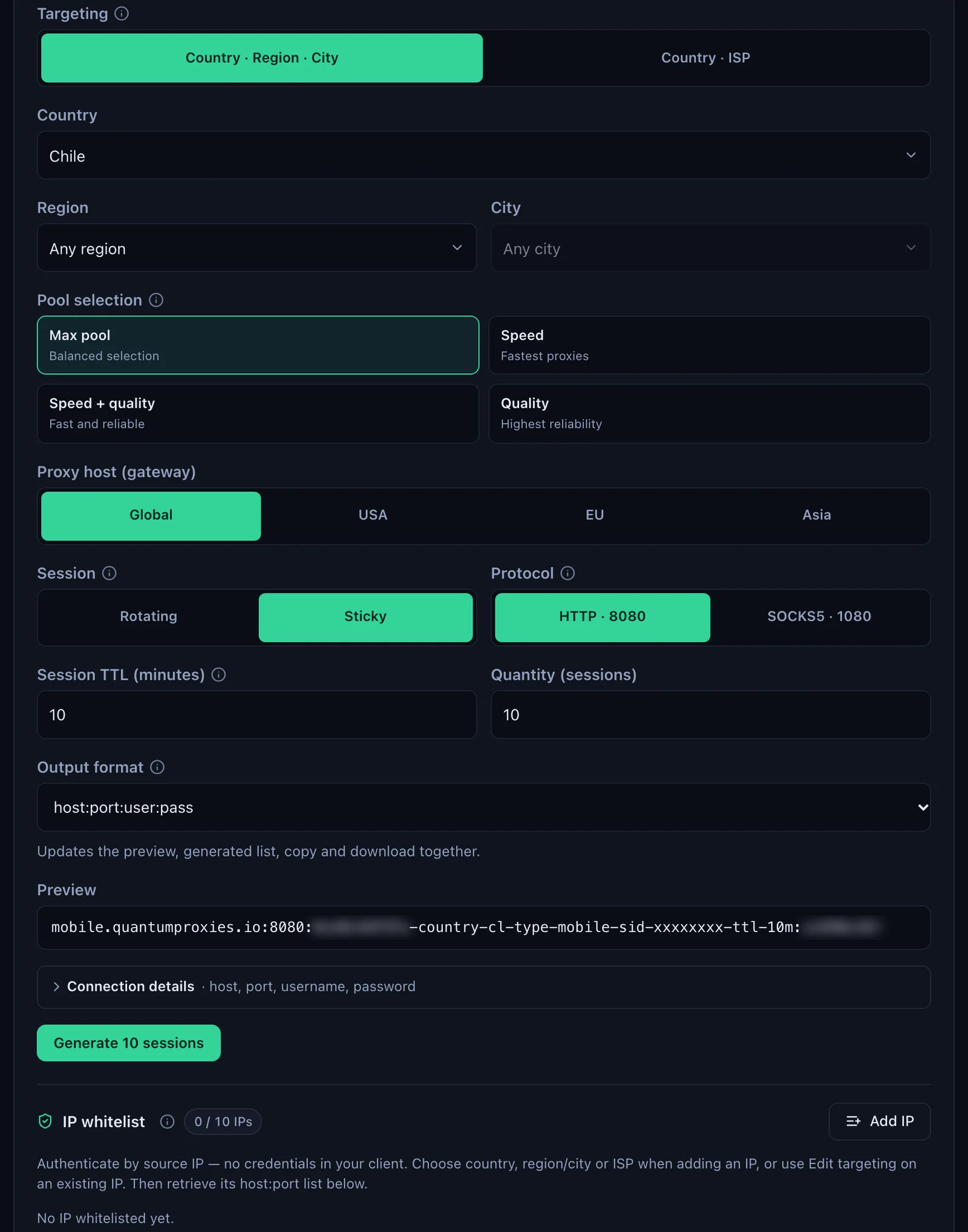
Mobile lines work exactly like Residential Premium, on the mobile gateway and with -type-mobile in the username. In the generator choose the gateway (Global, USA, EU or Asia), the country, Sticky and HTTP on port 8080 or SOCKS5 on port 1080. Mobile plans also offer IP whitelist authentication: once your server's IP is added, the generator lists host:port lines with no login, and the agent takes just http://host:port.
import { ProxyAgent } from 'undici';

// Mobile: the same code, the mobile gateway and -type-mobile in the username
const proxy = 'http://USER-country-cl-type-mobile-sid-m01-ttl-30m:PASS@mobile.quantumproxies.io:8080';
const dispatcher = new ProxyAgent(proxy);

const res = await fetch('https://ipinfo.io/json', { dispatcher });
const { ip, city, region, country, org } = await res.json();
console.log(res.status, { ip, city, region, country, org });
200 {
ip: '191.127.•••.•••',
city: 'Santiago',
region: 'Santiago Metropolitan',
country: 'CL',
org: 'AS7418 TELEFÓNICA CHILE S.A.'
}
The plans are on the page for QuanticData mobile proxies. Browsers driven from Node take the proxy differently; see the guides for Puppeteer and Playwright.
Node.js fetch proxy errors and fixes
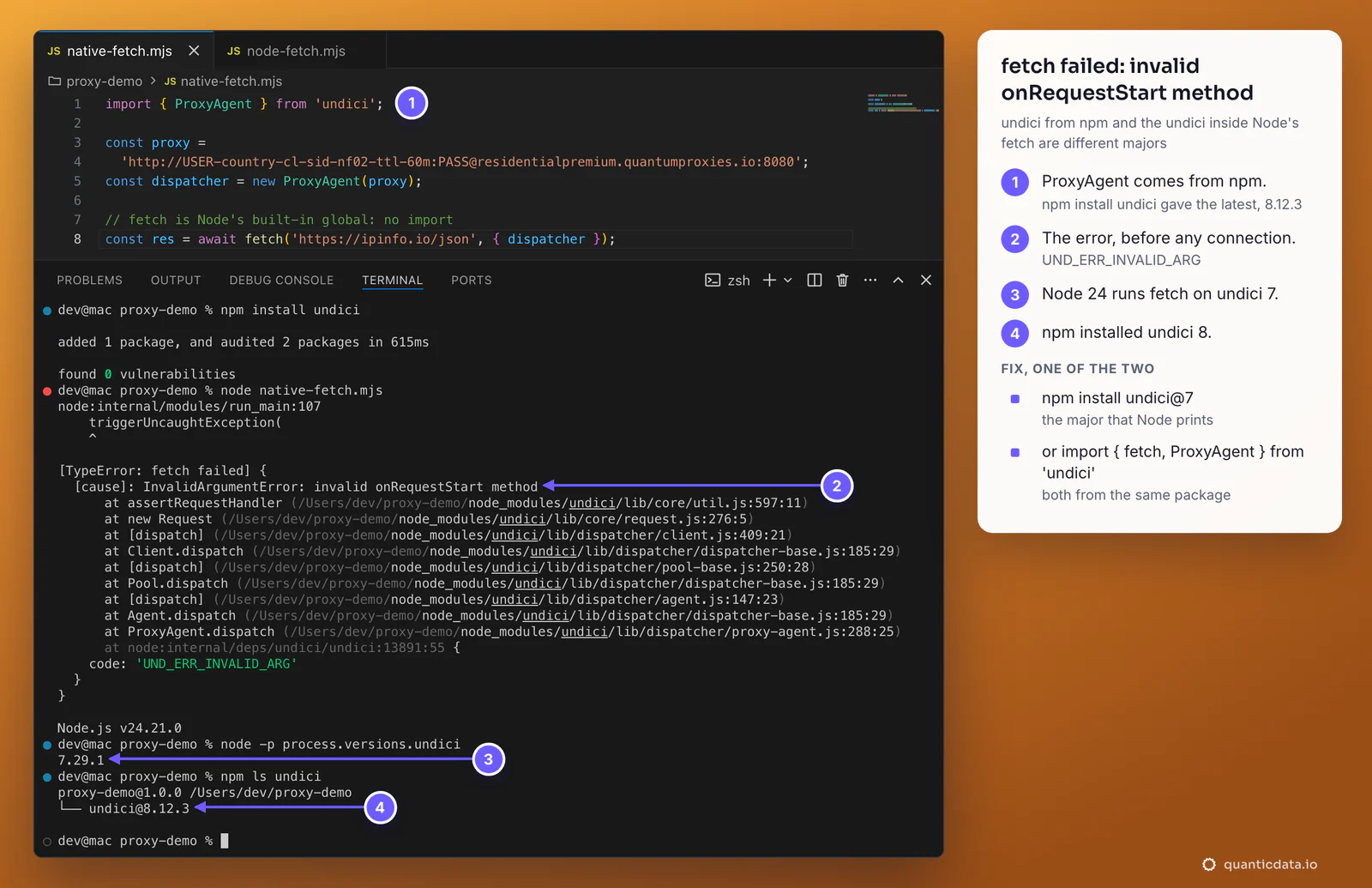
The most confusing one comes from mixing undici versions. Here npm install undici pulled the latest release, 8.12.3, while Node 24.21.0 runs its fetch on undici 7.29.1. The request fails before any connection is made:
[TypeError: fetch failed] {
  [cause]: InvalidArgumentError: invalid onRequestStart method
      at assertRequestHandler (/Users/dev/proxy-demo/node_modules/undici/lib/core/util.js:597:11)
      ...
    code: 'UND_ERR_INVALID_ARG'
  }
}
| What you see | Cause | Fix |
|---|---|---|
fetch failed, cause invalid onRequestStart method, UND_ERR_INVALID_ARG | undici from npm is a different major from the one inside Node | npm install undici@ the major of process.versions.undici, or import fetch from undici too |
The request leaves from your own IP although HTTPS_PROXY is set | NODE_USE_ENV_PROXY is not set, or Node is older than 24.0.0 and 22.21.0 | Set NODE_USE_ENV_PROXY=1 or --use-env-proxy, or pass an agent |
node-fetch: read ECONNRESET; undici: HTTPParserError: Response does not match the HTTP/1.1 protocol | An HTTP agent pointed at port 1080, the SOCKS5 port | Port 8080 for http://, or socks5h:// with port 1080 |
InvalidArgumentError: invalid url when the ProxyAgent is created | The password holds @, # or another reserved character | encodeURIComponent() on the username and password |
Every request fails, and curl with the same values answers 407 Proxy Authentication Required | Username or password wrong, or pasted with a space or a line break | Copy the URL again from the generator's Preview; see fixing 407 Proxy Authentication Required |
require() of node-fetch fails | node-fetch 3 is ES module only | import, a dynamic import(), or node-fetch 2 |
| Wrong country | No -country- in the username | Generate the URL with a country |
| The IP changes in the middle of a job | The TTL ended, or two workers share a session ID | A longer -ttl-, a different -sid- per worker |
One test outside Node settles most cases. If this answers from the right country, the proxy works and the problem is in the script; more options in the guide to using a proxy with curl:
curl -x http://residentialpremium.quantumproxies.io:8080 \
  -U "USER-country-cl-sid-test-ttl-10m:PASS" https://ipinfo.io/json
Our run of that check on 24 October 2026 answered from Antofagasta, Antofagasta region, Chile, time zone America/Santiago.
Use proxies the way they are meant to be used
A proxy changes where a request comes from, not what a site allows. Keep to each site's terms and robots rules and to the law where you work. The Node.js documentation also reminds that a proxy can see connection metadata and, for plain HTTP, the content: send credentials and private data only over HTTPS and only through proxies you trust.
Sources & further reading
- Node.js documentation: fetch and custom dispatchers (globals)
- Node.js documentation: NODE_USE_ENV_PROXY and --use-env-proxy (command-line options)
- Node.js documentation: Built-in Proxy Support and http.setGlobalProxyFromEnv()
- undici documentation: ProxyAgent
- undici documentation: Socks5ProxyAgent
- undici documentation: EnvHttpProxyAgent
- node-fetch README: custom agent and ES modules
- https-proxy-agent on npm
- socks-proxy-agent on npm