
To use a proxy in axios, add proxy: { protocol: 'http', host, port, auth: { username, password } } to the request config. For https:// URLs you can instead pass an HttpsProxyAgent as httpsAgent with proxy: false, and for SOCKS5 a SocksProxyAgent with socks5h://. Each example below shows the output it really printed on axios 1.20.0.
Axios sends requests from your own connection unless you tell it otherwise. With a proxy, the site you call sees the proxy's IP address and its country, which is what you need for scraping, price checks and testing geo rules from one machine. The option names below are the ones in the axios documentation; the values come from the QuanticData endpoint generator. The examples with output ran on 24 October 2026 with Node.js 22 through Residential Premium and mobile plans in Malaysia; USER and PASS stand for your own credentials and the printed IPs are masked.
What you need before you start
- Node.js 20 or newer. The current https-proxy-agent (9.1.0) and socks-proxy-agent (10.1.0) require it, and both are ES modules: load them with
importin a .mjs file or in a package with"type": "module". - axios 1.16.1 or newer if you want the built-in proxy option to tunnel https:// URLs, explained below. The examples use 1.20.0.
- The packages:
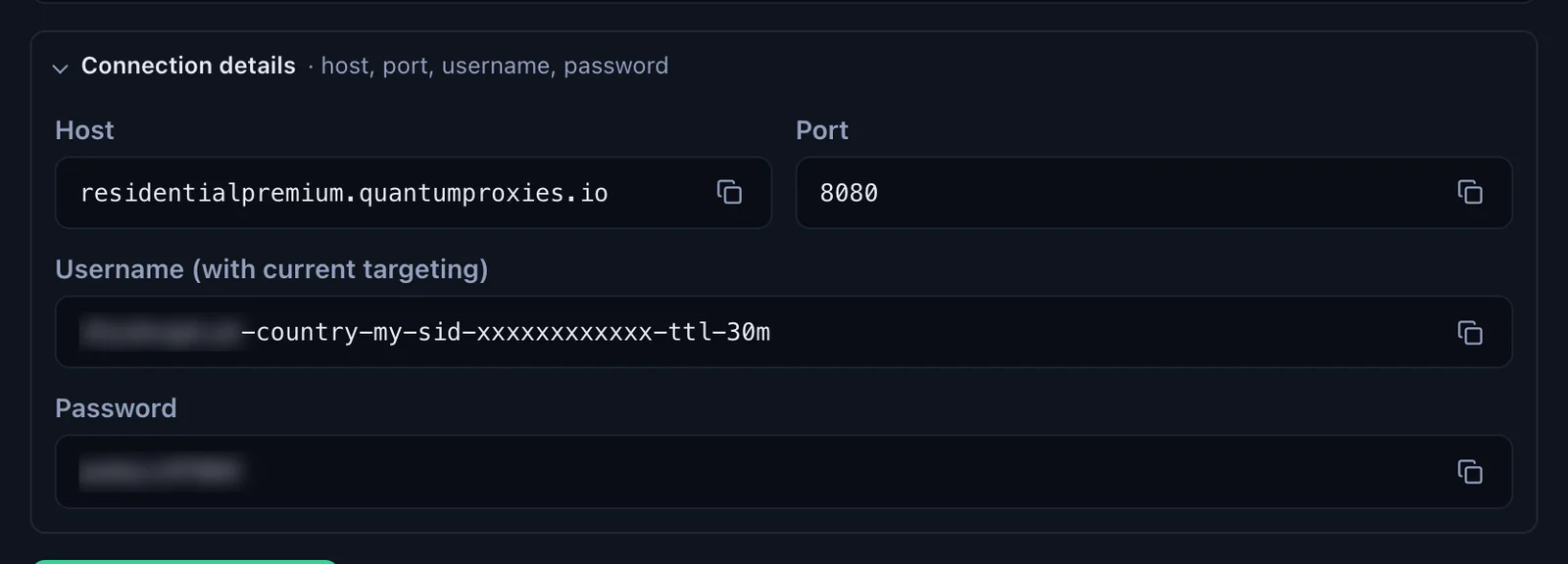
npm install axios https-proxy-agent socks-proxy-agent. The agents are only needed for the agent and SOCKS5 examples. - A proxy plan and four values: host, port, username and password. In the QuanticData dashboard they are under My proxies, on the plan's page, in the Endpoint generator: Connection details lists them one by one, which is how axios asks for them.
Three ways to send axios through a proxy
| Method | Use it for | Port on QuanticData | Remember |
|---|---|---|---|
The proxy option | An HTTP proxy for http:// and https:// URLs | 8080 | Node.js only; https:// goes through a CONNECT tunnel from axios 1.16.1 |
https-proxy-agent as httpsAgent | https:// URLs on any axios 1.x | 8080 | Set proxy: false next to it |
socks-proxy-agent as httpAgent and httpsAgent | SOCKS5 | 1080 | Use socks5h:// and proxy: false |
HTTPS_PROXY, HTTP_PROXY, NO_PROXY | A proxy without changing the code | 8080 | proxy: false turns them off for one request |
Step by step: Residential Premium with the proxy option
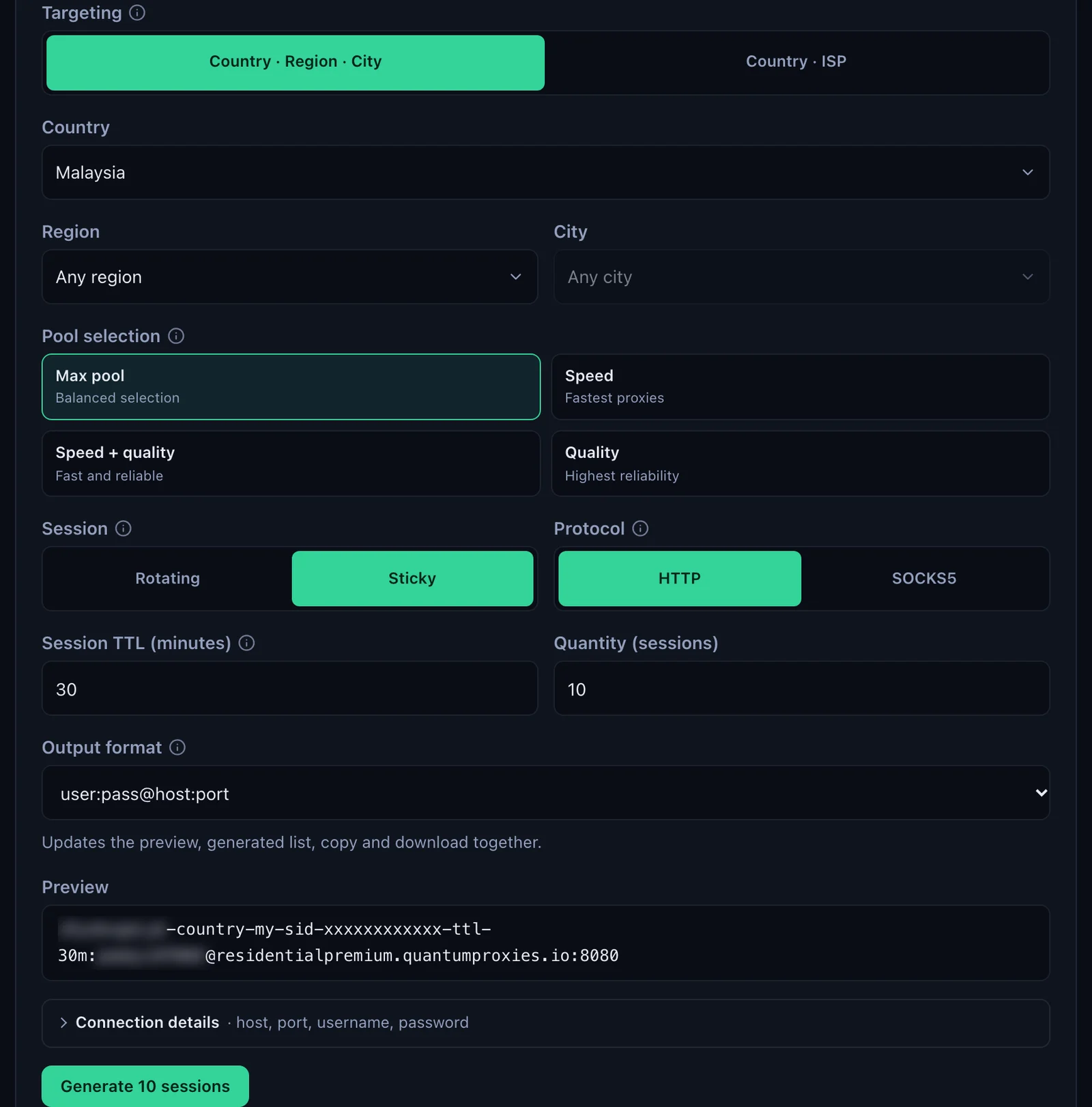
- Generate the line. In the QuanticData dashboard open My proxies, then your plan. In the Endpoint generator choose the Country (Malaysia in this example, with a Region or City if you need one), set Session to Sticky with a Session TTL (minutes) longer than your job, and keep Protocol on HTTP.
- Open Connection details. It lists Host, Port, Username and Password, each with a copy button.
- Write the proxy object.
protocolis the protocol of the proxy, not of the URL you call:'http'for port 8080, also when the URL starts with https://. Then the host, the port as a number, andauthwith the username copied whole and the password. - Set a timeout. Without one, a request that never gets an answer waits forever.
- Run it. The answer of ipinfo.io shows the exit: city, region, country and time zone.
import axios from 'axios';

const res = await axios.get('https://ipinfo.io/json', {
  proxy: {
    protocol: 'http',
    host: 'residentialpremium.quantumproxies.io',
    port: 8080,
    auth: {
      username: 'USER-country-my-sid-axios01-ttl-60m',
      password: 'PASS',
    },
  },
  timeout: 30000,
});

const { ip, city, region, country, timezone } = res.data;
console.log(res.status, { ip, city, region, country, timezone });
The output, on 24 October 2026:
200 {
  ip: '103.255.•••.•••',
  city: 'Kuala Terengganu',
  region: 'Terengganu',
  country: 'MY',
  timezone: 'Asia/Kuala_Lumpur'
}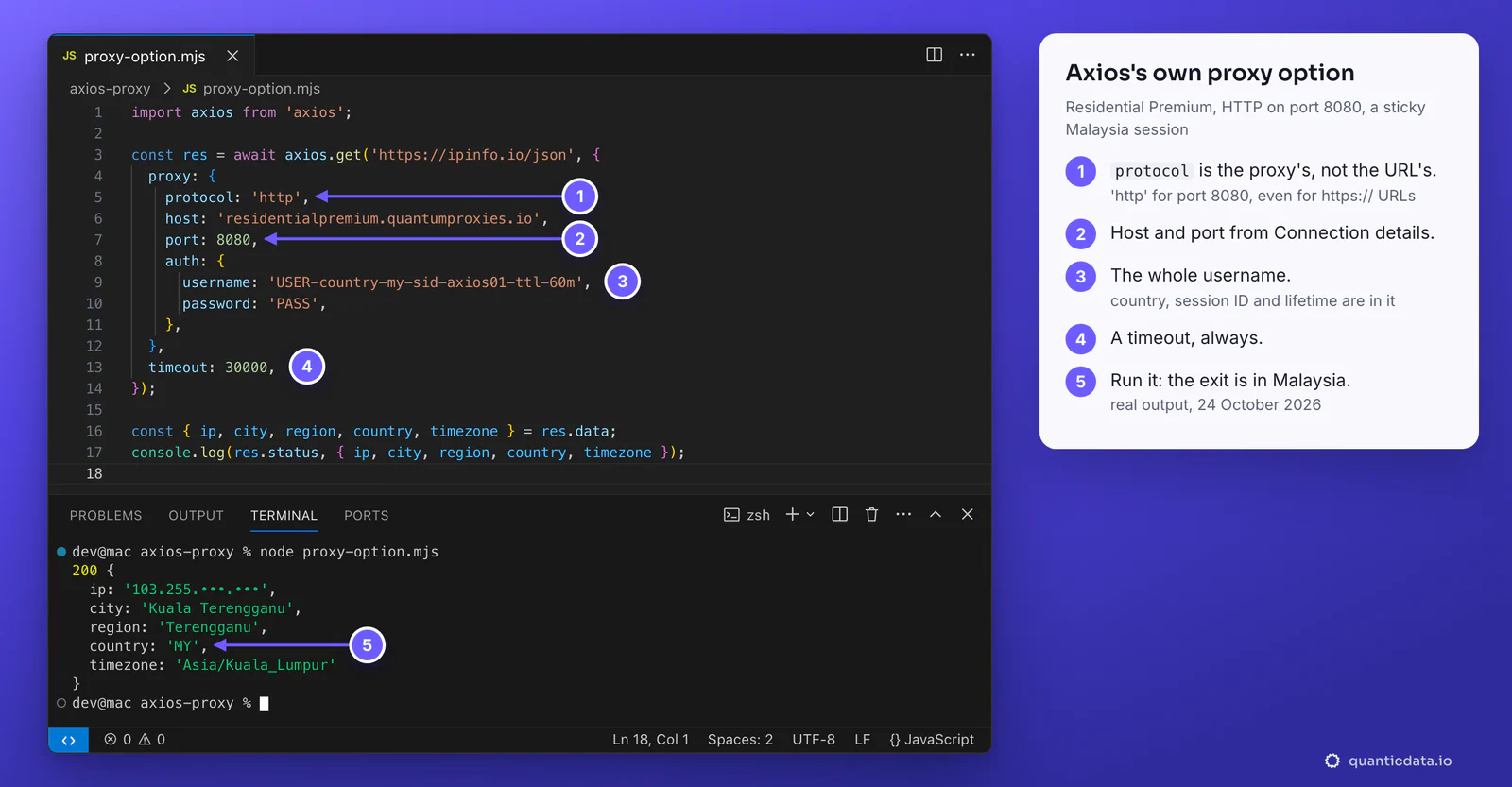
The username carries the targeting: -country-my picks the exit country, -sid-axios01 names the session and -ttl-60m keeps it for 60 minutes. A curl check through the same session a minute earlier left from the same address, which is the point of a sticky session.
What changed in axios 1.16.1. Older versions sent a request for an https:// URL to the proxy as plain HTTP, with the full URL in it, and the proxy made the TLS connection. Since 1.16.1 (13 May 2026) axios opens a CONNECT tunnel instead: TLS runs end to end between your code and the site, and the proxy login travels only on the CONNECT request. We checked it on the wire against a local listener: axios 1.8.4 sent GET https://ipinfo.io/json, axios 1.20.0 sent CONNECT ipinfo.io:443. Both reach the site through QuanticData; on an older axios, update it or use the agent below.
HTTPS URLs through https-proxy-agent
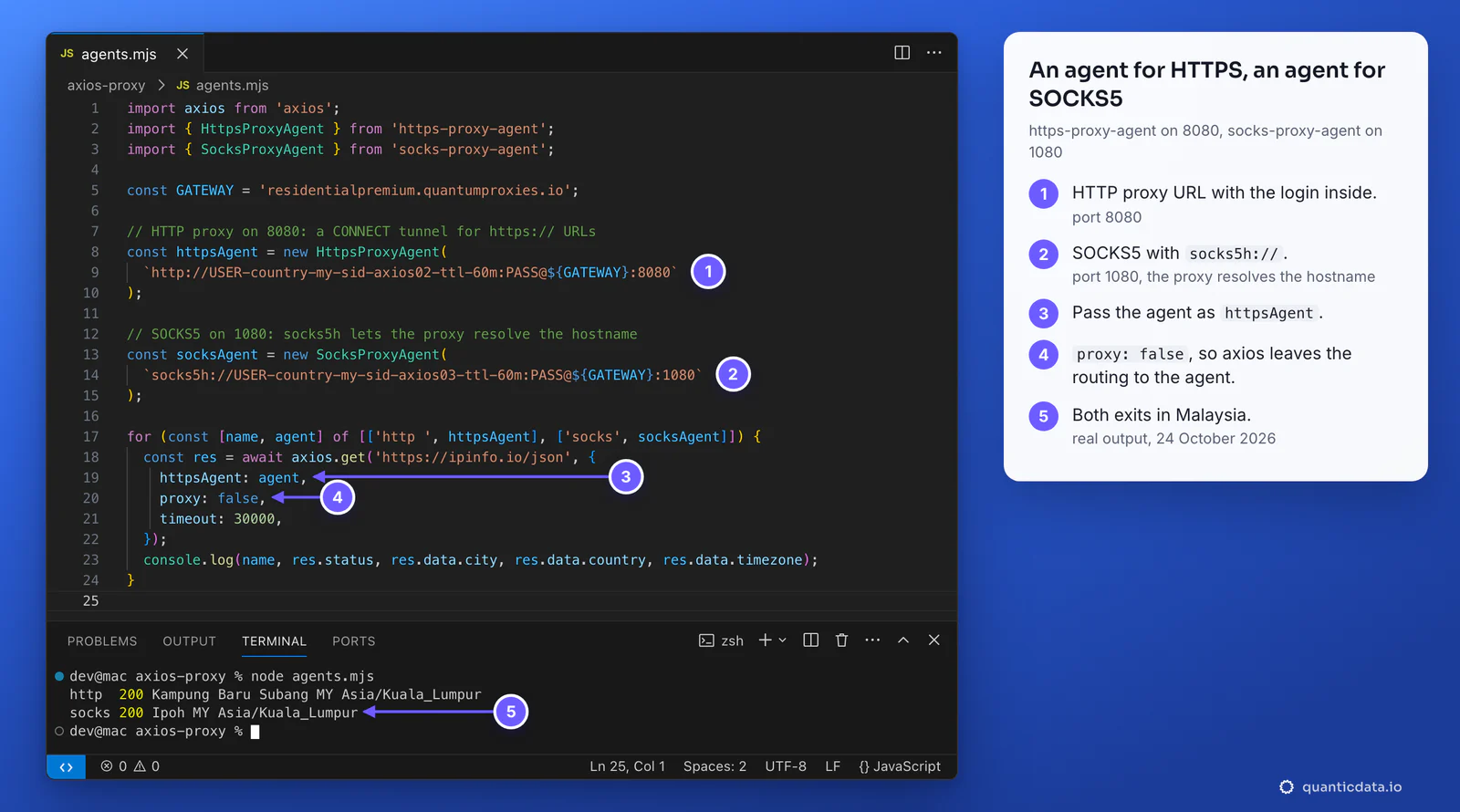
An agent hands the whole connection to a library built for proxies. It behaves the same on every axios 1.x, keeps the proxy in one URL that you can store in a variable, and fails within a second when the login is wrong, where the built-in option can keep waiting.
import axios from 'axios';
import { HttpsProxyAgent } from 'https-proxy-agent';

const httpsAgent = new HttpsProxyAgent(
  'http://USER-country-my-sid-axios02-ttl-60m:PASS@residentialpremium.quantumproxies.io:8080'
);

const res = await axios.get('https://ipinfo.io/json', {
  httpsAgent,
  proxy: false,
  timeout: 30000,
});
console.log(res.status, res.data.city, res.data.country);
// 200 Kampung Baru Subang MY
Why proxy: false. It tells axios not to apply any proxy of its own, including one from the environment. We tested it: with HTTPS_PROXY set and no proxy: false, axios 1.20.0 sent the request to the proxy in the environment variable and the agent was never used; with proxy: false the agent carried it. Keep the two together.
Special characters in the password. In a proxy URL, @, :, / and # in the password break the address. Encode it first: `http://${user}:${encodeURIComponent(pass)}@residentialpremium.quantumproxies.io:8080`. The proxy option does not need this, because the password has its own field.
SOCKS5 with socks-proxy-agent
import axios from 'axios';
import { SocksProxyAgent } from 'socks-proxy-agent';

const agent = new SocksProxyAgent(
  'socks5h://USER-country-my-sid-axios03-ttl-60m:PASS@residentialpremium.quantumproxies.io:1080'
);

const res = await axios.get('https://ipinfo.io/json', {
  httpAgent: agent,
  httpsAgent: agent,
  proxy: false,
  timeout: 30000,
});
console.log(res.status, res.data.city, res.data.country);
// 200 Ipoh MY- socks5h, not socks5. With
socks5://the agent looks up the site's address on your machine and sends the proxy an IP; withsocks5h://the proxy resolves the name, so the lookup happens in the exit country too. - Both agents.
httpAgentcovers http:// URLs andhttpsAgentcovers https:// URLs; set both and every request goes through SOCKS5. - Port 1080. SOCKS5 has its own port on every QuanticData network; port 8080 is HTTP only.
Sticky sessions per request
A scraper that logs in, keeps a cart or walks through pages of results should keep one IP for that job, and a second job should get a different one. With QuanticData the session lives in the username, so the simplest pattern is one agent per session ID, created once and reused:
import axios from 'axios';
import { HttpsProxyAgent } from 'https-proxy-agent';

const GATEWAY = 'residentialpremium.quantumproxies.io:8080';
const agents = new Map();

// One agent per session ID: the same -sid- keeps its IP, a new one gets a new IP.
function agentFor(sid) {
  if (!agents.has(sid)) {
    const user = `USER-country-my-sid-${sid}-ttl-60m`;
    agents.set(sid, new HttpsProxyAgent(`http://${user}:PASS@${GATEWAY}`));
  }
  return agents.get(sid);
}

async function exitOf(sid) {
  const res = await axios.get('https://ipinfo.io/json', {
    httpsAgent: agentFor(sid),
    proxy: false,
    timeout: 30000,
  });
  return `${res.data.ip} ${res.data.city}`;
}

const a = await exitOf('acct01');
const b = await exitOf('acct01');
const c = await exitOf('acct02');
console.log('acct01 first ', a);
console.log('acct01 again ', b, a === b ? 'same IP' : 'new IP');
console.log('acct02       ', c, c === a ? 'same IP' : 'new IP');
acct01 first 113.211.•••.••• Petaling Jaya
acct01 again 113.211.•••.••• Petaling Jaya same IP
acct02 124.13.•••.••• Taman Petaling new IP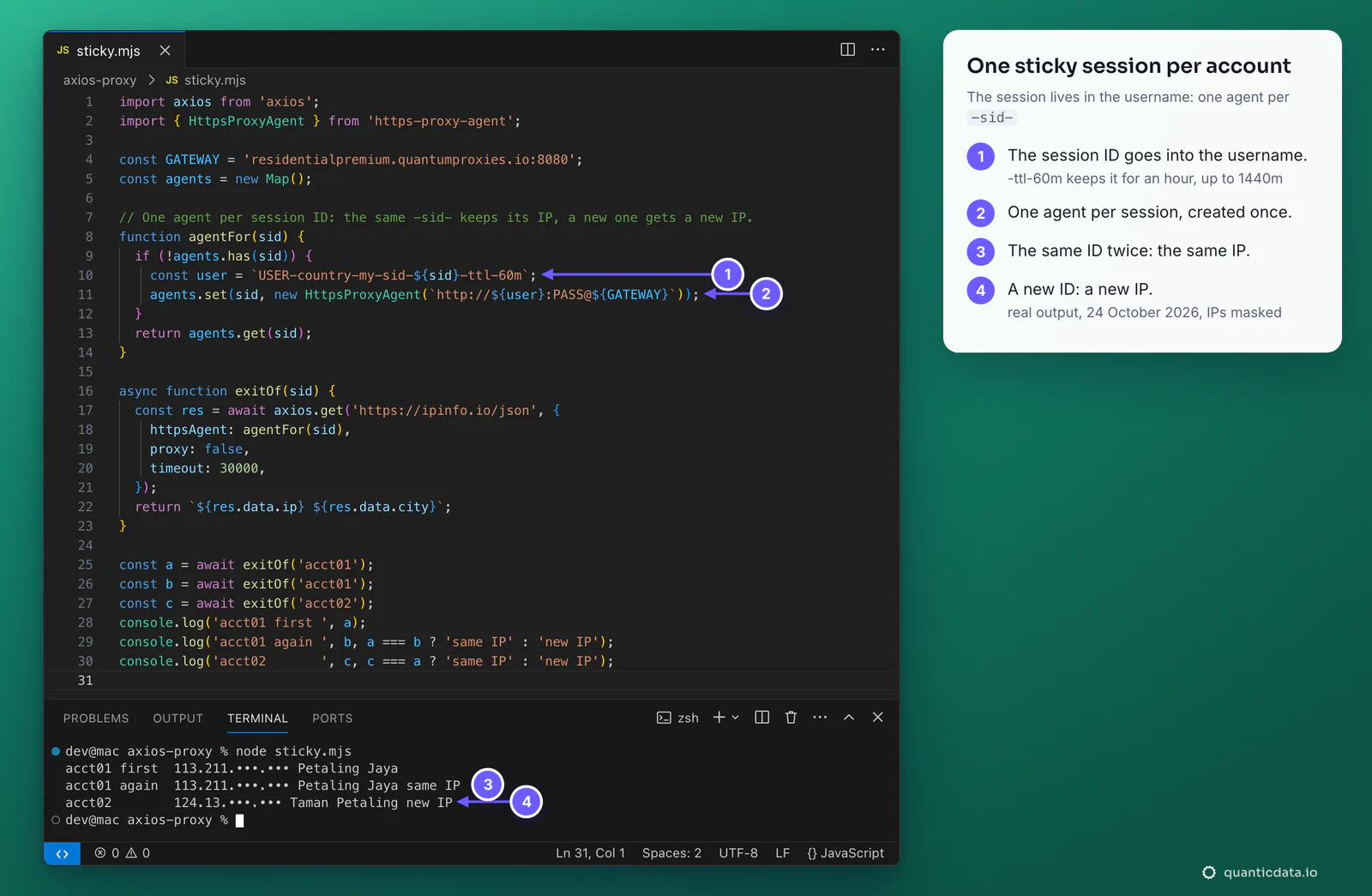
- Lifetime.
-ttl-goes up to 1440 minutes, a full day. After it ends, the next request on that ID gets a new IP. - With the proxy option. Put a different username in
proxy.authfor each job. For https:// URLs axios keeps a separate tunnel for each proxy and login, so two usernames never share a connection; in our test two session IDs in one process left from two different IPs. - Many sessions at once. In the generator, Generate 10 sessions makes ten sticky lines with their own session IDs, ten by default and as many as the Quantity field says; Copy all or Download takes them out.
Which proxy type for which job
| Proxy type | In axios | Good for |
|---|---|---|
| Residential Premium | residentialpremium.quantumproxies.io, HTTP 8080 or SOCKS5 1080; country, region, city or ISP and the session in the username | Most scraping and testing: home IPs in the country you choose, for example Malaysia residential proxies |
| ISP | One fixed IP per line from Assigned IPs, HTTP 50100 or SOCKS5 50101, the plan's username and password | Jobs that should keep one address while the plan runs: logged-in sessions, allowlists on the other side |
| Mobile | mobile.quantumproxies.io, HTTP 8080 or SOCKS5 1080, -type-mobile in the username; Global, USA, EU or Asia gateway; IP whitelist available | Mobile-first sites and APIs that treat carrier IPs differently |
ISP proxies in axios
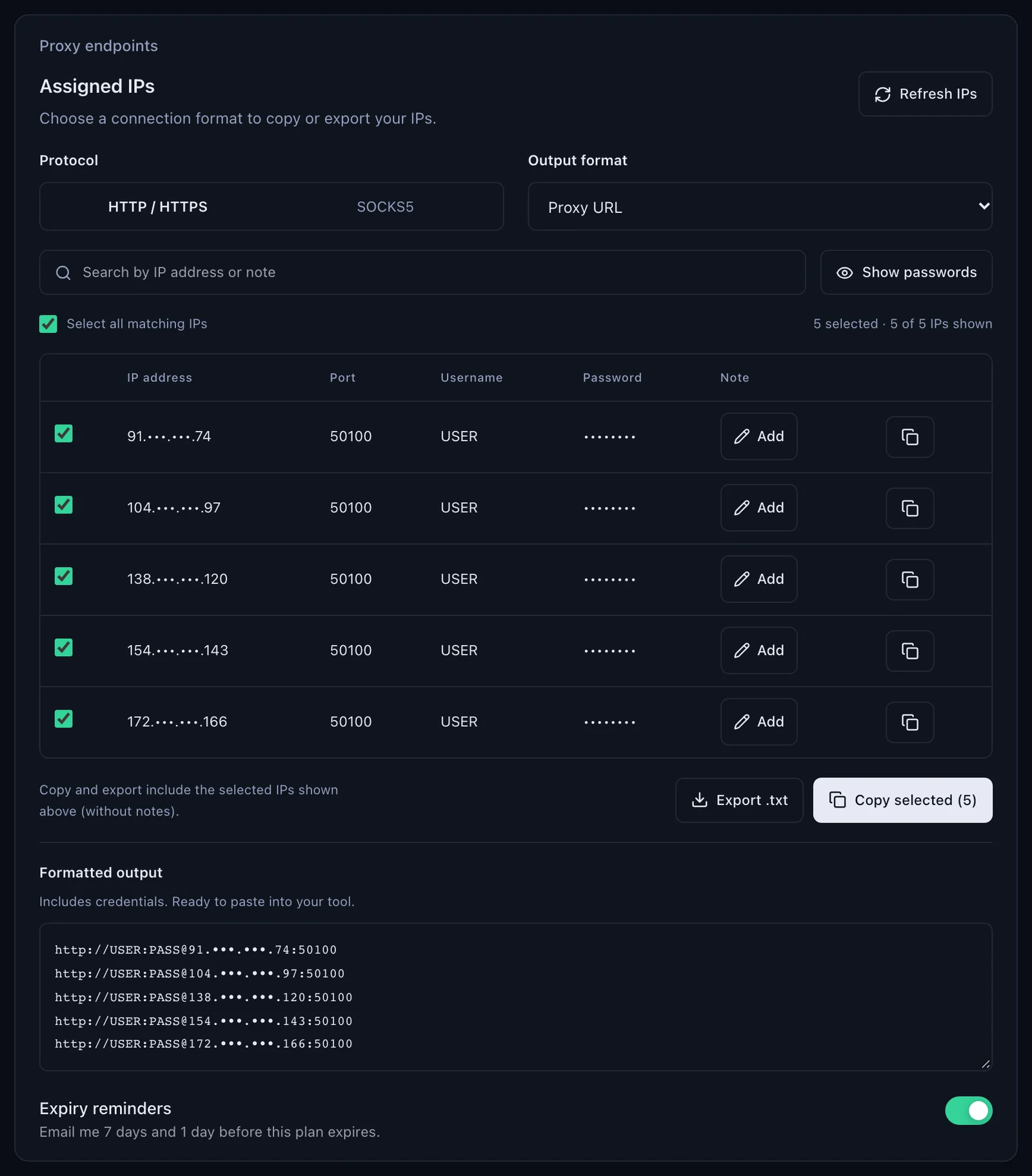
An ISP plan gives fixed IPs. In the dashboard, Proxy endpoints, Assigned IPs lists them; with Output format set to Proxy URL each line is already in the form an agent takes, http://USER:PASS@IP:50100. Copy one line per job: that IP stays the same while the plan is active, so there is no session ID in the username. The code is the same as for Residential Premium; the sample IP below is masked.
// the line from Assigned IPs, as an agent
const isp = new HttpsProxyAgent('http://USER:PASS@91.•••.•••.74:50100');
const res = await axios.get('https://example.com/', { httpsAgent: isp, proxy: false, timeout: 30000 });

// or as the proxy option
const res2 = await axios.get('https://example.com/', {
  proxy: { protocol: 'http', host: '91.•••.•••.74', port: 50100, auth: { username: 'USER', password: 'PASS' } },
  timeout: 30000,
});
For SOCKS5 switch the panel's Protocol to SOCKS5: the port in the list becomes 50101, and the line goes into a SocksProxyAgent with socks5h://. The IP your requests leave from is the IP in the line.
Mobile proxies in axios
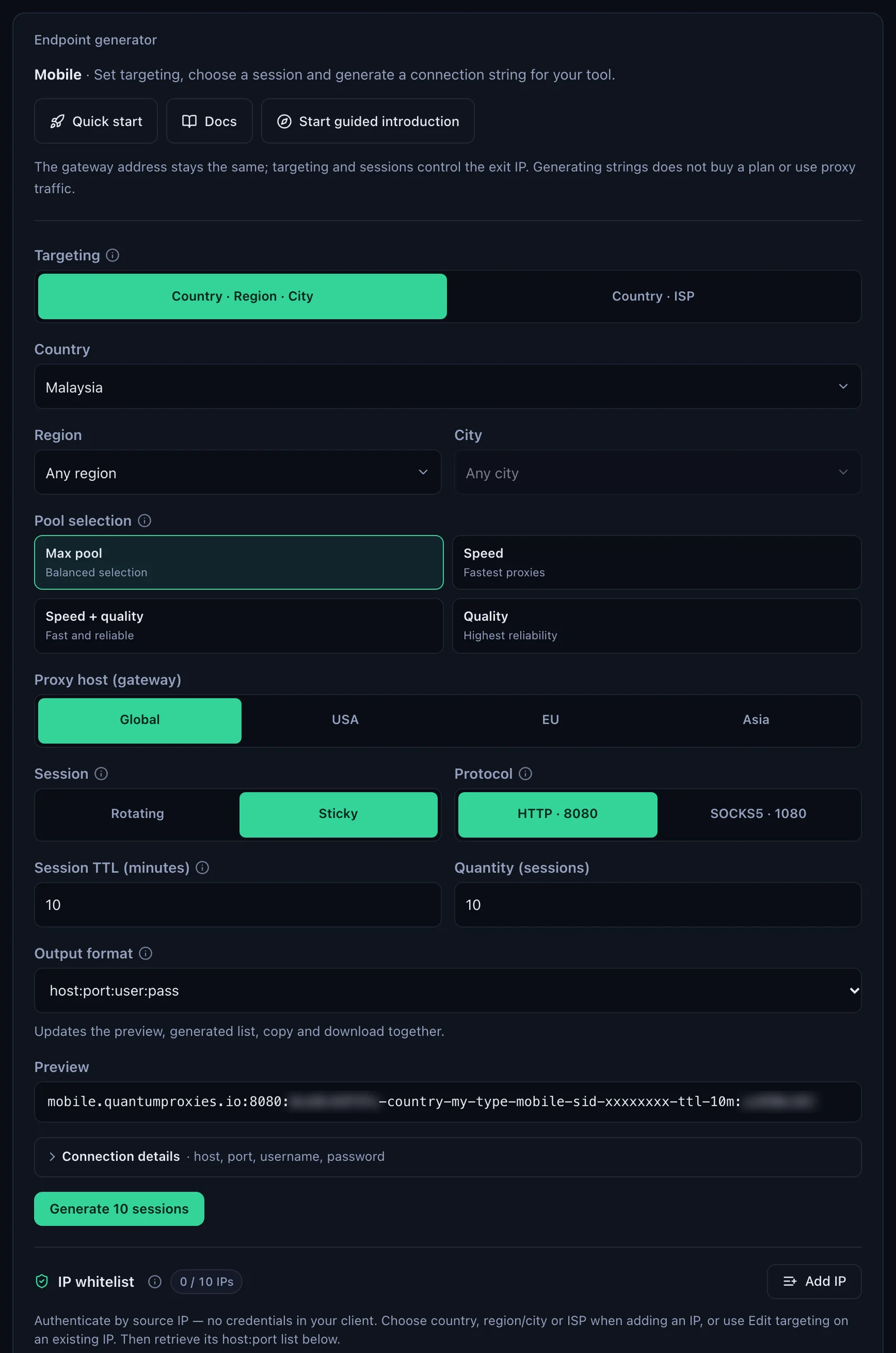
Mobile works like Residential Premium with two changes: the host is mobile.quantumproxies.io and the username carries -type-mobile. Choose the gateway (Global, USA, EU or Asia) and the protocol, HTTP 8080 or SOCKS5 1080, in the mobile plan's generator. One client per plan with axios.create keeps the code tidy:
import axios from 'axios';

const mobile = axios.create({
  proxy: {
    protocol: 'http',
    host: 'mobile.quantumproxies.io',
    port: 8080,
    auth: {
      username: 'USER-country-my-type-mobile-sid-m01-ttl-30m',
      password: 'PASS',
    },
  },
  timeout: 30000,
});

const res = await mobile.get('https://ipinfo.io/json');
console.log(res.status, res.data.city, res.data.country);
// 200 Kuala Lumpur MY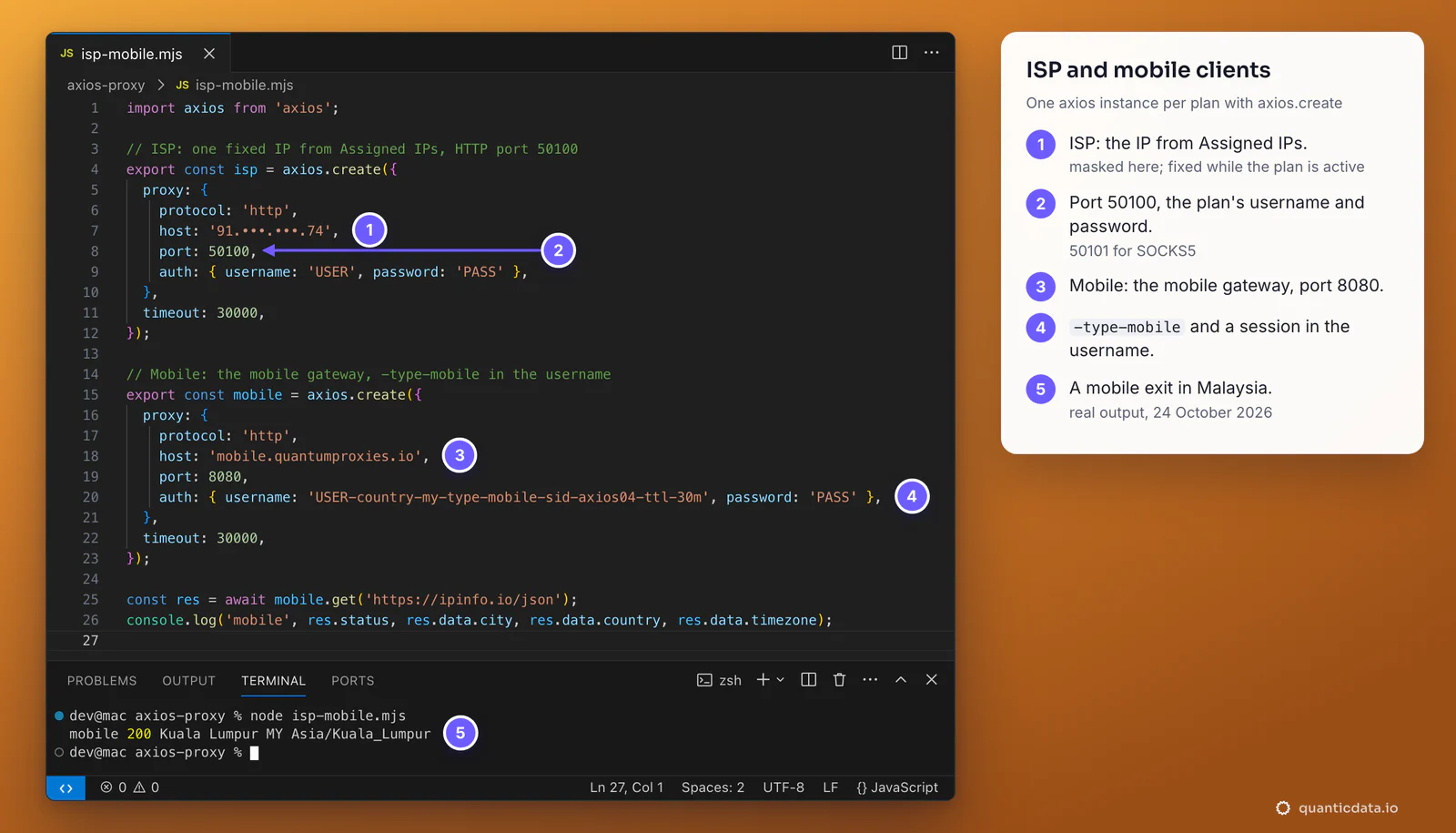
Mobile plans also offer IP whitelist authentication: add your server's IP in the generator, then use the host:port list the panel gives for it and leave auth out of the proxy object. Nothing secret sits in the code, which is handy on a fixed server.
Environment variables: HTTPS_PROXY, HTTP_PROXY, NO_PROXY
When a request has no proxy setting, axios reads the proxy from the environment, so a script can go through QuanticData without a code change:
HTTPS_PROXY='http://USER-country-my-sid-job01-ttl-60m:PASS@residentialpremium.quantumproxies.io:8080' \
NO_PROXY='localhost,127.0.0.1' node app.mjsHTTPS_PROXYis used for https:// URLs andHTTP_PROXYfor http:// URLs;NO_PROXYlists hosts that go direct.proxy: falseon a request ignores them, as in the agent examples above.- On Node versions with built-in proxy support started with
NODE_USE_ENV_PROXY=1or--use-env-proxy, axios leaves the environment variables to Node; an explicitproxyoption is still handled by axios.
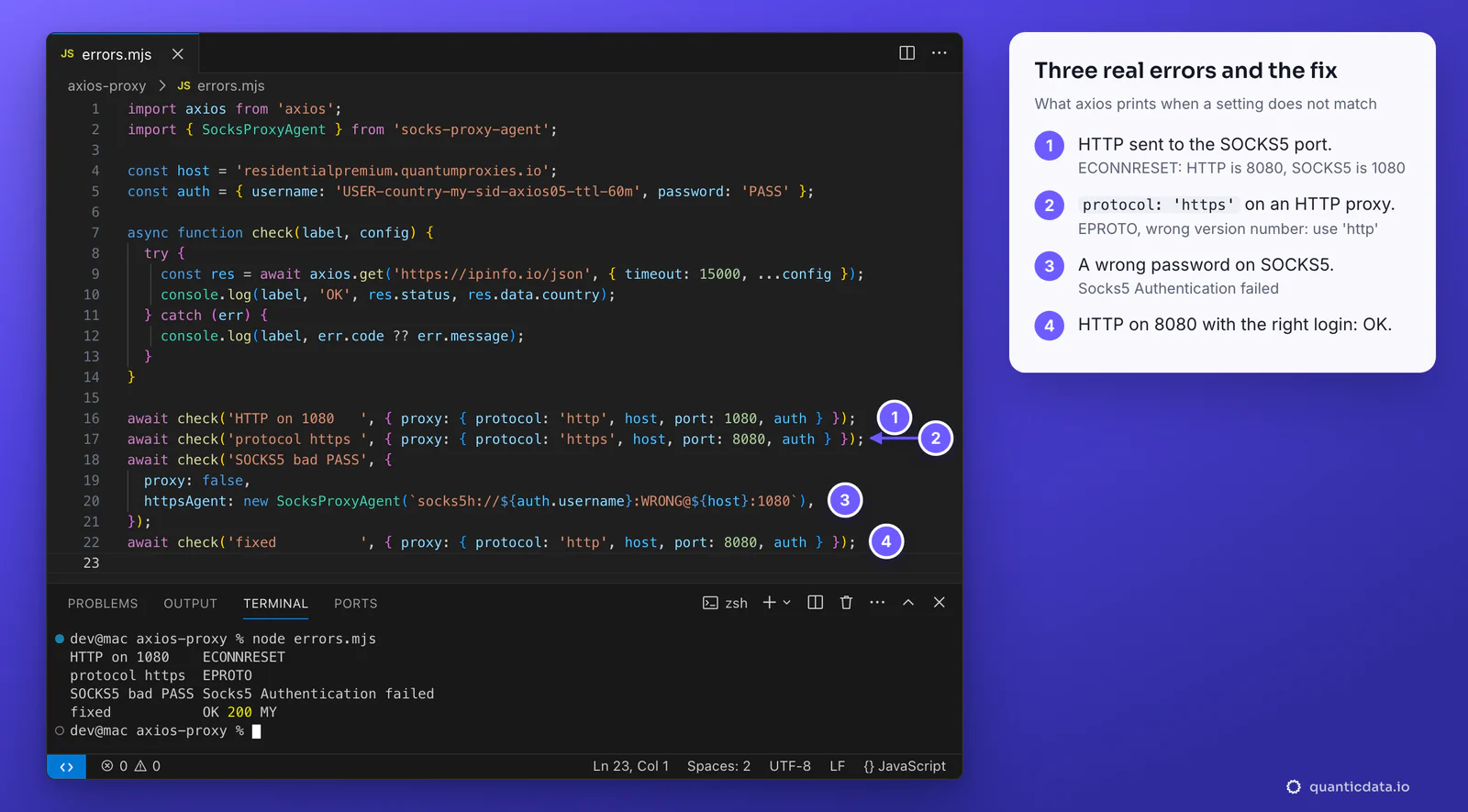
Axios proxy not working: errors and fixes
| What you see | Usual cause | Fix |
|---|---|---|
The request hangs (https:// URL with the proxy option), Parse Error: Missing expected CR after response line, or Proxy connection ended before receiving CONNECT response | Username or password wrong, or a country code in the username that does not exist | Copy the line again from the generator; set timeout on every request and, for https:// URLs, use https-proxy-agent so a bad login fails at once |
ECONNRESET or socket hang up | HTTP sent to the SOCKS5 port 1080 | HTTP on 8080, SOCKS5 on 1080 |
EPROTO ... wrong version number | protocol: 'https' in the proxy object | protocol: 'http': it is the proxy's protocol, not the URL's |
Socks5 Authentication failed | Wrong username or password on SOCKS5 | Copy both again; encode special characters in the password |
Socket closed after the timeout | A SOCKS agent pointed at port 8080 | Port 1080 for SOCKS5 |
| Your own IP in the answer | The code runs in a browser, where the proxy option does nothing, or proxy: false without an agent | Run it in Node.js; give the request a proxy or an agent |
| Wrong country | No -country- in the username | Generate the line with a country |
One test outside your code settles most cases in a minute. If this returns an address in the right country, the proxy works and the problem is in the axios config; see how to use a proxy with curl for more.
curl -x http://residentialpremium.quantumproxies.io:8080 \
  -U "USER-country-my-sid-test-ttl-10m:PASS" https://ipinfo.io/json
HTTP or SOCKS5 with axios
Start with HTTP on port 8080 and the proxy option: no extra package, and since axios 1.16.1 https:// URLs are tunnelled end to end. Pick SOCKS5 on port 1080 when the rest of your stack already speaks SOCKS or you want the proxy to resolve hostnames; the details are on the page for SOCKS5 proxies. For pages that need a real browser, the same lines work in Puppeteer; for fetch and undici, see how to use a proxy in Node.js; the Python equivalent is Python Requests. The plans themselves are on the pages for QuanticData residential proxies, ISP proxies and mobile proxies.
Before you scrape
A proxy changes where requests come from, not what you are allowed to collect. Keep to each site's terms and to the law where you work, send requests at a pace the site can handle, and give each job its own session.