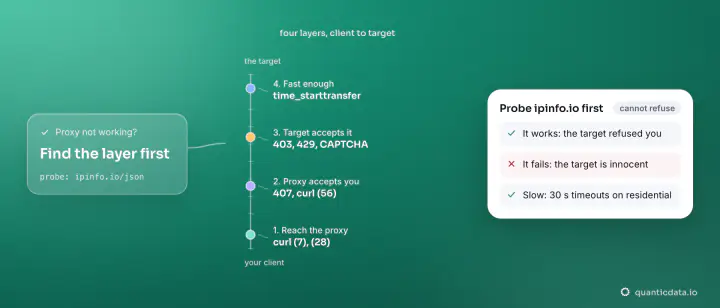
An IPv6 proxy that "does not work" is, most of the time, working perfectly against a site that has no IPv6 address: 57 of the 102 major domains in our census publish no AAAA record, and no IPv6 exit can reach them. The other causes are DNS resolved on the wrong side of the proxy, a client that cannot pass credentials, a host or port typo, and a target that answers but blocks the prefix. Five checks, in that order, settle it.
The forum threads that rank for this query are about home routers, SSH tunnels and Cloudflare origins; this guide is about the case you are probably in — a paid IPv6 proxy from a provider, a script or a tool that should be fetching pages through it, and an error or an empty result instead. Every command below runs on your own machine; host and port are the ones in your dashboard, USER and PASS your credentials. The checks apply to any provider, and to the QuanticData IPv6 network in particular.
Check 1 — Does the target have an IPv6 address at all?
This is the cause in most tickets, and the one no error message states clearly. An IPv6 exit can only connect to a host that publishes an AAAA record. Look it up:
dig +short AAAA www.tiktok.com
# www.tiktok.com.edgesuite.net.
# shared-global-api-spread.bytewlb.akadns.net.
# a2047.api8.akamai.net.
#   → aliases only, no address: IPv4-only

dig +short AAAA www.google.com
# 2001:4860:482b:7700::
# 2001:4860:4828:7700::
# … eight addresses: reachable over IPv6
Zero addresses means the site cannot be reached from an IPv6 proxy, full stop — not with a different provider, not with a "translation" option, not with more retries. The list is longer than people expect. From our census of 14 September 2026 (102 domains, three resolvers, redirects followed) and the probe of our 66-platform use-case catalog on 20 September:
| IPv4-only (no AAAA on apex or www) | Dual-stack (IPv6 exit reaches them) |
|---|---|
| TikTok, X, Reddit (www), eBay, Walmart, Etsy, Shopify, Twitch, Pinterest, Snapchat, Discord, Quora, DuckDuckGo, Baidu, Naver, GitHub, Stack Overflow, arXiv, Kaggle, Booking.com, Tripadvisor, Zillow, Indeed, Glassdoor, Yelp, Bloomberg, NYTimes, Semrush, Steam, Roblox, Minecraft, Hulu, Prime Video | Google, YouTube, Bing, Yahoo, Yandex, Facebook, Instagram, LinkedIn, Amazon (www), Wikipedia, Netflix, Spotify, Telegram, WhatsApp, ChatGPT, Claude, Gemini, Perplexity, Copilot, Hugging Face, PyPI, npm, Docker, Apple, Microsoft, Cloudflare, Ahrefs, Moz, Similarweb (www), CNN, WSJ (www), Zara, IKEA, Ryanair, Expedia |
Three traps inside the DNS check. Some sites publish AAAA on the apex but not on www, or the reverse — reddit.com has eight records on the apex and none on www.reddit.com, where the site actually lands; amazon.com has none on the apex and sixteen on www. Look up the host you fetch, after redirects. Some sites redirect by geography to a different host: yandex.ru sends non-Russian visitors to dzen.ru, kayak.com to a national site. And a CNAME chain in the output (lines ending with a dot) is not an address; only lines that look like 2a03:2880:… count. The per-platform answers, with the real dig output for each, are on the IPv6 proxies by use case pages.
Check 2 — Is DNS resolved at the exit, or on your machine?
The second cause is subtle and specific to SOCKS5. With socks5:// the client resolves the hostname locally and sends the proxy an IP address; on a machine with no IPv6 connectivity the resolver returns the site's IPv4 address, the proxy is asked to connect to an IPv4 address from an IPv6 exit, and the connection fails or falls back in ways that look like "the proxy is broken". With socks5h:// the hostname travels to the proxy and the exit — the machine that does have IPv6 — resolves it and connects. Plain HTTP proxying (http://PROXY_HOST:PORT with a CONNECT tunnel) sends the hostname too, so it does not have this problem.
# wrong: local resolution, the exit is handed an IPv4 address
curl --proxy "socks5://USER-country-us:PASS@PROXY_HOST:PORT" https://api64.ipify.org

# right: the hostname is resolved at the exit
curl --proxy "socks5h://USER-country-us:PASS@PROXY_HOST:PORT" https://api64.ipify.org
# or:  curl --socks5-hostname PROXY_HOST:PORT --proxy-user "USER-country-us:PASS" https://api64.ipify.org

# Python requests: the "h" matters
proxies = {"http": "socks5h://USER-country-us:PASS@PROXY_HOST:PORT",
           "https": "socks5h://USER-country-us:PASS@PROXY_HOST:PORT"}
Your own machine does not need IPv6 for any of this. The client talks to the proxy gateway over IPv4; the gateway's exit talks to the target over IPv6. "My ISP does not give me IPv6" is never the reason an IPv6 proxy fails.
Check 3 — Can the client pass the credentials?
Three variants of the same failure. A username with targeting in it — USER-country-de, or a session suffix — has to reach the proxy verbatim; some tools URL-encode the hyphen or split the string at the first colon, and the proxy answers 407. A mobile system proxy setting has no password field: Android's Wi-Fi proxy and many apps send no credentials at all, so the request arrives anonymous and is refused — use IP-whitelist authentication in the dashboard instead of a password, or a proxy client app that tunnels the whole device. And SOCKS5 and HTTP live on different ports on most gateways: an HTTP client pointed at the SOCKS5 port gets a connection reset that has nothing to do with IPv6. The 407 guide covers the credential side in detail.
Check 4 — Host, port and the error you actually got
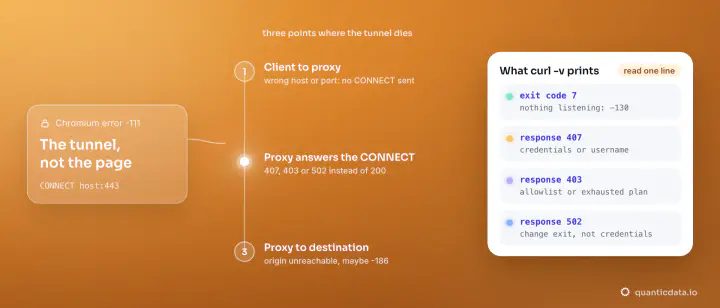
Read the client's error before blaming the address family. These are the ones that arrive as "IPv6 proxy not working" and mean something else:
| What you see | What it means | Fix |
|---|---|---|
curl: (7) Failed to connect to … port … | Wrong host or port, or a firewall between you and the gateway | Copy host and port from the dashboard; try the other protocol's port |
407 Proxy Authentication Required | Credentials missing or mangled | Check the username string, the client's auth support, or whitelist your IP |
curl: (97) Proxy handshake error / (6) Could not resolve host | Resolution on the wrong side (Check 2) or a target with no route (Check 1) | Use socks5h; verify the AAAA record |
502 Bad Gateway from the proxy | The exit could not reach the target — usually no AAAA record, sometimes the target refusing the connection | Check 1; if the record exists, retry from another exit and slow down |
| HTTP 200 with a captcha or "unusual traffic" page | The proxy works; the target is challenging your prefix | Check 5 |
| HTTP 403 or 429 from the target | The proxy works; the target blocks or rate-limits | Check 5, then the 403 and 429 guides |
Check 5 — The target answers, but blocks: pace by /64
If the exit reaches the site and the site answers with a challenge, a 429 or an empty shell, the proxy is not the problem; your rate per prefix is. Sites that see IPv6 traffic count by subnet, because a single machine can hold billions of addresses: rotating through a thousand addresses inside one /64 looks like one client. The fixes are the ones that work on any network, with one IPv6-specific twist. Rotate across subnets — our exits are spread over /48 and /64 ranges so that a fresh address is usually a fresh prefix. Keep a request every few seconds per exit and a low rate per destination across the whole job. Send a browser User-Agent and accept cookies. And treat a challenge page as a stop signal for that prefix rather than a reason to retry: every retry costs bytes and sends a signal.
There is also a class of sites that reject datacenter-issued ranges by ownership rather than by behaviour, streaming playback being the obvious case. Our IPv6 addresses are datacenter-issued; no IPv6 product from anyone fixes that gate. Those jobs belong on a residential exit, on the same account.
How to check an IPv6 proxy in ten seconds
People search for an "IPv6 proxy checker"; the checker is two commands. The first proves the exit is an IPv6 address in the country you asked for, the second proves a real target answers through it:
# 1. what address does the world see?
curl --proxy "http://PROXY_HOST:PORT" --proxy-user "USER-country-de:PASS" https://api64.ipify.org
# expected: an IPv6 literal, e.g. 2a0e:…  (an IPv4 answer means the request left over IPv4)

# 2. does a dual-stack target answer through the exit?
curl --proxy "http://PROXY_HOST:PORT" --proxy-user "USER-country-de:PASS" \
  -o /dev/null -s -w "%{http_code} %{size_download} bytes\n" \
  -A "Mozilla/5.0 (Windows NT 10.0; Win64; x64) Chrome/128.0 Safari/537.36" \
  https://www.google.com/
# expected: 200 and a few tens of kilobytes
The proxy tester on this site builds the first command for your credentials and shows the exit's answer without installing anything. If step 1 succeeds and step 2 fails on a target of yours, go back to Check 1 with that target's hostname: the answer is almost always in its DNS.
"IPv6 to IPv4 proxy": there is no translation for a missing route
A recurring search, and a recurring disappointment. Some providers describe an "IPv6 to IPv4 translation layer" that lets IPv6 proxies reach IPv4-only sites; what that means in practice is that the request leaves from an IPv4 address the provider owns — a datacenter IPv4 exit, priced and treated as one — not that the IPv6 address somehow reaches the IPv4 site. You cannot connect to a host that has no address in the family you are using. The honest architecture is the one on this account: IPv6 exits for the dual-stack half of the web at $0.20/GB down to $0.083/GB, datacenter or residential IPv4 exits for the rest, and a lookup of the AAAA record before each fetch to decide which. The general proxy-not-working checklist covers the causes that are not specific to IPv6.