
To use a proxy in Helium Scraper, open File, Proxy List and add a row: the host in Address, the port in Port, then User Name and Password; click OK. Then open Project, Settings and set Enable Proxies to True under Proxies. Use the HTTP port. Proxy Rotation Interval decides how often Helium moves to the next row.
Helium Scraper is a Windows scraper that drives Chromium browsers: you select the data on a page and its actions extract the same fields from every page. A proxy decides which IP address and which country the target site sees. Helium Scraper keeps proxies in two places: one Proxy List for the whole application, and a switch with three more settings inside every project. Most setups that "do nothing" have the list filled and the project switch off. The names below are the ones on Helium Scraper's own screens and in its documentation; the values come from the QuanticData dashboard.
Where Helium Scraper keeps its proxy settings
- File, Proxy List. A grid with four columns, Address, Port, User Name and Password, one row per proxy. The buttons are Clear (empties the list), Import (reads a text file of proxies), OK and Cancel. The list belongs to the application, so every project with proxies enabled uses it.
- Project, Settings, category Proxies. Four settings, saved with each project: Enable Proxies (False by default), Proxy Rotation Interval (300), Proxy Scope (Browser) and Proxy Test URL (example.com).
- Two actions for projects that need control. Action.RotateProxy moves to the next working proxy in the list; Browser.SetProxy sets one proxy, with its address, port, username and password, on all browsers.
The grid has no column for the protocol, so each row takes the HTTP port of the proxy. The same values for each QuanticData network:
| QuanticData proxy | Address | Port | User Name and Password |
|---|---|---|---|
| Residential Premium | residentialpremium.quantumproxies.io | 8080 | Required; the username carries the country, region or city and the session |
| ISP | The IP from Assigned IPs | 50100 | Required, one fixed IP per row |
| Mobile | mobile.quantumproxies.io | 8080 | Required, with -type-mobile in the username; or none with the IP whitelist |
Step by step: a Residential Premium proxy in Helium Scraper
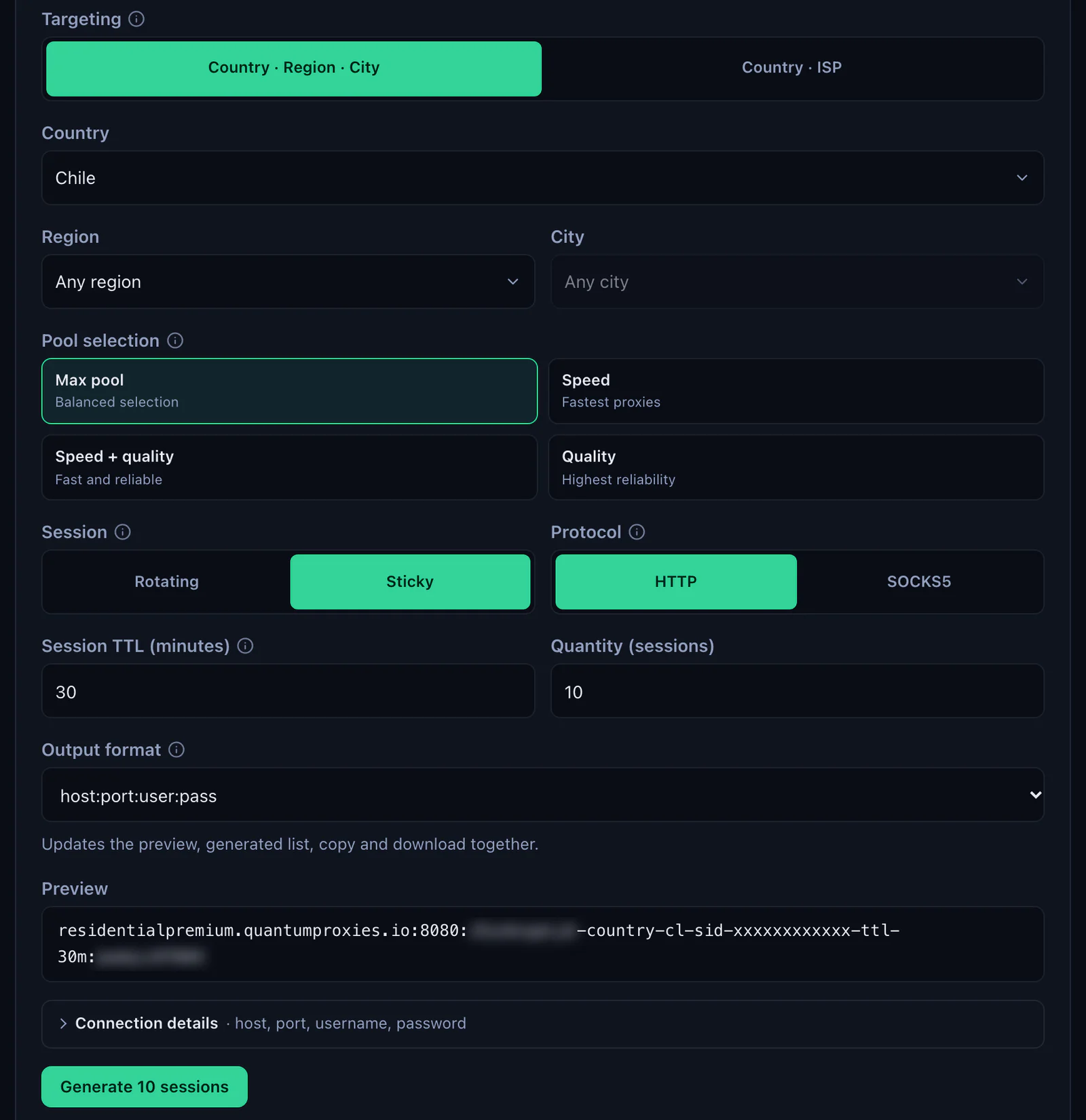
- Generate the values. In the QuanticData dashboard open My proxies, then your plan. In the Endpoint generator choose the Country (and a Region or City if you need one), set Session to Sticky, set Session TTL (minutes) to at least the length of the extraction, up to 1440, and choose HTTP.
- Open Connection details. Helium Scraper takes the four values in separate columns, and Connection details shows exactly those: host, port, username and password, each with a copy button.
- Open File, Proxy List in Helium Scraper.
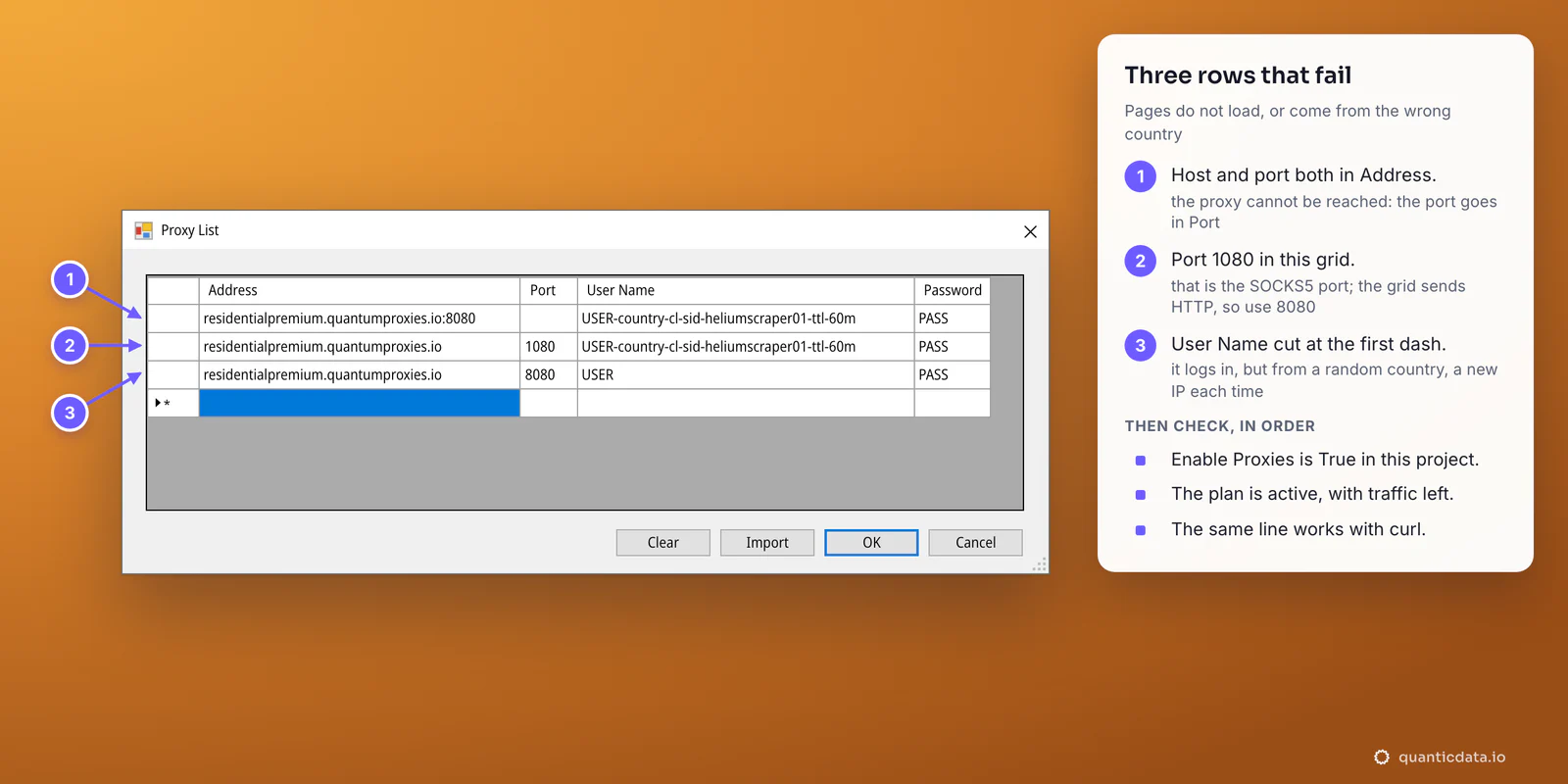
- Fill a row. Address residentialpremium.quantumproxies.io, Port 8080. The host goes alone in Address, with no port and no
http://in front. - Add the login. Paste the username whole in User Name, for example
USER-country-cl-sid-heliumscraper01-ttl-60m, and the password in Password. - Click OK. The list is saved for every project.
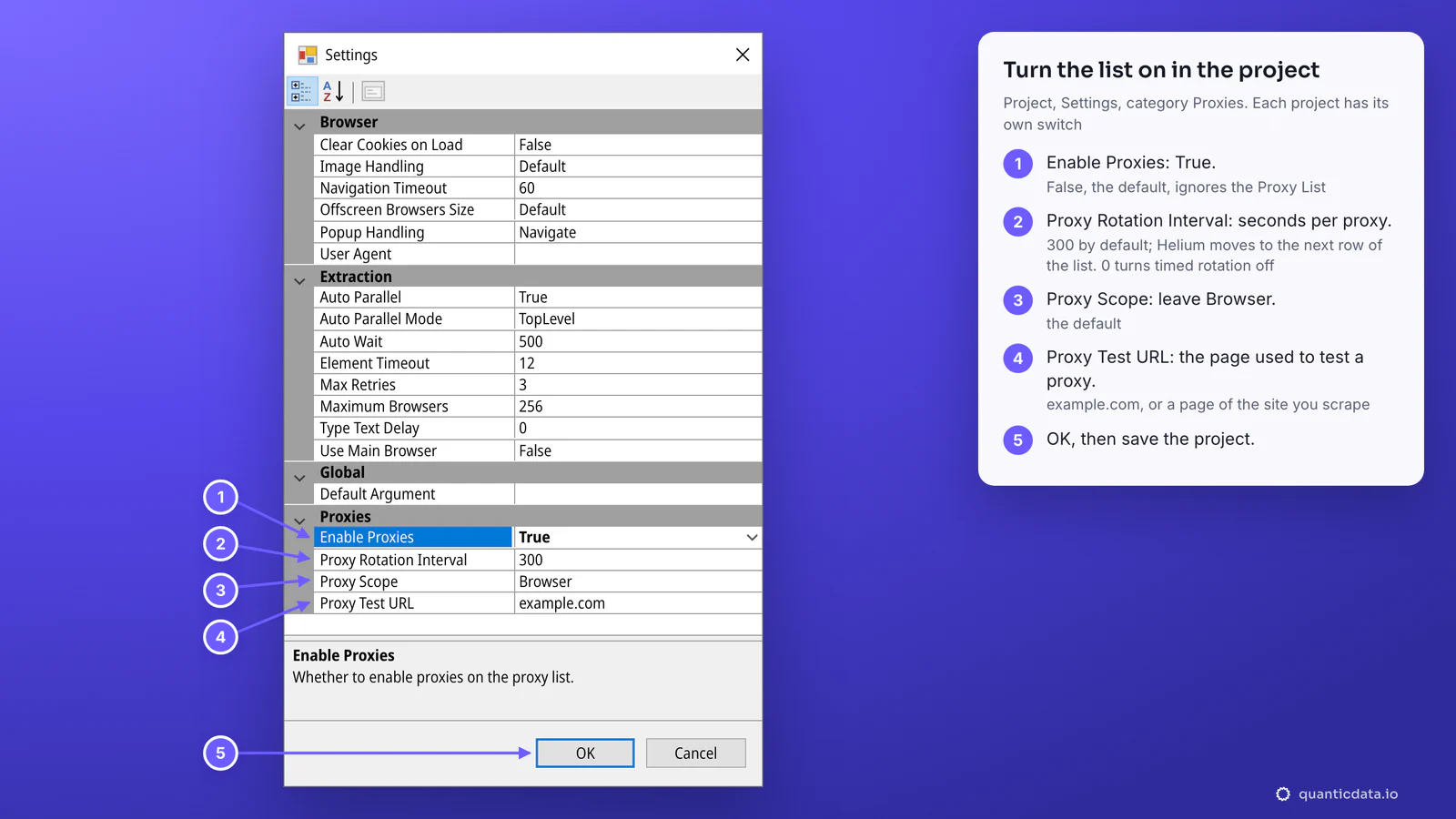
- Open Project, Settings. In the category Proxies set Enable Proxies to True. The help line at the bottom reads "Whether to enable proxies on the proxy list."
- Click OK and save the project. The switch is stored in the project, so a new project starts with it off.
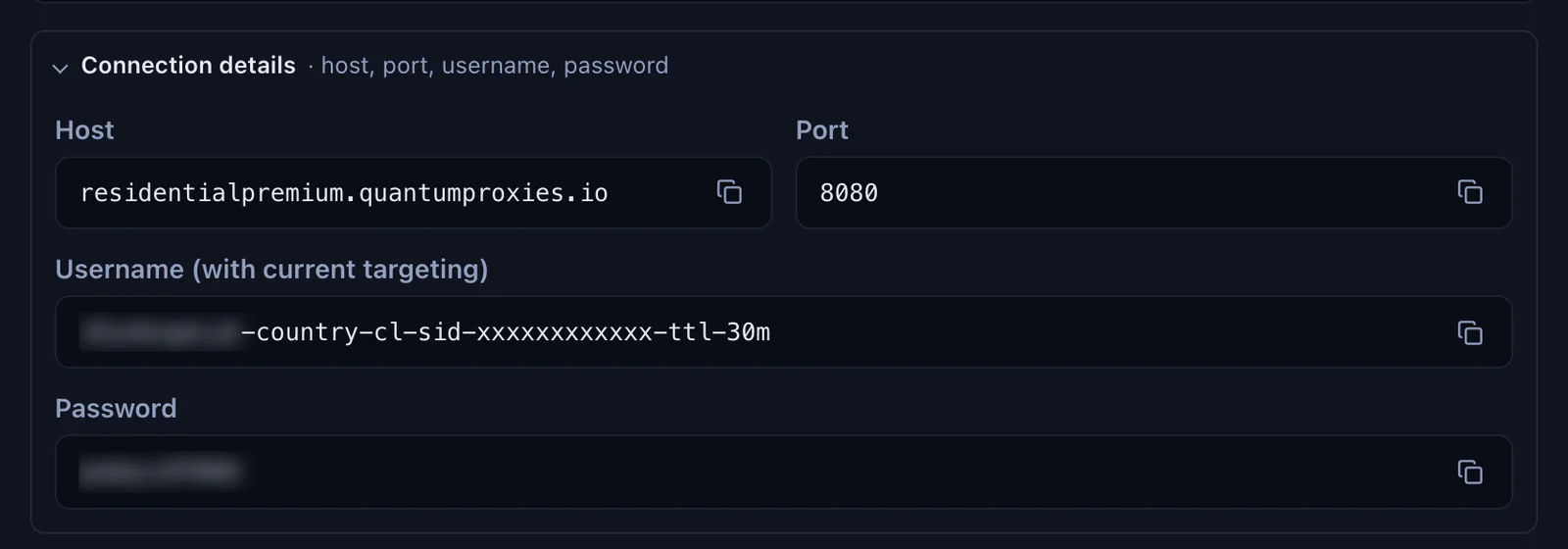
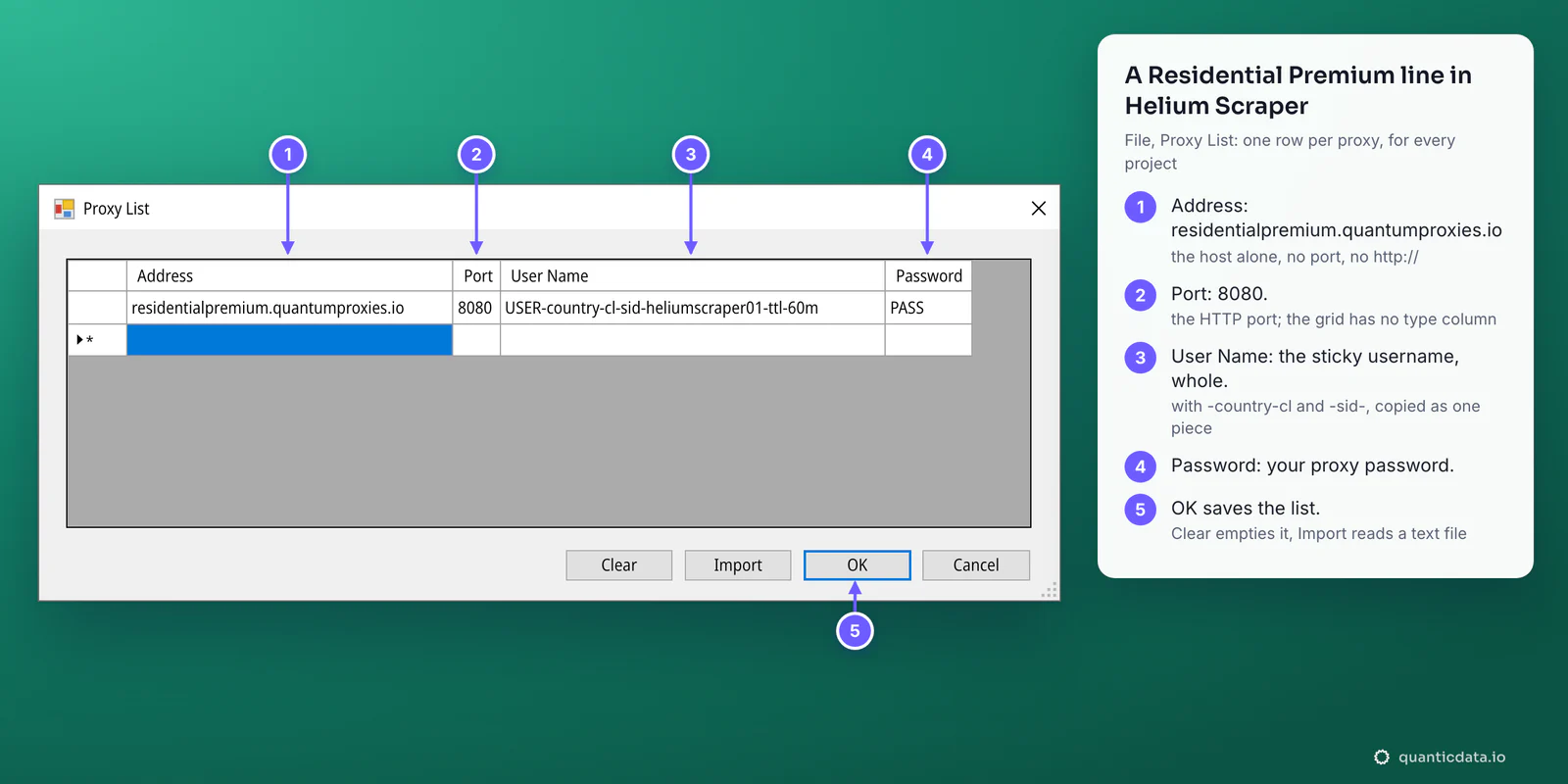
The username is the whole string. -country-cl picks the exit country, -sid-heliumscraper01 names the session and -ttl-60m keeps it for 60 minutes. A username cut at the first dash still signs in, but the browsers then leave from a random country on a new IP for every request.
What the four Proxies settings do
| Setting | Default | What to set |
|---|---|---|
| Enable Proxies | False | True. With False the project ignores the Proxy List, however full it is. |
| Proxy Rotation Interval | 300 | The seconds each proxy is used before Helium moves to the next row of the list. 0 turns the timed rotation off, which is what Action.RotateProxy needs. |
| Proxy Scope | Browser | Leave it on Browser. |
| Proxy Test URL | example.com | The page Helium loads to test a proxy. Leave it, or put a page of the site you scrape, so that a proxy that cannot open that site is skipped. |
Check where Helium Scraper exits
- After the project settings are saved, type
https://ipinfo.io/jsonin the address bar of Helium Scraper's browser. - Read city, region and timezone. They must match the
-country-in the username. - View, Log shows the proxies as Helium rotates them during an extraction.
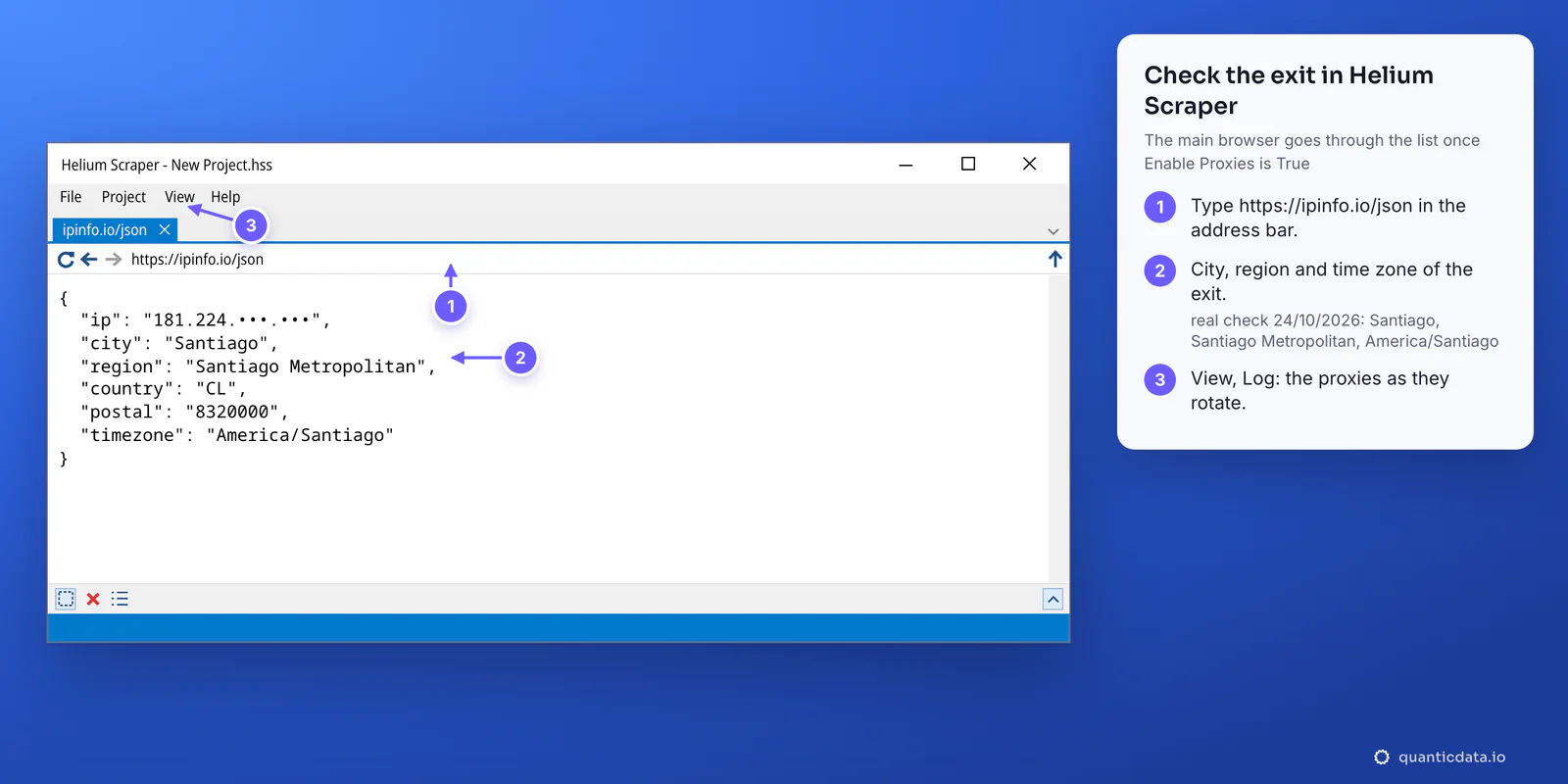
If the page still shows your own address, the project's Enable Proxies is still False, or the project was not saved after the change.
Rotation in Helium Scraper, step by step
Two things decide when the IP changes: the rows in the Proxy List with Proxy Rotation Interval, and, with Residential Premium and mobile, the session in each username. Pick the case that fits the job:
| You want | Proxy List | Proxy Rotation Interval |
|---|---|---|
| One IP for the whole extraction | One row with a sticky username, -ttl- longer than the run (up to 1440 minutes) | Leave it: with one row there is nothing to move to |
| A new IP every few minutes | Several rows, each with its own -sid- | The seconds per row, for example 300 |
| A new IP at moments you choose | Several rows, each with its own -sid-, or ISP IPs | 0, and an Action.RotateProxy step in the project where the change should happen |
| A new IP on every request | One row with a rotating username, USER-country-cl | Leave it |
Rows for the second and third case, one session each:
# Address                               Port  User Name                                 Password
residentialpremium.quantumproxies.io    8080  USER-country-cl-sid-hs01-ttl-60m          PASS
residentialpremium.quantumproxies.io    8080  USER-country-cl-sid-hs02-ttl-60m          PASS
residentialpremium.quantumproxies.io    8080  USER-country-cl-sid-hs03-ttl-60m          PASS
Sticky sessions suit a browser-based scraper: a page, its images and its scripts all come from one address, which is what a site expects from a visitor. A rotating username gives every request a new IP, so a page and its images can arrive from different addresses; keep it for simple pages that stand alone. For the trade-off in general, see rotating proxies.
Browser.SetProxy is the other way round: it sets one proxy, with address, port, username and password, on all browsers, from inside the project. Helium Scraper's documentation says a project that uses it should have Enable Proxies off, so the list and the action do not compete.
ISP proxies: one row per IP
An ISP plan gives fixed IPs, each with its own line, and each line becomes one row of the Proxy List.
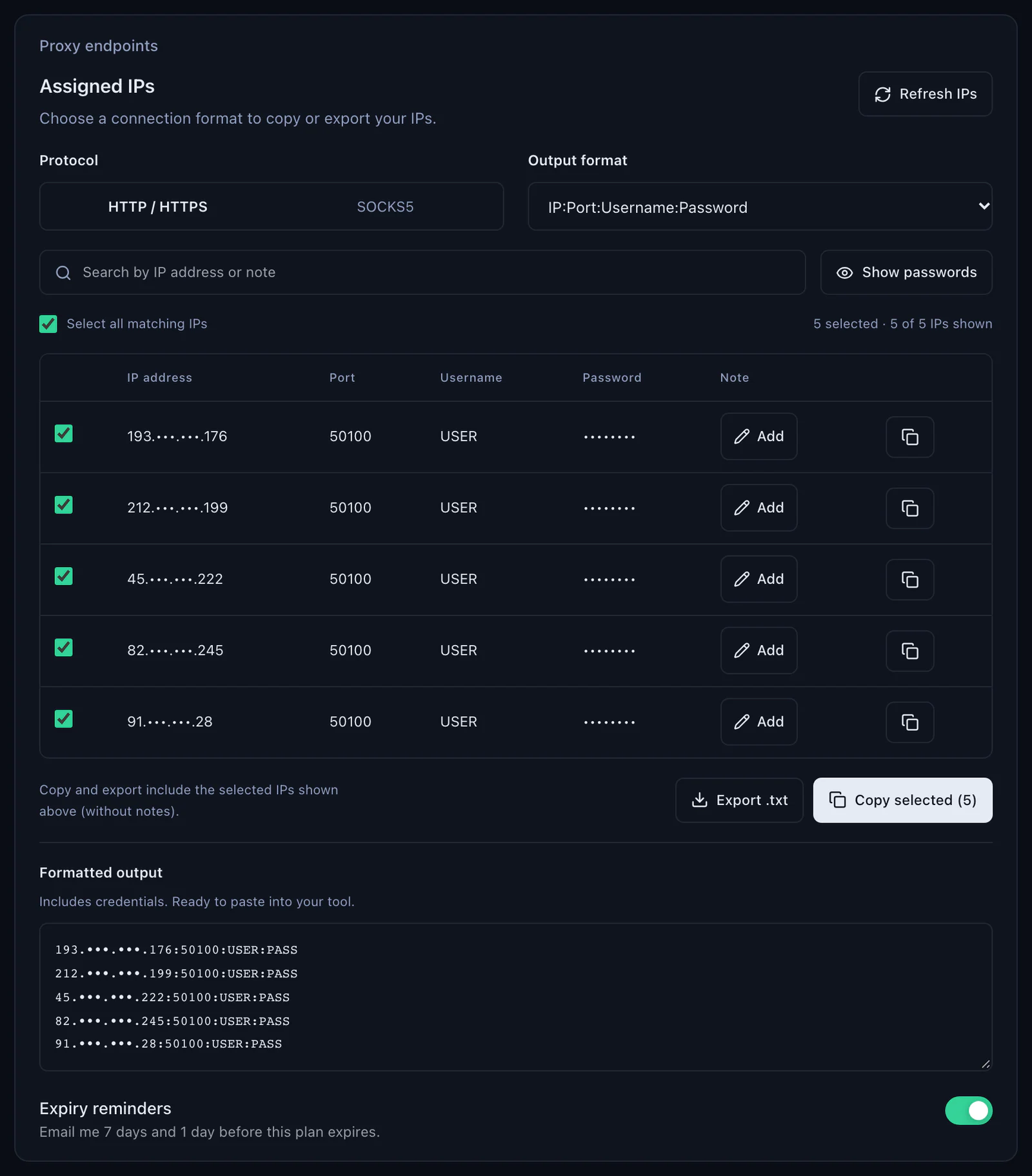
- Copy the lines. In the dashboard open the ISP plan, Proxy endpoints, Assigned IPs. Keep Protocol on HTTP / HTTPS, so the port is 50100, and Output format on IP:Port:Username:Password.
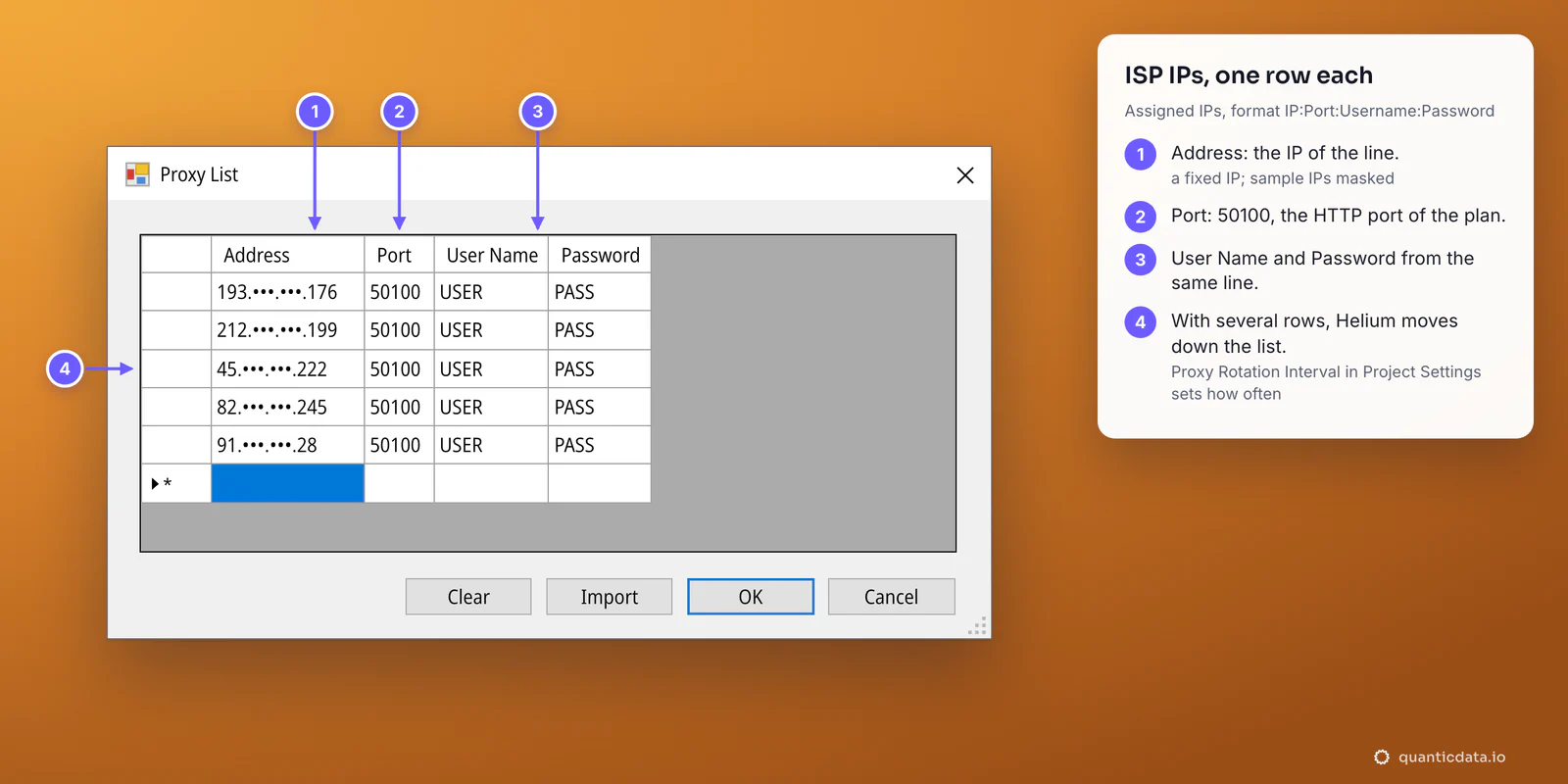
- One row per line. In File, Proxy List put the IP in Address, 50100 in Port, then the username and password of the same line.
- Click OK, then set Enable Proxies to True in the project.
- Choose the rotation. Proxy Rotation Interval moves through the IPs at that many seconds; 0 with Action.RotateProxy changes IP only where the project asks for it.
Every ISP IP stays the same for the life of the plan, so the list is a known set of addresses: useful when a target allows a fixed number of visits per address, or when results have to come from the same IPs every day. The plans are on the page for ISP proxies.
Mobile proxies in Helium Scraper
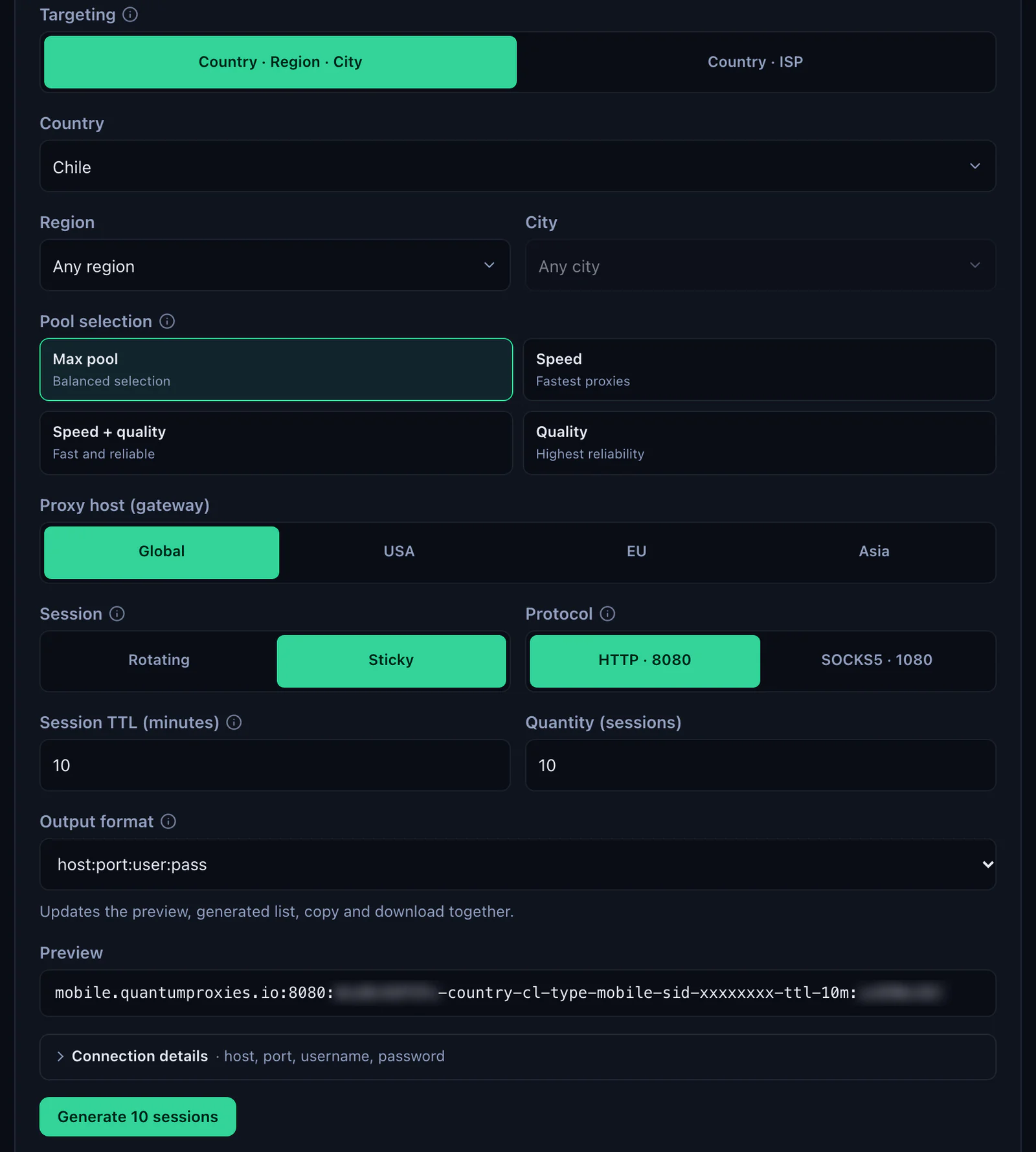
A mobile line goes in like a Residential Premium one: mobile.quantumproxies.io in Address, 8080 in Port, and a username with -type-mobile in it, for example USER-country-cl-type-mobile-sid-hs02-ttl-60m. In the generator choose the gateway (Global, USA, EU or Asia), the country, Sticky and HTTP · 8080, then copy the values from Connection details. A new -sid- is a new IP.
Mobile plans also offer the IP whitelist: add your computer's IP in the dashboard and take the host:port list for it, HTTP. Saved as a text file, one proxy per line, it goes into the Proxy List with Import, and User Name and Password stay empty. For coverage by country see mobile proxies in Chile and QuanticData mobile proxies.
Helium Scraper proxy not working: errors and fixes
When a proxy row is wrong, Helium Scraper's browser does not load pages, or loads them from the wrong place. Three rows cause most of it.
| What you see | Usual cause | Fix |
|---|---|---|
| Your own IP on ipinfo.io | Enable Proxies still False in this project, or the project not saved | Project, Settings, Enable Proxies True, OK, save the project |
| No page loads (Chromium calls it ERR_PROXY_CONNECTION_FAILED) | Host and port together in Address, or http:// in front | The host alone in Address, the port in Port |
| No page loads, the connection is reset (ERR_CONNECTION_RESET) | Port 1080, which is the SOCKS5 port, in a grid that sends HTTP | 8080 for Residential Premium and mobile, 50100 for ISP |
| No page loads, every field looks right | The password is wrong or the username was cut: our gateway answers 407 Proxy Authentication Required | Copy both again from Connection details, with no space at either end |
| Pages load from the wrong country | The username stops at the first dash, or has no -country- | Paste the username whole, generated with a country |
| It worked yesterday, fails today | The plan expired or its traffic is used up | Check the plan in My proxies: status, remaining traffic, expiry date |
| Some proxies are skipped | They fail on the Proxy Test URL | Run the curl test below on that row; put a page of the target site as Proxy Test URL to test what matters |
| Some pages time out | The site needs longer than Helium waits for it | Raise Navigation Timeout (60 by default) in the Browser category of the project settings |
One test outside Helium Scraper settles most cases in a minute. If this returns an address in the right country, the proxy works and the problem is in the row or the project settings:
curl -x http://residentialpremium.quantumproxies.io:8080 \
  -U "USER-country-cl-sid-test-ttl-10m:PASS" https://ipinfo.io/json
Before you scrape
A proxy changes where Helium Scraper's requests come from, not what a site allows. Keep to each site's terms and to the law where you work, and keep the pace reasonable: Maximum Browsers in the project settings caps how many browsers run at once. For Chilean targets the coverage is on the page for proxies in Chile; all plans are on the page for QuanticData residential proxies.
Sources & further reading
- Helium Scraper: features, including proxy rotation
- Helium Scraper documentation: Action.RotateProxy
- Helium Scraper documentation: Browser.SetProxy
- Helium Scraper download page: trial and system requirements
- Helium Scraper forum: Helium Scraper 3 New Features (File and Project settings)
- Helium Scraper forum: Helium Scraper 3 Has Been Released (Chromium browsers)
- RFC 9110: HTTP Semantics, 407 Proxy Authentication Required