
To use wget with a proxy, pass it on the command line: wget -e https_proxy=http://HOST:8080 --proxy-user=USER --proxy-password=PASS URL. For every command in a shell, export https_proxy and http_proxy; for every run, write the same settings in ~/.wgetrc. Wget talks to proxies over HTTP only: no SOCKS5.
Wget is the command-line downloader that comes with most Linux desktops and installs on macOS with brew install wget. It reads a proxy from three places, and most "wget ignores my proxy" questions come from not knowing which one wins. Every command and every line of output below is real: we ran GNU Wget 1.21 through QuanticData on 24 October 2026, and only the IP addresses are masked. USER and PASS stand for your credentials.
What you need before you start
- Wget.
wget --versiontells you if it is there. If not:sudo apt install wgeton Debian and Ubuntu,sudo dnf install wgeton Fedora,brew install wgeton macOS. - A proxy plan. Residential Premium, ISP or mobile: all of them work with wget over HTTP. The table further down says which one fits which job.
- Host, port, username and password. In the QuanticData dashboard they are under My proxies, on the plan's page: the Endpoint generator for Residential Premium and mobile, Assigned IPs for ISP. Choose the HTTP protocol: it is the one wget speaks.
Three ways to set a proxy in wget, and which one wins
| Method | What you write | Lasts for | Where the password sits |
|---|---|---|---|
| Command line | -e https_proxy=http://HOST:8080, --proxy-user, --proxy-password | One command | In the command, visible to ps and in your shell history |
| Environment variables | export https_proxy=..., http_proxy, no_proxy | The shell session, or every session from ~/.bashrc | Inside the proxy URL |
~/.wgetrc | use_proxy, https_proxy, http_proxy, proxy_user, proxy_password | Every wget run by that user | In a file only you can read (chmod 600) |
When more than one is set, the GNU Wget manual gives the order: the startup file overrides the environment variables, and a command run with -e is executed after the startup file, so it overrides both. In short, command line first, then ~/.wgetrc, then the environment. The proxy is on by default; use_proxy = off or --no-proxy turns it off.
Two details catch people out. https_proxy only applies to https:// addresses and http_proxy only to http:// ones, so set both if you download both. And the value is always written with http:// in front, even in https_proxy: wget opens an encrypted tunnel to the site through an HTTP proxy.
Residential Premium on the command line
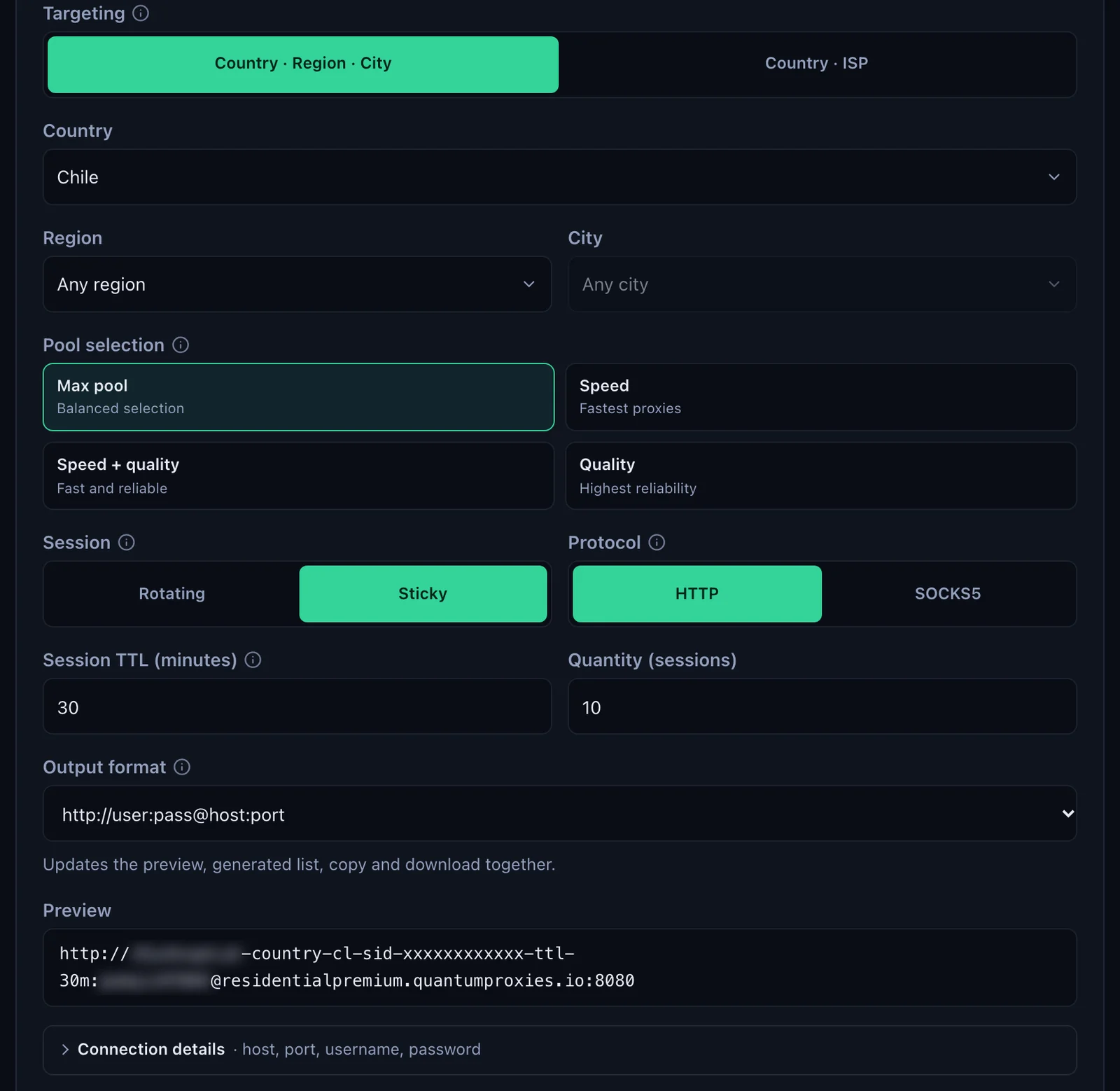
- Generate the line. In the QuanticData dashboard open My proxies, then your Residential Premium plan. In the Endpoint generator choose the Country (and a Region or City if you need one), set Session to Sticky, set Session TTL (minutes) to at least the length of the job, choose HTTP and set Output format to http://user:pass@host:port. Connection details shows the same values one by one.
- Write the command.
-eruns a startup-file command, so-e https_proxy=...sets the gateway for this command only. Put the username and password in their own options:
wget -e use_proxy=yes \
  -e https_proxy=http://residentialpremium.quantumproxies.io:8080 \
  --proxy-user="USER-country-cl-sid-wget01-ttl-60m" \
  --proxy-password="PASS" \
-O- https://ipinfo.io/json- Read the output.
Connecting to residentialpremium.quantumproxies.ioandProxy request sent, awaiting response... 200 OKmean the request went through the gateway and the login was accepted. The JSON from ipinfo.io is the exit: our check left from San Javier, Maule Region, Chile, time zone America/Santiago.
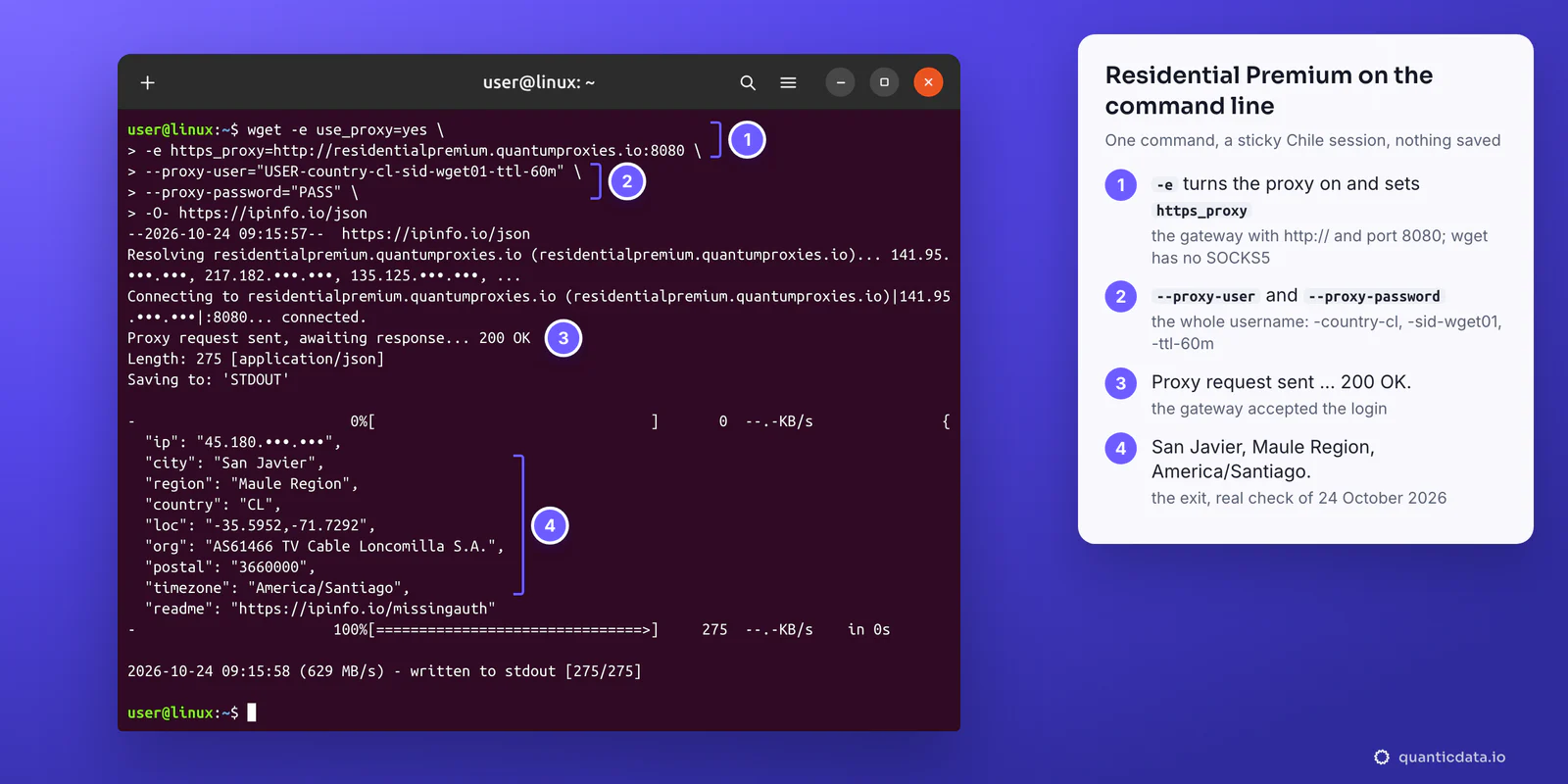
-e use_proxy=yes is only needed when a startup file turned the proxy off, but it does no harm and makes the command self-contained. The same command works with the credentials inside the URL, -e https_proxy=http://USER-country-cl-sid-wget01-ttl-60m:PASS@residentialpremium.quantumproxies.io:8080, which is exactly the line the generator gives. Wget sends proxy credentials with Basic authentication, the only scheme it implements for proxies.
To see only the JSON, add -q: wget -qO- https://ipinfo.io/json is the quickest way to check where any of the setups below exits.
One sticky session per job
The username carries the targeting and the session: -country-cl picks the exit country, -sid-wget01 names the session and -ttl-60m keeps it for 60 minutes. A recursive download or a mirror job with -r or -m makes many requests; with a sticky session they all leave from the same IP, which is what a site that sets cookies or limits per address expects.
- One session ID per job. Two jobs on the same
-sid-share one IP. - A lifetime longer than the job. The generator accepts up to 1440 minutes, a full day. When the session ends, the next connection gets a new IP.
- A new IP when you want one. Change the session ID, for example
-sid-wget02: the next request leaves from a different address.
Environment variables: a mobile line for the whole shell
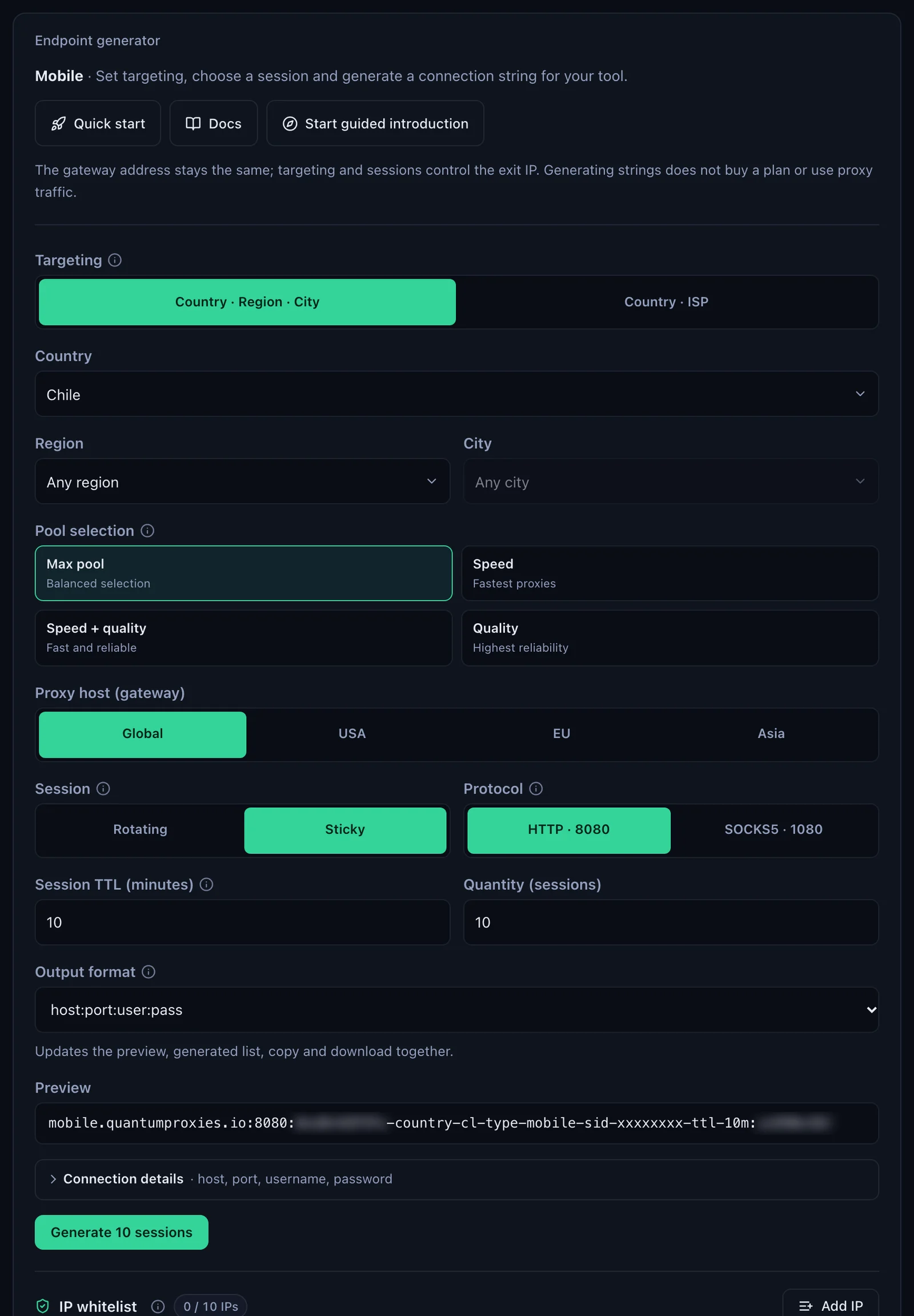
When every wget in a terminal, or a script that calls wget many times, should use the proxy, set the variables once. The mobile generator works like the Residential Premium one: choose the gateway (Global, USA, EU or Asia), Sticky, HTTP 8080 and the country; the username carries -type-mobile.
export https_proxy="http://USER-country-cl-type-mobile-sid-wget02-ttl-60m:PASS@mobile.quantumproxies.io:8080"
export http_proxy="$https_proxy"
env | grep _proxy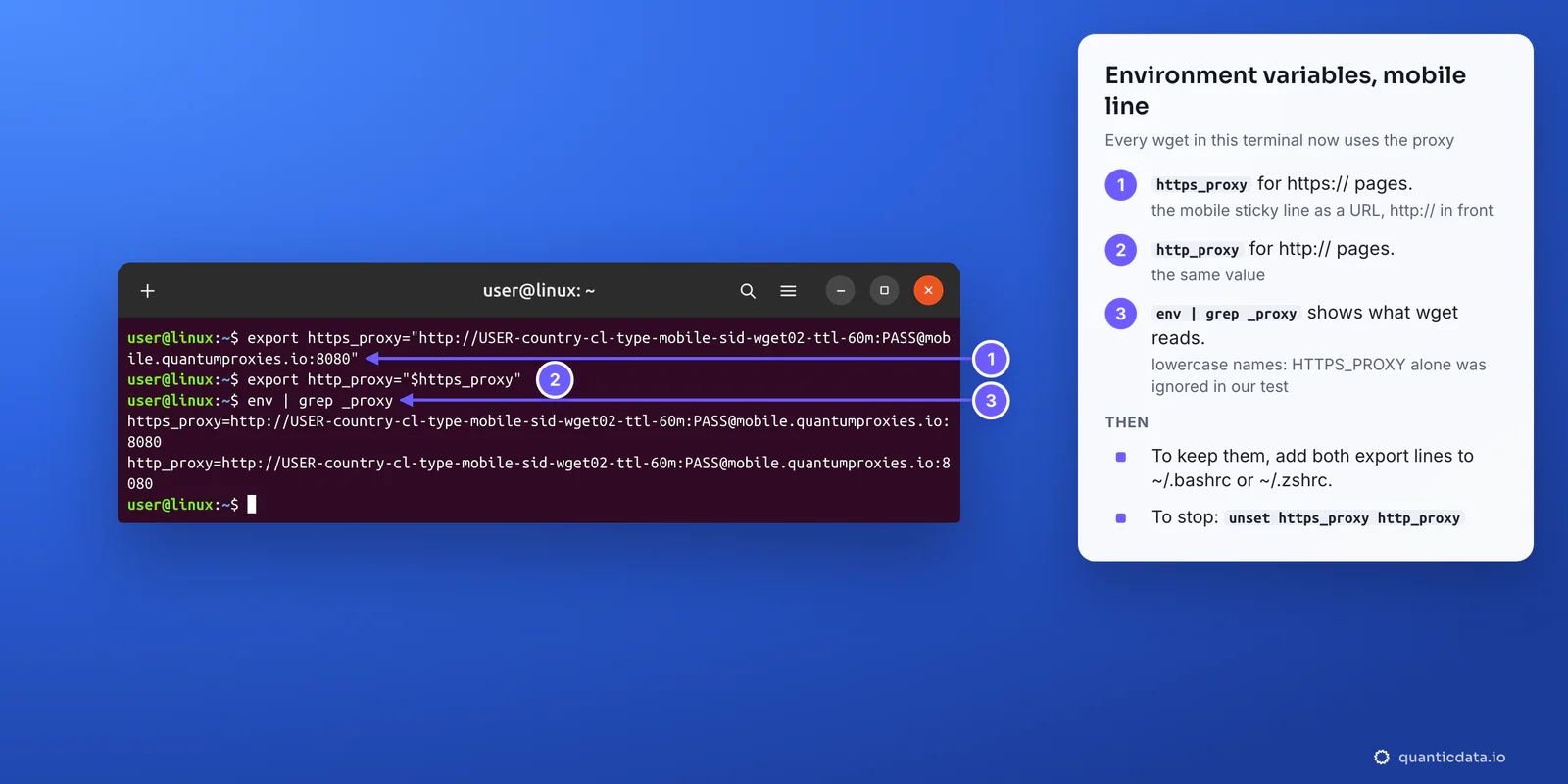
- Lowercase names. The manual documents
http_proxy,https_proxyandno_proxy. In our test, an uppercaseHTTPS_PROXYorNO_PROXYset on its own was ignored and wget connected straight to the site. - To keep them, add the two export lines to
~/.bashrcor~/.zshrc. To stop using them, rununset https_proxy http_proxy. - On Windows, wget reads the same variables:
set https_proxy=...in Command Prompt or$env:https_proxy="..."in PowerShell. - With IP whitelist, the mobile plan recognises your IP and no login is sent: add your IP in the IP whitelist section and use a host:port from its list as
http://HOST:PORT.
Choose which requests use the proxy: no_proxy and --no-proxy
Once the variables are set, every wget uses the proxy. Two switches send some requests direct, which matters for internal hosts, package mirrors or a local test server.
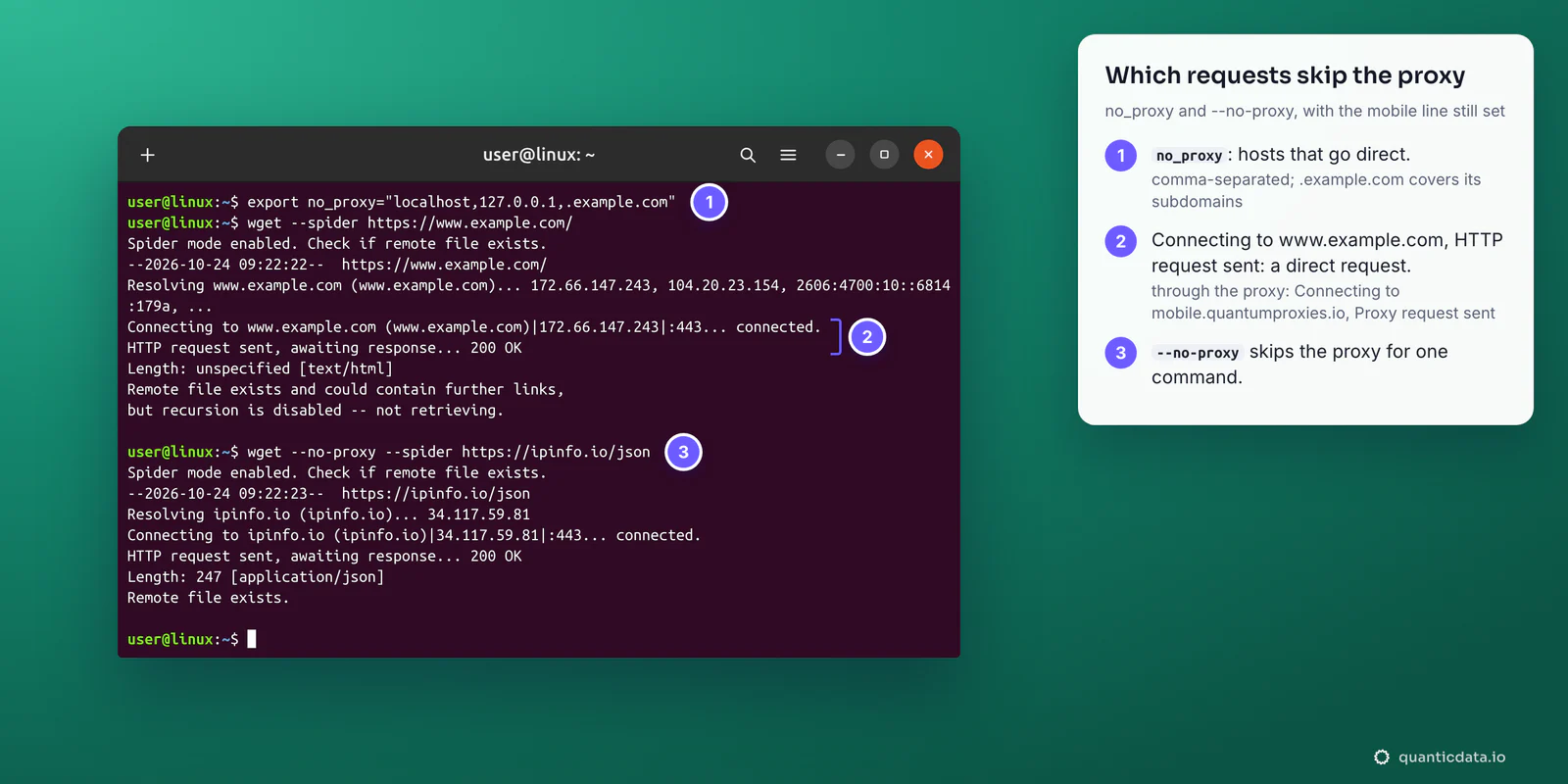
- no_proxy is a comma-separated list of hosts and domain endings that go direct:
export no_proxy="localhost,127.0.0.1,.example.com". In our tests.example.commatchedwww.example.combut notexample.comitself, whileexample.comwithout the dot matched both. - The output tells you the route. Through the proxy, wget prints
Connecting tofollowed by the gateway's name andProxy request sent; direct, it prints the site's own name andHTTP request sent. - --no-proxy skips the proxy for one command, whatever the variables or the startup file say.
-e use_proxy=offdoes the same.
ISP proxies in ~/.wgetrc
An ISP plan gives fixed IPs that stay the same for months, which suits scheduled downloads from a server that a site has allowlisted. In the dashboard, Proxy endpoints, Assigned IPs lists them: choose Protocol HTTP / HTTPS and Output format Proxy URL, and each line reads http://USER:PASS@IP:50100.
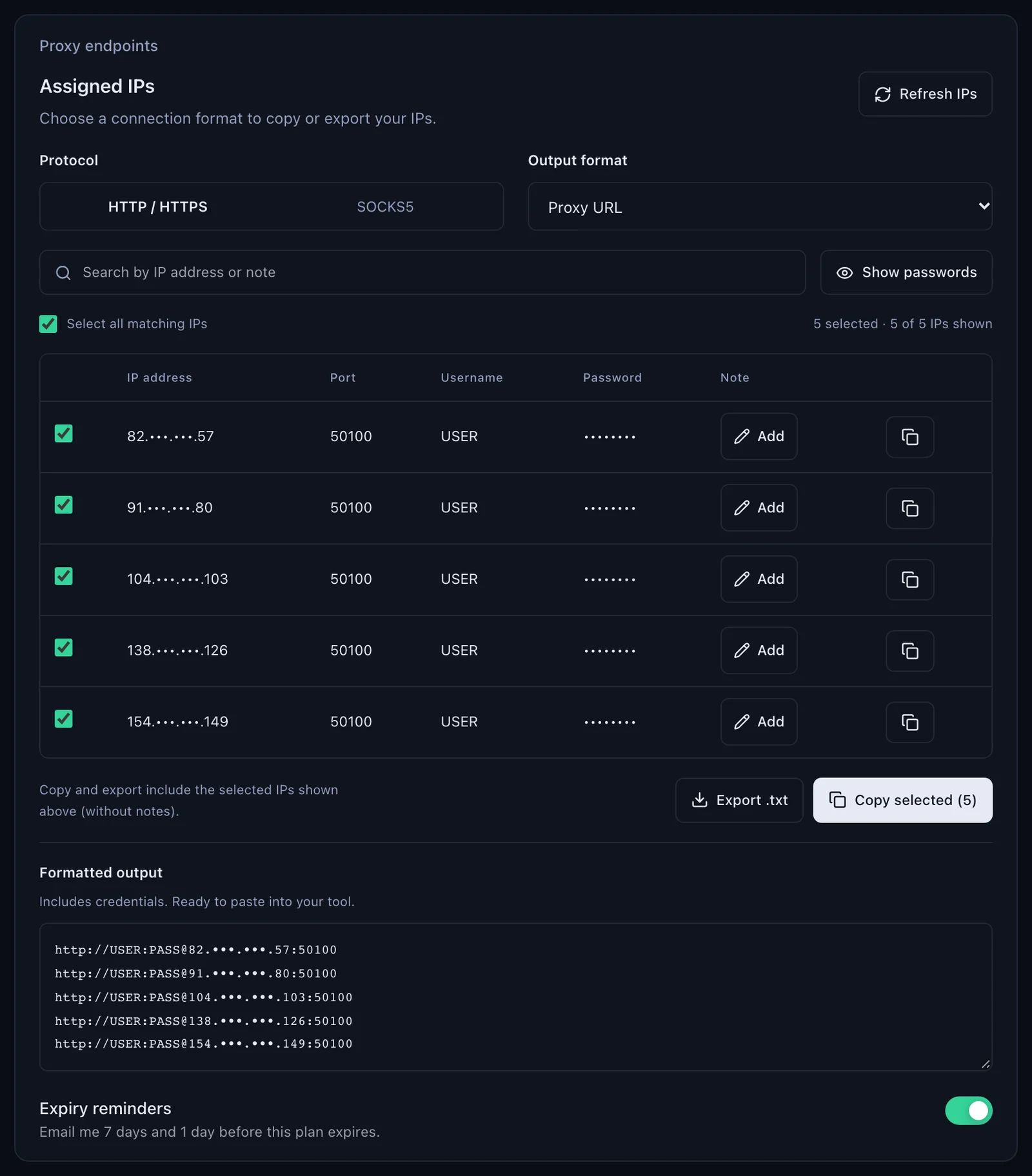
To make every wget leave from that IP, write it in the startup file. Wget reads a global file first, /usr/local/etc/wgetrc by default and /etc/wgetrc in the Debian and Ubuntu packages, then ~/.wgetrc, or the file named in the WGETRC variable; the user's file wins.
# ~/.wgetrc
use_proxy = on
http_proxy = http://IP:50100/
https_proxy = http://IP:50100/
proxy_user = USER
proxy_password = PASS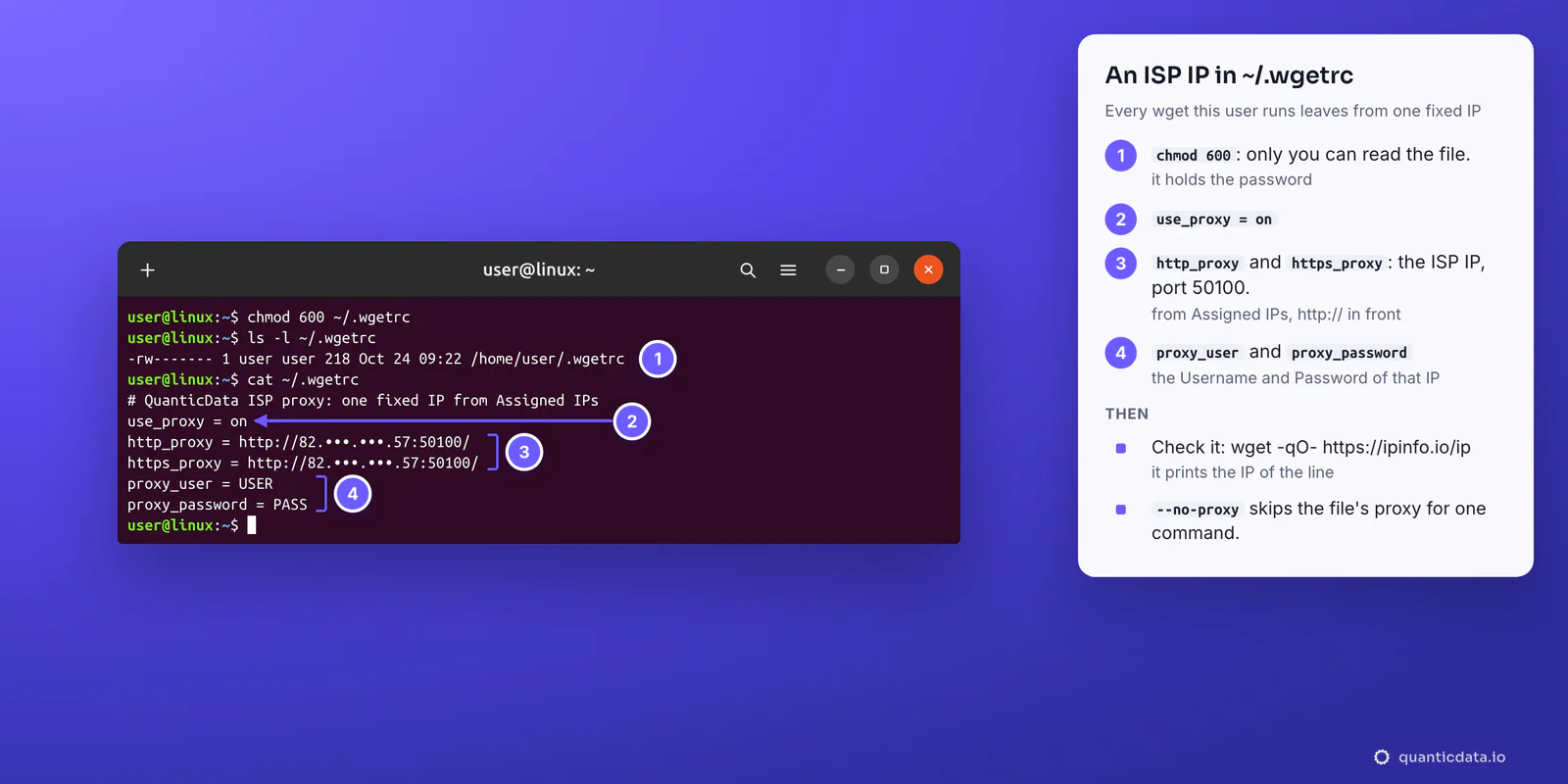
Run chmod 600 ~/.wgetrc so only you can read the password. The GNU manual warns that a password given on the command line is visible to anyone who runs ps; the file avoids that. Check the setup with wget -qO- https://ipinfo.io/ip: it prints the IP of the line.
Which proxy type for which wget job
| Proxy type | In wget | Good for |
|---|---|---|
| Residential Premium | http://residentialpremium.quantumproxies.io:8080; country, region, city or ISP, session and lifetime in the username; username and password only | Downloads that must come from a home connection in a chosen country, one sticky IP per job |
| ISP | http://IP:50100 from Assigned IPs, with that IP's username and password | Scheduled jobs that need the same address every run, downloads from sites that allowlist your IP |
| Mobile | http://mobile.quantumproxies.io:8080 with -type-mobile in the username, Global, USA, EU or Asia gateway; IP whitelist available | Pages and files served differently to mobile networks |
The plans are on the pages for QuanticData residential proxies, ISP proxies and mobile proxies; exits in this country are on the page for proxies in Chile.
Does wget support SOCKS5?
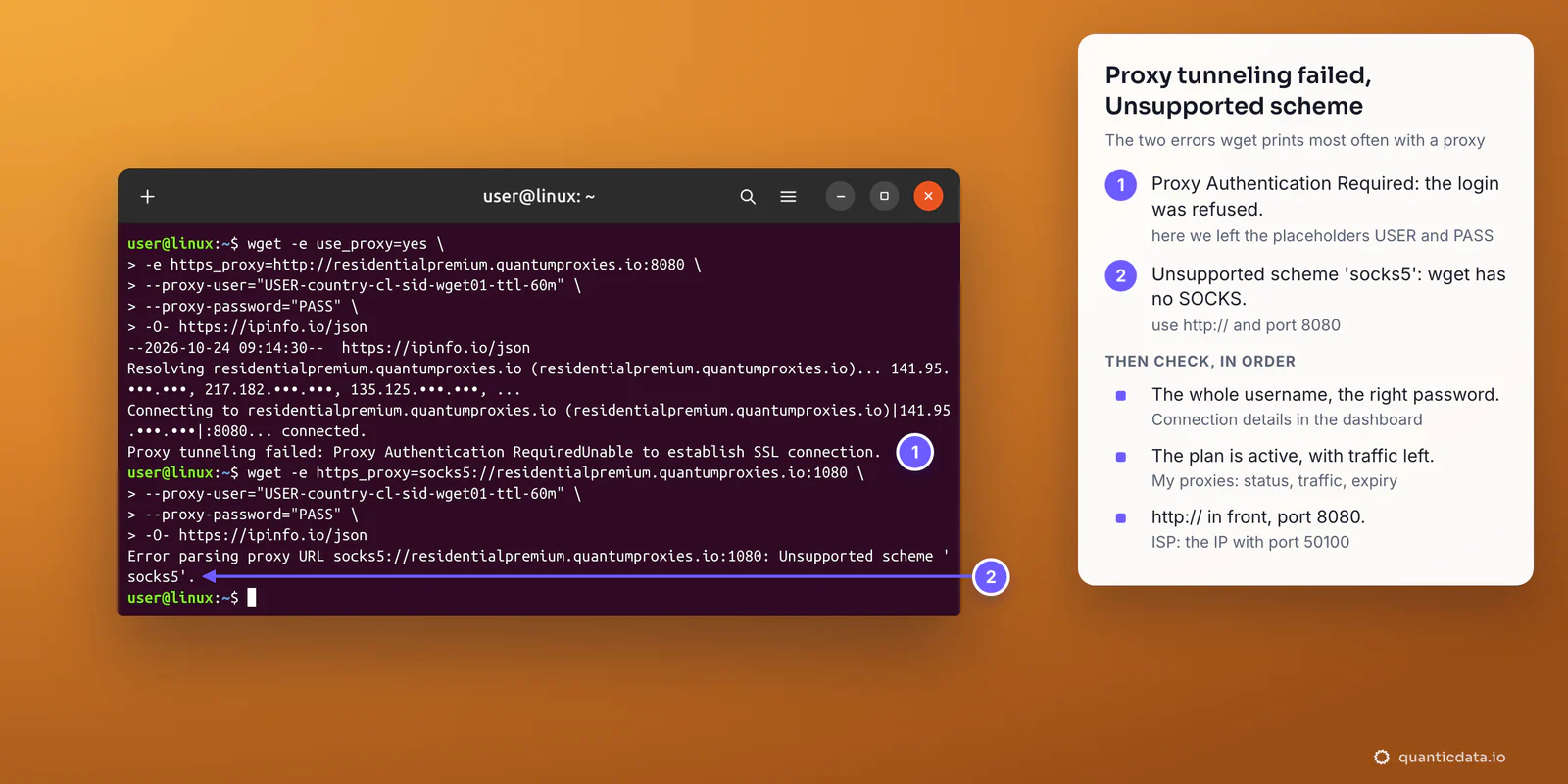
No. GNU Wget supports HTTP and FTP proxies only, and a socks5:// proxy stops it before it connects: Error parsing proxy URL socks5://...: Unsupported scheme 'socks5'. Pointing http:// at the SOCKS5 port does not work either. Every QuanticData network also listens on HTTP, so use port 8080 (50100 for ISP) and wget works as shown above. If a job really needs SOCKS5, curl supports it: see how to use a proxy with curl, and for scripts, a proxy in Python Requests. The details of the protocol are on the page for SOCKS5 proxies.
Wget proxy errors and fixes
| What wget prints | Usual cause | Fix |
|---|---|---|
Proxy tunneling failed: Proxy Authentication RequiredUnable to establish SSL connection. | The gateway answered 407 and refused the login: username cut at the first dash, wrong password, placeholders left in, or a plan that expired or ran out of traffic | Copy username and password again from Connection details; check status, traffic and expiry in My proxies |
Error parsing proxy URL socks5://...: Unsupported scheme 'socks5'. | Wget has no SOCKS support | http:// and port 8080, or 50100 for ISP |
Proxy tunneling failed: ?Unable to establish SSL connection. | http:// pointed at the SOCKS5 port 1080 | Port 8080 |
Error in proxy URL ftp://...: Must be HTTP. | A proxy URL with USER:PASS@ but no http:// in front | Start the value with http:// |
| Connecting to the site itself, not to the gateway | Variable written in uppercase, host listed in no_proxy, use_proxy = off in a startup file, or --no-proxy | Lowercase https_proxy; check no_proxy, ~/.wgetrc and the global wgetrc |
| The exit IP changes during a long job | The session lifetime ended, or the line was generated with Session set to Rotating | A sticky line with a longer -ttl-, up to 1440 minutes |
If the password contains characters such as @, : or /, a proxy URL needs them percent-encoded; --proxy-password or proxy_password in the startup file take it as it is. The 407 answer itself is explained step by step in fixing 407 Proxy Authentication Required, and the proxy not working checklist covers the causes that are not specific to wget.
Before you run large downloads
A proxy changes where wget's requests come from, not what you are allowed to download. Keep to each site's terms and to the law where you work, and give recursive jobs a pace a site can handle: --wait and --limit-rate are built into wget for that.