
To use a proxy in Crawl4AI, pass proxy_config with server, username and password: in BrowserConfig for the whole browser, or in CrawlerRunConfig for one run, the way the v0.9 docs recommend. Use http:// and port 8080 when there is a login. Below: sticky sessions, rotation, ISP and mobile lines, Docker and a fix for each error.
Crawl4AI is an open-source Python crawler: it drives Chromium through Playwright and turns pages into Markdown for language models. A proxy decides which IP address and which country the sites see. Crawl4AI hands your proxy to the browser as three values, a server, a username and a password, and almost every "proxy not working" report comes from one of them. The names below are the ones in Crawl4AI's documentation for v0.9.x and in the source of 0.9.5, released on 14 October 2026; the values come from the QuanticData endpoint generator.
What you need before you start
- Crawl4AI 0.9.5 or another 0.9 release, on Python 3.10 or newer. Install it with
pip install -U crawl4ai, runcrawl4ai-setup, thencrawl4ai-doctor, which checks Python, Playwright and the environment. - A proxy plan. Residential Premium, ISP or mobile: all three work in Crawl4AI. The table further down says which one fits which crawl.
- The four values: host, port, username and password. In the QuanticData dashboard they are under My proxies, on the plan's page, in the Endpoint generator; Connection details shows them one by one.
Where the proxy goes in Crawl4AI
Crawl4AI has two configuration objects, and both take a proxy. The difference is how far it reaches.
| Setting | Applies to | Use it for |
|---|---|---|
BrowserConfig(proxy_config=...) | Every crawl of that crawler | One exit for a whole job; the browser starts with it |
CrawlerRunConfig(proxy_config=...) | One arun() or arun_many() call | A different exit per run; the setting the Proxy & Security docs recommend |
CrawlerRunConfig(proxy_rotation_strategy=...) | Each request, in turn | Spreading pages over several sticky sessions |
A per-run proxy gets its own browser context, so one crawler can use several exits side by side. The old string argument, BrowserConfig(proxy="..."), still works in 0.9.5 but prints a deprecation warning; use proxy_config.
Step by step: a Residential Premium proxy in BrowserConfig
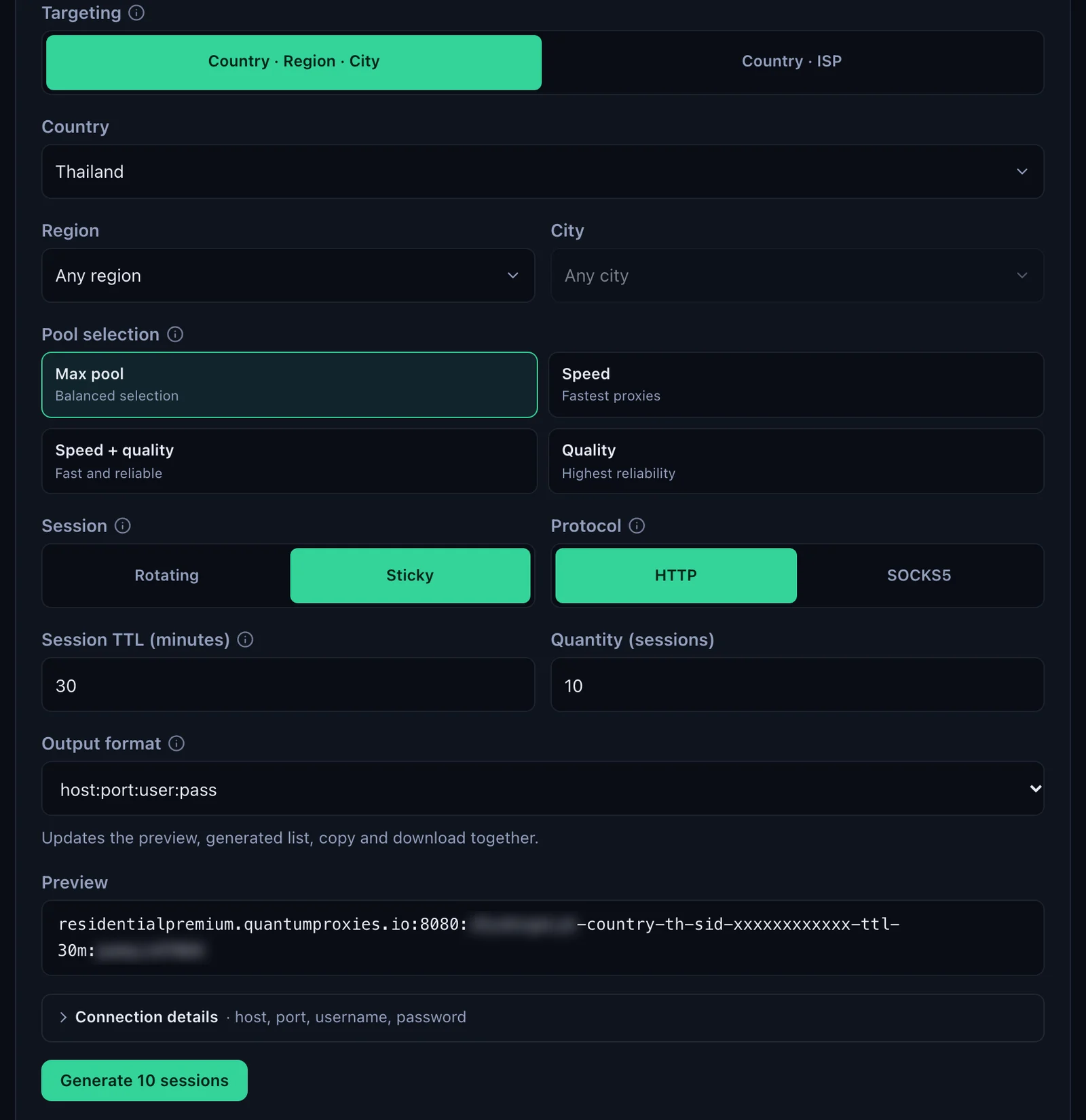
- Generate the line. In the QuanticData dashboard open My proxies, then your plan. In the Endpoint generator choose the Country (Thailand in this guide; a Region or City if the crawl needs one), set Session to Sticky, set Session TTL (minutes) to at least the length of the crawl and keep Protocol on HTTP. Open Connection details to copy the host, port, username and password one by one.
- Write the server with its scheme.
http://residentialpremium.quantumproxies.io:8080. Playwright reads a server without a scheme as HTTP, but writing it keeps the port and the protocol together where you can see them. - Copy the username whole. Everything after the first dash is targeting:
-country-thpicks the exit country,-sid-crawl4ai01names the session and-ttl-60mkeeps it for 60 minutes. - Put the three values in proxy_config and pass the BrowserConfig to the crawler, as below.
- Run it against ipinfo.io. The page Crawl4AI returns is ipinfo.io's answer for the exit: its IP, city and time zone.
import asyncio
from crawl4ai import AsyncWebCrawler, BrowserConfig

# One proxy for the whole browser: every crawl leaves from this exit
browser_config = BrowserConfig(
    headless=True,
    proxy_config={
        "server": "http://residentialpremium.quantumproxies.io:8080",
        "username": "USER-country-th-sid-crawl4ai01-ttl-60m",
        "password": "PASS",
    },
)

async def main():
    async with AsyncWebCrawler(config=browser_config) as crawler:
        result = await crawler.arun(url="https://ipinfo.io/json")
        if result.success:
            print(result.markdown[:300])
        else:
            print(result.error_message)

if __name__ == "__main__":
    asyncio.run(main())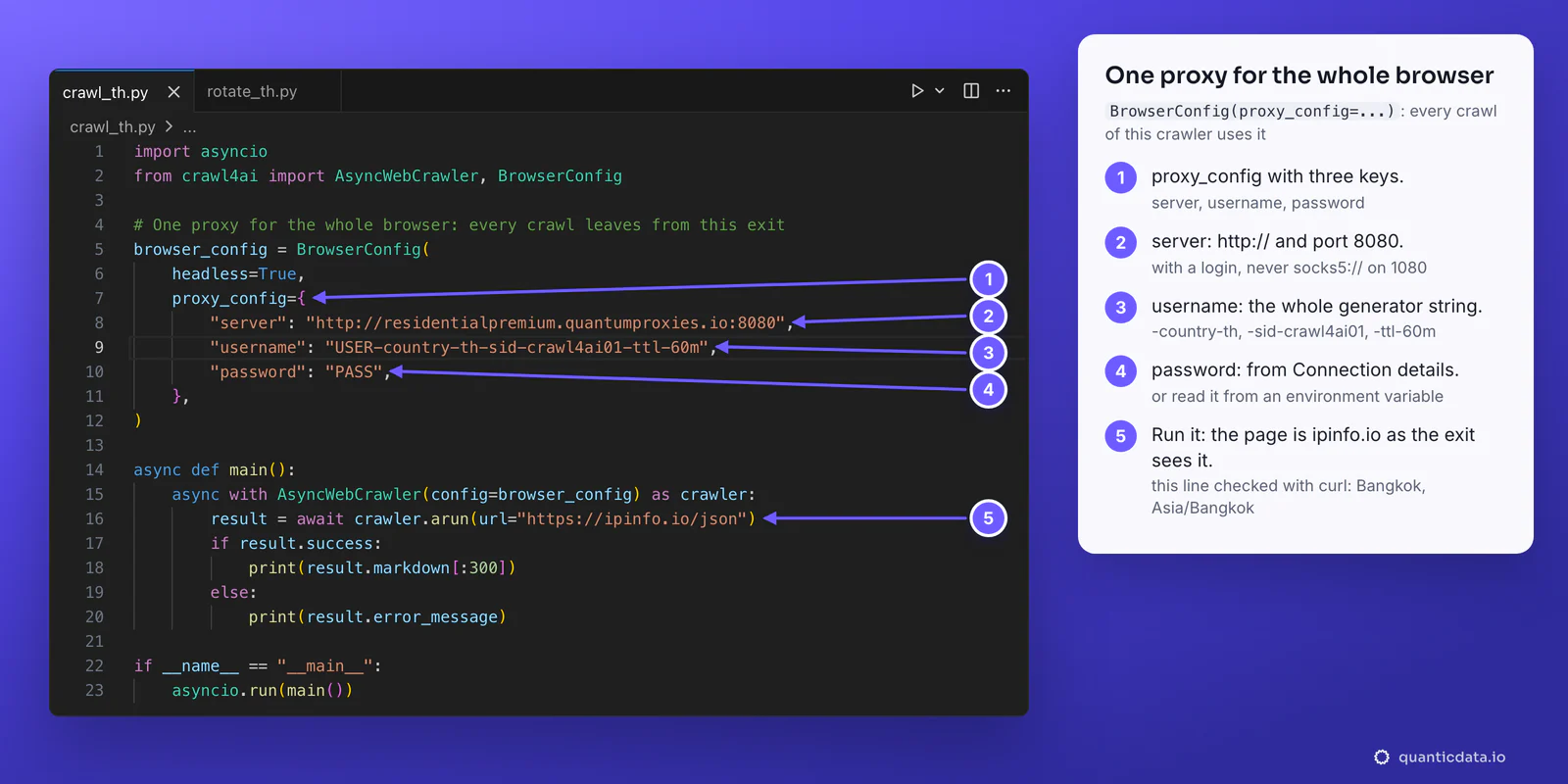
Before a long crawl, check the line outside Crawl4AI. The same three values in curl answer in a second, and if this works, any later failure is in the script, not in the proxy:
curl -s -x http://residentialpremium.quantumproxies.io:8080 \
  -U "USER-country-th-sid-crawl4ai01-ttl-60m:PASS" https://ipinfo.io/json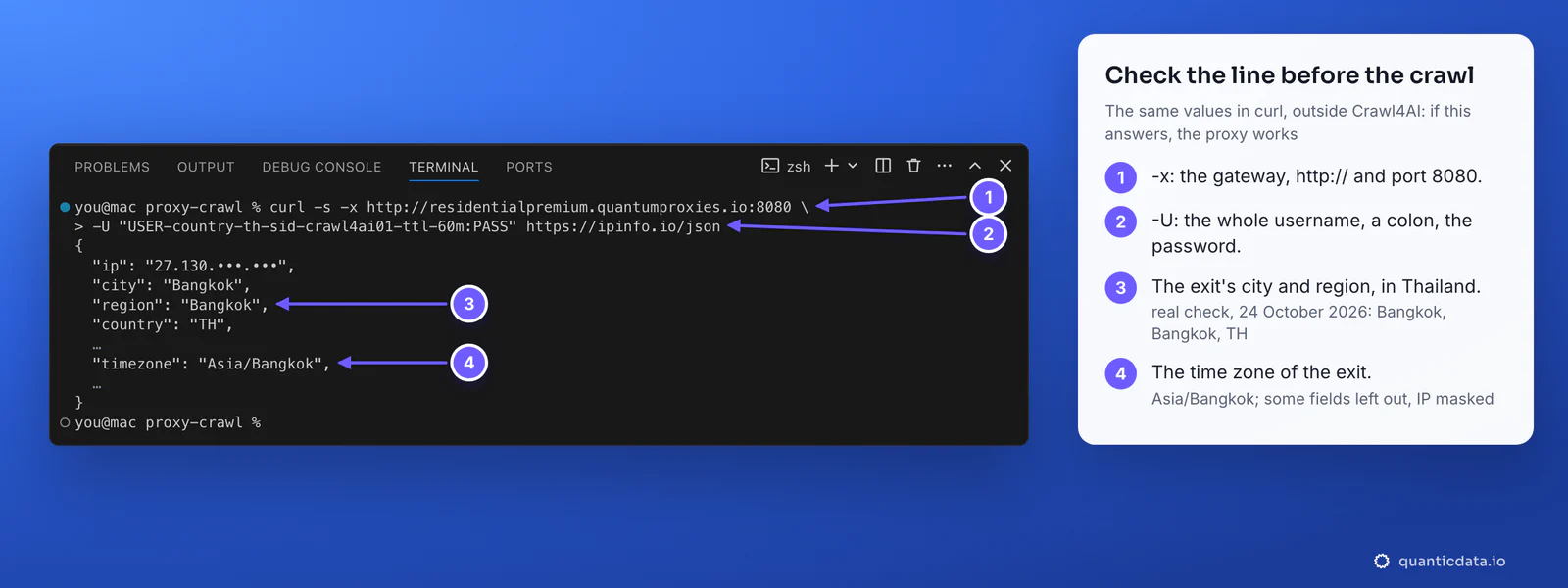
The formats proxy_config accepts
Crawl4AI turns whatever you pass into a ProxyConfig object. Three forms cover the generator's output formats:
# a dict with three keys, as in the docs table
proxy_config={"server": "http://residentialpremium.quantumproxies.io:8080",
              "username": "USER-country-th-sid-crawl4ai01-ttl-60m",
              "password": "PASS"}

# one string: the generator's http://user:pass@host:port format
proxy_config="http://USER-country-th-sid-crawl4ai01-ttl-60m:PASS@residentialpremium.quantumproxies.io:8080"

# the generator's host:port:user:pass format, read as HTTP
proxy_config=ProxyConfig.from_string(
    "residentialpremium.quantumproxies.io:8080:USER-country-th-sid-crawl4ai01-ttl-60m:PASS")
ProxyConfig.from_string also reads host:port alone, for IP whitelist authentication, and socks5://host:port. It splits on colons, so a line with an extra colon or a missing field stops with ValueError: Invalid proxy string format; the dict form avoids the question.
Keep the credentials out of the code
Crawl4AI's docs suggest environment variables for proxy credentials. ProxyConfig.from_env() reads the PROXIES variable, a comma-separated list, and accepts the generator's host:port:user:pass lines as they are:
export PROXIES="residentialpremium.quantumproxies.io:8080:USER-country-th-sid-c4a01-ttl-30m:PASS,residentialpremium.quantumproxies.io:8080:USER-country-th-sid-c4a02-ttl-30m:PASS"

# in Python
from crawl4ai import ProxyConfig
proxies = ProxyConfig.from_env()   # one ProxyConfig per line in PROXIES
One proxy per run with CrawlerRunConfig
The Proxy & Security docs recommend setting the proxy on each run: the run carries its own network settings and a different run can leave from somewhere else. The values are the same; only the object changes.
from crawl4ai import CrawlerRunConfig, ProxyConfig

th_run = CrawlerRunConfig(
    proxy_config=ProxyConfig(
        server="http://residentialpremium.quantumproxies.io:8080",
        username="USER-country-th-sid-crawl4ai02-ttl-60m",
        password="PASS",
    )
)

# inside main(), with an AsyncWebCrawler() that has no proxy of its own
result = await crawler.arun(url="https://example.com", config=th_run)
For a flow over several pages on one tab, Crawl4AI's session_id keeps the page open between arun() calls. Give that run config one fixed sticky line, so the tab and the IP stay together until the session ends.
Crawl4AI proxy rotation over sticky sessions
There are two ways to get a new IP. A username without -sid-, such as USER-country-th, rotates on the gateway: the IP can change between the requests of one page, which is fine for single fetches and confusing for a browser that loads a page in many requests. The other way, the one that suits a browser, is several sticky sessions and Crawl4AI's rotation strategy: each page keeps one IP, and the next page takes the next session.
import asyncio
from crawl4ai import AsyncWebCrawler, CrawlerRunConfig, CacheMode, ProxyConfig
from crawl4ai.proxy_strategy import RoundRobinProxyStrategy

SERVER = "http://residentialpremium.quantumproxies.io:8080"

# Five sticky sessions: same country, each with its own -sid-, so five IPs
sessions = [
    ProxyConfig(
        server=SERVER,
        username=f"USER-country-th-sid-c4a{n:02d}-ttl-30m",
        password="PASS",
    )
    for n in range(1, 6)
]

run_config = CrawlerRunConfig(
    cache_mode=CacheMode.BYPASS,
    proxy_rotation_strategy=RoundRobinProxyStrategy(sessions),
)

async def main():
    urls = [f"https://example.com/catalog?page={p}" for p in range(1, 11)]
    async with AsyncWebCrawler() as crawler:
        results = await crawler.arun_many(urls=urls, config=run_config)
        for r in results:
            print(r.url, r.success)

asyncio.run(main())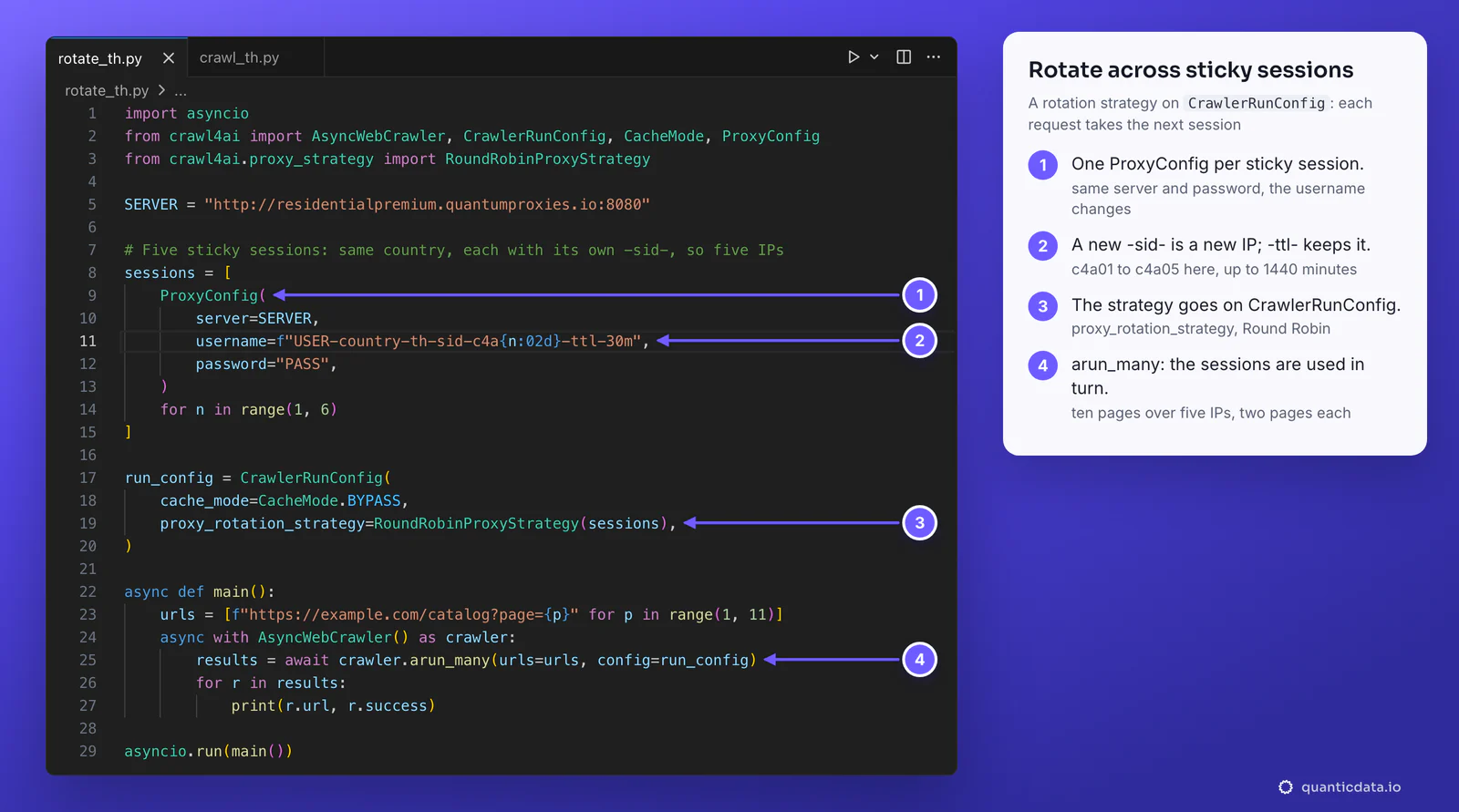
- A different session ID in every entry. Five lines with the same
-sid-are one IP five times. - A lifetime longer than the crawl. The generator accepts up to 1440 minutes. When a session ends, its next request gets a new IP.
- The cache out of the way.
CacheMode.BYPASSis the default in 0.9.5; writing it keeps a cached page from hiding the IP change.
To load the list from the environment instead, pass ProxyConfig.from_env() to RoundRobinProxyStrategy. For rotation patterns outside Crawl4AI, see rotating proxies in Python; the plans themselves are on the pages for QuanticData residential proxies and rotating proxies.
Which proxy type for which crawl
| Proxy type | In Crawl4AI | Good for |
|---|---|---|
| Residential Premium | http://residentialpremium.quantumproxies.io:8080; country, region, city or ISP in the username; username and password only | Most crawls: home IPs in the country you choose, sticky or rotating |
| ISP | Fixed IPs from Assigned IPs, IP:Port:Username:Password on port 50100 with HTTP | Crawls that log in and should keep the same address for months |
| Mobile | http://mobile.quantumproxies.io:8080 with -type-mobile in the username; Global, USA, EU or Asia gateway; IP whitelist available | Mobile versions of sites and platforms tied to mobile networks |
If the job is only turning sites into Markdown and you would rather not run browsers, QuanticData's crawl and map API does that over the same network.
ISP proxies in Crawl4AI
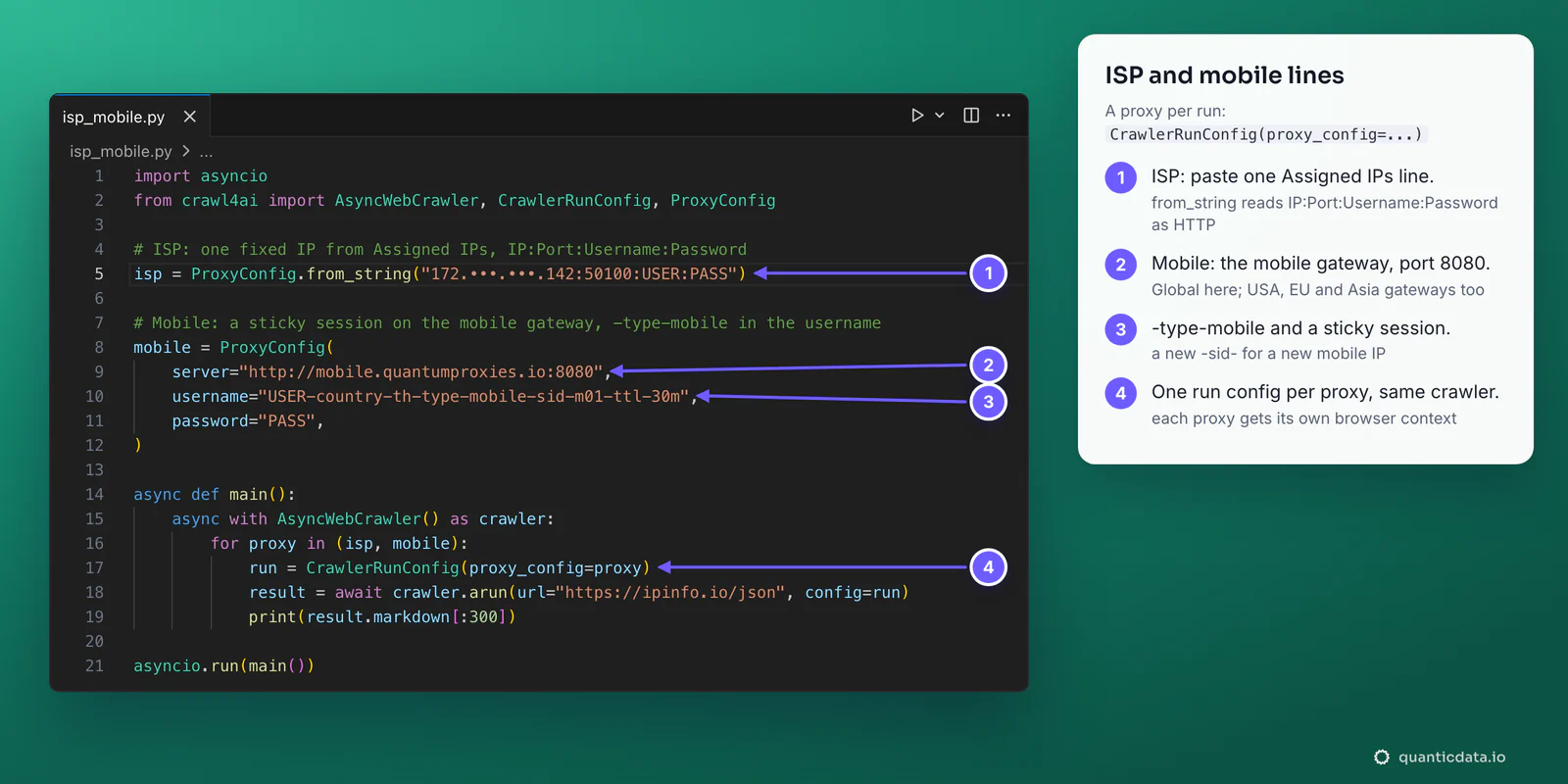
An ISP plan lists one fixed IP per line under Proxy endpoints, Assigned IPs. With the Protocol on HTTP / HTTPS and the Output format on IP:Port:Username:Password, each line goes straight into ProxyConfig.from_string, which reads that layout as HTTP. Keep the panel on HTTP / HTTPS: its SOCKS5 port, 50101, takes a login, and the browser will not send one over SOCKS5.
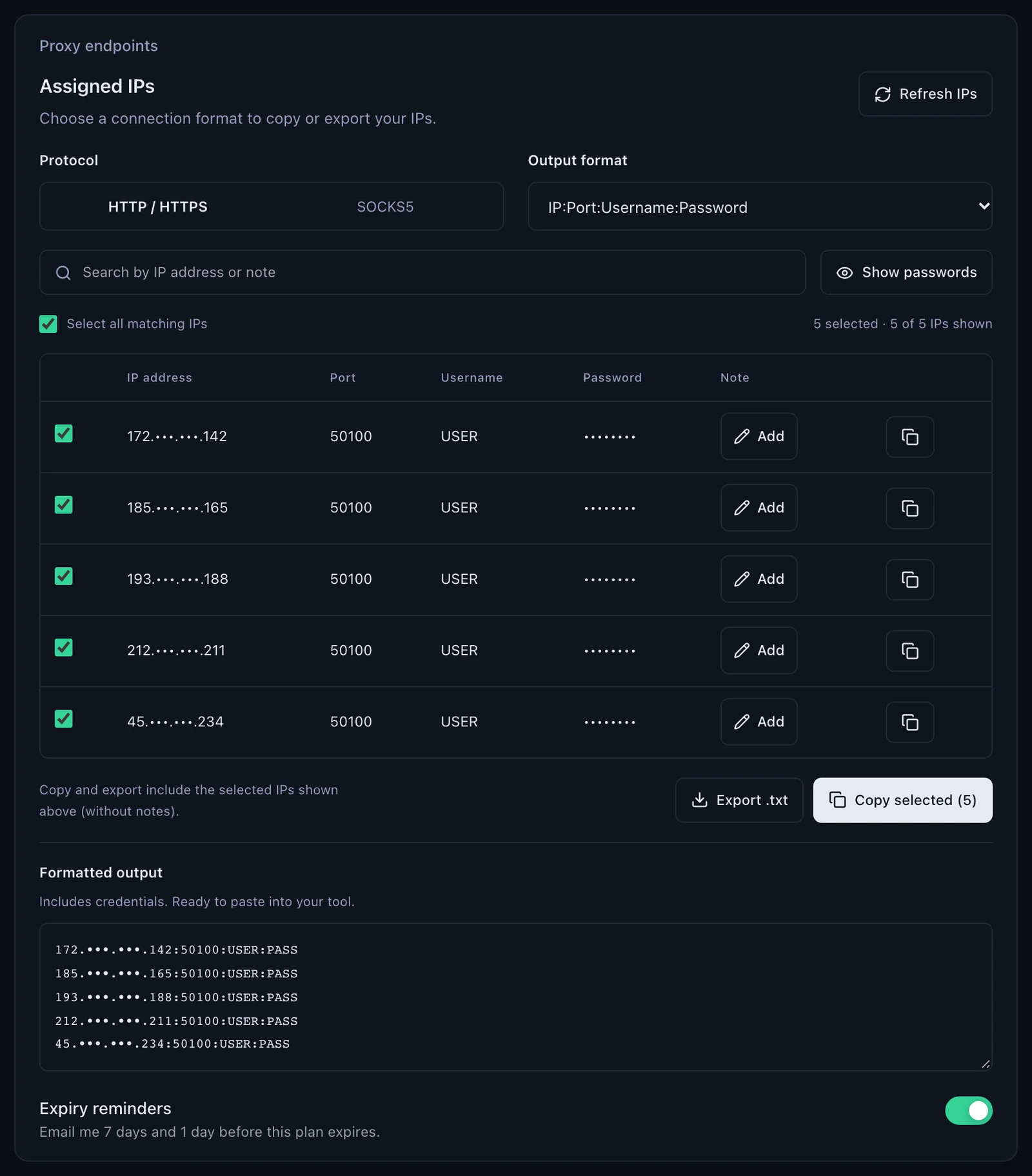
An ISP IP does not change, so it fits one account or one site that should always see the same address. Give each such job its own line; the details of the plan are on the page for ISP proxies.
Mobile proxies in Crawl4AI
A mobile line works like Residential Premium, on its own gateway and with -type-mobile in the username:
mobile = ProxyConfig(
    server="http://mobile.quantumproxies.io:8080",
    username="USER-country-th-type-mobile-sid-m01-ttl-30m",
    password="PASS",
)
mobile_run = CrawlerRunConfig(proxy_config=mobile)
In the generator, Proxy host (gateway) offers Global, USA, EU and Asia, and Protocol offers HTTP on 8080 or SOCKS5 on 1080. A new -sid- gives a new mobile IP. Mobile plans also offer IP whitelist authentication: add the IP of the machine that runs Crawl4AI, take the host:port lines from Proxy list for a whitelisted IP, and pass them with no username or password, with http:// or socks5:// in front. That is the one case where SOCKS5 works in Crawl4AI. More on the plans: mobile proxies.
Crawl4AI docker proxy: the proxy goes on the server
The self-hosted Crawl4AI server (Docker, port 11235) treats every request body as untrusted. In 0.9.5, a proxy_config inside the browser_config or crawler_config of a request is one of the fields it refuses, with an HTTP 400. The server takes its proxy from the environment instead: its egress code reads CRAWL4AI_UPSTREAM_PROXY, then HTTP_PROXY and HTTPS_PROXY, accepts only http://, takes the username and password from the URL and honours NO_PROXY. Set it when you start the container:
-e CRAWL4AI_UPSTREAM_PROXY="http://USER-country-th-sid-docker01-ttl-1440m:PASS@residentialpremium.quantumproxies.io:8080"That one proxy applies to every crawl of the server. A sticky session keeps one IP for its lifetime; a username without -sid- rotates.
Crawl4AI proxy not working: errors and fixes
A proxy problem in Crawl4AI surfaces in one of two places: the browser refuses to start, or a run fails and result.error_message carries Playwright's message, wrapped in "Failed on navigating ACS-GOTO". These are the cases, in the order to check.
| What you see | Usual cause | Fix |
|---|---|---|
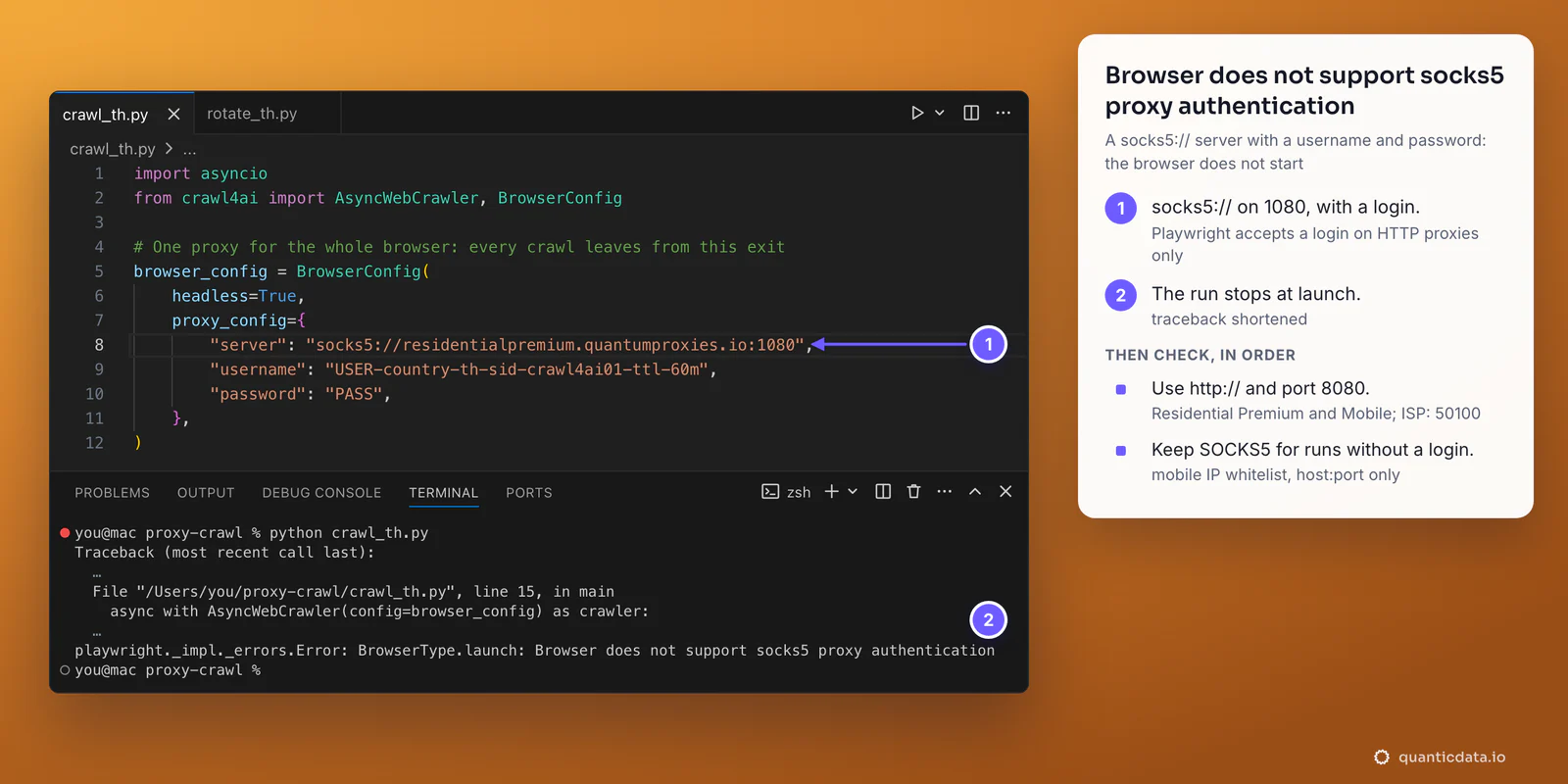
BrowserType.launch: Browser does not support socks5 proxy authentication, or the same after Browser.new_context on a per-run proxy | A socks5:// server with a username and password: Playwright passes a login to HTTP proxies only | http:// on port 8080 (ISP: 50100); SOCKS5 only without a login, through the mobile IP whitelist |
Page.goto: Timeout 60000ms exceeded | A wrong or cut username or password: the gateway answers 407 and the browser waits until page_timeout, 60 seconds by default | Copy the username and password again from Connection details; the curl test without -s stops at once with CONNECT tunnel failed, response 407 |
net::ERR_CONNECTION_RESET | http:// pointed at port 1080, the SOCKS5 port | Port 8080 for http:// |
ValueError: Invalid proxy string format | A line that ProxyConfig.from_string cannot split into host:port or host:port:user:pass | Copy the line again, or use the dict form with three keys |
| The page shows the wrong country | No -country- in the username | Generate the line with a country; copy the username whole |
| Rotation leaves from one IP | The same -sid- in every entry, an empty PROXIES variable, or the strategy on the wrong object | One session ID per entry; check len(proxies); put the strategy on CrawlerRunConfig |
| The IP changes in the middle of a crawl | The session lifetime ended, or the username has no -sid- | A longer -ttl-, up to 1440 minutes, and a sticky session |
The curl test from the first section settles most cases in a minute. If it returns an address in the right country, the proxy works and the problem is in the script. Without -s, a wrong login stops at once with CONNECT tunnel failed, response 407; more on that status in 407 Proxy Authentication Required. If curl fails on your network and works from another one, a firewall is blocking the connection to the proxy port.
HTTP or SOCKS5 in Crawl4AI
Use HTTP. Crawl4AI's browser runs on Playwright, and Playwright sends a username and password to HTTP proxies only, so on Residential Premium, ISP and mobile lines with a login the answer is always http:// with port 8080, or 50100 for ISP. SOCKS5 fits only a connection without a login, which on QuanticData means a mobile plan with IP whitelist. The protocol details are on the page for SOCKS5 proxies, and the same proxy settings in plain Playwright are in our Playwright scraping guide; country pages such as Thailand residential proxies list the targeting for each market.
Before you crawl
A proxy changes where a crawl comes from, not what it is allowed to fetch. Keep to each site's terms and to the law where you work; Crawl4AI's check_robots_txt=True on CrawlerRunConfig makes it read and respect robots.txt before each crawl.
Sources & further reading
- Crawl4AI documentation: Proxy & Security
- Crawl4AI documentation: Browser, Crawler & LLM Config
- Crawl4AI documentation: Installation
- Crawl4AI source, v0.9.5: Docker server egress proxy
- Playwright for Python: BrowserType.launch proxy option
- Playwright issue 10567: SOCKS5 proxy with authentication