
To use a proxy in Guzzle, pass the proxy request option when you create the Client: 'proxy' => 'http://user:pass@host:port'. A string covers every request; an array sets one proxy per URL scheme plus a no list of hosts that go direct. Below: SOCKS5, sticky sessions, ISP and mobile lines, plain PHP cURL and a fix for each cURL error.
Guzzle is a PHP HTTP client, and Laravel's HTTP client is a wrapper around it. It sends requests through libcurl when the cURL extension is loaded, and the proxy settings below end up as libcurl options. Everything here works on Guzzle 7 and on Guzzle 8 (8.3.0 came out on 18 October 2026) unless a line says otherwise. The proxy values come from the QuanticData endpoint generator; USER and PASS stand for your own credentials.
What you need
- Guzzle installed with Composer:
composer require guzzlehttp/guzzle. Guzzle 7 runs on PHP 7.2.5 and later, Guzzle 8 on PHP 7.4 and later. - The cURL extension (ext-curl) for SOCKS5. Guzzle can also send requests through PHP's stream wrapper, but that handler only speaks to HTTP proxies.
- A proxy plan: Residential Premium, ISP or mobile. The table further down says which fits which job.
- The proxy line. In the QuanticData dashboard open My proxies, then your plan; the Endpoint generator builds it. Set Output format to http://user:pass@host:port and the Preview is ready to paste into Guzzle.
The proxy request option
Guzzle reads the proxy from one request option, proxy. Passed to the Client constructor it becomes a default for every request that client sends; passed to a single request it applies to that request only. The value is a URL: the scheme says what kind of proxy it is, and the username and password go before the @.
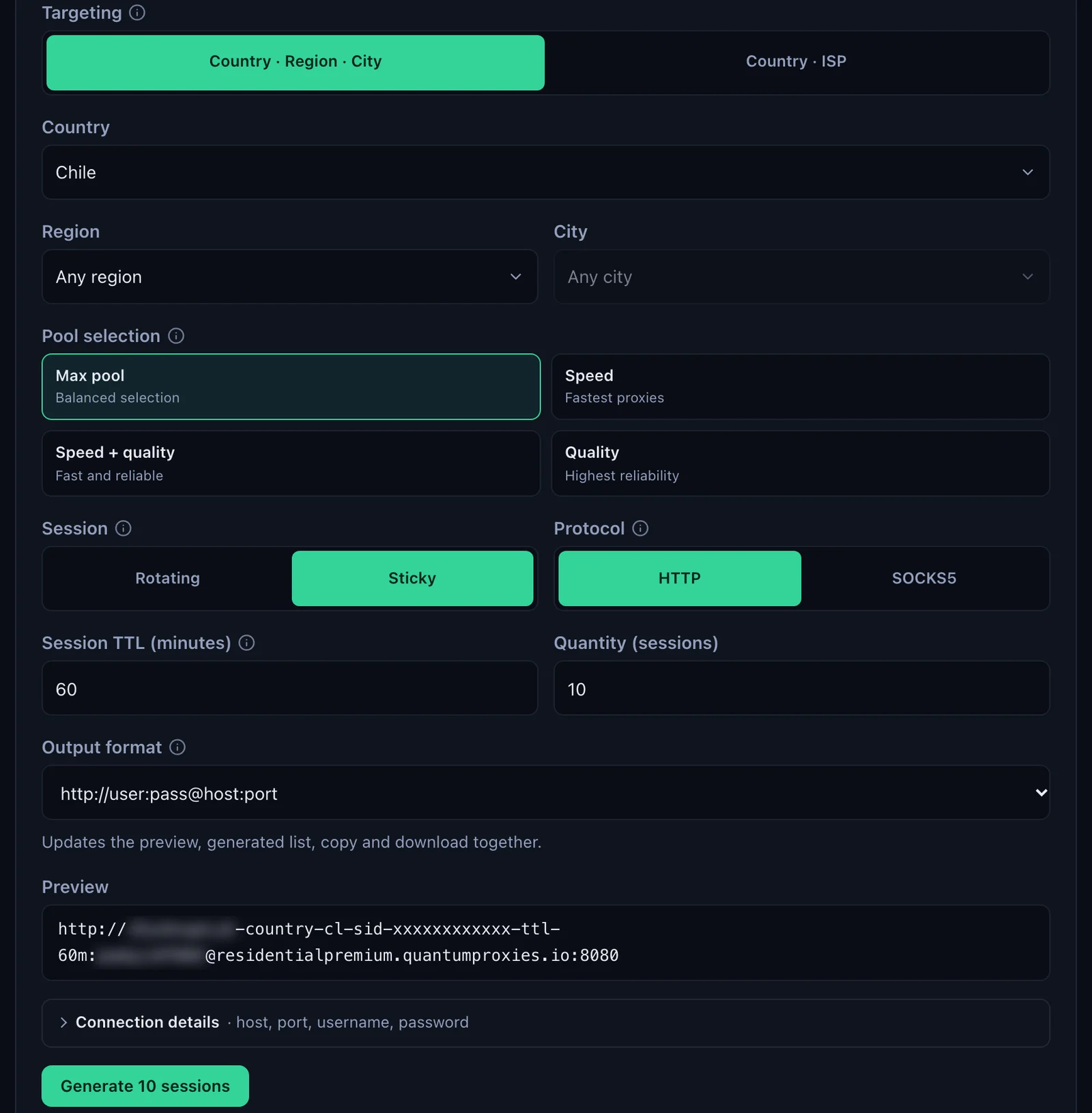
- Generate the line. In the Endpoint generator choose the Country (and a Region or City if you need one), set Session to Sticky, set Session TTL (minutes) to at least the length of the job, choose HTTP and set Output format to http://user:pass@host:port. Copy the Preview.
- Put it in the Client. Pass it as
proxywhen you create the Client, as in the code below. - Check the exit once. Request
https://ipinfo.io/jsonthrough the client: the city, region and timezone in the answer belong to the proxy's IP, and the country has to match the-country-in the username.
<?php
require __DIR__ . '/vendor/autoload.php';

use GuzzleHttp\Client;

// Residential Premium, Chile, one sticky session for 60 minutes
$user  = 'USER-country-cl-sid-guzzle01-ttl-60m';
$pass  = rawurlencode('PASS');
$proxy = "http://$user:$pass@residentialpremium.quantumproxies.io:8080";

$client = new Client([
    'proxy'   => $proxy,
    'timeout' => 30,
]);

echo $client->get('https://ipinfo.io/json')->getBody(), PHP_EOL;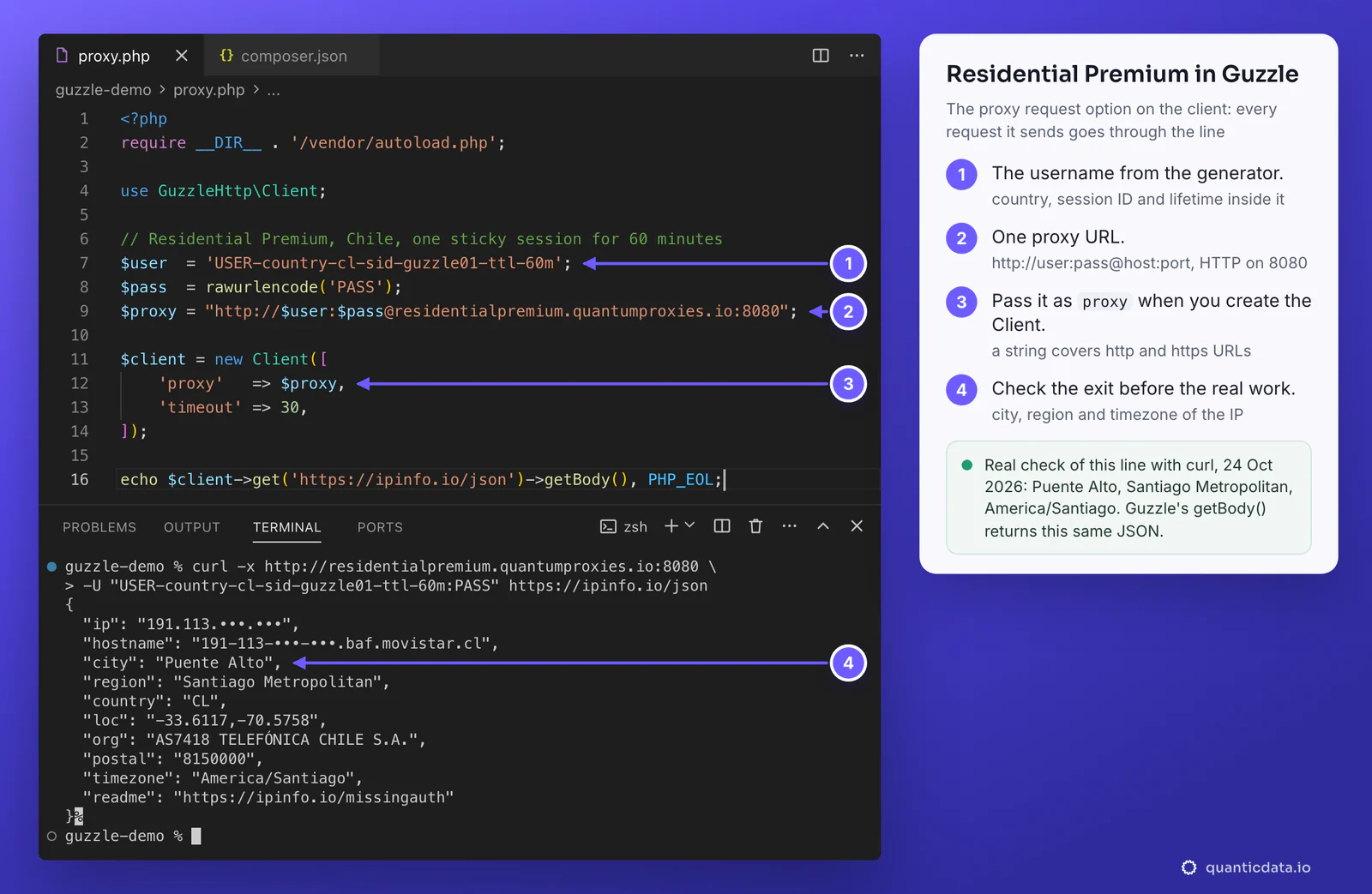
Three details matter. The username is the whole string, with everything after the first dash: -country-cl picks the exit country, -sid-guzzle01 names the session and -ttl-60m keeps it for 60 minutes; cut at the first dash, it still logs in but leaves from a random country. A password with @, : or / in it has to be percent-encoded, which is what rawurlencode() is for. And set a timeout: by default Guzzle waits indefinitely, so a request stuck on a slow site would hold the script forever.
In Laravel the same option goes through the HTTP client: Http::withOptions(['proxy' => $proxy])->get($url) for one request, or Http::globalOptions(['proxy' => $proxy]) in a service provider's boot() method for every request the application sends.
Per-scheme proxies and the no list
A string sends every request through the proxy. An array decides by the scheme of the URL you request: the http key is used for http:// URLs, the https key for https:// URLs, and the no key lists host names that always go direct.
$gw     = 'residentialpremium.quantumproxies.io:8080';
$proxy  = "http://USER-country-cl-sid-guzzle01-ttl-60m:PASS@$gw";
$proxy2 = "http://USER-country-cl-sid-guzzle02-ttl-60m:PASS@$gw";

$client = new Client([
    'proxy' => [
        'http'  => $proxy,   // http:// URLs
        'https' => $proxy,   // https:// URLs, most sites
        'no'    => ['localhost', '127.0.0.1', '.corp.example'],
    ],
]);

$client->get('https://ipinfo.io/json');        // proxy: the https key
$client->get('http://localhost:8000/health');  // direct: in the no list
$client->get('https://ipinfo.io/json', ['proxy' => $proxy2]); // this call only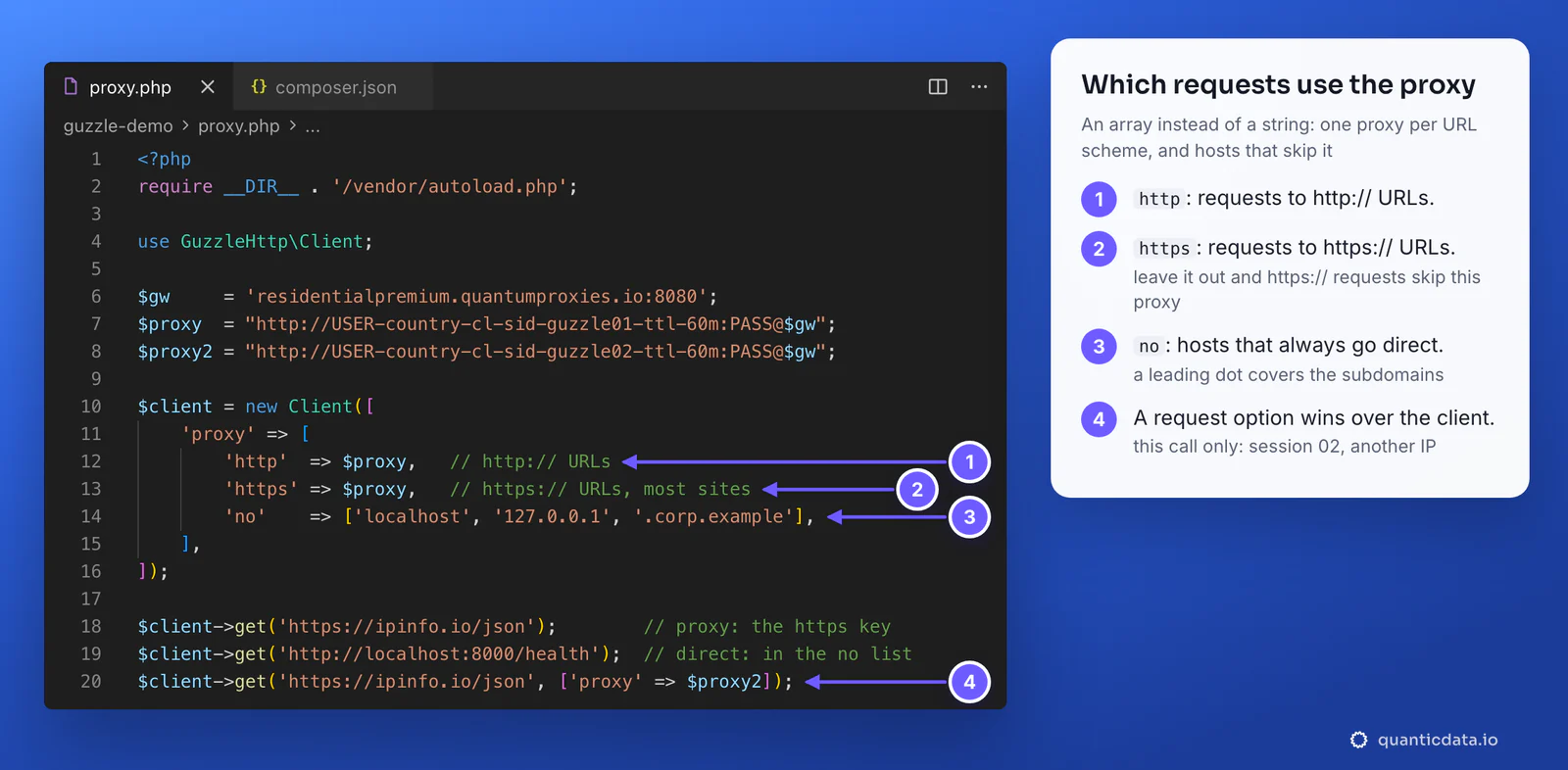
This is where most setups go wrong:
- The https key is the one that counts. An array with only
httpleaves everyhttps://request without that proxy: it goes straight from your server, or throughHTTPS_PROXYif that environment variable is set. Most sites are HTTPS, so the job runs, from the wrong IP. - The scheme of the key is the scheme of the target, not of the proxy. Both keys point to the same
http://proxy URL above; the HTTP proxy tunnels the HTTPS request with CONNECT. - The no list replaces NO_PROXY. Without a proxy option Guzzle reads
NO_PROXYby itself; once you pass the option, the exclusions are the ones you put underno, for exampleexplode(',', getenv('NO_PROXY')). A leading dot covers the subdomains; on Guzzle 8 it also covers the domain itself. - A request option wins. The
proxypassed to one request replaces the client's for that call, which is how one client can use several sessions. - Environment variables. With no proxy option at all, Guzzle 7 takes
HTTP_PROXY(only from the command line, a guard against the httpoxy problem) andHTTPS_PROXY. Guzzle 8 never reads the uppercaseHTTP_PROXY; it readshttp_proxy,https_proxyorHTTPS_PROXY, thenall_proxy.
SOCKS5 in Guzzle: the scheme, or cURL options
Guzzle has no separate SOCKS setting: the scheme of the proxy URL picks the protocol, and libcurl does the rest. Use socks5h:// and port 1080. The h means the proxy resolves the site's host name, so DNS lookups leave from the proxy as well; socks5:// resolves it on your server. The login can sit in the URL, or go into a cURL option, which also spares you the URL-encoding.
$user = 'USER-country-cl-sid-guzzle02-ttl-60m';
$pass = 'PASS';

// Guzzle 7 and 8: the scheme in the URL, the login as a cURL option
$client = new Client([
    'proxy' => 'socks5h://residentialpremium.quantumproxies.io:1080',
    'curl'  => [CURLOPT_PROXYUSERPWD => "$user:$pass"],
]);

// or the login in the URL
// 'proxy' => "socks5h://$user:[email protected]:1080"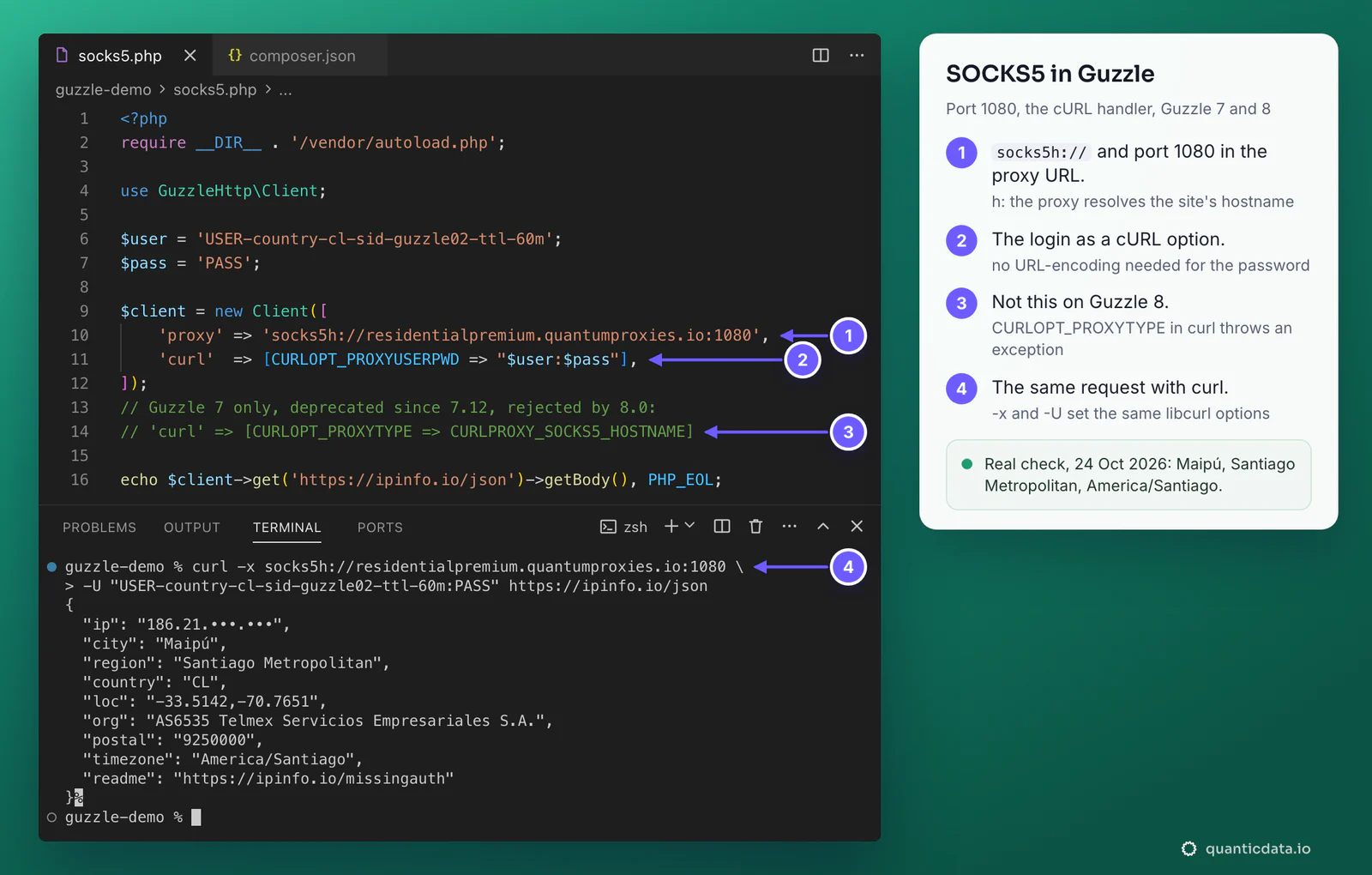
Older answers set the type with 'curl' => [CURLOPT_PROXYTYPE => CURLPROXY_SOCKS5_HOSTNAME] and a proxy without a scheme. Guzzle 7 still runs it but marks it deprecated since 7.12; Guzzle 8 rejects it before sending, with an exception that says to use the proxy option with a scheme-prefixed URL. If your code has that line, move the type into the URL. SOCKS5 also needs the cURL handler: on Guzzle 8 the stream handler stops with "SOCKS proxies are not supported by the stream handler." More on the protocol on the page for SOCKS5 proxies.
Sticky sessions: one IP per worker
A sticky session keeps one IP for as long as the session lives, and the session lives in the username. Same -sid-, same IP; a new -sid-, a new IP. That is all you need to control rotation from PHP:
- One session per worker, account or job. Two workers on the same line share one IP.
- A lifetime longer than the work.
-ttl-goes up to 1440 minutes, a full day. When it ends, the next request gets a new IP. - A new IP on demand. Change the session ID, for example
guzzle02instead ofguzzle01. Leave the session part out (Session set to Rotating in the generator) and every request leaves from a different IP.
Guzzle's Pool sends requests concurrently, and since each request can carry its own proxy option, each one can carry its own session:
use GuzzleHttp\Client;
use GuzzleHttp\Pool;

$client = new Client(['timeout' => 30]);
$gw     = 'residentialpremium.quantumproxies.io:8080';
$urls   = ['https://example.com/a', 'https://example.com/b', 'https://example.com/c'];

$requests = function () use ($client, $urls, $gw) {
    foreach ($urls as $i => $url) {
        $proxy = "http://USER-country-cl-sid-w{$i}-ttl-30m:PASS@$gw"; // one session each
        yield function () use ($client, $url, $proxy) {
            return $client->getAsync($url, ['proxy' => $proxy]);
        };
    }
};

$pool = new Pool($client, $requests(), ['concurrency' => 3]);
$pool->promise()->wait();
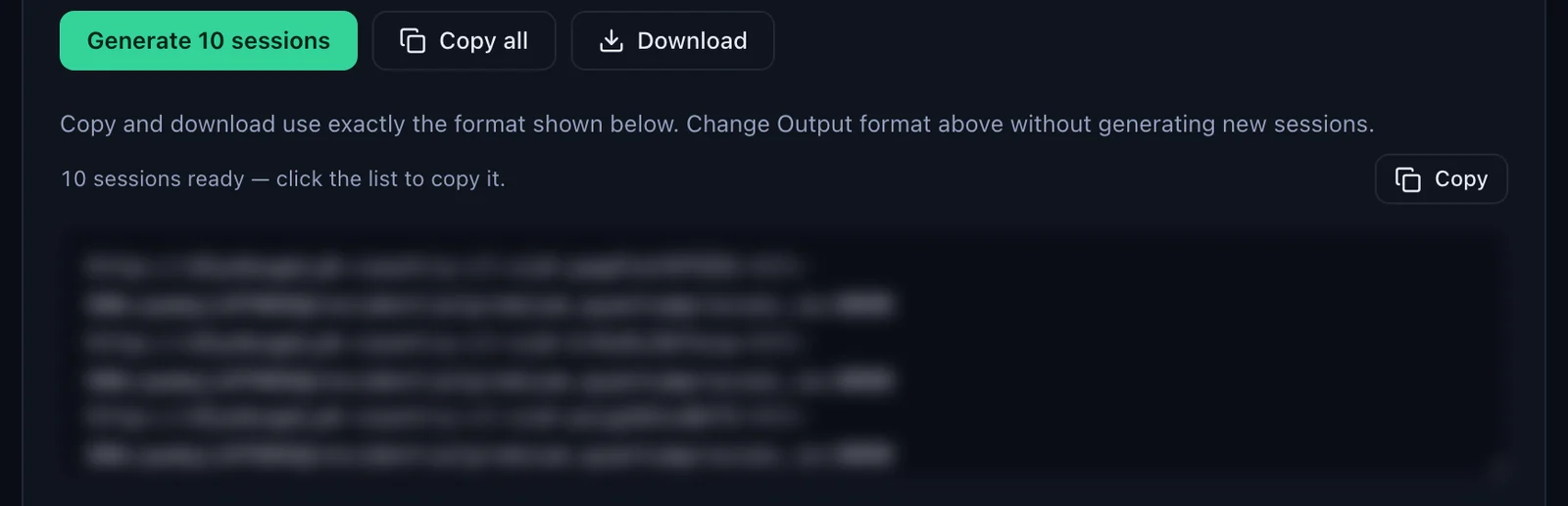
You do not have to invent the IDs: with Session set to Sticky, the generator makes as many lines as the Quantity field says, ten by default, each with its own random session ID, and Copy all or Download takes them out in the URL format. Keep them in a config file, one per worker.
Which proxy type for which job
| Proxy type | In Guzzle | Good for |
|---|---|---|
| Residential Premium | http://USER-country-cl-sid-…:PASS@residentialpremium.quantumproxies.io:8080, or socks5h:// on 1080; country, region, city or ISP in the username | Scraping and API calls that need home IPs in a given country |
| ISP | http://USER:PASS@IP:50100, one fixed IP per client; SOCKS5 on 50101 | Long sessions and accounts that should keep one address for months |
| Mobile | -type-mobile in the username on mobile.quantumproxies.io, HTTP 8080 or SOCKS5 1080; Global, USA, EU or Asia gateway; IP whitelist available | Mobile-first sites and apps, and targets that trust carrier IPs |
The plans are on the pages for QuanticData residential proxies (for this country, Chile residential proxies), ISP proxies and mobile proxies.
ISP proxies in Guzzle
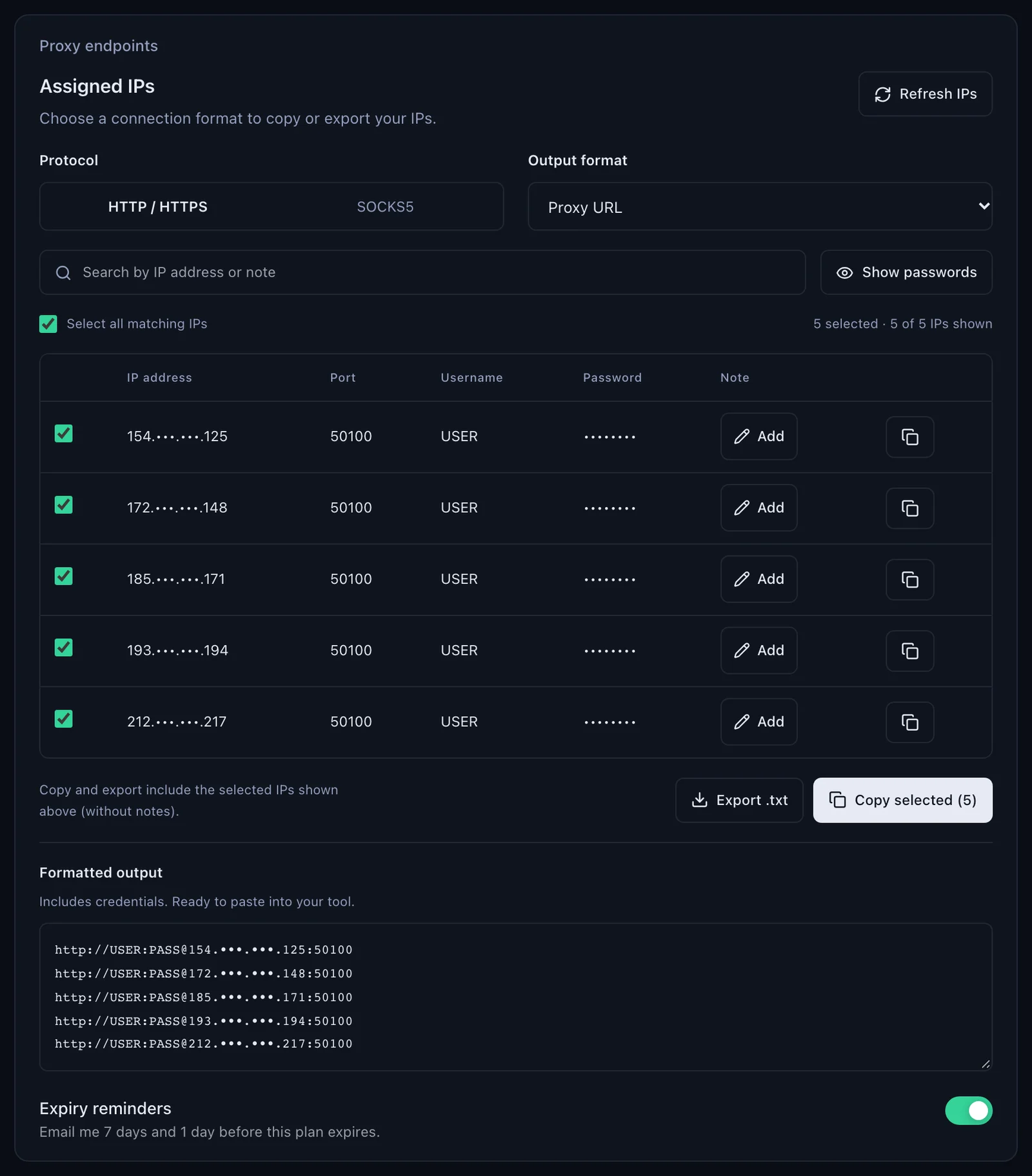
An ISP plan gives fixed IPs, listed in the dashboard under Proxy endpoints, Assigned IPs. Set Output format to Proxy URL and each line is already in the form Guzzle takes: http://USER:PASS@IP:50100. Use one IP per client, or per account; the address does not change, so there is no session to manage. Switch Protocol to SOCKS5 and the list moves to port 50101: use it as socks5h://USER:PASS@IP:50101.
Mobile proxies in Guzzle
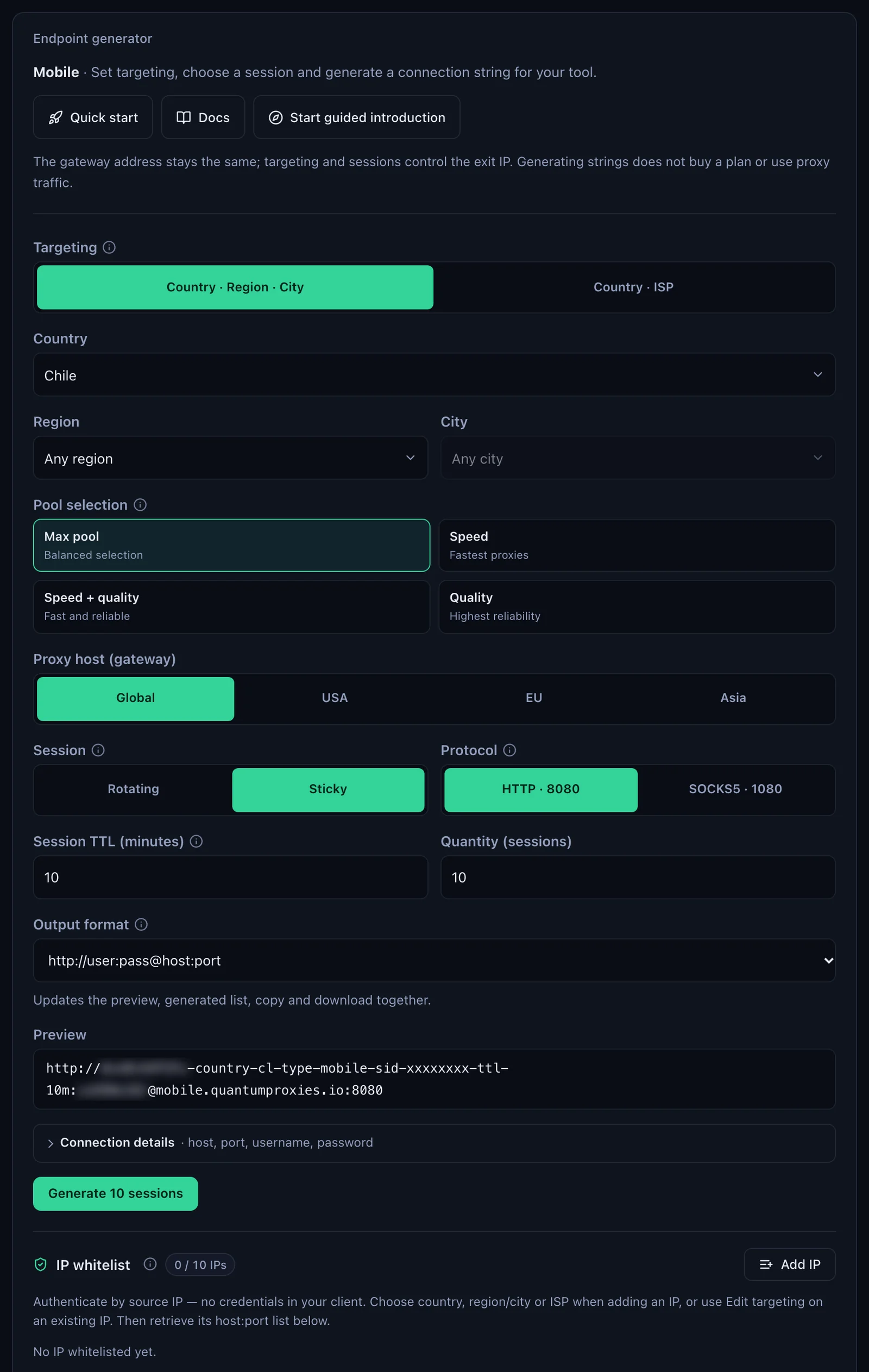
A mobile line works like Residential Premium, on its own gateway and with -type-mobile in the username. In the plan's Endpoint generator choose the gateway (Global, USA, EU or Asia), the country, Sticky, and HTTP on 8080 or SOCKS5 on 1080. Mobile plans also offer IP whitelist authentication: add your server's IP, then use the host:port lines from the whitelist list with no login in the URL.
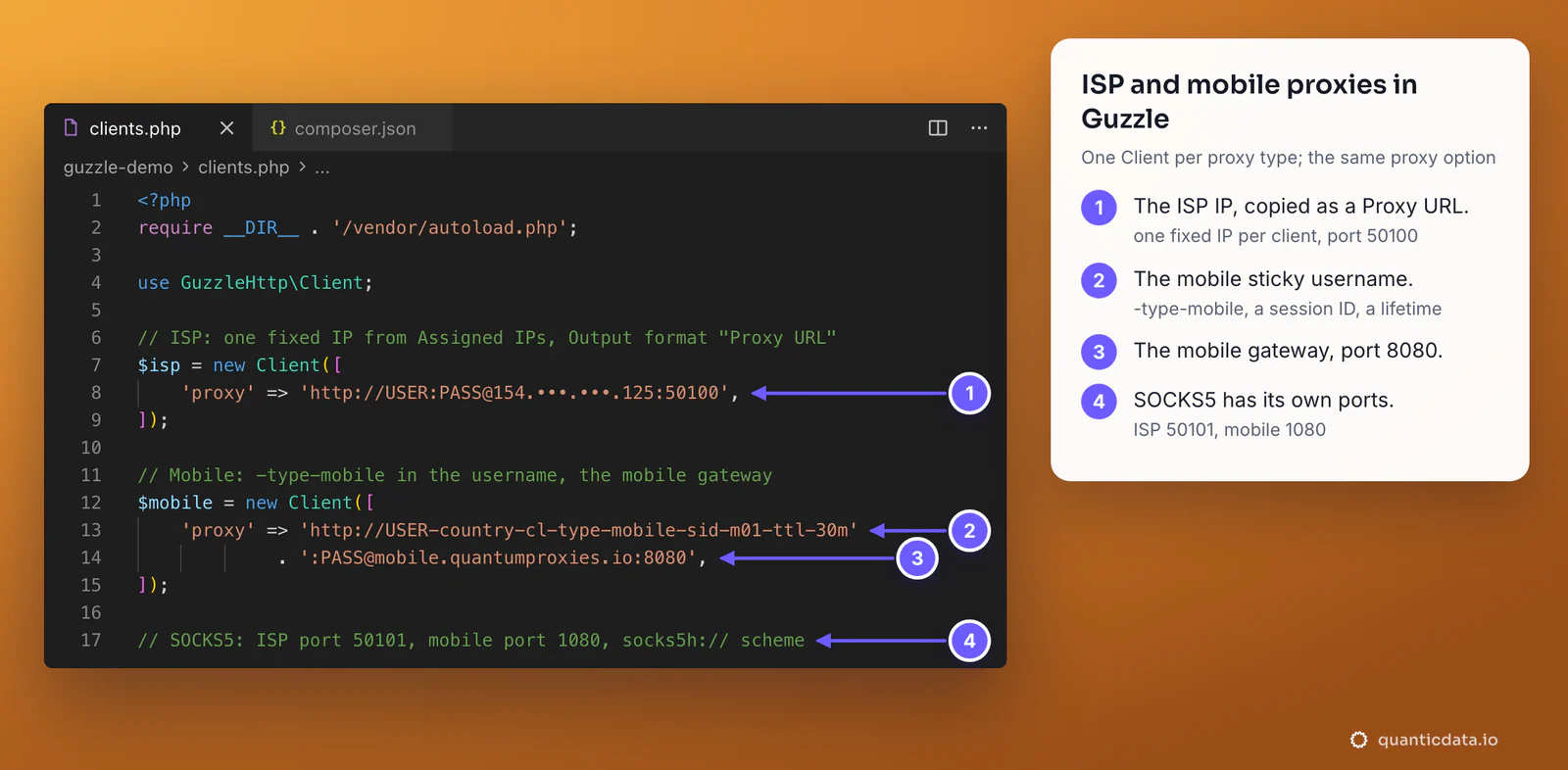
// ISP: one fixed IP from Assigned IPs, Output format "Proxy URL"
$isp = new Client(['proxy' => 'http://USER:PASS@IP:50100']);

// Mobile: -type-mobile in the username, the mobile gateway
$mobile = new Client([
    'proxy' => 'http://USER-country-cl-type-mobile-sid-m01-ttl-30m:PASS@mobile.quantumproxies.io:8080',
]);
Plain PHP cURL, without Guzzle
The same proxy works with PHP's own cURL functions, and the option names are the libcurl ones Guzzle sets for you: CURLOPT_PROXY for the proxy, CURLOPT_PROXYUSERPWD for username:password, CURLOPT_NOPROXY for the hosts that go direct.
$ch = curl_init('https://ipinfo.io/json');
curl_setopt_array($ch, [
    CURLOPT_PROXY          => 'http://residentialpremium.quantumproxies.io:8080',
    CURLOPT_PROXYUSERPWD   => 'USER-country-cl-sid-guzzle01-ttl-60m:PASS',
    CURLOPT_RETURNTRANSFER => true,
    CURLOPT_TIMEOUT        => 30,
]);
echo curl_exec($ch);

// SOCKS5: socks5h://residentialpremium.quantumproxies.io:1080 as CURLOPT_PROXY,
// or the host:port with CURLOPT_PROXYTYPE => CURLPROXY_SOCKS5_HOSTNAME
Here CURLOPT_PROXYTYPE is fine: it is Guzzle 8 that refuses it, not PHP. The same pattern in other languages is in the guides for Python requests, Node.js and using a proxy with curl.
Guzzle proxy not working: errors and fixes
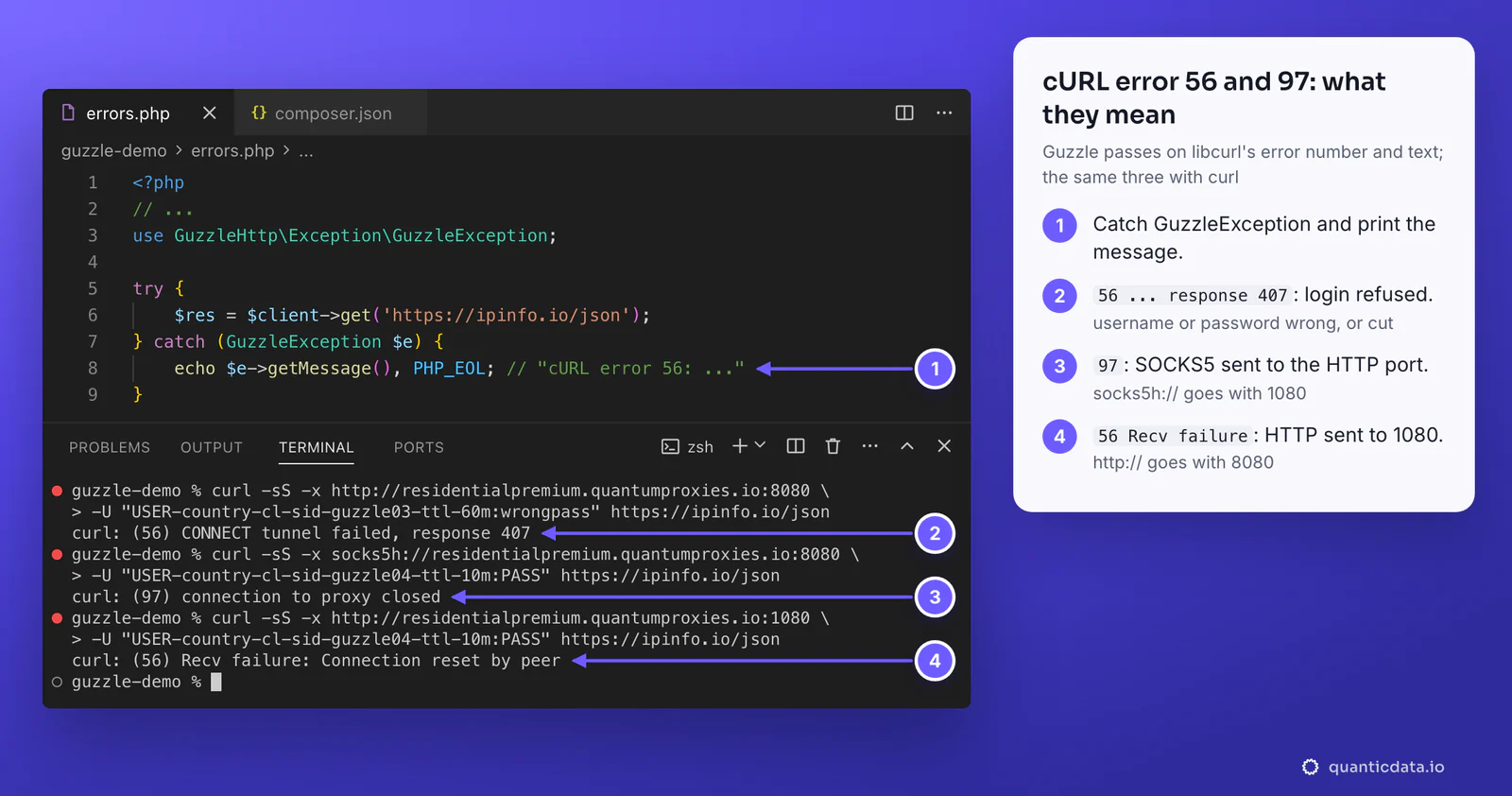
When the proxy fails, Guzzle throws an exception whose message starts with libcurl's error number and text: cURL error 56: CONNECT tunnel failed, response 407 (see https://curl.se/libcurl/c/libcurl-errors.html) for https://ipinfo.io/json. Catch GuzzleHttp\Exception\GuzzleException and print the message; the number tells you which part is wrong. The wording after the number depends on the libcurl version PHP was built with.
| What you see | Usual cause | Fix |
|---|---|---|
| cURL error 56: CONNECT tunnel failed, response 407 | Login refused on an https:// URL: username or password wrong, cut, or not encoded | Copy the line again from the generator; rawurlencode() the password; check the plan is active in My proxies |
| ClientException: ... resulted in a 407 Proxy Authentication Required response | The same refused login, on an http:// URL | As above; more in 407 Proxy Authentication Required |
| cURL error 97: connection to proxy closed | socks5h:// sent to the HTTP port 8080 | SOCKS5 goes with 1080 |
| cURL error 97: User was rejected by the SOCKS5 server | Wrong login on the SOCKS5 port | Check CURLOPT_PROXYUSERPWD or the login in the URL |
| cURL error 56: Recv failure: Connection reset by peer | http:// sent to the SOCKS5 port 1080 | HTTP goes with 8080 |
| cURL error 28: ... timed out after ... | A slow target or a blocked port | Set connect_timeout and timeout; test the port from the same server |
| HTTPS requests leave from your server's IP | An array proxy without the https key | Add 'https' => $proxy, or pass the proxy as a string |
| InvalidArgumentException about CURLOPT_PROXYTYPE (Guzzle 8) | The type set in the curl option | Put socks5h:// in the proxy URL |
| SOCKS proxies are not supported by the stream handler | The cURL extension is not loaded | Install or enable ext-curl |
| Wrong country in the answer | No -country- in the username | Generate the line with a country |
One test outside PHP settles most cases in a minute. Run it on the same server; if it returns an address in the right country, the proxy works and the problem is in the PHP code:
curl -x http://residentialpremium.quantumproxies.io:8080 \
  -U "USER-country-cl-sid-test-ttl-10m:PASS" https://ipinfo.io/json
If it fails on that server but works from another network, a firewall in front of the server is blocking the proxy port.
Before you scrape
A proxy changes where requests come from, not what a site allows. Keep to each site's terms and to the law where you work, send a reasonable number of requests, and identify your client where the site asks for it.
Sources & further reading
- Guzzle documentation: request options (proxy, timeout, http_errors)
- Guzzle documentation: quickstart (environment variables, exceptions, concurrent requests)
- Guzzle documentation: FAQ (custom cURL options)
- Guzzle releases on GitHub (Guzzle 8)
- Laravel documentation: HTTP client, Guzzle options
- PHP manual: curl_setopt
- libcurl: CURLOPT_PROXY
- libcurl error codes